
Unveiling memory savings on C# async operations with ValueTask
In modern C# programming, understanding the nuances between asynchronous constructs like ValueTask and Task is crucial for optimizing memory usage and application performance. This story delves into a real-world scenario where utilizing ValueTask can lead to significant memory savings. Through a practical use case and benchmarking analysis, we explore how ValueTask can efficiently handle asynchronous operations while minimizing memory allocations.
As we have already mentioned in a previous story on async / await best practices in C#, we should try to utilize the ValueTask construct anytime a method:
- Might not hit
awaitmost of the times. - The result that you
awaitwill most of the times be available immediately, thus the method will complete synchronously.
Practical use case
In the following example, we are going to examine the first use case, where we will illustrate the point of what ValueTask is and how we can benefit from that. This use case is something that the majority of developers will probably have in their code right now, and applying the ValueTask construct, we will save a quite significant chunk of memory allocations. That’s because ValueTask works a bit differently than Task. Let’s try to explain how they’re different by looking at a code sample.
Let’s say we have a service called GitHubService. It is a service where you pass in a GitHub username, and you are calling the public GitHub API in order to get back information about that specific user. Once it makes the call to get the user information, it caches it for an hour in memory, like we can see in the below code sample:
public class GitHubService
{
    private readonly IMemoryCache _cachedGitHubUserInfo = new MemoryCache(new MemoryCacheOptions());
    private static readonly HttpClient HttpClient = new()
    {
        BaseAddress = new Uri("https://api.github.com/"),
    };

    static GitHubService()
    {
        HttpClient.DefaultRequestHeaders.Add(HeaderNames.Accept, "application/vnd.github.v3+json");
        HttpClient.DefaultRequestHeaders.Add(HeaderNames.UserAgent, $"Medium-Story-{Environment.MachineName}");
    }

    public async Task<GitHubUserInfo?> GetGitHubUserInfoAsyncTask(string username)
    {
        var cacheKey = ("github-", username);

        var gitHubUserInfo = _cachedGitHubUserInfo.Get<GitHubUserInfo>(cacheKey);

        if (gitHubUserInfo is null)
        {
            var response = await HttpClient.GetAsync($"/users/{username}");

            if (response.StatusCode == HttpStatusCode.OK)
            {
                gitHubUserInfo = await response.Content.ReadFromJsonAsync<GitHubUserInfo>();

                _cachedGitHubUserInfo.Set(cacheKey, gitHubUserInfo, TimeSpan.FromHours(1));
            }
        }

        return gitHubUserInfo;
    }
}
Finally, it returns an object containing the username, the profileUrl, the name and the company of the GitHub user through a record called GitHubUserInfo:
public record GitHubUserInfo([property: JsonPropertyName("login")] string Username,
    [property: JsonPropertyName("html_url")] string ProfileUrl,
    [property: JsonPropertyName("name")] string Name,
    [property: JsonPropertyName("company")] string Company);
Suppose this is part of a bigger CRM like system where you’re keeping information about your customers, which just happen to be developers in our case.
There are many use cases where you effectively get something from an external third-party API or some other service or database, you cache it in memory, and then you do something with it in your application. And, as always, we should try to use an async Task method for that, because calling an API is an I/O operation, and we don’t want to have a blocking operation for our thread here.
The problem here is that we are returning a Task, and a Task is a reference type that will be allocated on the heap. If we think about it more carefully, in our example, we only really need to return the Task once every hour for a particular GitHub username, while all the other times we just return the user information we are keeping on the memory cache.
ValueTask to the rescue
And this is where ValueTask comes into play. This example is one of the simplest ways to use ValueTask in our code right now to save memory. ValueTask is effectively a discriminated union and can be one of two things: either a T (i.e., some type), or a Task<T>. And that means that we can replace the Task<T> return type with a ValueTask<T> and gain some memory allocation back because memory for the Task will only need to be allocated when our method actually needs to return a Task.
At all the other times that we get back the user information from the memory cache instead, we wouldn’t need to allocate any precious memory. So, if we want to configure the same GetGitHubUserInfoAsyncTask method to return a ValueTask<GitHubUserInfo> instead of a Task<GitHubUserInfo>, we can write it by introducing a new method called GetGitHubUserInfoAsyncValueTask inside GitHubService, as we can see in the code snippet below:
public async ValueTask<GitHubUserInfo?> GetGitHubUserInfoAsyncValueTask(string username)
{
    var cacheKey = ("github-", username);

    var gitHubUserInfo = _cachedGitHubUserInfo.Get<GitHubUserInfo>(cacheKey);

    if (gitHubUserInfo is null)
    {
        var response = await HttpClient.GetAsync($"/users/{username}");

        if (response.StatusCode == HttpStatusCode.OK)
        {
            gitHubUserInfo = await response.Content.ReadFromJsonAsync<GitHubUserInfo>();

            _cachedGitHubUserInfo.Set(cacheKey, gitHubUserInfo, TimeSpan.FromHours(1));
        }
    }

    return gitHubUserInfo;
}
Benchmarking Analysis: Task vs ValueTask performance Evaluation
Let’s try to understand the difference between the Task<T> and ValueTask<T> return types, by running a benchmark. For that purpose, we are going to use the BenchmarkDotNet library. First, we create a class called GitHubServiceBenchmarks and we decorate it with a MemoryDiagnoser attribute. This means that whenever we run those benchmarks, we’re going to get how much memory was actually allocated for them:
[MemoryDiagnoser]
public class GitHubServiceBenchmarks
{
    private static readonly GitHubService GitHubService = new();

    [Benchmark]
    public async Task<GitHubUserInfo?> GetGitHubUserInfoAsyncTask()
    {
        return await GitHubService.GetGitHubUserInfoAsyncTask("ormikopo1988");
    }
}
In our first benchmark (details right above), we have a single task where we just return a Task of some type, the GitHubUserInfo in this case.
Note: Remember to change the Configuration Manager of the console app to “Release” mode before running the benchmark.
During the first execution, our cache will be empty for a specific requested GitHub username, so we are going to call the GitHub API. After getting back a response, we immediately cache it for 1 hour, following what is known as the Cache-Aside pattern. After that, every other call for the same GitHub username for the next 1 hour, will fetch the GitHubUserInfo object from memory, which is pretty much what we may encounter in a typical system, whenever this information does not change often and we wish to cache it somewhere.
var cacheKey = ("github-", username);

var gitHubUserInfo = _cachedGitHubUserInfo.Get<GitHubUserInfo>(cacheKey);

if (gitHubUserInfo is null)
{
    var response = await HttpClient.GetAsync($"/users/{username}");

    if (response.StatusCode == HttpStatusCode.OK)
    {
        gitHubUserInfo = await response.Content.ReadFromJsonAsync<GitHubUserInfo>();

        _cachedGitHubUserInfo.Set(cacheKey, gitHubUserInfo, TimeSpan.FromHours(1));
    }
}

return gitHubUserInfo;
Now let’s add a second benchmark, and in that one, we are going to call the GetGitHubUserInfoAsyncValueTask method, which instead of a Task, returns a ValueTask of GitHubUserInfo:
[Benchmark]
public async Task<GitHubUserInfo?> GetGitHubUserInfoAsyncValueTask()
{
    return await GitHubService.GetGitHubUserInfoAsyncValueTask("ormikopo1988");
}
First, let’s try to make it clear that we do not expect to see any difference in speed. The important thing here is memory, the amount of work we put into the garbage collector and the memory we allocate on the heap.
If we run this benchmark and wait until it’s done to see what the results look like, we may see that Task is a bit faster, but if we run the test again, ValueTask might be a bit faster. So, for the sake of simplicity, in terms of speed, we are going to assume that it is the same thing for both examples:

The interesting thing to note is that Gen0 garbage collection and the memory allocated is 72 bytes less. But do 72 bytes really matter, you might ask? Well, if we think about it, it is not only 72 bytes overall. It is 72 bytes for every time we call that particular method and every time you have any other caller of that method that also returns a Task.
But what exactly does that mean? Because ValueTask works with a Task, in this second benchmark we return a Task even though the GetGitHubUserInfoAsyncValueTask method GitHubService actually returns a ValueTask. This means we are not taking maybe full advantage of ValueTask here, as the benchmark method could also use that performance improvement as well.
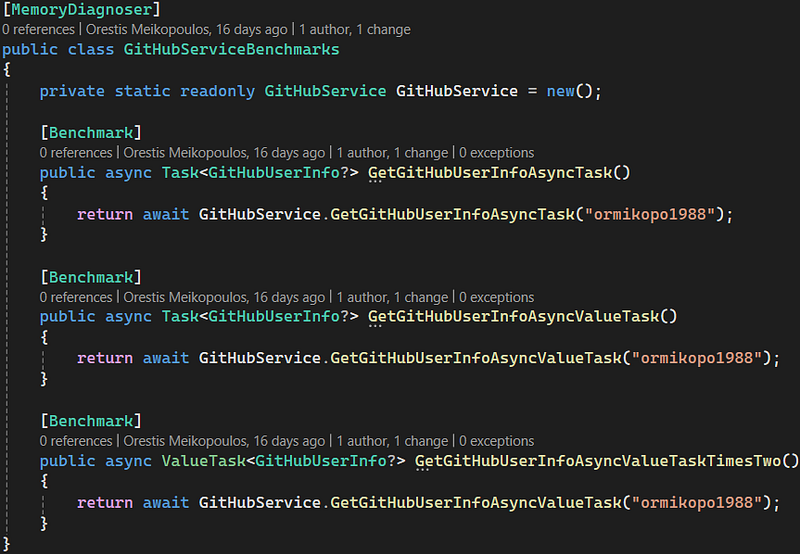
In fact, let’s create a third benchmark method called GetGitHubUserInfoAsyncValueTaskTimesTwo that would also return a ValueTask instead of a Task, and still call the same GetGitHubUserInfoAsyncValueTask method from GitHubService:
[Benchmark]
public async ValueTask<GitHubUserInfo?> GetGitHubUserInfoAsyncValueTaskTimesTwo()
{
    return await GitHubService.GetGitHubUserInfoAsyncValueTask("ormikopo1988");
}
Please note that the result we are going to see here, is only applicable if the parent method can also benefit from using a ValueTask, meaning that it’s not calling anything I/O related itself. If that is indeed the case, then the memory will be even lower, as we are going to save that second Task allocation as well, and this has a chain effect. We just want to cut off the chain, and then we can keep using a Task after that.
Something very important is that once we await a ValueTask, we don’t want to attach it again. This is quite different from how a Task works. We also don’t want to have a ValueTask in constructs like Task.WhenAll or Task.WaitAll and wait for them in any capacity in a mass way. Basically, once we do something with one ValueTask, we need to leave it as is.
Back to our example, as we can see with the third benchmark, we saved another 72 bytes because we also saved on that second allocation:

So, if we have like 1000 requests per second and we manage to use this technique for 50 or 100 of those, we are going to save quite a bit of memory. The use case we examined is something common and is the safest introduction to the ValueTask type. There are also other places that are not as straightforward, where we can also use it to our advantage, but this is outside the scope of this article.
Finally, always keep in mind that, as we already mentioned above, there are some caveats. For example, if we have a ValueTask, and we await it, then we really should not re-await it. We cannot, either keep it as a ValueTask in memory and keep awaiting it (e.g., for initialization purposes). If we are careful with those things, then we should be fine.
So should we use ValueTask everywhere then? Well, as a rule of thumb, if we have some piece of code like the one we examined earlier, where we have some sort of caching or some sort of mechanism which prevents our code from going to the I/O part of the method most of the times, then we can use ValueTask and gain those performance improvements in allocation. And this is important, especially in the context of highly scalable, and high throughput applications, where each extra memory allocation really matters.
But, generally, we don’t want to always use a ValueTask from the start in our code, unless we really know what we are doing. Basically, we should always aim to start with a Task. If we start spotting those performance degradations or performance bottlenecks and we want to optimize our application in terms of memory allocation, and we are in the context of an example, like the one we showcased in the current story, then that is a nice and safe place to start, always keeping the caveats of ValueTask in mind.
You can find the code for the above examples here.
Conclusion
Through a practical example and benchmarking analysis, this story demonstrated how transitioning to ValueTask can significantly reduce memory allocations, especially in scenarios where cached results are prevalent. While ValueTask offers compelling benefits, it’s crucial to employ it judiciously, considering its nuances. By integrating ValueTask selectively, developers can unlock performance gains, particularly in high-throughput applications.


