
Unmask the mystery: Visualize chosen text in your Retrieval Augmented Generation
Stop guessing, start Highlighting: read through all the Secrets of your RAG, one Text Snippet at a time.

Have you ever felt lost in the magical world of Retrieval Augmented Generation (RAG)? While it conjures up impressive text creations, the inner workings remain an enigma. You feed in a prompt, get back a seemingly flawless response, but what happens behind the curtain? What snippets of text, from the vast ocean of information, did the algorithm use to weave its magic?
The truth is, RAG can leave you feeling blindfolded. You know something amazing happened, but the intricate details, the specific pieces that contributed to the final product, stay hidden. This lack of transparency can be frustrating, especially when trying to understand the rationale behind the generated text or replicate its success. It’s like watching a master chef whip up a masterpiece without seeing the ingredients or techniques used.
But fear not, fellow language explorers! Today, we embark on a mission to demystify RAG. We’ll unveil a powerful tool: text highlighting.
By visualizing the exact portions of text chosen by the Similarity search algorithm, we’ll shed light on its inner workings and enable us to truly understand and harness its potential.
Get ready to pull back the veil and witness the magic of RAG, not just the end result, but the intricate dance of information retrieval and generation. Buckle up, let’s dive in!

Demystifying the magic: how RAG works in simple terms
Imagine RAG (Retrieval Augmented Generation) as a chef in a vast kitchen (the knowledge base) filled with countless ingredients (text snippets). When you give the chef a prompt (your request), they don’t just throw everything together. Instead, they:
- Understand your taste: The chef analyzes your prompt to grasp your intent and desired outcome. Do you want a factual report, a creative poem, or something else entirely?
- Search the pantry: Using a special “smell test” called similarity search, the chef scans the knowledge base for ingredients (text snippets) that smell (meaning, share similar meaning) to your prompt. This “smell test” relies on embeddings, which are like unique fingerprints for each piece of text, capturing its essence without revealing the exact words.
- Pick the best ingredients: The chef doesn’t just grab everything that smells similar. They carefully select the most relevant and high-quality snippets that best fit your taste and the dish they’re creating.
- Cook with flair: The chef skillfully combines the chosen ingredients, using their knowledge and creativity to craft a unique and delicious dish (your generated text).
This is essentially how RAG works! The similarity search powered by embeddings plays a crucial role:
- Think of embeddings as word portraits: basically each word or phrase has a unique portrait capturing its meaning. These portraits are vectors (numerical codes that computers can understand).
- The vector database stores these portraits: it’s a giant library where each book stores a word portrait. The database efficiently keeps track of these portraits, making it easy for the chef (RAG) to find ones that “smell” similar to the prompt.
- Similarity search compares the smells: when the chef wants to find matching ingredients, they compare the “smell” (embedding) of your prompt with the “smells” of all the portraits in the library. The ones that smell most similar are the chosen ingredients.

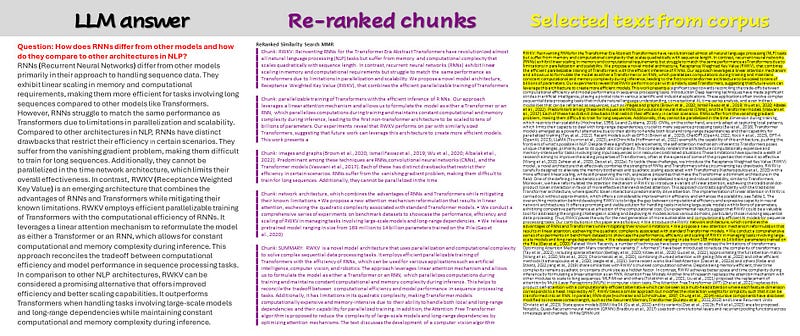
From Alchemy to Transparency: Unveiling the Secrets of RAG with Text Highlighting
Now that we’ve peeked behind the curtain and acknowledged the limitations of black-box RAG, let’s introduce our hero: text highlighting.
Retrieval Augmented Generation works in a really easy way:
- We import a text (from pdf, from a website, from a word file etc…)
- We split the text in small chunks: Large Language models have a limit to the number of tokens (let’s say words, more or less…) they can process. And to answer to a question we don’t need all the text, but only few parts of it
- We give the chunks to an embedding model. Embeddings are numbers, very sophisticated ones called multi-dimension vectors, that represents the meaning of the chunk.
- We store the chunks and their embeddings into a special database, able to handle words and multi-dimension vectors
- We pass our query to the same embedding: this model will compare the meaning of the question with all the chunks in the database and return us the one more similar to our question
- We send all the retrieved chunks to the LLM together with the question, and the Language model will return us a beautiful answer!
Even if the steps are easy, they are still separate steps. I will cover all of them in the next article. Here I want to prove that we can have full control on the information used for the generation of the answer.
Our Swiss-army knife has the following tools:
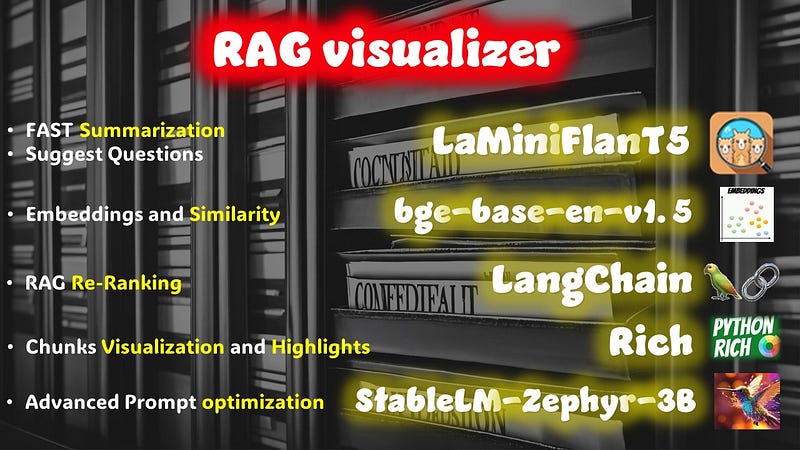
The first one, LaMiniFlanT5, can be used for multiple purposes. In reality you can do also the advanced prompt optimization… but this little guy is an encoder-decoder model with a small context window of 512 tokens.
So for now we will use it to get a fast summary of the long text and to generate a set of suggested questions.
Why the summary? We will pass the summary in all the generations, because it will provide a context to the small chunks.
Re-Ranking and Highlighting
There is a difference between similarity and relevance: the embeddings are normally really good in finding chunks of text similar to the question, but not all of them have the same relevance in terms of meaning. Re-ranking is a powerful tool from Langchain that will calculate the Relevance of the selected chunks.
Why do we need to re-rank them? Because studies have proven that Large Language Models tend to forget things when they are in the middle of a long text. They remember better information that are at the beginning or at the end position.
When we have a really long paper or book it is interesting to be able to verify the facts our AI is using to provide us the answer. That’s why we can use a simple library, like Rich, that is able to en-rich our text with colors and highlights.
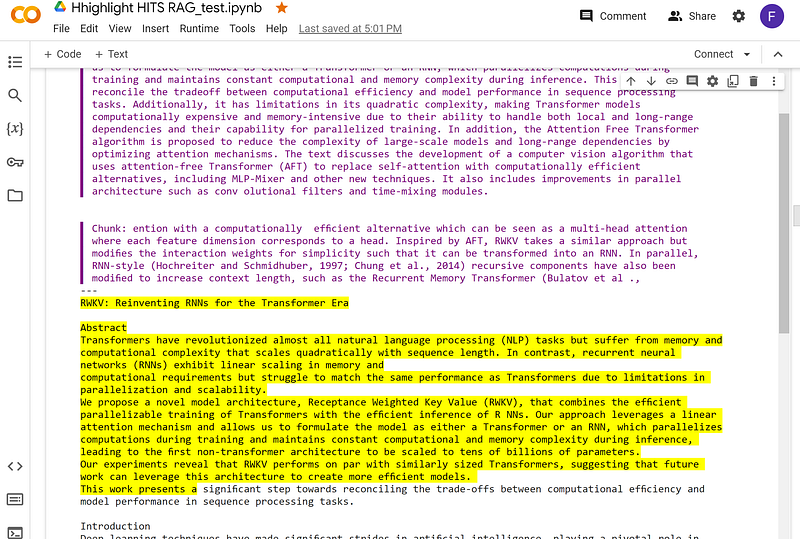
By visualizing these chosen chunks of text, we transform the once-opaque process into a transparent journey.
Imagine feeding RAG a prompt like “Write a poem about the ocean’s depths.” The algorithm delves into its library, retrieves relevant text (scientific descriptions, mythical tales, evocative poems), and weaves them together to create your unique poem. But without highlighting, you’d never know which lines about bioluminescent creatures, ancient shipwrecks, or mythical krakens inspired the final product.
With text highlighting, you can see exactly which parts of the retrieved text contributed to your generated content. Each highlighted section becomes a window into the algorithm’s thought process, revealing its understanding of your prompt and its creative choices.
What are the benefits
Despite the fact that we have to find a good User Interface to show our information, to be able to highlight the sources and the selected information chunks is a clear advantage:
- Deeper understanding: Visualizing the chosen text allows you to grasp the rationale behind the generated content. Did the similarity search focus on scientific accuracy, emotional impact, or a surprising blend of both?
- Improved control: By seeing which text chunks resonate with the similarity search algorithm, you can refine your prompts for more targeted results. Want a more whimsical poem? Emphasize fantasy elements in your prompt and observe how the highlighted text shifts.
- Replication and debugging: Highlighting helps you replicate successful results by understanding the specific textual inputs that led to a desired outcome. Conversely, if the generated content falls short, identifying irrelevant or misleading highlighted sections can aid in debugging your prompts.
- Learning and inspiration: Witnessing the embedding’s choices exposes you to diverse writing styles, factual information, and creative approaches. This can spark your own creativity and provide valuable learning opportunities.

Conclusions (for now)
So, how do we actually implement text highlighting in RAG? Stay tuned for the next article, where we’ll delve into the technical details and provide code examples for popular RAG libraries. I will equip you with the tools to unlock the secrets of RAG and transform your journey from blind trust to empowered understanding.
Hope you enjoyed the article. If this story provided value and you wish to show a little support, you could:
- Clap a lot of times for this story
- Highlight the parts more relevant to be remembered (it will be easier for you to find it later, and for me to write better articles)
- Learn how to start to Build Your Own AI, download This Free eBook
- Sign up for a Medium membership using my link — ($5/month to read unlimited Medium stories)
- Follow me on Medium
- Read my latest articles https://medium.com/@fabio.matricardi
If you want to read more here some ideas:
In Plain English 🚀
Thank you for being a part of the In Plain English community! Before you go:
- Be sure to clap and follow the writer ️👏️️
- Follow us: X | LinkedIn | YouTube | Discord | Newsletter
- Visit our other platforms: Stackademic | CoFeed | Venture
- More content at PlainEnglish.io


