
Unlocking the Power of Pandas: A Deep Dive into .loc and .iloc
Empowering Data Analysis with Pandas: Mastering .loc and .iloc for Precise Data Selection

The Python programming language is an important asset in data science and analytics due to its user-friendly nature and robust libraries. Pandas, one of these libraries, provides flexible and powerful tools for data manipulation, thereby becoming a popular choice for data scientists worldwide.
In the process of data analysis, the ability to manage and manipulate data efficiently is key, and this is where pandas shine. Among the various tools pandas offer, three stand out for their versatility: loc, iloc, and ix.
These methods are crucial for data selection in pandas, providing users with remarkable flexibility in accessing and modifying data in a pandas DataFrame.
Data selection, an essential step in data analysis, involves selecting specific data from a dataset for analysis, visualization, or machine learning algorithm input.
Why would we use loc iloc or ix?
Often, data scientists need only a part of an entire dataset. This is where the loc, iloc, and ix methods are invaluable, as they enable efficient data selection based on its DataFrame location or specific conditions.
This article aims to provide a deep dive into these three critical pandas methods, discussing their use cases and intricacies.
We will use pre-built datasets, for you to reproduce the same codes, with the goal of equipping you with the knowledge and confidence to manipulate and navigate any dataset using pandas in Python.
If you want to read more about Pandas methods, here is 17 Pandas Trick for you. And also, you can use PandaSAI if you feel lazy to write codes and want to write prompts instead.
Okay, ready to dive in? Let’s start exploring.
Understanding Data Selection in Pandas
The process of data selection is a foundational aspect of any data analysis or data science task.
Before analyzing data, visualizing, or making it read for machine learning algorithms, we should first select the data we need from a larger dataset.
Without selecting and handling part of the data, the algorithms work really slower or we might remove the data actually is important.
Data selection in pandas goes beyond merely picking a column or a row. It involves choosing specific subsets of data based on certain criteria. In pandas, we often work with dataframes, which are table-like data structures, with rows and columns.
The rows in a dataframe represent different observations, while the columns represent various features or variables. A key aspect of pandas’ versatility comes from its powerful data selection methods, which allow us to quickly isolate particular segments of these dataframes based on our needs.
Understanding data selection is really important because it will give us a chance to explore and understand the data better.
With the right techniques, we can collect the data we need, whether it is selecting specific rows with certain conditions or selecting a set of columns, which is important for our analysis.
Data Selection Methods in Python
In pandas, three main methods are used for data selection: loc, iloc, and ix. Each of these methods offers its own advantages and has specific use cases where it shines.
The loc method is used for label-based data selection, iloc for integer-based selection, and ix, which is a more versatile method that supports both label and integer-based selection.
These methods help us to select data from dataframe, in different ways.
In the next sections, we will explore these methods in detail by using a prebuilt dataset.
This will give you a strong knowledge in data selection with pandas, which is an important step in your journey to becoming a proficient data analyst or scientist.
So, let’s start our deep dive into these selection methods with the loc the method in the next section.
Data Selection with loc
The loc method is a powerful tool in the Pandas library, used for label-based data selection. It allows us to select data using the actual label of the index or column name, which makes it quite intuitive to use.
To understand loc in action, we'll utilize a built-in dataset in the seaborn library: the 'titanic' dataset. This dataset consists of passenger data from the ill-fated Titanic voyage, including information about each passenger's age, sex, fare, and whether they survived the sinking or not. Using the loc method, we can dive deep into this dataset and pull out insightful information quickly.
Let’s start by importing the necessary libraries and loading the data.
import seaborn as sns
import pandas as pd

# Load the 'titanic' dataset from seaborn
titanic = sns.load_dataset('titanic')

# Display the first few rows of the data
titanic.head()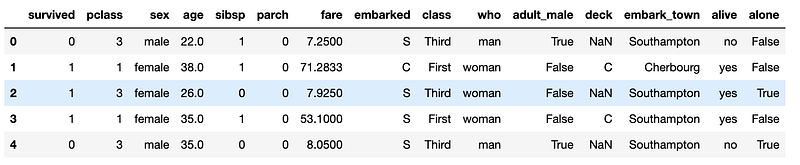
Now, let’s utilize the loc method. The format of a loc command is as follows: dataframe.loc[rows, columns].
Let’s say we want to select the first passenger in our dataframe.
We can do so by specifying the index label, which in this case is 0.
Here is the code.
# Select the first row and all columns
first_passenger = titanic.loc[0, :]
print(first_passenger)
Here is the output.
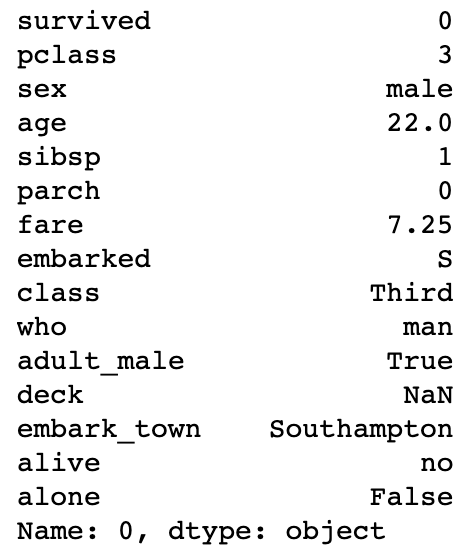
This flexibility doesn’t end with row selection. We can also select specific columns. Let’s say we’re only interested in the ‘age’ and ‘fare’ for the first three passengers. Here’s how we could use loc to select this data:
# Select the first three rows and specific columns
first_three_passengers_data = titanic.loc[[0, 1, 2], ['age', 'fare']]
print(first_three_passengers_data)
Here is the output.
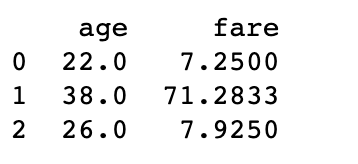
This is just scratching the surface of the loc method's capabilities. It can also handle boolean conditions, allowing us to select rows where a certain condition is met. Suppose we want to find all passengers who are under 18 years old. This can be achieved easily with loc.
# Select all passengers under 18
under_18_passengers = titanic.loc[titanic['age'] < 18, :]
under_18_passengers
Here is the output.
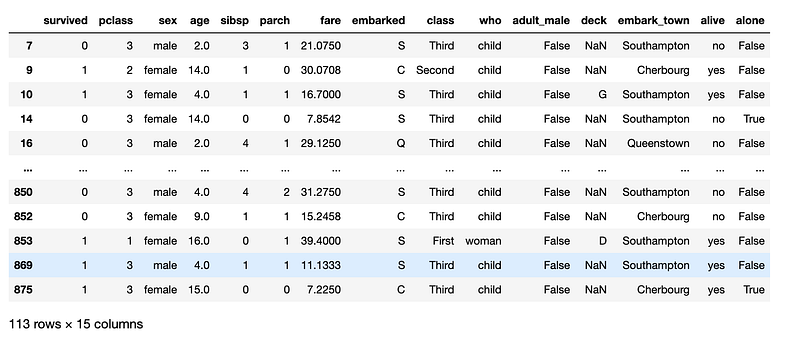
The loc method is versatile, intuitive, and effective at selecting data based on labels. However, sometimes we need to select data based on its positional location rather than its labels. That's where the iloc method comes in, which we'll explore in the next section.
Data Selection with iloc
While loc serves as a powerful tool for label-based selection, Pandas also provides the iloc method for purely integer-based location selection. The iloc method allows you to access the rows and columns of a DataFrame by specifying their respective integer positions.
Let’s continue our exploration with the ‘titanic’ dataset. Using iloc, we can select specific rows or columns based on their integer positions, regardless of the index labels or column names.
The syntax for iloc is quite similar to loc: dataframe.iloc[rows, columns]. The difference lies in how you specify the rows and columns. With iloc, you use the integer position, not the label.
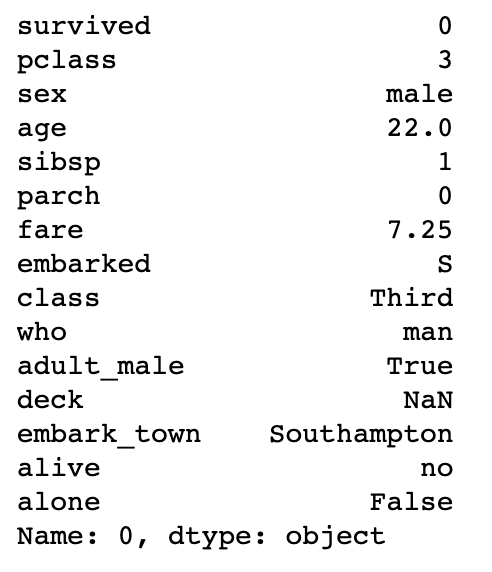
For example, let’s select the first row (i.e., the 0th position) of the DataFrame:
# Select the first row and all columns
first_row = titanic.iloc[0, :]
print(first_row)
Here is the output.
iloc also help you to select multiple rows or columns at once.
For example, if you want to select the first three rows and the columns in the 1st (0th index position) and 4th (3rd index position) positions, you would do:
# Select the first three rows and specific columns
selected_data = titanic.iloc[0:3, [0, 3]]
print(selected_data)
Here is the output.
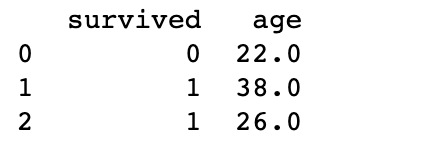
Note that when slicing with iloc, the start bound is included, but the stop bound is excluded, unlike label-based slicing with loc. Therefore, 0:3 selects the rows at integer positions 0, 1, and 2.
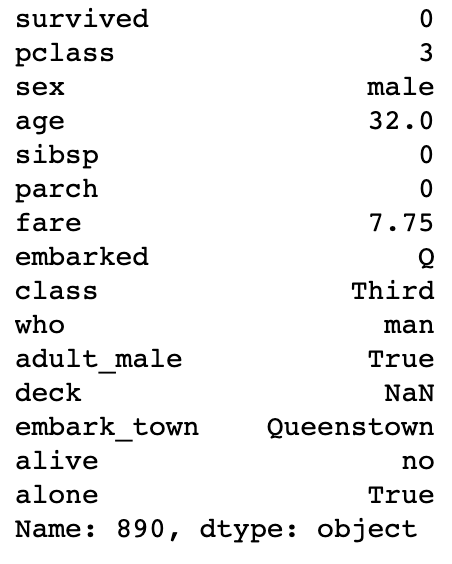
It’s also important to note that negative indexing works with iloc, unlike with loc. This means you can use -1 as the index to select the last row or column:
# Select the last row and all columns
last_row = titanic.iloc[-1, :]
print(last_row)
Here is the output.
Between loc and iloc, you have a great deal of flexibility in how you select data from a DataFrame. You can choose to select based on labels, integer locations, or a mixture of both. Knowing when and how to use these functions can greatly enhance your data manipulation skills. However, there's more to Pandas than just these two functions. In the next section, we'll take a look at another method for data selection - the at and iat methods.
Using at and iat for Faster Access
While loc and iloc are undeniably powerful tools for data selection; sometimes, you need an even faster method, especially when working with large datasets. This is where at and iat come into the picture. Both at and iat provide faster data access compared to loc and iloc.
The tradeoff for this speed is that at and iat can only access a single value at a time. They are used to get or set a single value in a DataFrame or Series and cannot be used for boolean indexing or to access multiple values simultaneously.
Let’s see them in action. Continuing with our ‘titanic’ dataset, suppose we want to quickly access the ‘fare’ of the passenger in the first row:
# Using `at`
fare_at = titanic.at[0, 'fare']
print(fare_at)

# Using `iat`
fare_iat = titanic.iat[0, 8]
print(fare_iat)
In the first example, at is used to access the 'fare' value based on the label index, which is 0 in this case.
In the second example, iat is used to access the 'fare' value based on its integer position (8) in the row.
Now that we’ve covered all these methods of data selection in Pandas, let’s conclude by discussing some best practices for their use. This will help ensure that you’re using the right tool for the job when working with your datasets.
Final Words
Understanding loc, iloc, at, and iat will significantly improve your efficiency and effectiveness when working with data in Pandas.
These methods provide flexible and powerful options for data selection, enabling you to handle virtually any data selection task you might encounter.
Keep practicing with these tools, and you'll be a Pandas pro in no time.
Thanks for reading my article.
Here is the ChatGPT cheat sheet.
Here is my daily newsletter about AI and Data Science.
Here is my NumPy cheat sheet.
Here is the source code of the “How to be a Billionaire” data project.
Here is the source code of the “Classification Task with 6 Different Algorithms using Python” data project.
Here is the source code of the “Decision Tree in Energy Efficiency Analysis” data project.
Here is the source code of the “DataDrivenInvestor 2022 Articles Analysis” data project.
In case you’re not yet a Medium member and want to expand your knowledge through reading, here’s my referral link.
Here is my E-Book: How to Learn Machine Learning with ChatGPT?
“Machine learning is the last invention that humanity will ever need to make.” Nick Bostrom


