
Connecting to Oracle programmatically
A Practical Approach using Python
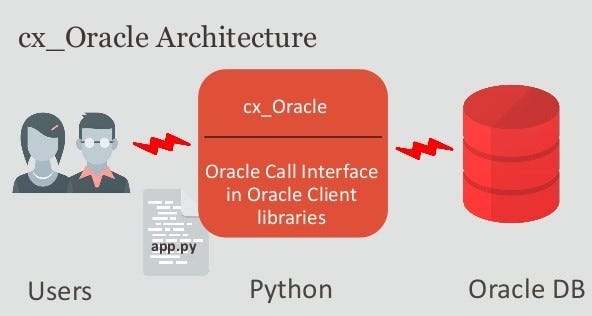
With Oracle being one of the most popular and robust RDBMSs out there and Python being one of the most popular programming languages it makes sense to try and connect one with the other and start to run database queries and updates using them. This article will show you how.
All the examples below use a dummy table that consists of just 2 columns. You can run the following SQL on your Oracle database which will create and populate the test table.
create table mytab(
  id    number,
  data  varchar2(20)
)

insert into mytab values(1,'First');
insert into mytab values(2,'Second');
insert into mytab values(3,'Third');
insert into mytab values(4,'Fourth');
insert into mytab values(5,'Fifth');
insert into mytab values(6,'Sixth');
insert into mytab values(7,'Seventh');


SQL> select * from mytab;

        ID DATA
---------- ----------
         1 First
         2 Second
         3 Third
         4 Fourth
         5 Fifth
         6 Sixth
         7 Seventh

7 rows selected.
Before starting I’m assuming that you have a recent version of Python (ideally a version ≥ 3.8) installed on your PC or server and access to an Oracle database with a version number of at least 11.2. In addition to this, you will also need to get a copy of cx_Oracle. cx_Oracle is a module that enables programmatic access to Oracle Databases and conforms to the Python database API specification. The latest version (8.3) is currently compatible with version 11.2 and up for Oracle Oracle Client versions, and from Python 3.6 and upwards.
cx_Oracle is distributed under an open-source (the BSD license). You will also need permission to read and write to your database. All the code below was tested using Python 3.8, cx_Oracle V 8.3 and Oracle 19c
You can install cx_Oracle from PyPi with the following command:
python -m pip install cx_Oracle
If you have any installation issues click this link and it will take you to cx_Oracle home page where you find a ton of documentation to help you.
Once you have it installed, you connect to your Oracle database like this with your credentials substituted for the “myuser”, “mypass”, “mydb” dummy ones shown below:
import cx_Oracle

# Connect to DB with your usual credentials

connection = cx_Oracle.connect("myuser", "mypass", "mydb")


cursor = connection.cursor()
Now we’ll see how we can select, insert, delete and update data. Note that where possible you should always use bind variables when running database statements. This will make for faster execution of the statement and also minimize SQL injection attacks.
Selecting data example
sql="select id,data
from mytab
where id > :id"


cursor.execute(sql,id=3)
Use this to get ALL rows one at a time
for id,data in cursor:
        print(id,data)


4 Fourth
5 Fifth
6 Sixth
7 Seventh
Or this to fetch a bunch of rows at a time.
numRows = 100

while True:
    rows = cursor.fetchmany(numRows)

    if not rows:
        break

    for row in rows:
        print(row)

(4, 'Fourth')
(5, 'Fifth')
(6, 'Sixth')
(7, 'Seventh')
Use this to get all rows at the same time
rows = cursor.fetchall()
print (rows)

[(4, 'Fourth'), (5, 'Fifth'), (6, 'Sixth'), (7, 'Seventh')]
And finally, this is to get a row one at a time
row = cursor.fetchone()
print(row)

row = cursor.fetchone()
print(row)

etc...
A final useful tip is to use the cursor.arraysize directive if you’re fetching a lot of data as it will save on network traffic.
cursor.arraysize = 1000

for row in cursor.execute("select * from BigTable"):

     print(row)
Inserts, updates, deletes and other DDL statements are all carried out using the execute or executemany directive of the cursor object. Here are a couple of examples.
Let’s re-create our little test table first by running the following SQL in Oracle Sqlplus.
drop table mytab;

create table mytab(id number,data varchar2(20));

create unique index i1 on mytab(id);
Alternatively, you could use cx_oracle too:
cursor.execute("drop table mytab")

cursor.execute("create table mytab(id number,data varchar2(10))")

cursor.execute("create unique index i1 on mytab(id)")
Batch Insert example
Now we can populate our table,
rows = [ (1, "First" ),
         (2, "Second" ),
         (3, "Third" ),
         (4, "Fourth" ),
         (5, "Fifth" ),
         (6, "Sixth" ),
         (7, "Seventh" ) ]

cursor = connection.cursor()
cursor.executemany("insert into mytab(id, data) values (:1, :2)", rows)

connection.commit()


SQL> select * from mytab;

        ID DATA
---------- ----------
         1 First
         2 Second
         3 Third
         4 Fourth
         5 Fifth
         6 Sixth
         7 Seventh

7 rows selected.
Batch Delete example
IdsToDelete = [2, 3, 5]

cursor.executemany("""
        delete from mytab
        where id = :1""",
        [(i,) for i in IdsToDelete])


SQL> select * from mytab;


        ID DATA
---------- ----------
         1 First
         4 Fourth
         6 Sixth
         7 Seventh

4 rows selected.
Batch Update example
datatoupdate=[]

datatoupdate.append ({'id':4,'data':'4th Entry'})

datatoupdate.append ({'id':7,'data':'Last Entry'})


sql="""

    update mytab
    set data = :data
    where id = :id

"""

cursor.executemany(sql, datatoupdate)


SQL> select * from mytab;


        ID DATA
---------- ----------
         1 First
         4 4th Entry
         6 Sixth
         7 Last Entry
Dealing with data errors and batch row counts
The executemany directive has two important optional parameters that can be used to determine and deal with errors in your SQL.
Batcherrors — setting this to true will ensure that your SQL will continue to run even when database errors occur. After the DML has finished running you can examine the errors using the getbatcherrors() function and take a view about what you want your program to do with the errors. Note that if an error occurs you must either explicitly commit non-error records to the database or rollback your whole transaction.
Arraydmlrowcounts — setting this to true will allow you to examine the row counts that each of your database statements affected
Let’s see an example of their use.
dataToInsert =
[ (1, "First" ),    # <= duplicate key
  (2, "Second" ),   # <= OK
  (3, "Third" ),    # <= OK
  (4, "Fourth" ),   # <= Duplicate key
  (5, "Fifth" ),    # <= OK
  (6, "Sixth" ),    # <= duplicate key
  (7, "Seventh" ) ] # <= duplicate key

cursor.executemany("insert into mytab values (:1, :2)", dataToInsert,
        batcherrors = True, arraydmlrowcounts = True)

# where errors have taken place, the row count is 0; otherwise it is 1
rowCounts = cursor.getarraydmlrowcounts()
print("Array DML row counts:", rowCounts)

# display the errors that have taken place
errors = cursor.getbatcherrors()
print("number of errors which took place:", len(errors))

for error in errors:
    print("Error", error.message.rstrip(), "at row offset", error.offset)
When the above is run you get the following output
Array DML row counts: [0, 1, 1, 0, 1, 0, 0]
number of errors which took place: 4
Error ORA-00001: unique constraint (CAPEL.I1) violated at row offset 0
Error ORA-00001: unique constraint (CAPEL.I1) violated at row offset 3
Error ORA-00001: unique constraint (CAPEL.I1) violated at row offset 5
Error ORA-00001: unique constraint (CAPEL.I1) violated at row offset 6
Note also that since we have not implicitly committed the transaction using the connection.commit() statement, the table remains unaltered due to at least one error having occurred. This would be true even if the connection. autocommit directive is turned on. If one or more errors have occurred you must issue a connection.commit() to commit all records that are error-free.
Exception handling
The normal Python try… except error paradigm can be used to deal with exceptions when running database statements. With cx_Oracle every exception object has exactly one argument in the args tuple. This argument is a cx_Oracle._Error object which has the following five read-only attributes.
Error.code — An Integer attribute representing the Oracle error number (ORA-XXXXX).
Error.offset — An Integer attribute representing the error offset when applicable.
Error.message — A String attribute representing the Oracle message of the error. This message is localized by the environment of the Oracle connection.
Error.context — A String attribute representing the context in which the exception was raised.
Error.isrecoverable — A Boolean attribute representing whether the error is recoverable or not.
Here is a simple example of using exception handling where we try and insert text data into a numeric field.
try:

  cursor.execute("insert into mytab values('A', 'A')")

except cx_Oracle.DatabaseError as exc:

  error, = exc.args

  print("Oracle-Error-Code:", error.code)

  print("Oracle-Error-Message:", error.message)


Oracle-Error-Code: 1722
Oracle-Error-Message: ORA-01722: invalid number
I hope this article has proved useful. I only just scratched the surface of what you can do with cx_Oracle. To learn more click on the link below.
The official cx_Oracle documentation
Ok, that’s all I have for now. If you found this content useful please consider following me for more content like this.