avatarEva Rtology

Free AI web copilot to create summaries, insights and extended knowledge, download it at here

4366

Abstract

e free, but some may come with a price tag. To install a plugins, select it and then hit the install button. Once the plugin is installed, go back to ChatGPT and enter a prompt to begin using the plugin.</p><p id="8d29" type="7">If you choose to use plugins, your data is used to train. private mode not available</p><h1 id="8217">How Do ChatGPT Plugins Work?</h1><p id="208f">ChatGPT Plugins work by enabling ChatGPT to interact with other third-party services and their APIs. Essentially, they provide a bridge that allows users to access the functionalities of various external services through the ChatGPT platform. In other words, when you activate a plugin, ChatGPT sends a request to the third-party service, retrieves the data, and then displays the result through its chat interface.</p><h1 id="5a66">What are the Best Third-Party Plugins for ChatGPT? Chatgpt plugins explained</h1><figure id="9718"><img src="https://cdn-images-1.readmedium.com/v2/resize:fit:800/1*XHwZ-qQIyVXXFYqNpaMX6g.jpeg"><figcaption><a href="https://open.substack.com/pub/mlearning/p/alternative-chatgpt-plugins-free-browsing-alpha?r=z7zu8&amp;utm_campaign=post&amp;utm_medium=web">Most Popular Plugins</a></figcaption></figure><h1 id="2c3f">What are the Top Plugins for ChatGPT?</h1><p id="399b">There are various third-party plugins available for ChatGPT, with new ones being added regularly. Some of the must-have third-party plugins for ChatGPT include <b>Wolfram Alpha </b>and<b> Expedia.</b> Wolfram Alpha is a highly-intelligent computational knowledge engine, which provides the answers to a wide range of questions. Meanwhile, Expedia is a travel service that provides information on hotel and flight bookings.</p><p id="06bb" type="7">During the BETA not everything works smoothly, and 25 GPT4 messages every 3 hours disappear faster than usual ; )</p><h1 id="a15c">How to Get Access to Third-Party Plugins?</h1><p id="fdd4">To get access to third-party plugins, simply navigate to ChatGPT Plugin Store, browse through the list of available plugins, and select the one you need. It’s that simple!</p><figure id="2d35"><img src="https://cdn-images-1.readmedium.com/v2/resize:fit:800/1*BXCQYdRKtGmCX7QhRZ3zIg.jpeg"><figcaption><a href="https://open.substack.com/pub/mlearning/p/alternative-chatgpt-plugins-free-browsing-alpha?r=z7zu8&amp;utm_campaign=post&amp;utm_medium=web">Plugin Store</a></figcaption></figure><h1 id="af39">Which Third-Party Plugins Are the Most Useful for ChatGPT?</h1><p id="a87d">The most useful third-party plugins for ChatGPT include plugins that can automatically summarize large texts or documents, plugins that perform product searches, and plugins that provide information on flight and hotel bookings.</p><h1 id="ec1d">What Are Some New Features of ChatGPT Plugins?</h1><blockquote id="8899"><p><b>PRO TIP</b>: Depending on which tools you have enabled, ChatGPT decides when to use them during a chat. By adding a three-letter plugin name (DIA) or full name, such as “<b>Diagram it,</b>” to the end of the prompt, the chatbot can jump right to using it.</p></blockquote><figure id="dca6"><img src="https://cdn-images-1.readmedium.com/v2/resize:fit:800/1*mayYi0715FK-MQ7HLawrFw.png"><figcaption><a href="https://open.substack.com/pub/mlearning/p/alternative-chatgpt-plugins-free-browsing-alpha?r=z7zu8&amp;utm_campaign=post&amp;utm_medium=web">chatGPT plugin </a>Diagram it — Create and edit diagrams directly in chat.</figcaption></figure><h1 id="69a9">What Are Some New Third-Party Plugins for ChatGPT?</h1><p id="dad9">The newest third-party plugins for ChatGPT include a retrieval plugin that helps ChatGPT access up-to-date information and an emotion detector plugin that can detect the user’s emotions based on their language.</p><h1 id="e2b3">What Are Some Other Up-to-date Information about ChatGPT Plugins?</h1><p id="4136">ChatGPT Plugins continue to evolve, with new plugins and functionalities being added regularly. Developers and ChatGPT Plus users are already working on new plugins, which promise to take the ChatGPT experience to the next level.</p><h1 id="90b6">How Can ChatGPT Plugins Improve Your Web Browsing Experience?</h1><figure id="2beb"><img src="https://cdn-images-1.readmedium.com/v2/resize:fit:800/1*bmORNXlhclo287ZKhbIHmQ.jpeg"><figcaption>SEO</figcaption></figure><h1 id="85e5">How Do ChatGPT Plugins and Web Brows

Options

ing Work Together?</h1><p id="0790">The combined power of ChatGPT Plugins and web browsing can produce an amazing browsing experience. By using ChatGPT Plugins, you can take advantage of the language model’s advanced capabilities to perform tasks such as text summarization, reading, and translation, all while browsing the internet.</p><figure id="ff14"><img src="https://cdn-images-1.readmedium.com/v2/resize:fit:800/1*x219B9DiDgKPB4rbVYEIFQ.jpeg"><figcaption><a href="https://open.substack.com/pub/mlearning/p/alternative-chatgpt-plugins-free-browsing-alpha?r=z7zu8&amp;utm_campaign=post&amp;utm_medium=web">text summarization, reading, and translation</a> — Ask Your PDF</figcaption></figure><h1 id="2ee4">What Are Some Natural Language Applications of ChatGPT Plugins?</h1><p id="5d7d">ChatGPT Plugins allow users to interact with the internet in a more natural way and can perform various language-based tasks such as automatic text summarization, translation, and language correction.</p><h1 id="49c0">What Are Some of the Best ChatGPT Plugins to Try?</h1><p id="df5e">Some of the best new Plugin to try include Wolfram Alpha, the retrieval plugin, and the emotion detector plugin. In conclusion, ChatGPT Plugins are a powerful tool that can improve your web browsing experience and make your life easier. They enable ChatGPT to perform tasks beyond its natural capabilities, and by using ChatGPT Plugins, users can unlock the platform’s full potential. We hope this article has been informative and helps you in unlocking the full potential of ChatGPT.</p><figure id="f3dd"><img src="https://cdn-images-1.readmedium.com/v2/resize:fit:800/1*7eT2Q9PfbyZMXNp5lNo8QA.jpeg"><figcaption><a href="https://open.substack.com/pub/mlearning/p/alternative-chatgpt-plugins-free-browsing-alpha?r=z7zu8&amp;utm_campaign=post&amp;utm_medium=web">Zapier</a></figcaption></figure><h1 id="f7de">Why pay for ChatGPT plugin when the alternatives are free?</h1><p id="39f8">Are you waiting to unlock the power of new version of chatgpt Plugins? Why wait when you can dive into a world of <a href="https://open.substack.com/pub/mlearning/p/alternative-chatgpt-plugins-free-browsing-alpha?r=z7zu8&amp;utm_campaign=post&amp;utm_medium=web"><b>free AI alternatives</b></a> now? This article is your ultimate guide to free, cutting-edge tools that will not only satisfy your AI curiosity but also prepare you for the exciting future of ChatGPT Plugins. So, don’t let the wait hold you back.</p><p id="cac2" type="7">Use free alternatives now: HERE</p><div id="01fe" class="link-block"> <a href="https://open.substack.com/pub/mlearning/p/alternative-chatgpt-plugins-free-browsing-alpha?r=z7zu8&amp;utm_campaign=post&amp;utm_medium=web"> <div> <div> <h2>A good alternative to chatGPT plugins, that you can use while waiting</h2> <div><h3>Are you eager to unleash the power of ChatGPT Plugins but stuck waiting in line for access? Fret not, fellow AI…</h3></div> <div><p>open.substack.com</p></div> </div> <div> <div style="background-image: url(https://miro.readmedium.com/v2/resize:fit:320/0*7OYvBopIyKIQOCLp)"></div> </div> </div> </a> </div><h2 id="b2e0">🟠 Get Access to Free Alternatives of ChatGPT Plugin Today. Without Waitlist or Paying</h2><p id="dbe2">Start exploring these amazing alternatives today and get ready to navigate the thrilling future of API with GPT Alternative Web Browsing Plugins! Early access. <b>The future is now,</b> and it’s free!</p><div id="c485" class="link-block"> <a href="https://readmedium.com/unlocking-the-power-of-anthropics-claude-ai-a-comprehensive-guide-to-the-innovative-100k-context-1ee241b760f7"> <div> <div> <h2>Unlocking the Power of Anthropic’s Claude AI: A Comprehensive Guide to the Innovative 100K Context…</h2> <div><h3>Breaking Barriers: Anthropic LLMs Without Restrictions</h3></div> <div><p>medium.com</p></div> </div> <div> <div style="background-image: url(https://miro.readmedium.com/v2/resize:fit:320/1*G8To3rV1kDzk8JMjG0JYAQ.jpeg)"></div> </div> </div> </a> </div></article></body>

Use chatgpt Free Alternatives plugins Now!

Unlocking ChatGPT Power: Free Alternatives and How to Use Plugins Today

OpenAI ‘s New Feature: Exploring Free Alternatives to ChatGPT Plugins

ChatGPT PLUS plugins $20 monthly — HERE: free alternatives available today

What is ChatGPT and ChatGPT Plugins?

ChatGPT is a language model developed by OpenAI, which has the capacity to perform various natural language applications such as language translation, sentence completion, and chatbot conversations. Meanwhile, ChatGPT Plugins enable ChatGPT to perform additional tasks and make it more useful. Essentially, the plugins are third-party add-ons that expand ChatGPT’s capabilities.
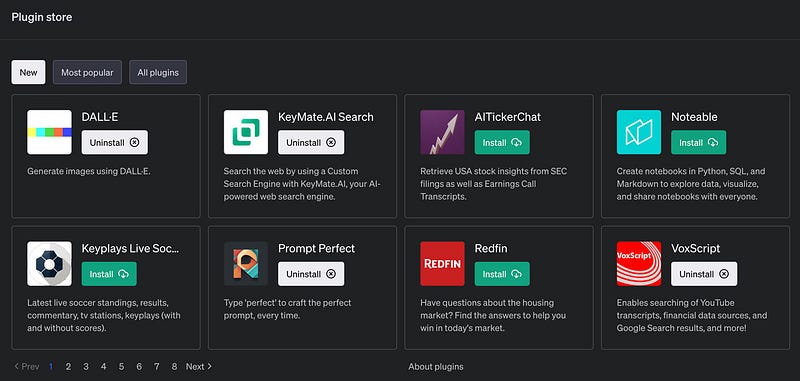
New Plugins — Dall e

Introduction to ChatGPT

OpenAI’s ChatGPT is a powerful AI platform that utilizes natural language processing and artificial intelligence technology to facilitate tasks that range from answering questions, generating human-like conversations, text translation and summarization, and much more. It is the most advanced and widely-used AI language model in the world today.

What are ChatGPT Plugins?

ChatGPT Plugins are third-party software add-ons that allow ChatGPT to perform further functions beyond the basic operations and tasks that the platform is equipped to handle. These plugins are designed to be used with ChatGPT and they provide additional functionalities to the language model.

🔵 Plugins only work with GPT4

What do ChatGPT Plugins do?

ChatGPT Plugins enable users to perform any task on ChatGPT including, but not limited to, automatic summarization of texts, image recognition, music searches, and much more. With ChatGPT Plugins, users can take advantage of the advanced capabilities of OpenAI’s ChatGPT platform to do more and hence perform their tasks faster and in a more efficient manner.

How to Use ChatGPT Plus Plugins? AI Web Browsing. Install and use.
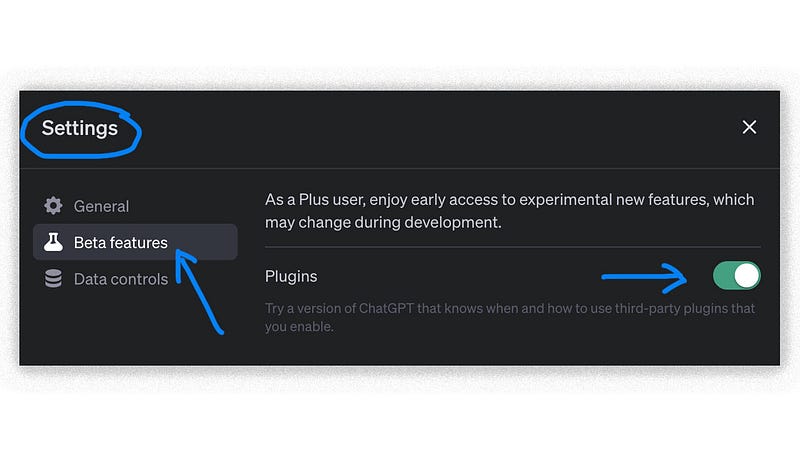
Settings — Beta Features-Plugins

To enable plugins, follow these steps:

  • Select Profile & Settings.
  • Choose Beta Features
  • Toggle the features you want to test.

Can Anyone Use ChatGPT Plugins?

Yes, anyone who uses Plus paid version can use ChatGPT plugins and take advantage of the services provided by third-party plugins. All you need to do is to enable Beta Features in Settings and start using your favorite third-party plugins. No more waitlist

80+ Plugins Alternatives ChatGPT.

How to Install and Use ChatGPT Plugins?

To use ChatGPT Plugins, navigate to ChatGPT Plugin Store and select the plugin of your choice. Most plugins are free, but some may come with a price tag. To install a plugins, select it and then hit the install button. Once the plugin is installed, go back to ChatGPT and enter a prompt to begin using the plugin.

If you choose to use plugins, your data is used to train. private mode not available

How Do ChatGPT Plugins Work?

ChatGPT Plugins work by enabling ChatGPT to interact with other third-party services and their APIs. Essentially, they provide a bridge that allows users to access the functionalities of various external services through the ChatGPT platform. In other words, when you activate a plugin, ChatGPT sends a request to the third-party service, retrieves the data, and then displays the result through its chat interface.

What are the Best Third-Party Plugins for ChatGPT? Chatgpt plugins explained
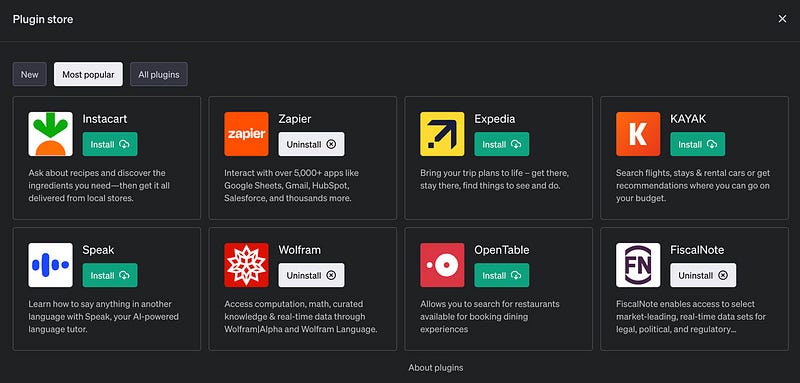
Most Popular Plugins

What are the Top Plugins for ChatGPT?

There are various third-party plugins available for ChatGPT, with new ones being added regularly. Some of the must-have third-party plugins for ChatGPT include Wolfram Alpha and Expedia. Wolfram Alpha is a highly-intelligent computational knowledge engine, which provides the answers to a wide range of questions. Meanwhile, Expedia is a travel service that provides information on hotel and flight bookings.

During the BETA not everything works smoothly, and 25 GPT4 messages every 3 hours disappear faster than usual ; )

How to Get Access to Third-Party Plugins?

To get access to third-party plugins, simply navigate to ChatGPT Plugin Store, browse through the list of available plugins, and select the one you need. It’s that simple!
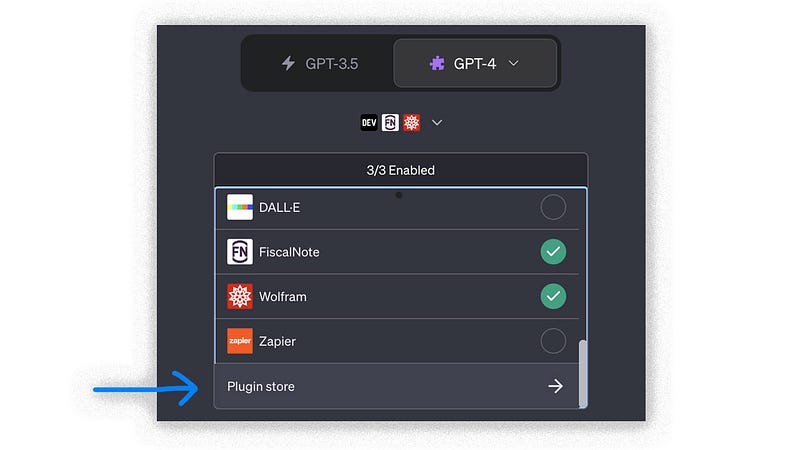
Plugin Store

Which Third-Party Plugins Are the Most Useful for ChatGPT?

The most useful third-party plugins for ChatGPT include plugins that can automatically summarize large texts or documents, plugins that perform product searches, and plugins that provide information on flight and hotel bookings.

What Are Some New Features of ChatGPT Plugins?

PRO TIP: Depending on which tools you have enabled, ChatGPT decides when to use them during a chat. By adding a three-letter plugin name (DIA) or full name, such as “Diagram it,” to the end of the prompt, the chatbot can jump right to using it.
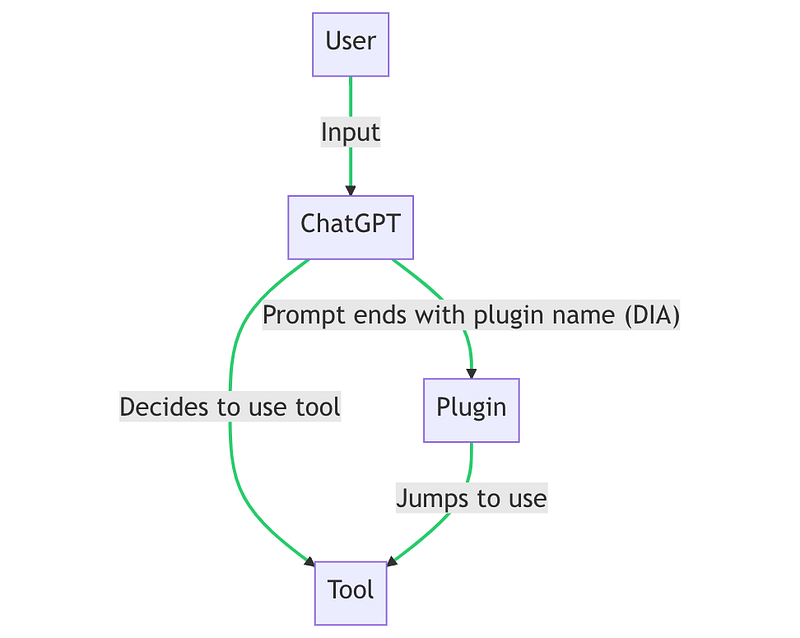
chatGPT plugin Diagram it — Create and edit diagrams directly in chat.

What Are Some New Third-Party Plugins for ChatGPT?

The newest third-party plugins for ChatGPT include a retrieval plugin that helps ChatGPT access up-to-date information and an emotion detector plugin that can detect the user’s emotions based on their language.

What Are Some Other Up-to-date Information about ChatGPT Plugins?

ChatGPT Plugins continue to evolve, with new plugins and functionalities being added regularly. Developers and ChatGPT Plus users are already working on new plugins, which promise to take the ChatGPT experience to the next level.

How Can ChatGPT Plugins Improve Your Web Browsing Experience?
SEO

How Do ChatGPT Plugins and Web Browsing Work Together?

The combined power of ChatGPT Plugins and web browsing can produce an amazing browsing experience. By using ChatGPT Plugins, you can take advantage of the language model’s advanced capabilities to perform tasks such as text summarization, reading, and translation, all while browsing the internet.
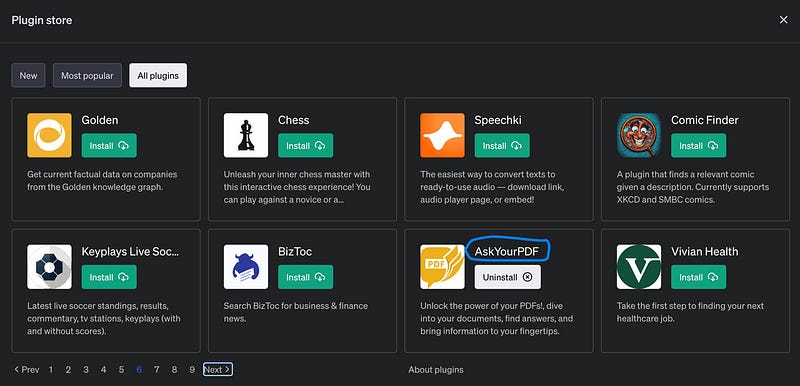
text summarization, reading, and translation — Ask Your PDF

What Are Some Natural Language Applications of ChatGPT Plugins?

ChatGPT Plugins allow users to interact with the internet in a more natural way and can perform various language-based tasks such as automatic text summarization, translation, and language correction.

What Are Some of the Best ChatGPT Plugins to Try?

Some of the best new Plugin to try include Wolfram Alpha, the retrieval plugin, and the emotion detector plugin. In conclusion, ChatGPT Plugins are a powerful tool that can improve your web browsing experience and make your life easier. They enable ChatGPT to perform tasks beyond its natural capabilities, and by using ChatGPT Plugins, users can unlock the platform’s full potential. We hope this article has been informative and helps you in unlocking the full potential of ChatGPT.
Zapier

Why pay for ChatGPT plugin when the alternatives are free?

Are you waiting to unlock the power of new version of chatgpt Plugins? Why wait when you can dive into a world of free AI alternatives now? This article is your ultimate guide to free, cutting-edge tools that will not only satisfy your AI curiosity but also prepare you for the exciting future of ChatGPT Plugins. So, don’t let the wait hold you back.

Use free alternatives now: HERE

🟠 Get Access to Free Alternatives of ChatGPT Plugin Today. Without Waitlist or Paying

Start exploring these amazing alternatives today and get ready to navigate the thrilling future of API with GPT Alternative Web Browsing Plugins! Early access. The future is now, and it’s free!

Plugins
Artificial Intelligence
Machine Learning
Technology
OpenAI
Recommended from ReadMedium