
Python Concurrency
Unlock the Power of Python: A Beginner’s Guide to Concurrency
Learn the Basic Concepts of Concurrency and Upgrade Your Python Skills today!

Python is popular. It’s versatile. And it’s widely used for everything from web development to scientific computing [1].
However, many of today's applications rely heavily on the use of input/output (I/O) operations, which can have a severe and compounding impact on performance. Luckily for us, Python offers a range of tools and techniques to tackle this issue. Most importantly concurrency.
But with many options to choose from, it can become quite a challenge, especially for beginners, to figure out where to start.
In the following sections, we will break down the key and basic concepts for Python concurrency. Covering everything from multithreading and multiprocessing to the Global Interpreter Lock and single-threaded concurrency.
Whether you are looking to optimize your application’s performance or simply want to improve your programming skills, this guide has got you covered.
Concurrency, Parallelism, and Multitasking
Let’s begin our journey by covering some basic terminology first.
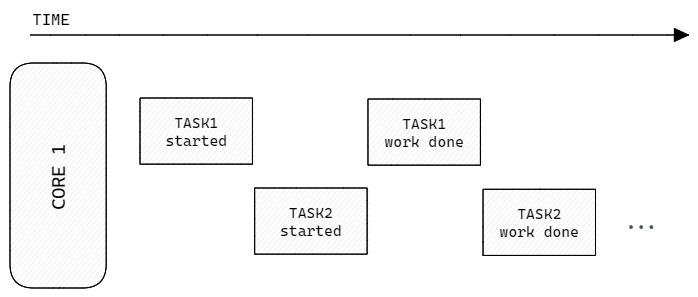
Concurrency is the concept of allowing more than one task to be handled at the same time, out of or in partial order [2]. This can be incredibly useful for improving the performance of applications.
In Python, concurrency can be achieved in several ways, including threading, multiprocessing, and asynchronous programming using libraries such as asyncio. One important aspect of concurrency is that it is achieved through switching between tasks, which means that only one task is actively being executed at a time, even if multiple tasks are in progress. Thus, concurrency does not imply running multiple tasks in parallel.
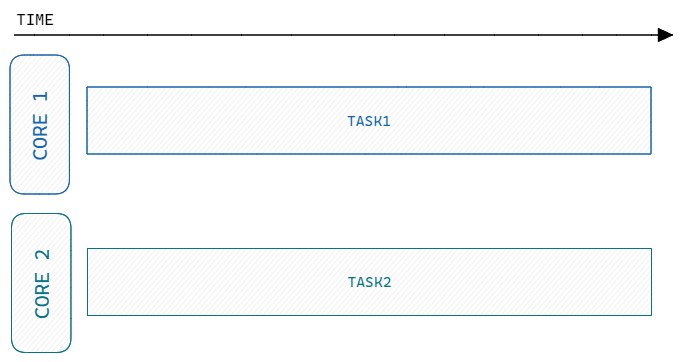
Parallelism, on the other hand, is the concept of actively doing more than one task at the same time. Multiple calculations or processes are carried out simultaneously [3]. This is different from concurrency and multiple CPU cores are required to be able to execute various tasks simultaneously.
In Python, parallelism can be achieved using the multiprocessing module, which allows multiple processes to be created and run in parallel. Unlike concurrency, parallelism can significantly improve the performance of CPU-bound tasks.
Note: I/O-bound operations in Python are tasks that spend most of the time waiting for input/output operations to complete, such as network requests, file I/O, or user input. CPU-bound operations are tasks that require heavy computations and do not rely on I/O operations for their executions.
Multitasking allows for numerous tasks to be executed concurrently in an interleaved manner by sharing resources between them [4]. It can be achieved in two ways: Preemptive and cooperative multitasking.
Preemptive multitasking is managed by the operating system, which decides when to switch between tasks. It does so by using an algorithm such as time-slicing. In this approach, each task is allocated a time slice or quantum, during which it can run on the CPU. When the time slice expires, the operating system interrupts and switches to another task. The switching between tasks is resource-intensive and may lead to poor performance if not managed properly.
Cooperative multitasking, on the other hand, relies on the developer to provide specific code instructions that allow tasks to yield control to other tasks voluntarily. This approach can be beneficial since it is less resource-intensive and provides more granularity and control.
In Python, cooperative multitasking is often achieved using coroutines and the async/await syntax. The asyncio module is a good example of cooperative multitasking, where coroutines are run in a single-threaded event loop, and the developer can control when to switch between them using await statements.
Processes, Threads, Multithreading, and Multiprocessing
Now, that we know and understand some of the basic concepts, we can start to dig a little deeper.
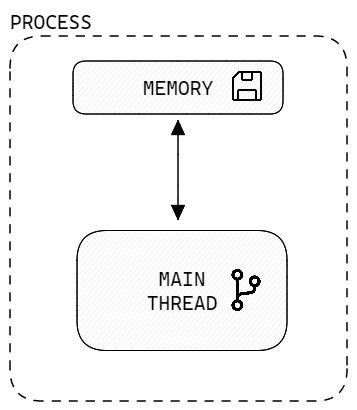
In Python, a process is an instance of a program that is being executed by the operating system. A process is equipped with its own separate memory space. Thus, each process has its own set of resources, such as CPU time and memory, and does not share those with other processes or the parent process that launched it. Additionally, a process can execute multiple threads to perform different tasks concurrently.
Threads are a way to achieve multitasking by dividing a program into smaller, independent parts that can be executed concurrently. In simpler terms, threads can be thought of as a “light-weight-process” that can run at the same time with other threads in the same process.
In contrast to processes, threads share the same memory space as the parent process, which allows accessing the same variables and data structures, making communication between threads easier. However, this also introduces another layer of complexity and problems like “race conditions” to be at least aware of. There will at least be one thread in the parent process: The main thread.
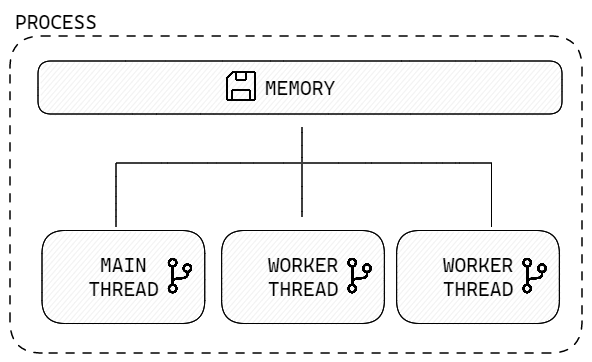
Threads are particularly useful for I/O-bound tasks. By running these tasks in separate threads, a Python program can continue executing other tasks while waiting for I/O operations to complete. This allows for a faster, more efficient, and more responsive application.
In Python, threads can be created using the threading module, which provides a Thread class that can be used to create and manage new threads.
import os
import threading

# Get the parent process id
process_id = os.getpid()
# Get the total number of active threads
num_active_threads = threading.active_count()
# Get the current thread's name
curr_thread_name = threading.current_thread().name

print(f"Python process running with id: {process_id} \
with {num_active_threads} active threads running. \
Current thread: {curr_thread_name}")

# Output:
# Python process running with id: 2300 with 1 active threads running.
# Current thread: MainThread
But how can we improve the application’s performance by utilizing the concepts of processes and threads?
Multithreading is a way to achieve concurrency by running multiple threads simultaneously in the same process [5]. In other words, we can execute more than one task at the same time within a single program. As stated earlier, communication between threads is simple, since they share the same memory space. Thus, allowing access to the same variables and data structures.
The concept of multithreading is especially useful for I/O-bound tasks, such as network requests and file I/O, where waiting for external events is a bottleneck in program performance. By running these tasks in separate threads, we can continue executing other tasks concurrently, which can improve the performance and efficiency of the application.
However, it is important to note that multithreading has its limitations in Python, due to the Global Interpreter Lock (GIL), which ensures that only one thread can execute Python bytecode at a time.
import threading

def print_numbers():
    for i in range(1, 11):
        print(i)

def print_letters():
    for letter in ['a', 'b', 'c', 'd', 'e']:
        print(letter)

# Create two threads
t1 = threading.Thread(target=print_numbers)
t2 = threading.Thread(target=print_letters)

# Start the threads
t1.start()
t2.start()

# Wait for the threads to finish
t1.join()
t2.join()

# When we run this program,
# we'll see output that interleaves the numbers and letters
# printed by the two threads. This is because the two threads
# are executing concurrently, or in parallelMultiprocessing, on the other hand, is a way to achieve parallelism by running multiple processes simultaneously on different CPU cores. In other words, it allows us to execute more than one task at the same time by distributing them across multiple processes. Each process has its own memory space and system resources.
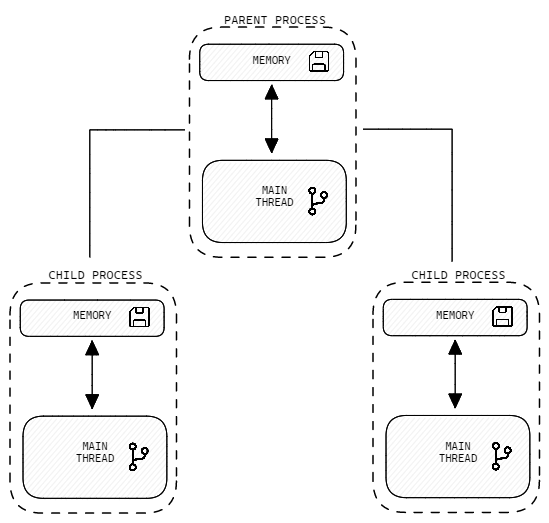
Multiprocessing and parallelism are particularly useful for CPU-bound tasks, such as heavy computation or data processing. By running these tasks in separate processes, a Python program can execute multiple tasks simultaneously, utilizing all available CPU cores. This can result in a significant speedup in program execution and improve program efficiency.
In Python, multiprocessing can be achieved using the multiprocessing module, which provides a Process class that can be used to create and manage new processes. Unlike multithreading, multiprocessing does not have the same limitations imposed by the Global Interpreter Lock (GIL), as each process has its own interpreter and can execute Python bytecode independently.
import os
import multiprocessing


def hello_from_process():
    print(f"Hello from child process {os.getpid()}")

if __name__ == '__main__':
    # Create new process
    child_process = multiprocessing.Process(target=hello_from_process)
    # Start new process
    child_process.start()

    print(f"Hello from parent process {os.getpid()}")

    # Wait for child process to finish
    child_process.join()

    # Output:
    # Hello from parent process 3128
    # Hello from child process 2248
However, it’s important to note that multiprocessing has some overhead in terms of memory usage and interprocess communication, so it’s not always the best approach for every situation.
The Global Interpreter Lock
In the previous section, we hinted at the fact that multithreading in Python has its limitations due to the Global Interpreter Lock. Now, let’s take a closer look at what the Global Interpreter Lock (GIL) actually is.
The Global Interpreter Lock (GIL) is a mechanism in Python that ensures that only one thread can execute Python bytecode at a time, even in a multithreaded program [6]. The purpose of the GIL is to prevent multiple threads from accessing shared data simultaneously and causing data inconsistencies, which can result in hard-to-debug errors.
The GIL works by locking the interpreter, which prevents other threads from acquiring the lock and executing Python bytecode. This means while one thread is executing bytecode, all other threads are blocked and have to wait. This can limit the performance of multithreaded programs, especially in situations where the program is CPU-bound and requires heavy computation.
So why does the GIL even exist in the first place?
While the GIL can be a limitation for some programs, it’s also a feature that simplifies Python’s memory management. Python uses a reference-counting model for memory management, which is not thread-safe. The GIL ensures that only one thread can modify the reference counts of Python objects at any given time, preventing memory corruption and crashes.
Probably the most important thing to note is that the GIL only applies to threads that execute Python bytecode.
I/O-bound tasks, such as network requests and file I/O, can release the GIL and allow other threads to execute Python bytecode while they wait for I/O operations to complete.
This means that multithreading is still a useful tool for I/O-bound tasks, even in a GIL-constrained environment.
Single-threaded Concurrency
Single-threaded concurrency can be achieved by running multiple tasks concurrently within a single thread, without creating additional threads or processes. This approach is especially useful for I/O-bound tasks since those release the GIL and allow other Python bytecode to be executed while waiting for I/O operations to be completed. Moreover, single-threaded concurrency can be more efficient due to the saving of the overhead cost of creating multiple threads or processes.
In Python, single-threaded concurrency can be achieved using non-blocking sockets and the OS event notification system, such as kqueue, epoll, or IOCP. When data is ready, the system sends a notification, and the coroutine can return the result. This approach allows a single thread to handle multiple I/O operations concurrently, without blocking and waiting for each operation to complete.
The asyncio module in Python is a good example of single-threaded concurrency in action. The module provides an event loop that can handle multiple coroutines concurrently, using non-blocking sockets and the event notification system to achieve concurrency.
The Event-Loop
In asyncio Python, an event loop is a central part of the asynchronous programming model, allowing coroutines to be scheduled and executed in a non-blocking manner.
The event loop is responsible for managing tasks and coroutines, and for determining which task or coroutine to run next. It’s essentially a loop that continuously waits for events to occur, and then dispatches tasks or coroutines to handle those events [7].
The following code example shows an implementation of the most basic event loop.
import queue

# Create a queue to store events
message_queue = queue.Queue()

# Fill queue with dummy events
for i in range(5):
    message_queue.put(f"event_{i}")

def process_message(message):
    print(f"Processing message: {message}")


# Run event-loop forever
while True:
    try:
        if message_queue:
            message = message_queue.get(timeout=1)
            process_message(message)
    except queue.Empty:
        # Continue the loop and wait for new events
        continue
    except KeyboardInterrupt:
        # Exiting the program with Ctrl+C
        break

# Output:
# Processing message: event_0
# Processing message: event_1
# Processing message: event_2
# Processing message: event_3
# Processing message: event_4
When an asyncio program starts, it creates an event loop, which is used to schedule and execute coroutines. Each coroutine is a task that represents a unit of work to be done, such as making a network request or reading from a file. The event loop manages these tasks and decides which one to run next based on which task is ready to run, such as one that has data available to read or one that has completed an I/O operation.
The event loop is also responsible for handling exceptions and errors that may occur during the execution of a coroutine. If an exception occurs, the event loop can catch the exception and decide whether to continue running the coroutine or stop it and move on to the next task.
Conclusion
Understanding concurrency in Python is an essential skill for any developer who wants to create efficient and responsive programs.
The concept of asynchronous programming helps to achieve concurrency by allowing programs to handle multiple I/O-bound tasks concurrently and free up system resources. Resulting in greater efficiency, better performance, and resource usage.
However, there are some drawbacks as well. Asynchronous code can be harder to read and write than synchronous code, especially for beginners. It also requires a different programming mindset. And additionally, some tasks, such as heavy computation or CPU-bound tasks, may not be well-suited for asynchronous programming.
While asynchronous programming can provide significant performance gains it is unfortunately not a ‘silver bullet’ for everything.
If you enjoyed the read, make sure to hit ‘follow’ for more on Python concurrency and advanced techniques to take your programming skills to the next level.
Consider becoming a Medium member and continue learning with no limits. I’ll receive a portion of your membership fee if you use the following link, at no extra cost to you.
References / Further Material:
- [1] https://www.statista.com/statistics/1338409/python-use-cases/
- [2] https://en.wikipedia.org/wiki/Concurrency_(computer_science)
- [3] https://en.wikipedia.org/wiki/Parallel_computing
- [4] https://en.wikipedia.org/wiki/Computer_multitasking
- [5] https://en.wikipedia.org/wiki/Multithreading_(computer_architecture)
- [6] https://wiki.python.org/moin/GlobalInterpreterLock
- [7] https://en.wikipedia.org/wiki/Event_loop
- Fowler, Matthew. (2022). Python Concurrency with Asyncio. Manning Publications.