
Unleashing the Power of gRPC in .NET 6: A Game Changer for Microservices Communication

gRPC is a modern, high-performance, open-source framework for building microservices. With the release of .NET 6, gRPC has become a first-class citizen in the .NET ecosystem, making it easier than ever to build fast and efficient microservices that can communicate seamlessly with each other.
We will explore the benefits of using gRPC in .NET 6 and how it can revolutionize the way we build microservices. From its high-performance capabilities to its ease of use, gRPC in .NET 6 is a game changer for microservices communication. Let’s dive in and see how it can help you build better, faster, and more efficient microservices.
What is gRPC?
gRPC is a remote procedure call (RPC) framework [7].
It uses the Protocol to send and receive binary data over HTTP/2 efficiently [1]. Unlike traditional REST APIs, which use XML or JSON for data transfer, gRPC uses a binary format that allows for smaller message sizes and faster serialization and deserialization [2].
gRPC is also contract-based, meaning that the client and server have a pre-agreed-upon API that defines the available methods and their inputs and outputs [2]. This allows for more robust and predictable communication between microservices.
gRPC is available across different ecosystems, such as C++, Java, Python, and .NET, making it easy to integrate with existing systems [2]. Furthermore, gRPC is secure by default, requiring HTTPS for all communication [1]. It also supports uni- and bi-directional streaming, allowing for real-time communication between microservices [1].
Is REST dead?
REST (Representational State Transfer) is a popular architectural style for building web services, but it is not a protocol. While REST is still widely used, it is not a replacement for gRPC [2].
gRPC and REST are meant to do different things [2]. gRPC is a high-performance, open-source framework for building microservices, while REST is an architectural style for building web services.
Different ways of communication
There are several ways to communicate between different systems, including GraphQL, SignalR, REST, and gRPC. Each of these technologies has its strengths and weaknesses, and it depends on the use case which one is the best fit.
When building purely web apps or doing a create, read, update and delete sort of app, REST continues to be a smart and easy way of developing that [2]. RESTful APIs are easy to understand and implement, making them an excellent option for these apps.
On the other hand, SignalR is helpful for one-to-many broadcasting and is excellent for sending data from a small number of servers to a large number of clients [2]. This makes it perfect for real-time applications such as chat or notifications.
GraphQL is excellent for the open querying of large datasets [2]. This allows for more flexible and efficient communication with a backend. It allows the client to specify the data it needs, and the server will respond only with that data.
Finally, gRPC is excellent for streaming, low-resource clients, and inter-data center communication [2]. It’s a high-performance framework using the Protocol Buffers data serialization format to efficiently send and receive binary data over HTTP/2 [1]. This makes it perfect for microservices architectures.
It’s worth noting that you don’t have to pick one; these technologies can be used together. Depending on the needs of your project, you can choose to use different technologies for different parts of your system.
Contracts in gRPC
Contracts are a fundamental part of gRPC and define the API the client and server will use to communicate. These contracts are written in a User Interface definition language called Protocol Buffers (ProtoBuf), a programming language-independent format [2].
Once the contracts are defined, gRPC provides tools to generate clients and servers in various programming languages, such as C++, Java, Python, and .NET, based on the contract definition [2]. This makes it easy to integrate gRPC into existing systems and create new systems that can communicate seamlessly with each other.
The generated clients and servers are fully functional and include all the necessary code to handle data communication, serialization, and deserialization. This means that developers can focus on implementing the business logic of their applications without having to worry about the details of the communication between the different systems.
Additionally, since the contracts are written in Protocol Buffers, they are easy to understand and maintain and can be used as shared documentation between the client and server. This allows for more robust and predictable communication between microservices.
How to add gRPC to your ASP.NET Core Project?
gRPC is part of the .NET Core or .NET 6, so it can be added as middleware [2]. It can also use other existing middleware like logging or authorization [2].
Let’s start by creating a new project. There should be a project type of gRPC service [3]. We’ll start with this.
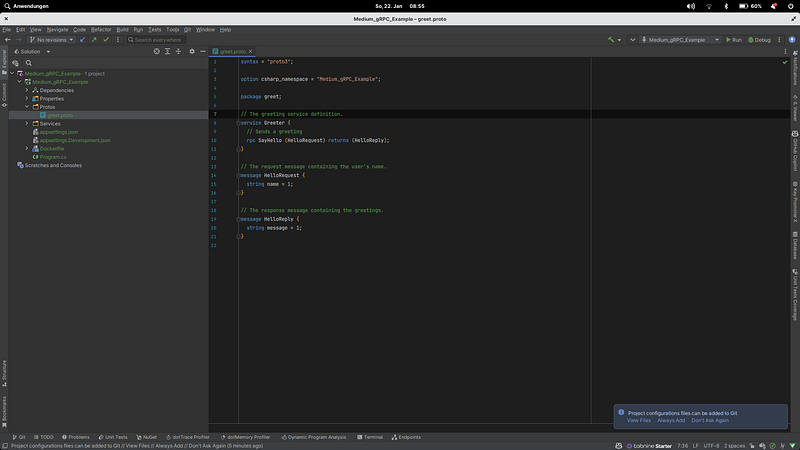
After creating the project, you should see something like the above.
I want to start by looking at the proto file because that’s the heart of the whole thing.
The syntax and the namespace must be defined within the proto file. Proto3 is currently the familiar syntax.
gRPC works with the contract-first approach [4], which means that the proto file must always be created and configured first.
In the proto file, the service is defined, and the messages are sent between the client and server [4].
Furthermore, Protobuf supports additional metadata definitions by using the keyword option, which generators can use to generate idiomatic code [5]. The gRPC tools will create the base classes within the Medium_gRPC_Example namespace [5].
The next step is to add the proto file to the .csproj file [5].
<Project Sdk="Microsoft.NET.Sdk.Web">

    <PropertyGroup>
        <TargetFramework>net6.0</TargetFramework>
        <Nullable>enable</Nullable>
        <ImplicitUsings>enable</ImplicitUsings>
        <DockerDefaultTargetOS>Linux</DockerDefaultTargetOS>
    </PropertyGroup>

    <!------ Added Proto File ------!>
    <ItemGroup>
        <Protobuf Include="Protos\greet.proto" GrpcServices="Server" />
    </ItemGroup>

    <ItemGroup>
        <PackageReference Include="Grpc.AspNetCore" Version="2.40.0" />
    </ItemGroup>

    <ItemGroup>
        <Content Include="..\.dockerignore">
            <Link>.dockerignore</Link>
        </Content>
    </ItemGroup>

</Project>
After adding the Proto file, the service can be created. In the example project, this can be found under Services.
using Grpc.Core;
using Medium_gRPC_Example;

namespace Medium_gRPC_Example.Services;

public class GreeterService : Greeter.GreeterBase
{
    private readonly ILogger<GreeterService> _logger;

    public GreeterService(ILogger<GreeterService> logger)
    {
        _logger = logger;
    }

    public override Task<HelloReply> SayHello(HelloRequest request, ServerCallContext context)
    {
        return Task.FromResult(new HelloReply
        {
            Message = "Hello " + request.Name
        });
    }
}
If you look at it like this, you will notice that it is hardly different from a non-gRPC service.
The GreetingService derives from the Greeter.GreeterBase [5]. If you are still waiting to see this class, build your solution first [5].
Next, we override the method definition found in the proto file.
Afterward, we need to register our gRPC in the program.cs.
using Medium_gRPC_Example.Services;

var builder = WebApplication.CreateBuilder(args);

// Additional configuration is required to successfully run gRPC on macOS.
// For instructions on how to configure Kestrel and gRPC clients on macOS, visit https://go.microsoft.com/fwlink/?linkid=2099682

// Add services to the container.
builder.Services.AddGrpc();

var app = builder.Build();

// Configure the HTTP request pipeline.
app.MapGrpcService<GreeterService>();
app.MapGet("/",
    () =>
        "Communication with gRPC endpoints must be made through a gRPC client. To learn how to create a client, visit: https://go.microsoft.com/fwlink/?linkid=2086909");

app.Run();
The server is set up, but we need some clients to communicate. This will be our next step.
Meanwhile, Postman supports gRPC so that we can test our server via Postman [6].
As mentioned before, the client must know the contract before it can send requests. For this, Postman and other tools offer two options [6]. The manual addition of the proto file or the automatic detection via reflection [6].
Let’s use automatic detection for convenience. We need to register another service in the program.cs. To do this, we must first install a package.
builder.Services.AddGrpcReflection();

var app = builder.Build();

// Configure the HTTP request pipeline.
app.MapGrpcService<GreeterService>();

var env = app.Environment;

if (env.IsDevelopment())
{
    app.MapGrpcReflectionService();
}
Now clients which support the automatic detection of proto files should be able to retrieve them via a service.
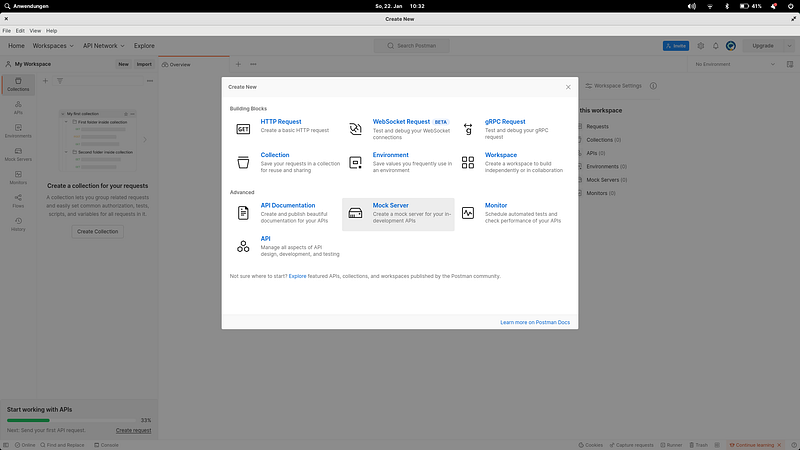
We create a new gRPC Request.
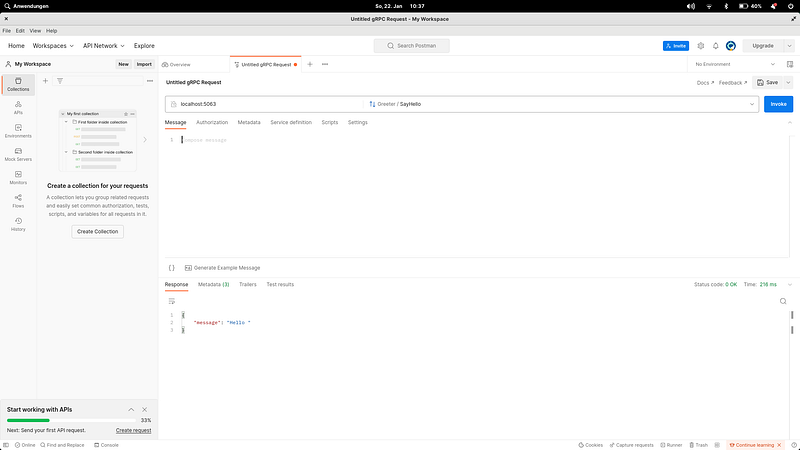
You must enter the hostname and port (without the HTTP scheme) in the server URL. Go to the service definition and select server reflection. It should now automatically detect the SayHello method.
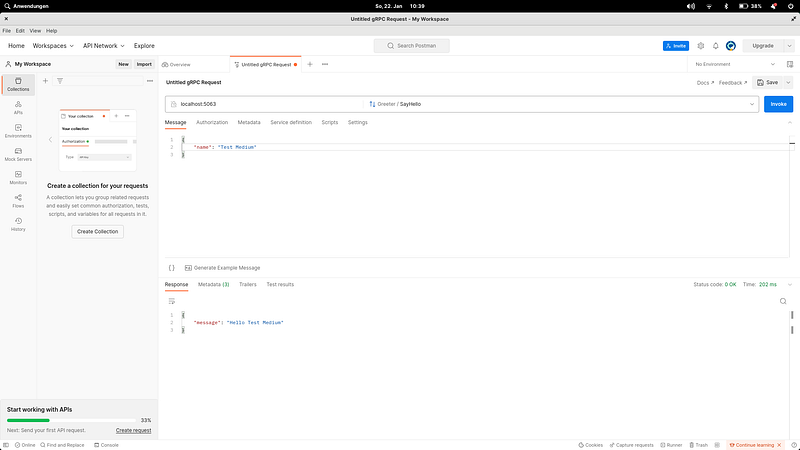
For more methods to test the server, please look here.
Setup Client
First, we create a console project.
We need to add three packages:
We now copy the proto file into our console application (or in a shared project) and adjust the namespace in the proto file.
In the next step, we customize the client .csproj file.
<ItemGroup>
  <Protobuf Include="Protos\greet.proto">
    <GrpcServices>Client</GrpcServices>
  </Protobuf>
</ItemGroup>
So much for the setup now; we can start with the implementation. We go into the program.cs and set up a channel.
// See https://aka.ms/new-console-template for more information
// https://learn.microsoft.com/en-gb/aspnet/core/tutorials/grpc/grpc-start?view=aspnetcore-7.0&tabs=visual-studio
using Grpc.Net.Client;
using Medium_gRPC_Example;

Console.WriteLine("Hello gRPC");
using var channel = GrpcChannel.ForAddress("http://localhost:5063");
var client = new Greeter.GreeterClient(channel);
var reply = await client.SayHelloAsync(
    new HelloRequest { Name = "gRPCClient" });
Console.WriteLine("Greeting: " + reply.Message);
Console.ReadKey();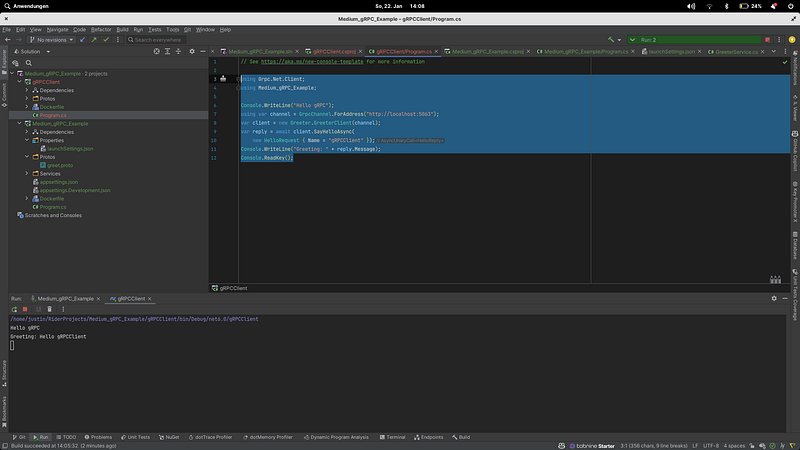
If we run both projects now, we should see that we have sent a message to the server and received a response.
Benefits of using gRPC
gRPC offers several advantages that make it an excellent option for building microservices. Some of the key benefits include:
- High performance: gRPC uses the Protocol Buffers data serialization format, a binary format that allows for smaller message sizes and faster serialization and deserialization. This makes it a high-performance option for building microservices.
- Ease of Use: gRPC provides tools to generate clients and servers in various programming languages, such as C++, Java, Python, and .NET, based on the contract definition. This makes it easy to integrate gRPC into existing systems and create new systems that can communicate seamlessly with each other.
- Contract-based communication: gRPC is contract-based, meaning that the client and server have a pre-agreed-upon API that defines the available methods and their inputs and outputs. This allows for more robust and predictable communication between microservices.
- Cross-platform: gRPC is available across different ecosystems, such as C++, Java, Python, and .NET, making it easy to integrate with existing systems.
- Secure by default: gRPC is secure by default, requiring the use of HTTPS for all communication; this improves the security of the communication.
- Streaming: gRPC supports uni- and bi-directional streaming, allowing for real-time communication between microservices.
- Platform Independent: gRPC is platform-independent and can run on any operating system, making it a versatile option for building microservices.
Overall, gRPC is a robust framework for building microservices and offers several benefits that make it an excellent option for building high-performance, scalable, and complete systems.
When not to use gRPC?
While gRPC is a robust framework for building microservices, there are certain situations where it may not be the best option. Some of the cases where gRPC may not be the best fit include:
- When using legacy systems: gRPC requires support for HTTP/2, which may not be available in legacy systems. If you need to integrate with systems that do not support HTTP/2, there may be better options than gRPC.
- When dealing with large payloads: gRPC uses Protocol Buffers for serialization, a binary format that can be more efficient than text-based formats like JSON or XML. However, if you are dealing with enormous payloads, the overhead of serializing and deserializing the data may outweigh the benefits of the binary format.
- When the client is a web browser: gRPC uses HTTP/2, which is not natively supported by all web browsers.
- When your app needs to be very simple and doesn’t require any special features like streaming, bidirectional streaming, and flow control: In that case, a more straightforward protocol like REST may be more suitable.
It’s worth noting that these are not hard and fast rules and that gRPC can be used in various situations, but in the cases mentioned above, it may not be the best fit. It’s always best to evaluate the specific requirements of your project and choose the best communication protocol that fits your needs.
Conclusion
In conclusion, gRPC is a modern, high-performance, open-source framework for building microservices that can communicate seamlessly with each other. It offers several benefits: high performance, ease of use, contract-based communication, cross-platform, secure by default, and streaming capabilities.
Its contract-based communication is written in Protocol Buffers, a programming language-independent format, which allows for more robust and predictable communication between microservices. However, gRPC may not be the best fit in certain situations, like when using legacy systems, dealing with large payloads, the client is a web browser or low-resource device, or your app needs to be very simple and doesn’t require any special features.
It’s always essential to evaluate the specific requirements of your project and choose the best communication protocol that fits your needs.
Make sure to check out my other Posts!


Want to connect and stay up-to-date on AI, tech, and .NET development?

Follow me on Twitter and LinkedIn - I'm always happy to hear from you.
References
- https://learn.microsoft.com/en-us/dotnet/architecture/cloud-native/grpc
- Using gRPC in ASP.NET Core 6 by Shawn Wildermuth
- https://learn.microsoft.com/en-us/aspnet/core/tutorials/grpc/grpc-start?view=aspnetcore-6.0&tabs=visual-studio
- https://learn.microsoft.com/en-us/aspnet/core/grpc/basics?view=aspnetcore-6.0
- https://blog.jetbrains.com/dotnet/2021/07/19/getting-started-with-asp-net-core-and-grpc/
- https://learn.microsoft.com/en-us/aspnet/core/grpc/test-tools?view=aspnetcore-7.0
- https://speedscale.com/using-grpc-with-golang/


