avatarData Overload

Free AI web copilot to create summaries, insights and extended knowledge, download it at here

3594

Abstract

k prices and analyzing market trends.</p><div id="7456"><pre><span class="hljs-keyword">import</span> plotly.<span class="hljs-property">graph_objects</span> <span class="hljs-keyword">as</span> go <span class="hljs-keyword">import</span> pandas <span class="hljs-keyword">as</span> pd</pre></div><div id="53ed"><pre><span class="hljs-meta"># Sample stock price data</span> stock_data = pd.DataFrame({ 'Date': ['<span class="hljs-number">2022</span>–01–01', '<span class="hljs-number">2022</span>–01–02', '<span class="hljs-number">2022</span>–01–03'], 'AAPL': [<span class="hljs-number">150</span>, <span class="hljs-number">152</span>, <span class="hljs-number">155</span>], 'GOOGL': [<span class="hljs-number">2700</span>, <span class="hljs-number">2750</span>, <span class="hljs-number">2800</span>], 'MSFT': [<span class="hljs-number">300</span>, <span class="hljs-number">305</span>, <span class="hljs-number">310</span>] })</pre></div><div id="03f9"><pre><span class="hljs-comment"># Create interactive line chart</span> fig = go.Figure() <span class="hljs-keyword">for</span> col <span class="hljs-keyword">in</span> stock_data.columns[1:]: fig.add_trace(go.Scatter(<span class="hljs-attribute">x</span>=stock_data[<span class="hljs-string">'Date'</span>], <span class="hljs-attribute">y</span>=stock_data[col], <span class="hljs-attribute">mode</span>=<span class="hljs-string">'lines'</span>, <span class="hljs-attribute">name</span>=col))</pre></div><div id="45c7"><pre><span class="hljs-comment"># Customize layout</span> fig.update_layout(<span class="hljs-attribute">title</span>=<span class="hljs-string">'Interactive Stock Price Dashboard'</span>, <span class="hljs-attribute">xaxis_title</span>=<span class="hljs-string">'Date'</span>, <span class="hljs-attribute">yaxis_title</span>=<span class="hljs-string">'Price'</span>)</pre></div><div id="872d"><pre><span class="hljs-comment"># Show interactive plot</span> fig.<span class="hljs-literal">show</span>()</pre></div><p id="5808">In the second example, we’ll delve into how a data journalist harnesses the flexibility of D3.js to create an immersive data-driven story for a news article.</p><div id="611a"><pre><span class="hljs-meta"><!DOCTYPE <span class="hljs-keyword">html</span>></span> <span class="hljs-tag"><<span class="hljs-name">html</span> <span class="hljs-attr">lang</span>=<span class="hljs-string">"en"</span>></span> <span class="hljs-tag"><<span class="hljs-name">head</span>></span> <span class="hljs-tag"><<span class="hljs-name">meta</span> <span class="hljs-attr">charset</span>=<span class="hljs-string">"UTF-8"</span>></span> <span class="hljs-tag"><<span class="hljs-name">meta</span> <span class="hljs-attr">name</span>=<span class="hljs-string">"viewport"</span> <span class="hljs-attr">content</span>=<span class="hljs-string">"width=device-width, initial-scale=1.0"</span>></span> <span class="hljs-tag"><<span class="hljs-name">title</span>></span>Data-Driven Storytelling with D3.js<span class="hljs-tag"></<span class="hljs-name">title</span>></span> <span class="hljs-tag"><<span class="hljs-name">script</span> <span class="hljs-attr">src</span>=<span class="hljs-string">"https://d3js.org/d3.v7.min.js"</span>></span><span class="hljs-tag"></<span class="hljs-name">script</span>></span> <span class="hljs-tag"></<span class="hljs-name">head</span>></span> <span class="hljs-tag"><<span class="hljs-name">body</span>></span> <span class="hljs-tag"><<span class="hljs-name">div</span> <span class="hljs-attr"

Options

id</span>=<span class="hljs-string">"chart"</span>></span><span class="hljs-tag"></<span class="hljs-name">div</span>></span> <span class="hljs-tag"><<span class="hljs-name">script</span>></span></pre></div><div id="2fd6"><pre> // <span class="hljs-type">Sample</span> <span class="hljs-class"><span class="hljs-keyword">data</span></span> const <span class="hljs-class"><span class="hljs-keyword">data</span> = [10, 20, 30, 40, 50];</span></pre></div><div id="7e8c"><pre><span class="hljs-comment">// Create SVG container</span> <span class="hljs-keyword">const</span> svg = d3.<span class="hljs-keyword">select</span>(<span class="hljs-string">"#chart"</span>) .<span class="hljs-built_in">append</span>(<span class="hljs-string">"svg"</span>) .attr(<span class="hljs-string">"width"</span>, <span class="hljs-number">400</span>) .attr(<span class="hljs-string">"height"</span>, <span class="hljs-number">200</span>);</pre></div><div id="d75a"><pre><span class="hljs-regexp">//</span> Create bars svg.selectAll(<span class="hljs-string">"rect"</span>) .data(data) .enter() .append(<span class="hljs-string">"rect"</span>) .attr(<span class="hljs-string">"x"</span>, <span class="hljs-function"><span class="hljs-params">(d, i)</span> =></span> i * <span class="hljs-number">50</span>) .attr(<span class="hljs-string">"y"</span>, <span class="hljs-function"><span class="hljs-params">(d)</span> =></span> <span class="hljs-number">200</span> - d * <span class="hljs-number">2</span>) .attr(<span class="hljs-string">"width"</span>, <span class="hljs-number">40</span>) .attr(<span class="hljs-string">"height"</span>, <span class="hljs-function"><span class="hljs-params">(d)</span> =></span> d * <span class="hljs-number">2</span>) .attr(<span class="hljs-string">"fill"</span>, <span class="hljs-string">"steelblue"</span>);</pre></div><div id="1948"><pre><span class="hljs-regexp">//</span> Add text labels svg.selectAll(<span class="hljs-string">"text"</span>) .data(data) .enter() .append(<span class="hljs-string">"text"</span>) .text(<span class="hljs-function"><span class="hljs-params">(d)</span> =></span> d) .attr(<span class="hljs-string">"x"</span>, <span class="hljs-function"><span class="hljs-params">(d, i)</span> =></span> i * <span class="hljs-number">50</span> + <span class="hljs-number">15</span>) .attr(<span class="hljs-string">"y"</span>, <span class="hljs-function"><span class="hljs-params">(d)</span> =></span> <span class="hljs-number">200</span> - d * <span class="hljs-number">2</span> + <span class="hljs-number">20</span>) .attr(<span class="hljs-string">"fill"</span>, <span class="hljs-string">"white"</span>) .style(<span class="hljs-string">"text-anchor"</span>, <span class="hljs-string">"middle"</span>); </script> </body> </html></pre></div><p id="f562">Interactive data visualizations offer a compelling way to engage audiences and convey insights effectively. Whether using Plotly for its ease of use or D3.js for its customization capabilities, data storytellers have a wealth of tools at their disposal. By mastering these libraries and adopting best practices, data scientists can unleash the full potential of interactive visualizations to tell captivating stories with data.</p><p id="07c7">Remember, the key to creating impactful visualizations lies not just in the complexity of the code but in the clarity of the narrative they convey. So, go ahead, explore the world of interactive visualizations, and unleash the power of your data storytelling!</p></article></body>

Unleashing Data Stories: Creating Interactive Visualizations with Plotly and D3.js

In the world of data science, storytelling with data is crucial for effective communication. Visualizations play a pivotal role in conveying insights and patterns hidden within datasets. While static charts have their place, interactive visualizations take data storytelling to the next level. In this article, we’ll explore the power of creating interactive data visualizations using libraries like Plotly and D3.js.
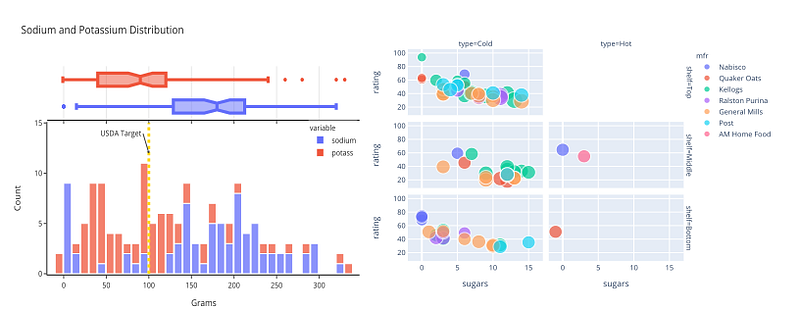
Source: https://pbpython.com/plotly-look.html

Why Interactive Visualizations Matter

Static visualizations provide a snapshot of data, but interactive visualizations engage users on a deeper level. They allow users to explore data dynamically, uncovering insights and patterns that may not be immediately apparent in static images. Interactive features such as zooming, filtering, and tooltips empower users to interact with data, leading to a richer understanding of the underlying trends.

Introducing Plotly and D3.js

Plotly and D3.js are two popular libraries for creating interactive data visualizations in Python and JavaScript, respectively. Plotly offers a high-level interface for building interactive plots effortlessly, while D3.js provides unparalleled flexibility and customization options for creating complex visualizations from scratch.

Getting Started with Plotly

Plotly’s Python library enables users to create a wide range of interactive plots with minimal code. Whether it’s line charts, bar charts, scatter plots, or heatmaps, Plotly makes it easy to visualize data in an interactive manner. By leveraging Plotly’s rich features such as hover information, zooming, and panning, users can create engaging visualizations that captivate their audience.
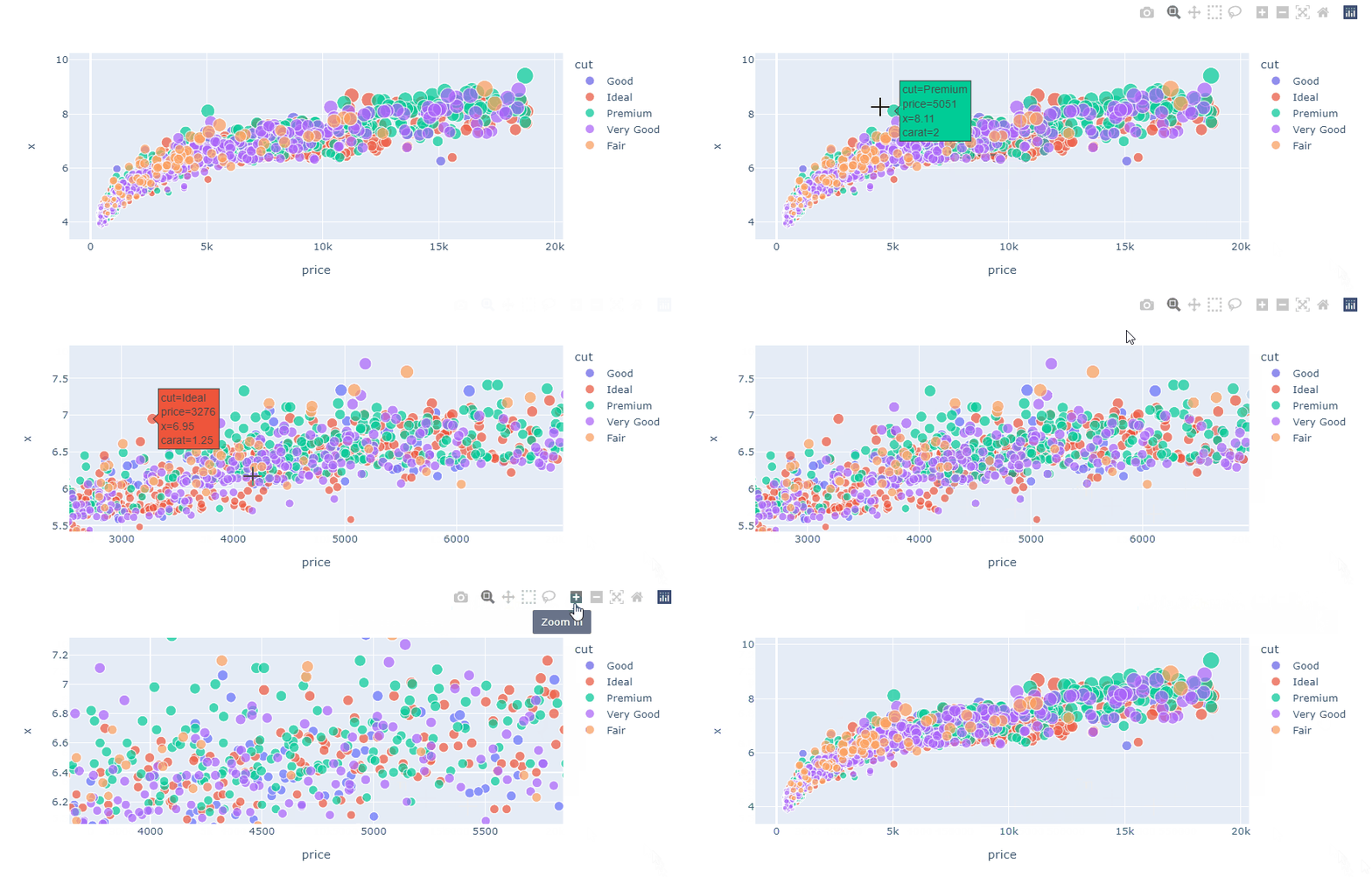
Source: https://www.datacamp.com/tutorial/python-plotly-express-tutorial

Diving into D3.js

D3.js, on the other hand, offers unparalleled control over every aspect of a visualization. While it has a steeper learning curve compared to Plotly, D3.js provides endless possibilities for customization and creativity. With D3.js, users can create bespoke visualizations tailored to their specific needs, from animated data transitions to interactive network graphs.

Best Practices for Interactive Visualizations

Regardless of the library chosen, there are several best practices to keep in mind when creating interactive visualizations. Firstly, prioritize user experience by ensuring that interactions are intuitive and responsive. Provide clear instructions and feedback to guide users through the visualization. Additionally, optimize performance to handle large datasets efficiently, especially in web-based applications.

Case Studies

To illustrate the power of interactive visualizations, let’s consider a couple of case studies. In the first example, we’ll explore how a financial analyst uses Plotly to create an interactive dashboard for tracking stock prices and analyzing market trends.

import plotly.graph_objects as go
import pandas as pd
# Sample stock price data
stock_data = pd.DataFrame({
 'Date': ['2022–01–01', '2022–01–02', '2022–01–03'],
 'AAPL': [150, 152, 155],
 'GOOGL': [2700, 2750, 2800],
 'MSFT': [300, 305, 310]
})
# Create interactive line chart
fig = go.Figure()
for col in stock_data.columns[1:]:
 fig.add_trace(go.Scatter(x=stock_data['Date'], y=stock_data[col], mode='lines', name=col))
# Customize layout
fig.update_layout(title='Interactive Stock Price Dashboard',
 xaxis_title='Date',
 yaxis_title='Price')
# Show interactive plot
fig.show()

In the second example, we’ll delve into how a data journalist harnesses the flexibility of D3.js to create an immersive data-driven story for a news article.

<!DOCTYPE html>
<html lang="en">
<head>
 <meta charset="UTF-8">
 <meta name="viewport" content="width=device-width, initial-scale=1.0">
 <title>Data-Driven Storytelling with D3.js</title>
 <script src="https://d3js.org/d3.v7.min.js"></script>
</head>
<body>
 <div id="chart"></div>
<script>
 // Sample data
 const data = [10, 20, 30, 40, 50];
// Create SVG container
 const svg = d3.select("#chart")
 .append("svg")
 .attr("width", 400)
 .attr("height", 200);
// Create bars
 svg.selectAll("rect")
 .data(data)
 .enter()
 .append("rect")
 .attr("x", (d, i) => i * 50)
 .attr("y", (d) => 200 - d * 2)
 .attr("width", 40)
 .attr("height", (d) => d * 2)
 .attr("fill", "steelblue");
// Add text labels
 svg.selectAll("text")
 .data(data)
 .enter()
 .append("text")
 .text((d) => d)
 .attr("x", (d, i) => i * 50 + 15)
 .attr("y", (d) => 200 - d * 2 + 20)
 .attr("fill", "white")
 .style("text-anchor", "middle");
 </script>
</body>
</html>

Interactive data visualizations offer a compelling way to engage audiences and convey insights effectively. Whether using Plotly for its ease of use or D3.js for its customization capabilities, data storytellers have a wealth of tools at their disposal. By mastering these libraries and adopting best practices, data scientists can unleash the full potential of interactive visualizations to tell captivating stories with data.

Remember, the key to creating impactful visualizations lies not just in the complexity of the code but in the clarity of the narrative they convey. So, go ahead, explore the world of interactive visualizations, and unleash the power of your data storytelling!

D3js
Visualization
Data Visualization
Data Science
Interactive
Recommended from ReadMedium