
Unleashing Automated Continuous Delivery in an Nx Monorepo
Streamlined npm Releases for Monorepos with Automated Commit-based Versioning and multiple Versioned npm packages!
Innovative approaches continue to emerge in the ever-evolving landscape of software development, reshaping how we build and maintain applications.
One such trend that has gained significant momentum in recent years is the adoption of NX mono repos. With their ability to streamline workflows, enhance collaboration, and increase development efficiency,
NX mono repos have become the go-to solution for many organizations seeking a modern and scalable approach.
The usage of mono repos is very well documented. But what about releasing? How can you continuously deliver multiple npm packages from a mono repo? How can you automate your release so that we get automatic releasing based on commit messages?
This blog post will explore an optimized approach to fully automate the release process for multiple npm libraries within a monorepo. By leveraging commit messages, we can establish a streamlined workflow that enables independent publishing and versioning of these packages. Let’s dive in!
The setup
In our NX monorepo, we have an application and three libraries: foo, baz, and bar. The dependency graph for our application is as follows:
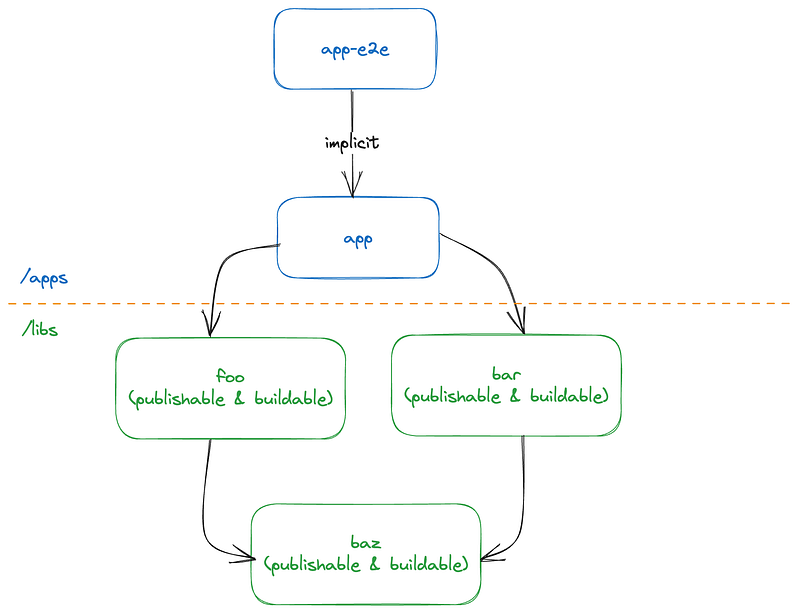
- The application depends on the
fooandbarlibrary. - The
fooandbarlibrary depends on thebazlibrary.
Check out my Youtube channel for more videos on Angular and modern frontend development!

What is our goal? 🎯
To enable automated and continuous delivery for all the libraries in our monorepo, we aim to achieve the following objectives:
- Automated version bump based on conventional commits
- Automated linting
- Automated testing
- Automated builds
- Automated tag creation
- Automated release notes
- Automated
CHANGELOGgeneration - Automated version bump in
package.json - Automated packaging and npm publish
Uff, that’s a lot. But once set up, we get a lot of benefits. Especially when working with Open source. A fully automated release setup allows us to release new versions from contributions with a simple merge. No more manual releasing!
🤫 Do you want fully automated releases in a classic repository (not monorepo) then check out this blog post:
While setting up fully automated releases in a traditional repository is quite simple, it is tricky in a mono repo. Especially when you want to publish multiple libraries from a Monorepo.
At this point, you are probably ready to dive into the code, but before we check out the implementation details, we must first discuss the versioning approaches.
One version vs. multiple versions
When releasing multiple libraries from a mono repo, we have two options:
- All libraries will always be released under the same version — there’s only one version for all the libraries.
- Each library gets versioned independently — there can be multiple versions (one per library).
As usual in software development, each approach has its pros and cons.
Pros of having one version only
When all libraries within a monorepo have the same version, it simplifies usage, upgrades, and maintenance. Having a single version ensures compatibility and avoids the need for managing individual library versions or compatibility tables.
Having one version for libraries that are meant to be used together, like in the case of Angular, simplifies usage for consumers. They can easily upgrade all packages without maintaining a compatibility table or tracking individual library versions. This unified versioning approach ensures compatibility and streamlines the upgrade process.
Cons of having one version only
Using a single version for all libraries in a monorepo has some drawbacks:
- Slower Pipelines (if no remote cache is enabled): Releasing all libraries, even if only one has changed, can slow down pipelines, especially in larger projects.
- Unnecessary Releases: Libraries that haven’t changed will still be released, resulting in unnecessary releases. If we change
foo,barandbazare not affected but would still get released.
Which one to choose?
The single-version approach is easier to set up and maintain. However, it also depends if you want to release continuously (every commit on main) and if the libraries inside the mono repo are domain related.
Let’s again take Angular as an example. Angular is split into multiple packages and released at a predefined schedule. So this is a perfect case for a single version.
But let’s say you have multiple libraries that are not necessarily domain related, and you want to move them all into one mono repo but still publish them to npm; then a multi-version approach can make sense.
Throughout this blog post, we focus on the multi-version approach. But don’t worry; I am also working on a blog post for the single-version setup. Stay tuned!
🐦 Follow me on Twitter and get updated on new interesting stuff on frontend development!
Multiple versions — the theory
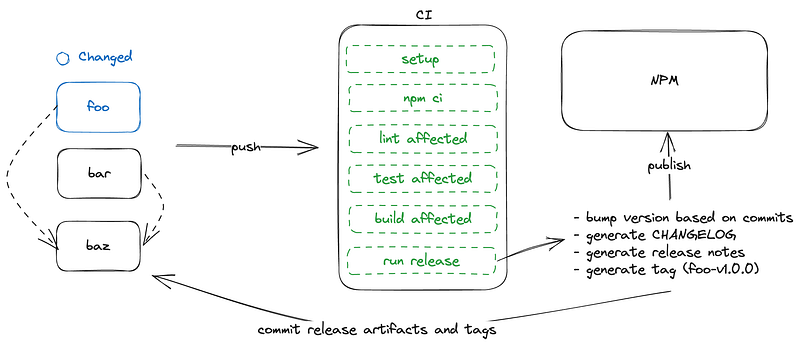
In the flow illustrated above, we only changed foo, which means bar and baz are not affected by the change. In this case, the following things will happen:
- We will run setup and
npm cion our CI. - Next, we lint all the affected projects. In this case, only
foowill be linted sincebarandbazare not affected by the change - Next, we run tests for all affected projects — again only
foo. - We build
foo. - Finally, we will run the release, which will do the following things; create release artifacts, generate
CHANGELOGforfoo, bump version forfoobased on commit messages, create a new tagfoo-v1.0.0, releasefooand commit back all the artifacts (toofooonly).
Awesome! Each library is handled individually.
What would happen if we update baz instead of foo? Because baz affects foo and bar right? What would that look like?
Well, if we update baz we generate CHANGELOG and bump the versions for foo, bar and baz. Furthermore, we generate three tags, foo-v1.0.0, bar-1.0.0 and baz-v1.0.0.
Excellent, so we get the overall concept now. So enough with the theory; Let’s check out the setup!
semantic-release setup
To interpret the commit messages and generate the release artifacts, we are going to use a tool called semantic-release together with a bunch of plugins.
npm i -D @semantic-release/changelog @semantic-release/commit-analyzer
@semantic-release/exec @semantic-release/git @semantic-release/npm
@semantic-release/release-notes-generator
Once installed, we can add release configurations in our library projects.
( libs/foo/.release.config.js , libs/bar/.release.config.js , libs/baz/.release.config.js )
The release config looks something like this.
const libName = 'bar';
const libPath = `libs/${libName}`;
const importPath = `@my-org/${libName}`;

module.exports = {
  name: libName,
  pkgRoot: `dist/${libPath}`,
  tagFormat: artifactName + '-v${version}',
  commitPaths: [`${libPath}/*`],
  assets: [`${libPath}/README.md`, `${libPath}/CHANGELOG.md`],
  plugins: [
    '@semantic-release/commit-analyzer',
    '@semantic-release/release-notes-generator',
    [
      '@semantic-release/changelog',
      {
        changelogFile: `${libPath}/CHANGELOG.md`,
      },
    ],
    '@semantic-release/npm',
    ["@semantic-release/exec", {
       prepareCmd: ` PACKAGE_NAME=${importPath} VERSION=\${nextRelease.version} npm run update-deps && VERSION=\${nextRelease.version} npm run bump-version:${libName}`,    }],
    [
      '@semantic-release/git',
      {
        assets: [`${libPath}/CHANGELOG.md`],
        message:
          `chore(release): ${libName}` +
          '-v${nextRelease.version} [skip ci]\n\n${nextRelease.notes}',
      },
    ],
  ],
};
Okay, there’s quite some stuff going on here. We can’t cover the whole config, but we will focus on the most exciting parts, which are the @semantic-release/exec config and the @semantic-release/git config.
The @semantic-release/exec config allows us to hook into life cycles and run some custom scripts. In our case, we set some environment variables and run a script called npm run update-deps. More on that later 😉
The @semantic-release/exec config tells us which assets we want to include and commit back.
Semantic-release is configured. Let’s introduce the workflows.
GitHub actions
To generate Github actions, we can add YAML files under a .github/workflows folder.
I added two workflows for my use case: a CI workflow and a release workflow. The CI runs on pull requests and feature branches. The release on main. Both perform lint, test, and build. The release workflow additionally executes the release step.
Since the first couple of steps are identical, we will only look at the release.yml.
name: Release
on:
  push:
    branches:
      - 'main'
jobs:
  main:
    runs-on: ubuntu-latest
    steps:
      - uses: actions/checkout@v2
        with:
          fetch-depth: 0
      - uses: nrwl/nx-set-shas@v3
      - run: npm ci
      - run: npx nx affected -t lint
      - run: npx nx affected -t test --configuration=ci
      - run: npx nx affected -t build
      - run: npx nx affected -t release --parallel=1
        env:
          GITHUB_TOKEN: ${{ secrets.GH_TOKEN }}
          NPM_TOKEN: ${{ secrets.NPM_TOKEN }}
The config is straightforward. We use the fantastic nx affected command to trigger the task on all the affected projects.
The
--parallel=1(default is 3) is important since the release otherwise runs in parallel and causes issues on CI since some artifacts will be pushed which causes ourmainbranch to be out of sync.
Okay, we run lint, test and build, but what about release, that’s not a known target? Isn’t it?
No, it’s not.
We explicitly have to create the release targets in the project.json of our library projects with the help of the nx-run-commands executor.
  "release": {
      "executor": "nx:run-commands",
      "options": {
        "command": "npx semantic-release --debug --extends=./libs/bar/.release.config.js"
      }
    },
The initial configuration serves as the foundation for the system; however, it is not without its imperfections. We still must address some open issues and trade-offs; let’s check them out.
Trade-offs
1. We have to ignore release artifacts
One of the base concepts is to release affected libraries independently. But given the scenario and the current setup, we are releasing too many libraries. How come?
Let’s say we change baz. By changing baz we generate and commit release artifacts on baz, foo and bar (all the affected libraries). If we now adjust foo which does not impact bar nor baz, nx affected would still print all projects since it also sees the commits of the release artifacts.
How do we deal with this situation?
Nx allows us to add a .nxignore file at the root of our project, which enables us to ignore the release artifacts, such as the CHANGELOG.md file and the package.json.
CHANGELOG.md
package.json
.release.config.js
Adding the package.json is not the nicest, and it's a trade-off we have to take at this point to make the setup work. The consequences of adding the package.json to the .nxignore is that changes to the package.json file will not trigger a release.
This means you can not release a library by simply bumping a third-party dependency. Bumping the library actually requires a code change.
2. Dependency handling
The setup works nicely to publish libraries that do not rely on other libs from the same repository. But in our case foo and bar rely on baz. Therefore it’s crucial that once baz is changed and released, foo and bar get released with the correct dependency on baz.
At this point, this isn’t yet the case, and here’s why.
Nx automatically adds dependencies from the same repo as a dependency inside of the package.json. What do I mean by that? Well, inside our repository, the source of libs/foo/package.json looks like this.
{
  "name": "@kreuzerk/monoleasa-foo",
  "publishConfig": {
    "access": "public"
  },
  "peerDependencies": {
    "@angular/common": "^16.1.0",
    "@angular/core": "^16.1.0"
  },
  "dependencies": {
    "tslib": "^2.3.0"
  },
  "sideEffects": false
}
but once we build foo, the package.json inside dist/libs/foo looks like this.
{
  "name": "@kreuzerk/monoleasa-foo",
  "version": "0.0.1",
  "publishConfig": {
    "access": "public"
  },
  "peerDependencies": {
    "@angular/common": "^16.1.0",
    "@angular/core": "^16.1.0",
    "@myorg/baz": "1.4.0"
  },
  "dependencies": {
    "tslib": "^2.3.0"
  },
  "sideEffects": false,
  "module": "fesm2022/kreuzerk-monoleasa-foo.mjs",
  "typings": "index.d.ts",
  "exports": {
    "./package.json": {
      "default": "./package.json"
    },
    ".": {
      "types": "./index.d.ts",
      "esm2022": "./esm2022/kreuzerk-monoleasa-foo.mjs",
      "esm": "./esm2022/kreuzerk-monoleasa-foo.mjs",
      "default": "./fesm2022/kreuzerk-monoleasa-foo.mjs"
    }
  }
}
Nx adds a bunch of extra properties. One of the added properties is the @myorg/baz to the peerDependencies property.
Sounds great, so what’s the issue? Well, let’s look again at the steps executed on our CI.
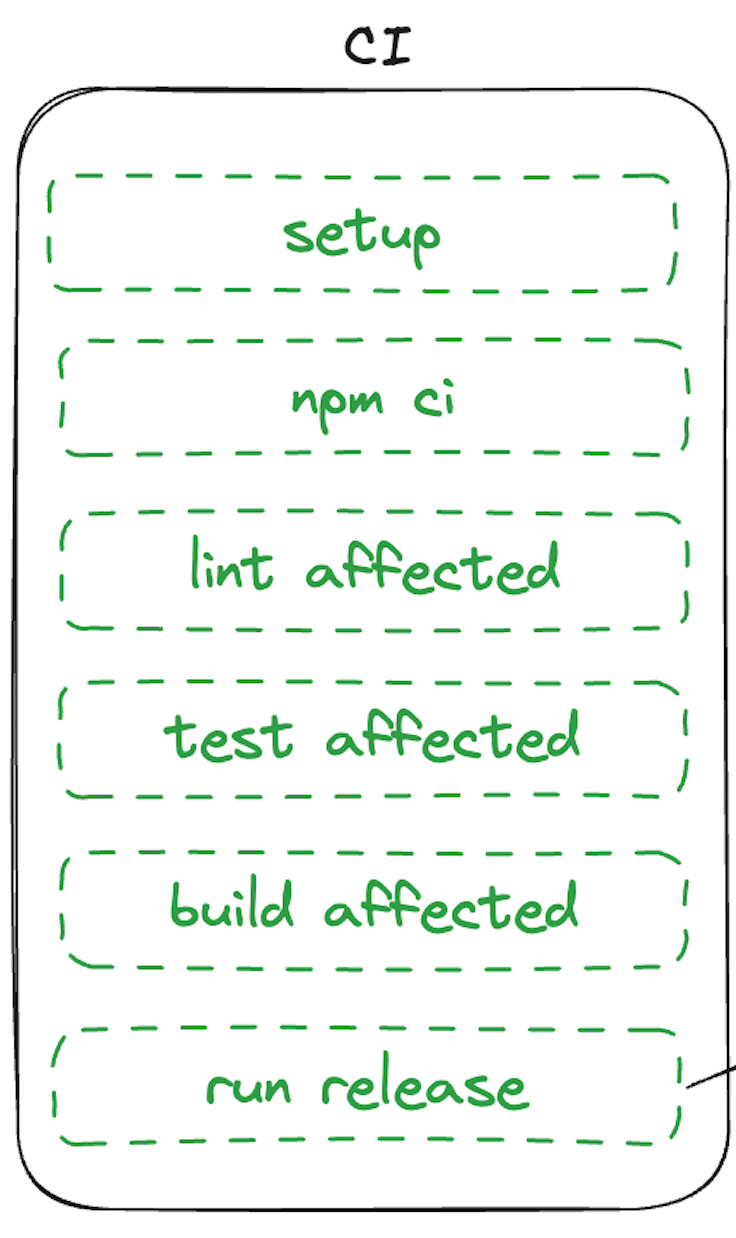
If we pay close attention to the execution order, we can see that build affected runs before release. In other words, we build the artifact before we release it.
This means if we change baz, we not only build baz, we also build foo and bar (the affected projects). By building foo and bar the current version of baz will be added as a dependency.
Later, we then use semantic release and conventional commits to determine the new version of baz. Which is too late.
So we need a way to update the version in the artifacts. And that’s where our @semantic-release/exec config comes into play.
["@semantic-release/exec", {
      prepareCmd: `PACKAGE_NAME=${importPath} VERSION=\${nextRelease.version} npm run update-deps`,
}],
Here we set the importPath and the nextRelease.version as environment variables and then run the update-deps command.
This command is specified in the root package.json.
"update-deps": "PACKAGE_NAME=$PACKAGE_NAME VERSION=$VERSION npx nx run-many -t update-deps"Again, we use nx affected with a custom target: update-deps. To make this work, we update the project.json in our library projects and add a run command with the help of nx:run-commands.
 "update-deps": {
      "executor": "nx:run-commands",
      "options": {
        "command": "npx rjp ./dist/libs/bar/package.json $PACKAGE_NAME $VERSION"
      }
 }
Here we use a small library name replace-json-property to update the library dependency (if it exists) in the package.json inside the dist.
And that’s it; we created a fully automated release setup to continuously deliver npm packages with individual version numbers from an NX mono repo.
Working example
It’s a very complicated topic, and I get that it’s hard to follow based on a blog post. Therefore you are welcome to check out the sample repository that contains a working version of the described setup.
The repo name is monoleasa — is a perfect fusion of monorepo and release.
Summary
Automatically publishing a library to npm is easy. However, publishing multiple libraries from a mono repo to npm quickly gets complicated.
There are many things to consider. How do you want to publish your libraries? One version or multiple versions? How often do you want to publish? Do the libraries depend on each other? How do you handle dependencies?
Typically, publishing a single version of your work is advisable for clarity and consistency. However, there are certain situations where it may be beneficial or necessary to release multiple versions, as discussed in this article.

Welcome to the world of Angular excellence — angularexperts.ch
Do you find the information in this article useful? — We are providing tailored expert support for developing your Angular applications. Explore our wide range offers on angularexperts.ch


