
Testing a gateway client using Javalin
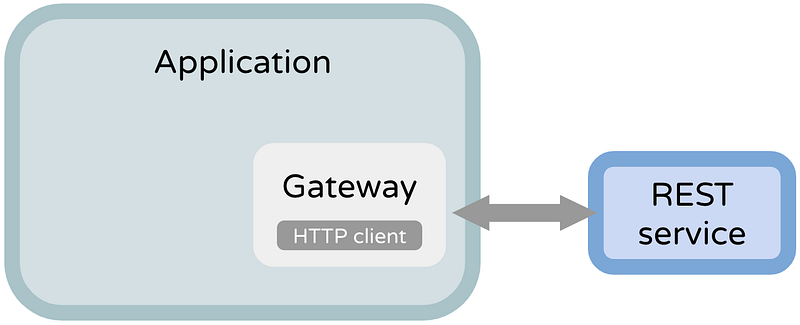
In Kotlin/Java, how would you test that your app is properly consuming an external REST API? We’ll use Javalin to do it.
📝 I adapted this article to the official Javalin docs page.
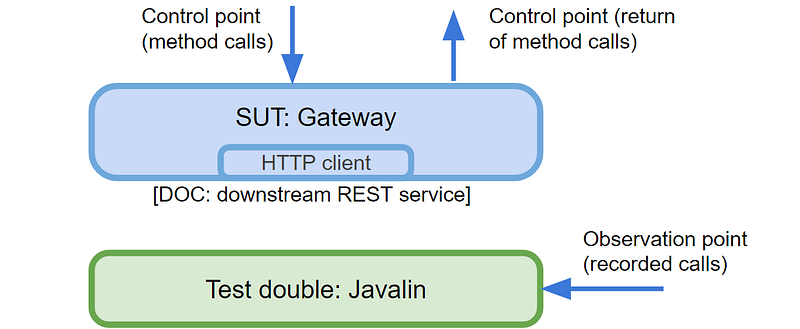
My proposal is to use Javalin (a lightweight webserver) as the test double, thereby replacing the external API (the DOC: dependent-on component). We’ll launch Javalin acting as the real API but running in localhost so that the gateway (the SUT) can’t tell the difference. We’ll confirm the validity by asserting the calls made to the test double.
⚠️ Don’t confuse testing API calls with testing your own API handlers. We want to tackle the former: testing a REST client; not a REST service.
Before starting
We’ll have two examples of testing ProfileGateway: a query and a command, according to the command/query separation:
- query: check that it properly consumes a GET response from an external party; we’ll assert the output of a method;
- command: check that a POST call was made as expected; we’ll assert a consequence, namely the posted body.
We just need this boilerplate that guarantees that Javalin stops per every test:
Don’t worry as this won’t make your tests slow; Javalin is extremely fast booting up (hundreds of starts/stops in a few seconds).
📝 I’ll use my recipe to create unit tests.
Example #1: testing a GET to an API
Let’s say your app depends on an external API to fetch the user’s profile — a query. We need to test that ProfileGateway handles it well, namely the parsing and proper transformation of data.
General recipe
- arrange: prepare Javalin with a single handler only to simulate your external API endpoint; inside the handler, write a stubbed response as if you were the API owner;
- act: call the subject method that fetches the data;
- assert: test that your subject correctly parsed the stubbed response (API JSON → your domain representation); optionally, you can check the number of calls and HTTP details (e.g. if you sent the proper headers).
Example #2: testing a POST to an API
Now we’ll see an example of a command — there’s a side-effect to be tested. In this case, we need to assert that the data was properly prepared and posted to the third party by the ProfileGateway. The HTTP call details can be tested as well.
General recipe
- Arrange: prepare Javalin with a single handler only to simulate your external API endpoint; inside the handler, store what you want to assert later, like path, headers, and body;
- Act: call the subject method that executes the side effect;
- Assert: test that the stored values in the handler are correct; for example, the body must have been properly converted to the external API (your domain representation → API JSON).
⚠️ Whatever you do, never do assertions inside the Javalin test handler. Why? Because if they fail, they’ll throw a JUnit exception, which is swallowed by Javalin; the test will be green! Always do the assertions in the end hence following the Arrange, Act, Assert pattern.
Alternative approaches
It’s important to mention alternatives to the Javalin proposal:
- 🛑 Mocking the HTTP client (e.g. with MockK, HttpClientMock)
when httpClient.get is called with ... respond with ...You’d be mocking what you don’t own; would you mock a database driver? Mocking a REST client would be as bad. You’d couple the test with the HTTP client, which is an implementation detail. With Javalin, it doesn’t matter which REST client you use in your implementation (Java HTTP client, Apache HTTP Client, Retrofit, etc). - Mocking a wrapper around the HTTP client You’re creating just an additional pass-through layer. Also, you’re not emulating HTTP anyway. Finally, you’re not abstracting the external party data model. Using Javalin, you have the (localhost) network involved so it’s much more realistic. For example, it’s trivial to simulate network errors (e.g. 401 Unauthorized) to see how your system handles them.
- Using a library that mocks the language HTTP layer (e.g. vrc, ExVCR, VCR.py) If it’s a well-supported library and it’s not coupled to any HTTP client in concrete, I see this as a good alternative. It’s not as realistic as my proposal but it’s worth considering.
- Using a simulator for HTTP-based APIs (e.g. MockServer, WireMock, JSON Server) The same technique as the Javalin proposal but with a dedicated library with a built-in DSL. I tried both and ended up replacing them with Javalin because I didn’t want to learn their DSL. In addition, when a test fails, Javalin makes it easier to fix it. (The equivalent for Python is the HTTPretty’s library but there it doesn’t look so odd.)
- Integration, system, contract, and end-to-end testing These are complementary to unit testing rather than replacing it.
📝 If you’re using Javalin as your app web server, it’s even better, as you won’t add extra libraries for testing.
You can find the given examples in a GitHub repo (test and implementation).


