avatarElye - A One Eye Dev By His Grace

Free AI web copilot to create summaries, insights and extended knowledge, download it at here

4190

Abstract

nActivityResult</code> , the <code><b>requestCode</b></code> has been altered. A <code>0xP0000</code> is append to the original <code><b>requestCode</b></code><b>.</b></li><li>The <code>P</code> value starts from 1, and incremented for each <code>onActivityResult</code> is called from the same destination fragment. (If another destination Fragment is called, the <code>P</code> value is reset).</li><li>e.g. if the original <code><b>requestCode</b></code><b> </b>is 0xFF (i.e. 255), the <code><b>requestCode </b></code>return the first time will be 0x100FF. The second time return <code><b>requestCode</b></code> will be 0x200FF.</li><li>Upon returning to the source activity’s <code>onActivityResult</code>, it is <i>expected</i> that it should call <code>super.onActivityResult</code>, which resides in <code>FragmentActivity</code> (the parent of <code>AppCompatActivity</code>)</li><li>The <code>onActivityResult</code> in <code>FragmentActivity</code> will then extract the <code>P</code> value (using <code><b>requestCode >> 16</b></code>). The <code>P</code> is the index of the array where the source fragment is stored. (e.g. if <code><b>requestCode</b></code> is <code>0x200FF</code>, then <code>0x200FF >> 16 = 2</code>)</li><li>Using the <code>P</code> value, it now has access to the source fragment, which is used in step 9 below.</li><li>Now, it strips away the <code>P</code> value from the <code><b>requestCode</b></code><b> </b>(using <code><b>requestCode & 0xffff</b></code>), to get back to the original request code (e.g. if <code><b>requestCode</b></code> is <code>0x200FF</code>, then <code>0x200FF & 0xffff = 0xFF</code>)</li><li>And now it gets the original <code><b>requestCode</b></code><b> </b>that the source fragment created, it could call the source fragment’s <code>onActivityResult</code> with the original <code><b>requestCode</b></code></li></ol><h1 id="38d5">What do we learn from the flow?</h1><h2 id="ce6d">A. The behavior of Activity’s startActivityForResult is different from Fragment’s startActivityForResult</h2><p id="2800">In Fragment, if we call <code>activity?.startActivityForResult(...)</code>, it will end up in flow like in diagram 1 above. Hence Fragment’s <code>onActivityResult</code> will not be called automatically.</p><h2 id="7d66">B. If we override activity’s onActivityResult, make sure we have super.onActivityResult in place</h2><p id="c298">If we override source activity’s <code>onActivityResult</code>, but forget to have <code>super.onActivityResult</code> there, step 5 above will fail, and the source Fragment’s <code>onActivityResult</code> will not be called.</p><div id="efd7" class="link-block"> <a href="https://stackoverflow.com/questions/6147884/onactivityresult-is-not-being-called-in-fragment"> <div> <div> <h2>onActivityResult is not being called in Fragment</h2> <div><h3>This is one of the most popular issue. We can found lots of thread regarding this issue. But none of them is useful for…</h3></div> <div><p>stackoverflow.com</p></div> </div> <div> <div style="background-image: url(https://miro.readmedium.com/v2/resize:fit:320/0*7RqeqtOjcU2YRY22)"></div> </div> </div> </a> </div><h2 id="92f7">C. The requestCode seen in activity’s onActivityResult is different from the one fragment provided</h2><p id="ad3e">Due to the reason where Android SDK appended <code>P</code> to the <code><b>requestCode</b></code>, in the activity’s <code>onActivityResult</code>, we’ll never get the identical <code><b>requestCode</b></code><b> </b>there. This at times causes confusion to the developer when debugging the code there.</p><div id="405f" class="link-block"> <a href="https://stackoverflow.com/questions/10564474/wrong-requestcode-in-onactivityresult"> <div> <div> <h2>Wrong requestCode in onActivityResult</h2> <div><h3>Thanks for contributing an answer to Stack Overflow! Please be sure to answer the question. Provide details and share…</h3></div>

Options

            <div><p>stackoverflow.com</p></div>
          </div>
          <div>
            <div style="background-image: url(https://miro.readmedium.com/v2/resize:fit:320/0*59qHFO1D7x-XgZRR)"></div>
          </div>
        </div>
      </a>
    </div><h2 id="345b">D. When an activity is restored from the state (i.e. onStateInstance != null), it should avoid recreating its fragment.</h2><p id="36d2">As stated in step 7 above, when <code>onActivityResult</code> is called, it tried to retrieve the original fragment. This is also performed for the activity that is restored from a killed state (e.g. emulated using Don’t Keep Activity).</p><p id="13b3">So if the developer recreates the Fragment every time onCreate is called (regardless if it is a restored state or not), then the original Fragment that was restored will be destroyed, and <code>onActivityResult</code> of the caller-fragment will mysteriously not be called.</p><p id="0339">This is a pitfall even for many experienced developers and app released in the field, as it is a very hard-to-identify bug (since it is not happening every time, and require a more complex flow to trigger).</p><div id="c0ed" class="link-block">
      <a href="https://stackoverflow.com/questions/13580075/onactivityresult-not-called-in-new-nested-fragment-api/20543245#20543245">
        <div>
          <div>
            <h2>onActivityResult() not called in new nested fragment API</h2>
            <div><h3>I have search the FragmentActivity source.I find these facts. when fragment call startActivityForResult(), it actually…</h3></div>
            <div><p>stackoverflow.com</p></div>
          </div>
          <div>
            <div style="background-image: url(https://miro.readmedium.com/v2/resize:fit:320/0*63nhyHbN3Y_brAWm)"></div>
          </div>
        </div>
      </a>
    </div><div id="c2ca" class="link-block">
      <a href="https://stackoverflow.com/questions/55770376/onactivityresult-not-called-when-nested-fragment-is-using-replace-instead-of-add">
        <div>
          <div>
            <h2>OnActivityResult not called when nested fragment is using replace instead of add with Don't Keep…</h2>
            <div><h3>Thanks for contributing an answer to Stack Overflow! Please be sure to answer the question. Provide details and share…</h3></div>
            <div><p>stackoverflow.com</p></div>
          </div>
          <div>
            <div style="background-image: url(https://miro.readmedium.com/v2/resize:fit:320/0*j8EK_LAeZXnw1Qk5)"></div>
          </div>
        </div>
      </a>
    </div><p id="cef6">To understand this further with a real example, you could play around this more with a simple App I created below</p><div id="8c80" class="link-block">
      <a href="https://github.com/elye/demo_android_fragment_startactivityforresult/tree/master">
        <div>
          <div>
            <h2>elye/demo_android_fragment_startactivityforresult</h2>
            <div><h3>Explaining Fragment's startActivityForResult behavior vs Activity's startActivityForResult, Explaining the impact of…</h3></div>
            <div><p>github.com</p></div>
          </div>
          <div>
            <div style="background-image: url(https://miro.readmedium.com/v2/resize:fit:320/0*OAKZ3k6DrV8XqLdx)"></div>
          </div>
        </div>
      </a>
    </div><p id="387b">Hope this could help give some good heads up for those unaware of this and clear some mysteries for those faced this issue in the past.</p><p id="a4d0">Thanks for reading. You could check out my other topics <a href="https://medium.com/@elye.project/">here</a>.</p><p id="baba">Follow me on <a href="https://medium.com/@elye.project"><i>medium</i></a><i>,</i> <a href="https://twitter.com/elye_project"><i>Twitter</i></a><i>, <a href="https://www.facebook.com/elyeproj/">Facebook</a></i> or <a href="https://www.reddit.com/user/elyeproj/"><i>Reddit</i></a> for little tips and learning on mobile development etc related topics. ~Elye~</p></article></body>

Learning Android Development

Undocumented startActivityForResult behavior for Fragment

Clearing seemingly misunderstood mysterious behavior for many

Picture by Jelleke Vanooteghem on Unsplash

In Android, everyone knows startActivityForResult and onActivityResult as clearly documented by Google in Getting Results from an Activity and Activity.

However, there’s hardly any mention of how it behaves when a Fragment is involved. And due to this, this causes some common bugs on various apps and hard-to-understand behavior.

Check out and ensure you are clear about it, that could save previous future time debugging the strange issue (that I faced in the past 😓)

The basic startActivityForResult Activity flow

Before we get into the undocumented behavior, let’s look at the known behavior. You could skip to the other section if you were already familiar with it.

The entire startActivityForResult, and onActivityResult is to allow a 2-way communication between the source activity and the destination activity. Its flow is as shown in the diagram below.
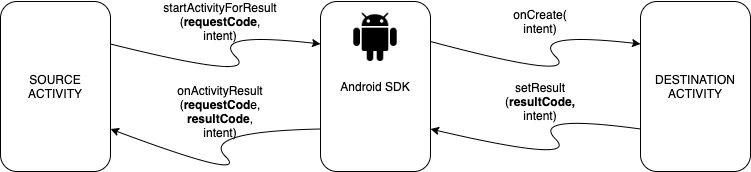
Diagram 1: Activity’s startActivityForResult flow
  • The source activity call, startActivityForResult by sending in the intent together with the requestCode to Android SDK.
  • Android SDK then opens the activity accordingly as stated in the Intent.
  • Once the destination activity has finish with its job, it returns to its caller activity. It could send the result back using setResult by sending in the resultCode and intent

Several notes here:

  • The resultCode is used by the destination activity to flag to its source activity its status (e.g. OK, Cancel, etc).
  • The requestCode is used by the source activity to know which destination activity is returning the call.
  • We could see that the destination activity has no visibility of requestCode

Undocumented startActivityForResult Fragment Flow

In Fragment, we also have startActivityForResult function to call, and also onActivityResult function to override.

This raises several questions…e.g. How does it works? Is it the same as activity’s startActivityForResult and onActivityResult? How are they related?

The short answer is, they are similar but subtly different. A frequent cause of confusion, and bugs. So it’s important to understand the similarity and differences.

The fragment flow illustrated.

Below is the diagram the illustrates clearly how it all works together. The differences with activity’s startActivityForResult and onActivityResult flow is colored in RED.
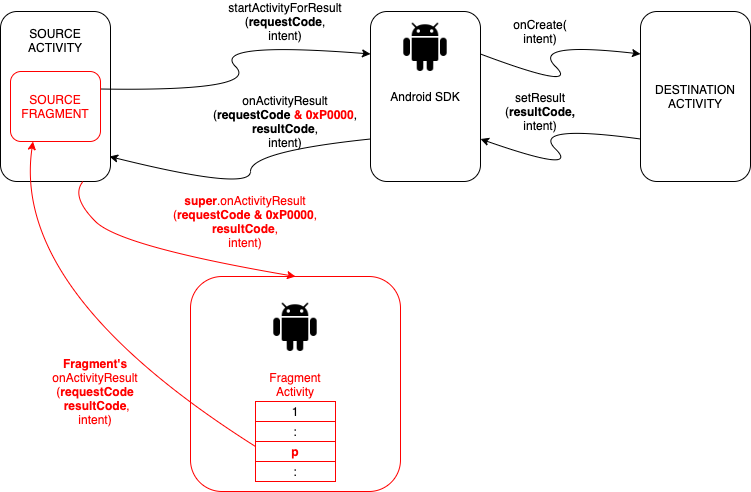
Diagram 2: Fragment’s startActivityForResult flow

Let me elaborate on it.

  1. When we call Fragment’s startActivityForResult (note: NOT activity?.startActivityForResult), the creation of destination activity is the same. However, the difference is in onActivityResult
  2. When Android SDK returns onActivityResult , the requestCode has been altered. A 0xP0000 is append to the original requestCode.
  3. The P value starts from 1, and incremented for each onActivityResult is called from the same destination fragment. (If another destination Fragment is called, the P value is reset).
  4. e.g. if the original requestCode is 0xFF (i.e. 255), the requestCode return the first time will be 0x100FF. The second time return requestCode will be 0x200FF.
  5. Upon returning to the source activity’s onActivityResult, it is expected that it should call super.onActivityResult, which resides in FragmentActivity (the parent of AppCompatActivity)
  6. The onActivityResult in FragmentActivity will then extract the P value (using requestCode >> 16). The P is the index of the array where the source fragment is stored. (e.g. if requestCode is 0x200FF, then 0x200FF >> 16 = 2)
  7. Using the P value, it now has access to the source fragment, which is used in step 9 below.
  8. Now, it strips away the P value from the requestCode (using requestCode & 0xffff), to get back to the original request code (e.g. if requestCode is 0x200FF, then 0x200FF & 0xffff = 0xFF)
  9. And now it gets the original requestCode that the source fragment created, it could call the source fragment’s onActivityResult with the original requestCode

What do we learn from the flow?

A. The behavior of Activity’s startActivityForResult is different from Fragment’s startActivityForResult

In Fragment, if we call activity?.startActivityForResult(...), it will end up in flow like in diagram 1 above. Hence Fragment’s onActivityResult will not be called automatically.

B. If we override activity’s onActivityResult, make sure we have super.onActivityResult in place

If we override source activity’s onActivityResult, but forget to have super.onActivityResult there, step 5 above will fail, and the source Fragment’s onActivityResult will not be called.

C. The requestCode seen in activity’s onActivityResult is different from the one fragment provided

Due to the reason where Android SDK appended P to the requestCode, in the activity’s onActivityResult, we’ll never get the identical requestCode there. This at times causes confusion to the developer when debugging the code there.

D. When an activity is restored from the state (i.e. onStateInstance != null), it should avoid recreating its fragment.

As stated in step 7 above, when onActivityResult is called, it tried to retrieve the original fragment. This is also performed for the activity that is restored from a killed state (e.g. emulated using Don’t Keep Activity).

So if the developer recreates the Fragment every time onCreate is called (regardless if it is a restored state or not), then the original Fragment that was restored will be destroyed, and onActivityResult of the caller-fragment will mysteriously not be called.

This is a pitfall even for many experienced developers and app released in the field, as it is a very hard-to-identify bug (since it is not happening every time, and require a more complex flow to trigger).

To understand this further with a real example, you could play around this more with a simple App I created below

Hope this could help give some good heads up for those unaware of this and clear some mysteries for those faced this issue in the past.

Thanks for reading. You could check out my other topics here.

Follow me on medium, Twitter, Facebook or Reddit for little tips and learning on mobile development etc related topics. ~Elye~

Android App Development
AndroidDev
Mobile App Development
Google Developer Group
Google Developer Expert
Recommended from ReadMedium