
Understanding Triggers with Databricks Spark Structured Streaming: Default, ProcessingTime, and AvailableNow
Introduction
Structured Streaming is one of the most powerful features of Apache Spark, enabling you to process data in real time. However, not all streaming scenarios are the same, and the trigger you choose can greatly affect how your data flows through your application.
In this article, I’ll walk you through three common trigger types — default, processingTime, and availableNow — using simple explanations and code examples. By the end, you’ll understand when and why to use each of them.
Information about the data set:
- We are going to use a Formula 1 table that contains all F1 circuits. Below is a preview
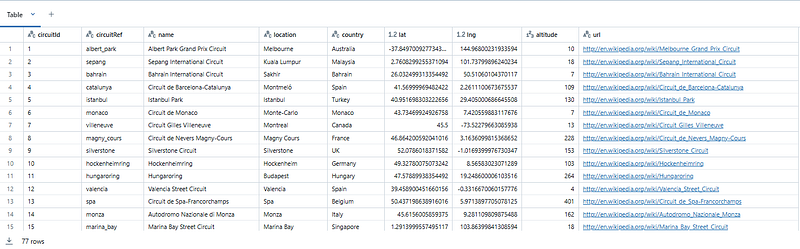
2. Data was uploaded to the following path in CSV format: dbutils.fs.ls(‘/FileStore/tables/streaming’)
3. Schema was created before hand to avoid automatic inference:
from pyspark.sql.types import StructType, StructField, StringType , IntegerType, FloatType

schema = StructType([
                     StructField('circuitId',StringType()),
                     StructField('circuitRef',StringType()),
                     StructField('name',StringType()),
                     StructField('location',StringType()),
                     StructField('country',StringType()),
                     StructField('lat',FloatType()),
                     StructField('lng',FloatType()),
                     StructField('altitude',IntegerType()),
                     StructField('url',StringType())
])
4. Destination is a hive metastore table:
%sql
create table default.streaming_circuits (
  circuitId STRING,
  circuitRef STRING,
  name STRING,
  location STRING,
  country STRING,
  lat FLOAT,
  lng FLOAT,
  altitude INT,
  url STRING
) stored as parquet
5. Setup of the variables for the readStream and writeStream:
# File location and type
file_location = "/FileStore/tables/streaming"
file_type = "csv"
checkpoint_location = "/FileStore/tables/streaming/checkpoints"

# CSV options
infer_schema = "false"
first_row_is_header = "false"
delimiter = ","

df = spark.readStream.format("csv")\
        .option('header','true')\
        .schema(schema)\
        .load(file_location)
What is a trigger in the context of Databricks Spark Structured Streaming?
A trigger in Structured Streaming determines how often the streaming query runs to process incoming data. Think of it like setting an alarm to wake up your application at specific intervals or conditions.
1. Trigger default
The default trigger runs your query as fast as possible, processing any data as soon as it arrives. Structured Streaming defaults to fixed interval micro-batches of 500ms.
Step 1: Write the Streaming query.
writeStreamDefault = (
    df.writeStream.format("delta")
    .option("checkpointLocation", f"{checkpoint_location}")
    .outputMode("append")
    .queryName("DefaultTrigger")
    .toTable("default.streaming_circuits")
)
Step 2: Visualize the Input and Processing Rate of the stream. First a spike is observed until the data is streamed and then the Input Rate drops to 0.

Step 3: Data is streamed to the destination — 77 rows.

Step 4: Update new batch to the same location

Step 5: Observe data is streamed automatically, while the stream query is still alive. The new batch is appended to the destination and the count rows is increased. A spike in Input Rate can also be observed.
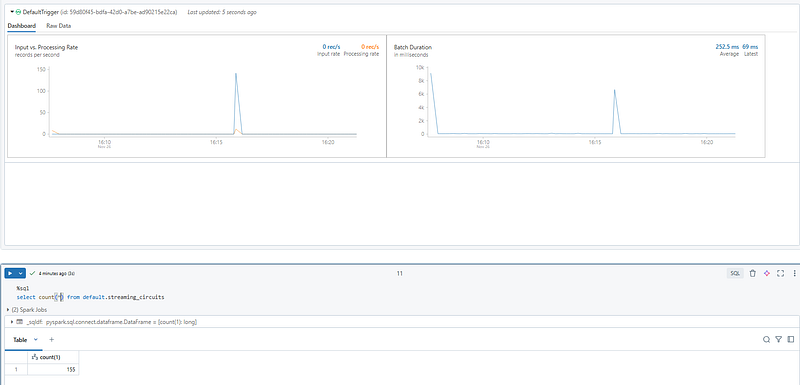
Result: Query discovered the new csv file in the location and streamed the data to the Delta table automatically.
When to Use:
- Real-time use cases where low latency is crucial (e.g., detecting fraud or monitoring sensors).
- The system can handle the incoming data volume.
2. Trigger availableNow
The availableNow trigger processes all the data currently available in the source and then stops. It’s like a one-time cleanup of everything in your inbox.
Step 1: drop the table and recreate the checkpoint location
%sql
drop table default.streaming_circuitsdbutils.fs.mkdirs('/FileStore/tables/streaming/checkpoints')dbutils.fs.ls('/FileStore/tables/streaming/checkpoints')Step 2: write the Streaming query with available=True
writeStreamAvailableNow = (
    df.writeStream.format("delta")
    .option("checkpointLocation", f"{checkpoint_location}")
    .trigger(availableNow=True)
    .outputMode("append")
    .queryName("AvailableNow")
    .toTable("default.streaming_circuits")
)
Step 3: observe the behavior.
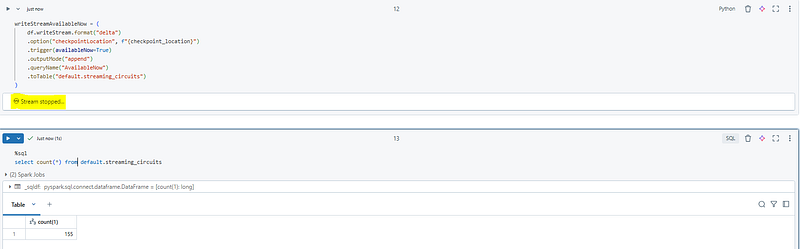
Result: here, the query processes all data available in the source and then terminates. This is a great choice when you want to process data in a “stream-like” fashion but only once.
When to Use:
- Migrating streaming workloads to batch.
- One-off processing of historical or near-real-time data.
3. Trigger processingTime
The processingTime trigger processes data at fixed time intervals, regardless of when it arrives. Imagine a worker who checks for new tasks every 2 minutes.
Step 1: repeat the Step 1 from the “Trigger availableNow” section
Step 2: write the Streaming script with the option processingTime = “2 minutes”.
writeStreamProcessingTime = (
    df.writeStream.format("delta")
    .option("checkpointLocation", f"{checkpoint_location}")
    .trigger(processingTime = "2 minutes")
    .outputMode("append")
    .queryName("ProcessingTime")
    .toTable("default.streaming_circuits")
)
Step 3: the data found in the location is processed first time at 16:12:35. The best way to observe the processingTime behavior is using the Spark UI
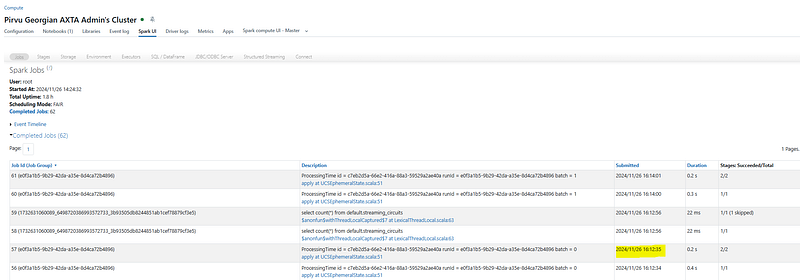
Step 4: another batch was added to the location to the location at 16:12:56, but the process didn`t streamed the data as arrived, but it consumed the data when the next 2 minutes window started. This was happening at 16:14:01
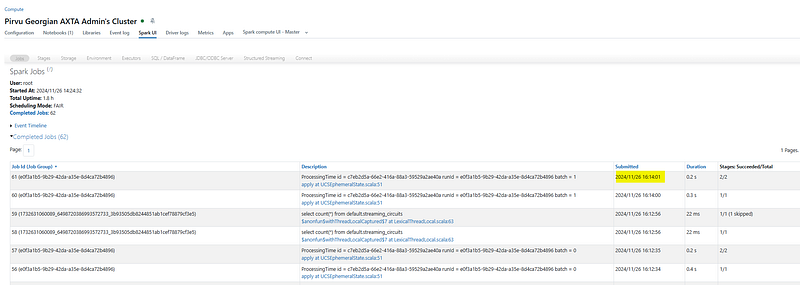
Result: the query processes incoming data every 2 minutes, regardless of when it arrives. It’s ideal for workloads that prioritize efficiency over real-time responsiveness.
When to Use:
- Use cases where you can tolerate some delay (e.g., aggregating data every 2 minutes).
- Preventing resource exhaustion by batching data processing.
Conclusion
Understanding the key differences in Databricks Spark Structured Streaming triggers — Default, processingTime, and availableNow — is crucial for optimizing your streaming workloads. Each trigger serves specific use cases, whether it’s real-time processing with minimal latency, periodic processing for efficiency, or batch-like processing for historical data.
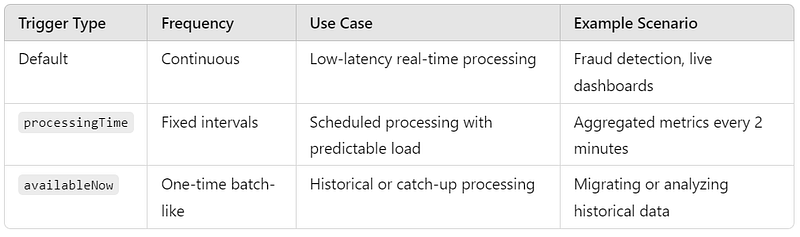
Choosing the right trigger:
- Choose Default when latency is key and your system can handle high throughput.
- Choose
processingTimewhen you prefer periodic processing to balance performance and resource usage. - Choose
availableNowfor one-time analysis or batch-like scenarios on streaming sources.
Enjoy Databricks and cloud computing!
Source: https://docs.databricks.com/en/structured-streaming/index.html