
Understanding this in ES5 vs ES6
Unlike my previous articles, this one is going to be a short one because there is nothing major about this ;)

The this keyword represents a JavaScript object in the global scope or inside a function scope and its value depends on how you call the function, not, how you define it. Therefore, this value inside a function is not guaranteed to be the same as it depends on the function call signature.
Unlike C, C++, Java or Go, JavaScript doesn’t have the main function (which is the starting point of program execution) since the entire code in the file is executed implicitly. Therefore, you can imagine the entire JavaScript file (code) wrapped in a virtual main function. Since that’s the case, the this keyword exists in the global scope and has some object value.
When you define a variable in the global scope, it belongs to window object. JavaScript defines global variables as the properties of the global object which in the browser is window (and global in Node). Therefore, you can access window.var_name if var_name is a variable defined in the global scope.
Let’s start with a simple function. Since functions in JavaScript are first-class objects, they also behave like variables. Hence, any globally named function (defined in the global scope) belongs to window object as a normal property.
var value = 'HELLO';
function showValue(){}console.log( this );
console.log( window );
console.log( 'window === this : ', window === this );console.log( 'this.value : ', this.value );
console.log( 'this.showValue : ', this.showValue );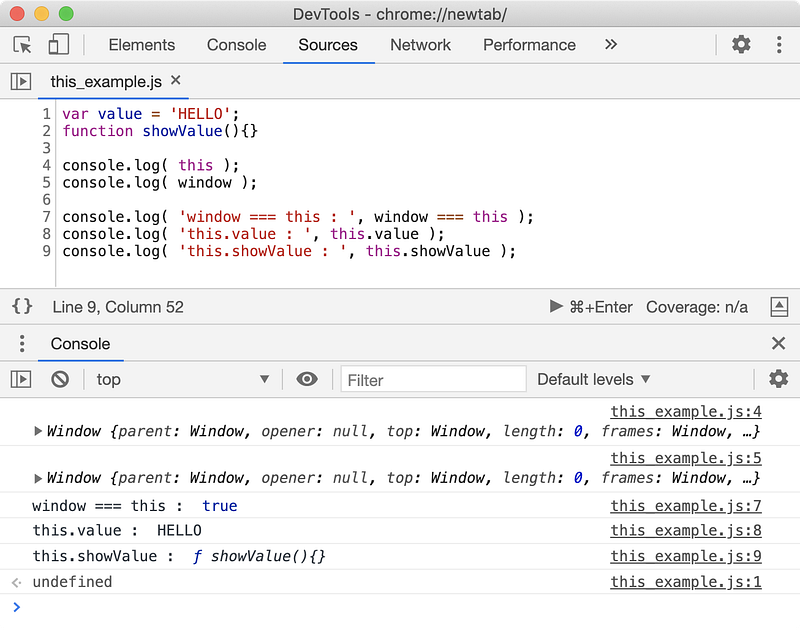
Now you know, this is just an object. So in the global scope, this refers to window and it is fixed. But the value of this inside a function varies depending on where you call the function.
💡 You can also use
selfkeyword which always refers to global scope no matter where you used it in your code.
Inside a function, this refers to the object that function belongs to.
var value = 'HELLO';function showValue(){
console.log( 'this inside showValue function is : ', this );
console.log( 'this === window : ', this === window );
return this.value;
}showValue();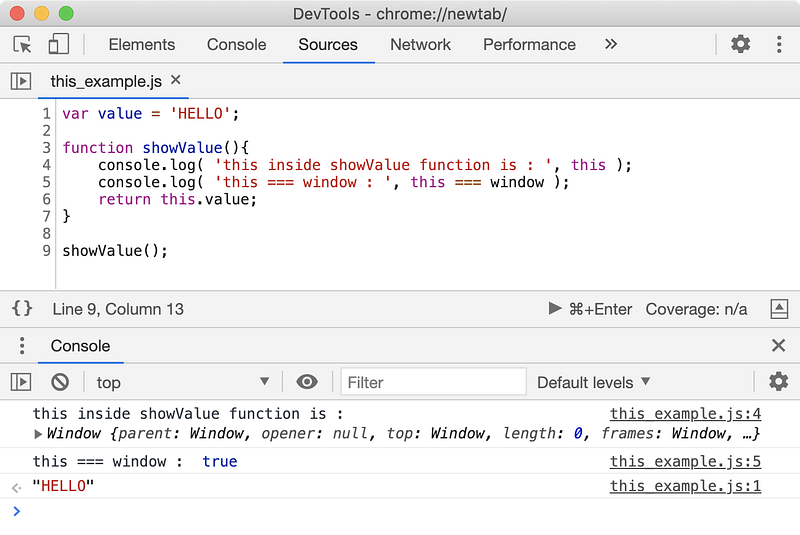
When you call a function like function_name(), the this value inside the function points to the global object which is window in our case. Since value variable also belongs to window object, this.value is same as window.value inside showValue function.
Now, let’s talk about different ways of calling a function especially when a function is a property of some object.
var value = 'window-value';var showValue = function( scope ){
console.log( 'this inside ' + scope + ' is : ', this );
console.log( this.value );
};var object = {
value: 'object-value',
showValue: showValue
};showValue( 'window' );
object.showValue( 'object' );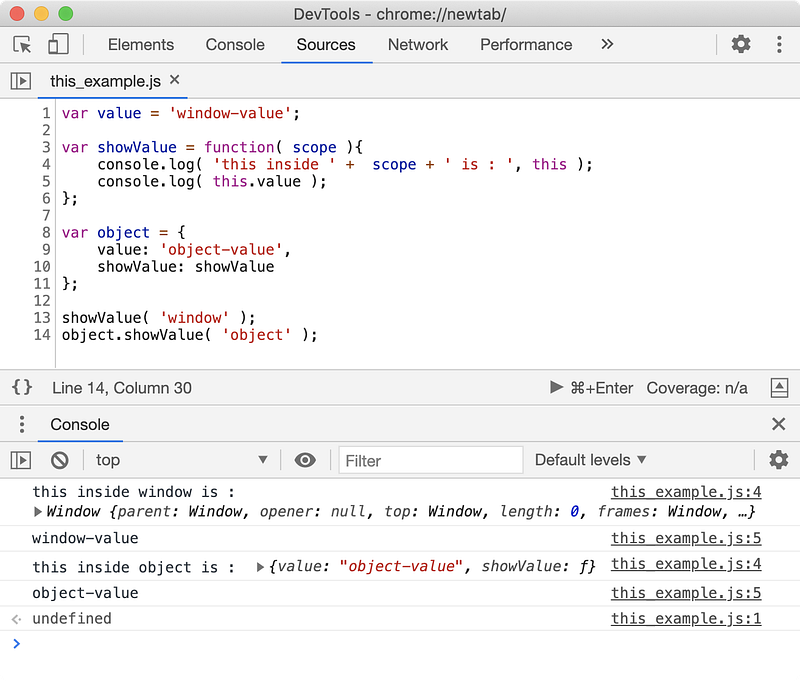
Here, when you call the owner.showValue(), you are going to get the same results. According to the object.function_name() function call signature, the function_name belongs to the owner object, hence the this value inside function_name function will always be the owner.
So when you call a function with the signature function_name(), the this keyword points to the window object and when you call the same function but with an owner like owner.function_name(), the this keyword points to owner itself. This proves that the this value inside a function is not hardcoded and it depends on how a function is called, not how it was defined.
This can be frustrating at times if you want the this value inside a function to be the same no matter how it was called. In that case, you can use the bind prototype method of the Function type. This method accepts a value that should be used for this inside the function in all circumstances and returns a new function that you can use here onwards with a fixed this value.
However, if the this value for a function is dynamic, then having multiple functions with a fixed this (created using the bind method) is not feasible (or in some cases impossible). In those cases, we would want to call the function with a custom this value. You can call a function with a custom this value using the call and apply prototype methods.
Inheritance and this value
If you have read my article on prototype-based inheritance in JavaScript, then you know how the prototype chain works as well as the significance of the __proto__ property. Whenever you define a class in JavaScript (ES6), you are ultimately defining a constructor function and adding methods on its prototype object.
Whenever you access a property on the object such as owner.prop_name, JavaScript will try to look for the property prop_name on the owner object or on its prototype chain. Let’s have a look.
function Animal( species ) {
    this.species = species;
}Animal.prototype.makeSound = function() {
return this.sound + '! ' + this.sound + '!'; // Mooo! Mooo!
}function Dog( name ) {
Animal.call( this, 'dog' );
this.name = name;
this.sound = 'Woof';
}Dog.prototype.info = function() {
return 'Hi, I am ' + this.name + ' and I am a Dog!';
}// set `Animal.prototype` as the prototype of `Dog.prototype` object
Object.setPrototypeOf( Dog.prototype, Animal.prototype );// create a dog
var tom = new Dog( 'Tommy' );console.log( 'tom.name ->', tom.name );
console.log( 'tom.species ->', tom.species );console.log( 'tom.info() ->', tom.info() );
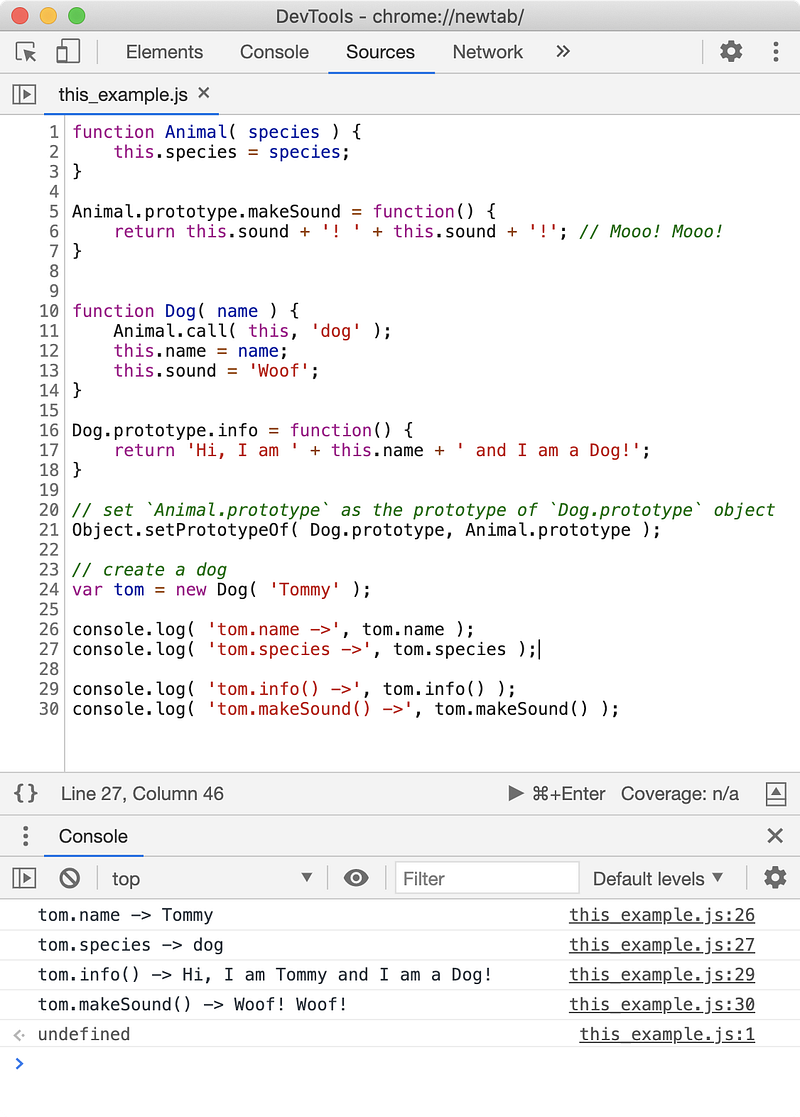
console.log( 'tom.makeSound() ->', tom.makeSound() );In the above example, the Animal class is the superclass of the Dog class as the Dog.prototype has the Animal.prototype parent. As you can see, the info function belongs to the Dog.prototype object but the makeSound function belongs to the Animal.prototype object. If you open the tom object and follow the __proto__ property, this hierarchy will be evident.
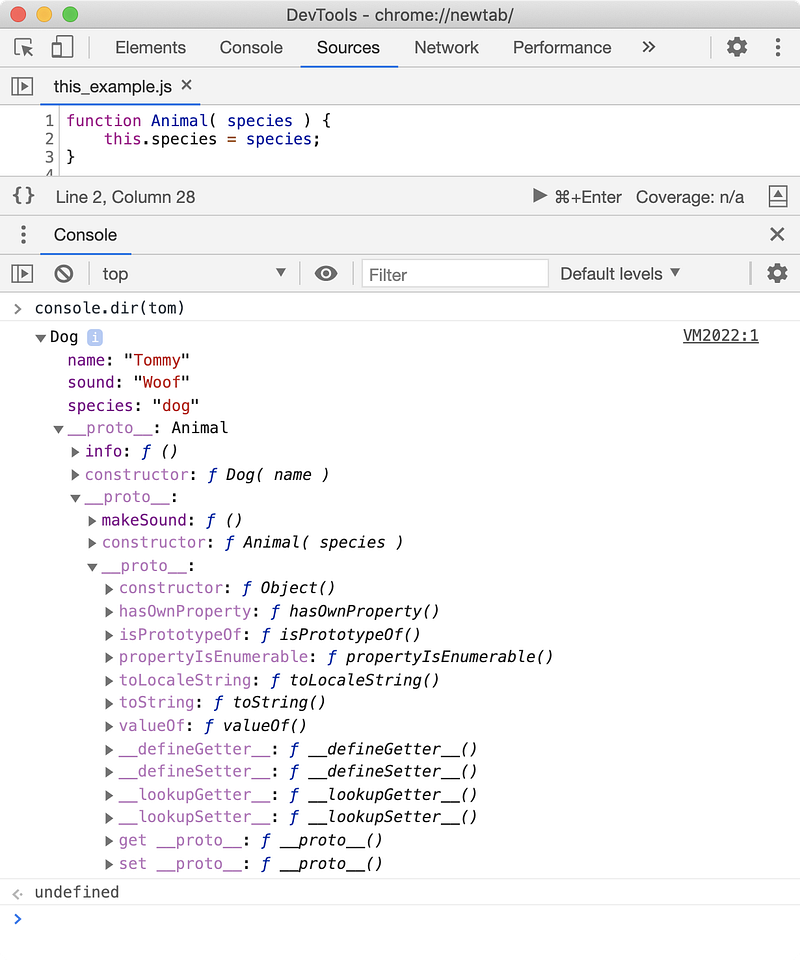
The Object.setPrototypeOf(obj, proto) function assigns the proto object (which is supposed to be the new prototype of obj) to the __proto__ property of the obj. Hence in our code, the expression Object.setPrototypeOf( Dog.prototype, Animal.prototype ); sets the value of the property Dog.prototype.__proto__ to Animal.prototype.
According to the law of the prototype chain, when you access a property on an object, for example obj.prop_name, JavaScript will try to find prop_name property on the obj or its prototype chain, obj.__proto__, obj.__proto__.__proto__ and so on until the last __proto__ object has __proto__ set to null.
Hence, makeSound() method is accessible on tom though the makeSound property exists on tom.__proto__.__proto__. When we call this method with tom.makeSound() call signature, the makeSound function has tom object as the owner, hence this inside makeSound points to the tom.
Fat Arrow ( ES6 )
The this keyword can be painful at times to work with since its value depends on how the function was called. When a callback function is executed by JavaScript, the this value inside the function can be unpredictable. Let’s see what problem is.
var object = {
    provider: 'gmail.com',
    usernames: [ 'mike', 'john', 'nina' ],
    getEmails: function() {
        return this.usernames.map( function( username ){
            return username + '@' + this.provider;
        } );
    }
};
var emails = object.getEmails();
console.log( emails );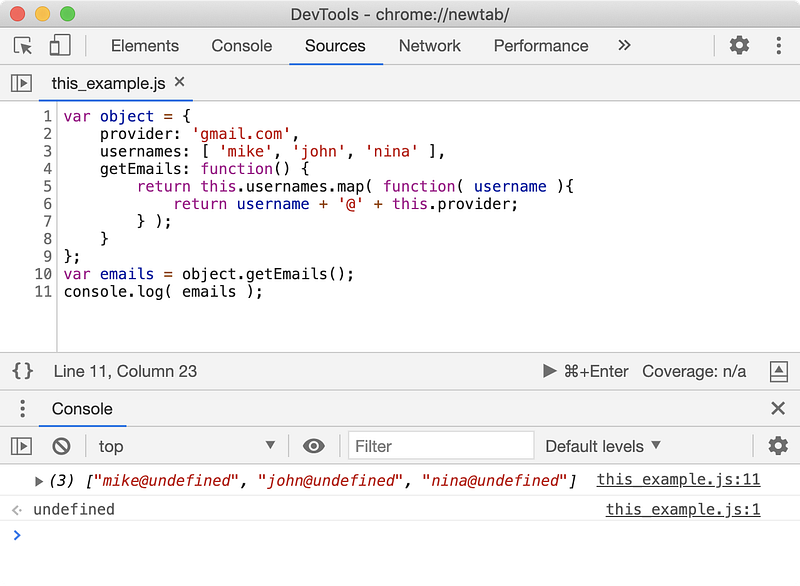
We got the value of this.provider as undefined. The anonymous function passed as an argument to the map method gets its this value from the function who is executing it. In the above example, the map function, somewhere in its internal implementation is executing our anonymous function. The map prototype method uses undefined as this value for our anonymous function, and in non-strict mode falls back to window. Hence, our below example works.
var provider = 'yahoo.com';
var object = {
    provider: 'gmail.com',
    usernames: [ 'mike', 'john', 'nina' ],
    getEmails: function() {
        return this.usernames.map( function( username ){
            return username + '@' + this.provider;
        } );
    }
};
var emails = object.getEmails();
console.log( emails );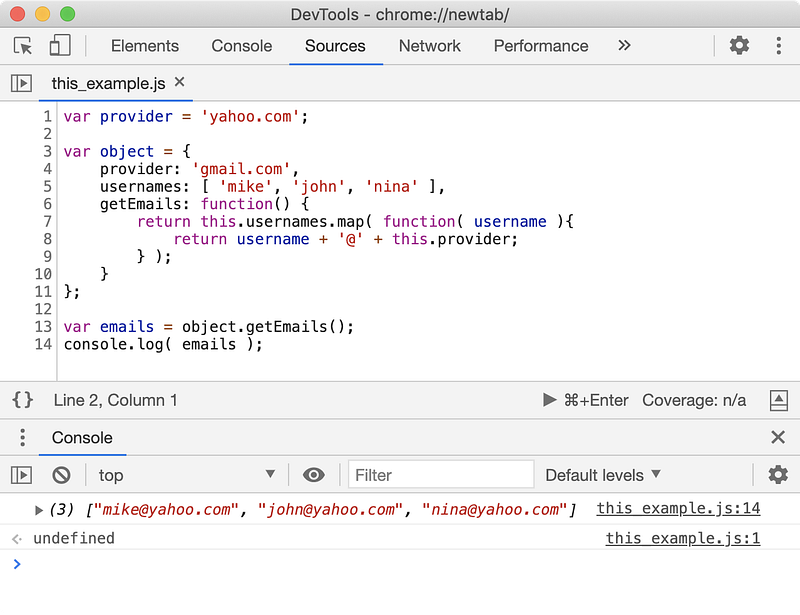
I don’t think, I need to elaborate the above example further. So, how can we fix this? We can always use the bind method to bind a function to an object so that this inside that function points to the object we have provided.
var provider = 'yahoo.com';
var object = {
    provider: 'gmail.com',
    usernames: [ 'mike', 'john', 'nina' ],
    getEmails: function() {
        return this.usernames.map( function( username ){
            return username + '@' + this.provider;
        }.bind( this ) );
    }
};
var emails = object.getEmails();
console.log( emails );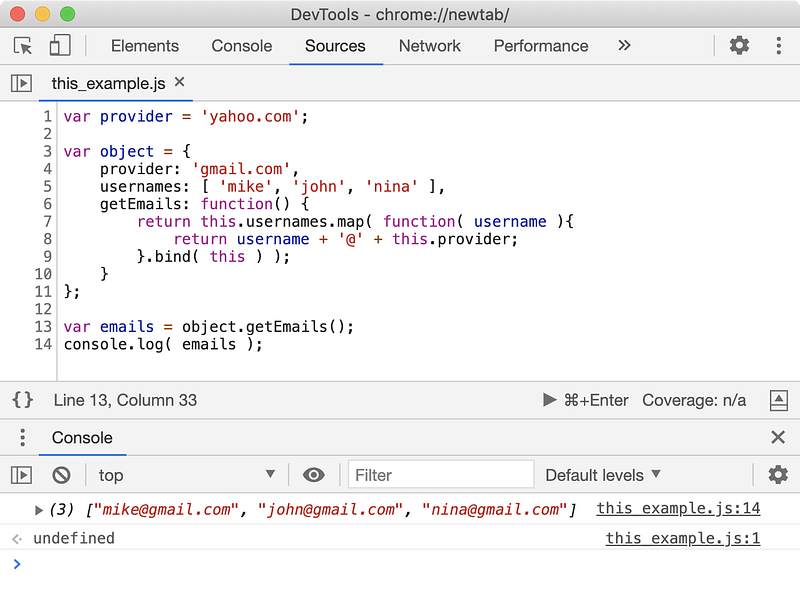
Since this inside getEmails function points to the object, .bind(this) call on anonymous function returns a function with its this value set to the object.
💡 You can also store value of
thisto a variable_thisin thegetEmailsfunction and use_thisinstead ofthisinside anonymous function.
A big relief with ES6 is fat arrow function is, this inside fat arrow function points to whatever the value of this inside upper function is. Hence the value of this inside arrow function is lexically scoped.
var provider = 'yahoo.com';
var object = {
    provider: 'gmail.com',
    usernames: [ 'mike', 'john', 'nina' ],
    getEmails: function() {
        return this.usernames.map( ( username ) => {
            return username + '@' + this.provider;
        } );
    }
};
var emails = object.getEmails();
console.log( emails );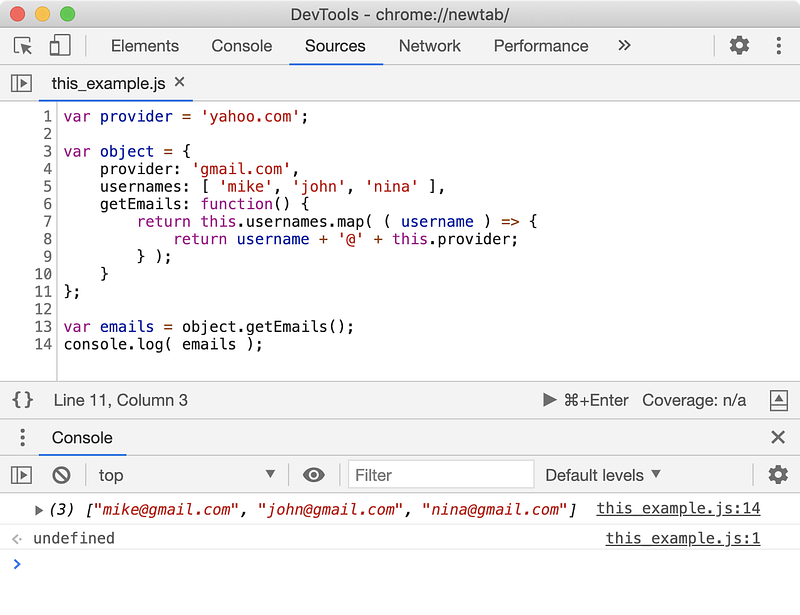
We still have the anonymous function but this time with a fat arrow expression, which saves us a lot of time and makes syntax look much better.
The this inside anonymous function points to this value of the upper function which is getEmails function in our case. The value of this inside getEmails function is object since it was called with object.getEmails() expression. So, when you pass an arrow function as an argument, its this value depends on the this value of the enclosing function and it won’t create any side effects of its own.




