
Data Analysis
Understanding the n_jobs Parameter to Speedup scikit-learn Classification
A ready-to-run code which demonstrates how the use of the n_jobs parameter can reduce the training time

In this tutorial I illustrate the importance of the n_jobs parameter provided by some classes of the scikit-learn library. According to the official scikit-learn library, the n_jobs parameter is described as follows:
The number of parallel jobs to run for neighbors search. None means 1 unless in a joblib.parallel_backend context. -1 means using all processors.
This means that the n_jobs parameter can be used to distribute and exploit all the CPUs available in the local computer.
In this tutorial, I evaluate the time elapsed to fit all the default classification datasets provided by the scikit-learn library, by varying the n_jobs parameter from 1 to the maximum number of CPUs. As example, I will try a K-Neighbors Classifier with Grid Search with Cross Validation.
Define auxiliary variables
Firstly I define a list of all the classification datasets names, contained in the sklearn.datasets package.
datasets_list = ['iris', 'digits', 'wine', 'breast_cancer','diabetes']Then, I calculate the number of CPUs available in my system. I exploit the cpu_count() function provided by the os package.
import os

n_cpu = os.cpu_count()
print("Number of CPUs in the system:", n_cpu)
In my case. the number of CPUs is 4 (a quite old computer, sigh…I should decide to build a newer one…)
I also define all the parameters for the Grid Search.
import numpy as np
parameters = {  'n_neighbors'   : np.arange(2, 25),
                'weights'       : ['uniform', 'distance'],
                'metric'        : ['euclidean', 'manhattan',
                                   'chebyshev', 'minkowski'],
                'algorithm'     : ['ball_tree', 'kd_tree']
            }
Define the Main function
Now, I’m ready to define the main function, which will be used to test the time elapsed for training. I import all the needed functions and classes:
from sklearn.neighbors import KNeighborsClassifier
from sklearn.model_selection import GridSearchCV
from sklearn.datasets import *
import time
and I define the load_and_train() function, which receives the dataset name as input. In order to load the corresponding dataaset, I exploit the globals() function, which contains a table with all the imported functions. Since I have already imported all the datasets provided by scikit-learn, I can pass the function name to the globals() function. The syntax is: globals()[<function_name>]().
def load_and_train(name):
    dataset = globals()['load_' + name]()
    X = dataset.data
    y = dataset.target
Once loaded the dataset, I can build a loop which iterates across the number of CPUS and calculates the time elapsed for training, by varying the number of CPUs. I build a list with all the elapsed times, which are eventually returned by the function.
    tdelta_list = []
    for i in range(1, n_cpu+1):
        s = time.time()
        model = KNeighborsClassifier(n_jobs=i)
        clf = GridSearchCV(model, parameters, cv = 10)
        model.fit(X_train, y_train)
        e = time.time()
        tdelta = e - s
        tdelta_list.append({'time' : tdelta, 'bin' : i})
    return tdelta_list
Plot Results
Finally I invoke the load_and_train() function for all the datasets names and I plot results.
import matplotlib.pyplot as plt
import pandas as pd
for d in datasets_list:
tdelta_list = load_and_train(d)
df = pd.DataFrame(tdelta_list)
plt.plot(df['bin'], df['time'], label=d)
plt.grid()
plt.legend()
plt.xlabel('N Jobs')
plt.ylabel('Time for fit (sec.)')
plt.title('Time for fit VS number of CPUs')
plt.show()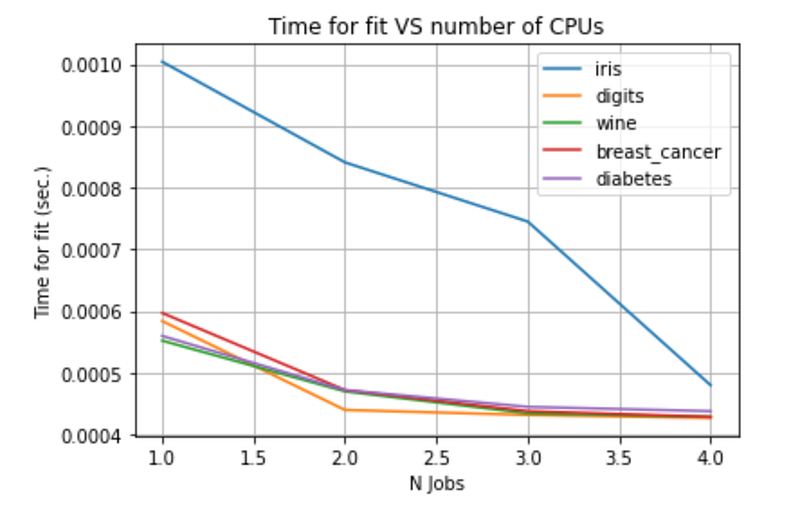
For all the datasets, the time elapsed to perform Grid search with Cross Validation for K-Neighbours Classifiers decreases by increasing the number of jobs. For this reason, I strongly suggest you to use the n_jobs parameter.
Specifically, I suggest to set n_jobs=n_cpus-1 , in order to avoid that the machine gets stuck.
Summary
In this tutorial, I have demonstrated how the use of the n_jobs parameter can speedup the training process.
The full code for this tutorial can be downloaded from my Github repository.
Now Medium provides a new feature, namely it permits to build lists. If you liked this article, you can add it to your favourite list, simply clicking on the button, put on the top right button of the article:

If you wanted to be updated on my research and other activities, you can follow me on Twitter, Youtube and and Github.


