Understanding the Components of Various Types of Networks 🖥️🕸️🛜
Free AI web copilot to create summaries, insights and extended knowledge, download it at here
3178
Abstract
nects to the internet.</p><p id="495c">3. <b>Switches (optional)</b>: Used to expand the number of devices that can be wired to the network.</p><p id="b729">4. <b>Wireless Access Point (WAP)</b>: Often integrated into the router, it allows wireless devices to connect to the network.</p><p id="7047">5. <b>Network Cables</b>: Ethernet cables to connect devices like PCs, gaming consoles, and smart TVs to the network.</p><p id="a072">6. <b>Network-Attached Storage (NAS)</b>: For shared data storage accessible by all networked devices.</p><h1 id="fa3b">Test Lab Network Components:</h1><figure id="b92d"><img src="https://cdn-images-1.readmedium.com/v2/resize:fit:800/1*[email protected]"><figcaption>Image of a laptop running network simulation software, displaying a detailed network topology diagram. This diagram features various interconnected routers, switches, and virtual machines, highlighted through icons and connection lines. Visualization captures utilizing simulation tools in networking to understand, design, and troubleshoot complex network architectures.</figcaption></figure><p id="c116">1. <b>High-Performance Switches and Routers</b>: For creating complex network configurations and experimenting with network traffic management.</p><p id="6dd7">2. <b>Firewalls and Security Appliances</b>: To practice and test security configurations and defenses.</p><p id="892b">3. <b>Server Rack</b>: Housing for multiple servers used for various testing environments and applications.</p><p id="cf06">4. <b>Network Emulators/Simulators</b>: Hardware or software tools for mimicking network conditions and behaviors.</p><p id="7373">5. <b>Performance and Monitoring Tools</b>: For tracking network performance under test conditions.</p><p id="4581">6. <b>Virtualization Hardware/Software</b>: To create and manage virtual networks and virtual machines for testing different scenarios.</p><h1 id="7647">Business Network Components:</h1><figure id="3e9d"><img src="https://cdn-images-1.readmedium.com/v2/resize:fit:800/1*[email protected]"><figcaption>Illustration of a business network within an office setting, where a centralized server room.</figcaption></figure><p id="e040">1. <b>Enterprise-Class Routers and Switches</b>: To support a larger number of connections and provide advanced features like VLAN support, QoS, and more.</p><p id="a250">2. <b>Firewalls and Security Appliances</b>: Enhanced security measures to protect sensitive business data.</p><p id="bcc0">3. <b>Dedicated Internet Connection</b>: Often with higher bandwidth and reliability to meet business needs.</p><p id="c1fc">4. <b>Wi-Fi Access Points</b>: Spread throughout the premises to ensure comprehensive wireless coverage.</p><p id="66c0">5. <b>Network Attached Storage (NAS) or Storage Area Network (SAN)</b>: For centralized data storage and management.</p><p id="2a22">6. <b>Unified Threat Management (UTM)</b>: Integrated solutions that combine firewall, VPN, antivirus, and other security features.</p><p id="b4ce">7. <b>VoIP Systems</b>: For managing business communications over the network.</p><h1 id="3a52">Data Center Network Components:</h1><figure id=
Options
"ce3c"><img src="https://cdn-images-1.readmedium.com/v2/resize:fit:800/1*[email protected]"><figcaption>Illustration of a state-of-the-art data center interior, with expansive rows of advanced server racks.</figcaption></figure><p id="afb2">1. <b>High-Capacity Routers and Switches</b>: To manage the immense data traffic within and outside the data center.</p><p id="d790">2. <b>Load Balancers</b>: To distribute traffic evenly across servers to optimize resource use and maximize uptime.</p><p id="9631">3. <b>Redundant Components</b>: Including multiple power supplies, network paths, and cooling systems for high availability.</p><p id="ef70">4. <b>Storage Area Network (SAN)</b>: High-speed, dedicated network that connects and presents shared pools of storage devices to multiple servers.</p><p id="729c">5. <b>Application Delivery Controllers (ADCs)</b>: To ensure applications are delivered securely and efficiently to users.</p><p id="d769">6. <b>Environmental Monitoring Systems</b>: For real-time monitoring of conditions like temperature and humidity.</p><p id="f73b">7. <b>Advanced Security Systems</b>: Including next-generation firewalls, intrusion detection/prevention systems, and network segmentation to protect data integrity and privacy.</p><blockquote id="1560"><p><b><i>Each network type scales in complexity and specificity of components based on its intended purpose, user base, and operational demands, transitioning from the relatively simple setups of home networks to the highly sophisticated and redundant configurations of data centers.</i></b></p></blockquote><figure id="8b80"><img src="https://cdn-images-1.readmedium.com/v2/resize:fit:800/1*[email protected]"><figcaption>Illustration of a business network setup within an office environment with server racks equipped with servers, switches, and routers, alongside a workbench with network testing equipment.</figcaption></figure><p id="44ac">The aspect of security and compliance cannot be overstated. Networks are constantly under the threat of cyber attacks. A thorough understanding of network components helps in implementing robust security measures tailored to each component’s vulnerabilities. Additionally, compliance with data protection regulations requires a comprehensive grasp of how data flows through and is stored within a network. Knowledge of network components and their functionalities is thus crucial for ensuring that the network adheres to industry standards and legal requirements, safeguarding sensitive information against unauthorized access and breaches.</p><p id="9b4b">In conclusion, the importance of understanding network components spans across the design, maintenance, and security of networks. This knowledge serves as the backbone for creating efficient, reliable, and secure networks, irrespective of their scale or purpose, and is indispensable for anyone involved in network administration, cybersecurity, or IT infrastructure development.</p><blockquote id="e4c2"><p><b><i>If you enjoyed this don’t forget to give a clap, share with your peers, and leave your thoughts in the comments.</i></b></p></blockquote></article></body>

Understanding the Components of Various Types of Networks 🖥️🕸️🛜
Whether setting up a simple home network or architecting a complex data center, awareness of the necessary components and their functions enables the creation of a network tailored to specific requirements. It ensures that the network can handle the intended data loads, provides adequate connectivity and coverage, and is scalable for future expansions. This foundational knowledge ensures that the network is not only operational but also optimized for performance and cost-efficiency.
When it comes to troubleshooting and maintenance, understanding network components and their interplay is critical. Identifying and resolving network issues swiftly is essential to minimize downtime and maintain productivity. Knowing the role of each component within the network allows for quicker diagnostics and more precise interventions, ensuring that problems are addressed effectively at their root. This knowledge is also vital for regular maintenance activities, helping to prevent potential issues before they escalate into significant problems.
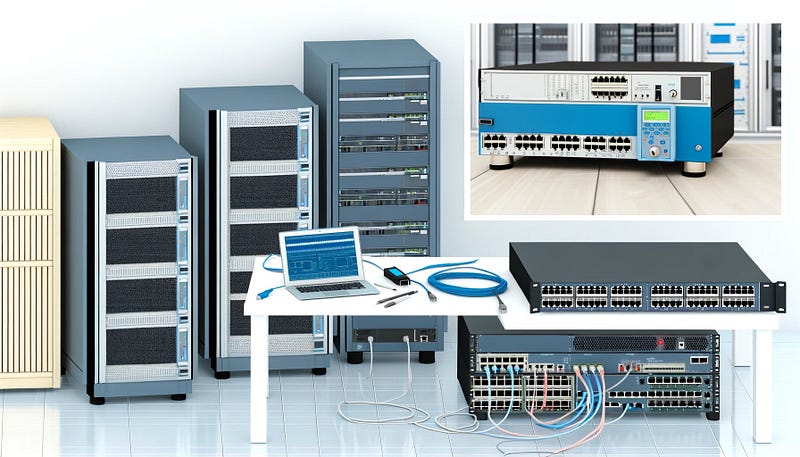
Each type of network — be it for a home, a test lab, a business, or a data center — has its unique set of components tailored to its specific needs and scale.

1. Modem: Connects to your Internet Service Provider (ISP) to provide internet access.
2. Router: Directs traffic between devices in your home and connects to the internet.
3. Switches (optional): Used to expand the number of devices that can be wired to the network.
4. Wireless Access Point (WAP): Often integrated into the router, it allows wireless devices to connect to the network.
5. Network Cables: Ethernet cables to connect devices like PCs, gaming consoles, and smart TVs to the network.
6. Network-Attached Storage (NAS): For shared data storage accessible by all networked devices.

1. High-Performance Switches and Routers: For creating complex network configurations and experimenting with network traffic management.
2. Firewalls and Security Appliances: To practice and test security configurations and defenses.
3. Server Rack: Housing for multiple servers used for various testing environments and applications.
4. Network Emulators/Simulators: Hardware or software tools for mimicking network conditions and behaviors.
5. Performance and Monitoring Tools: For tracking network performance under test conditions.
6. Virtualization Hardware/Software: To create and manage virtual networks and virtual machines for testing different scenarios.

1. Enterprise-Class Routers and Switches: To support a larger number of connections and provide advanced features like VLAN support, QoS, and more.
2. Firewalls and Security Appliances: Enhanced security measures to protect sensitive business data.
3. Dedicated Internet Connection: Often with higher bandwidth and reliability to meet business needs.
4. Wi-Fi Access Points: Spread throughout the premises to ensure comprehensive wireless coverage.
5. Network Attached Storage (NAS) or Storage Area Network (SAN): For centralized data storage and management.
6. Unified Threat Management (UTM): Integrated solutions that combine firewall, VPN, antivirus, and other security features.
7. VoIP Systems: For managing business communications over the network.

1. High-Capacity Routers and Switches: To manage the immense data traffic within and outside the data center.
2. Load Balancers: To distribute traffic evenly across servers to optimize resource use and maximize uptime.
3. Redundant Components: Including multiple power supplies, network paths, and cooling systems for high availability.
4. Storage Area Network (SAN): High-speed, dedicated network that connects and presents shared pools of storage devices to multiple servers.
5. Application Delivery Controllers (ADCs): To ensure applications are delivered securely and efficiently to users.
6. Environmental Monitoring Systems: For real-time monitoring of conditions like temperature and humidity.
7. Advanced Security Systems: Including next-generation firewalls, intrusion detection/prevention systems, and network segmentation to protect data integrity and privacy.
Each network type scales in complexity and specificity of components based on its intended purpose, user base, and operational demands, transitioning from the relatively simple setups of home networks to the highly sophisticated and redundant configurations of data centers.
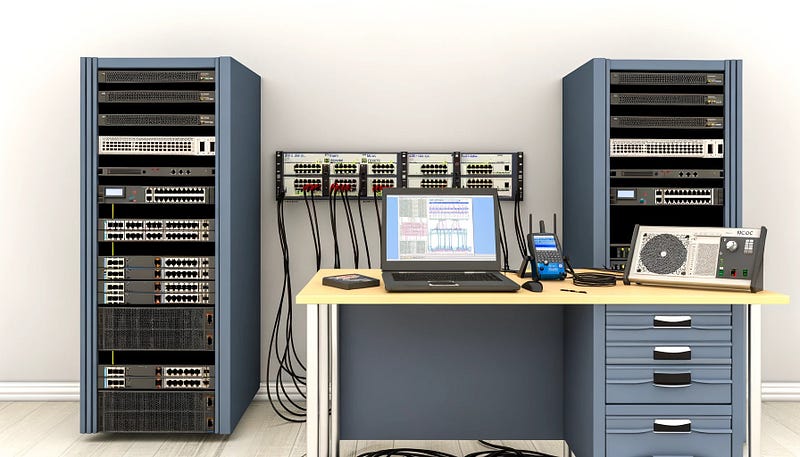
The aspect of security and compliance cannot be overstated. Networks are constantly under the threat of cyber attacks. A thorough understanding of network components helps in implementing robust security measures tailored to each component’s vulnerabilities. Additionally, compliance with data protection regulations requires a comprehensive grasp of how data flows through and is stored within a network. Knowledge of network components and their functionalities is thus crucial for ensuring that the network adheres to industry standards and legal requirements, safeguarding sensitive information against unauthorized access and breaches.
In conclusion, the importance of understanding network components spans across the design, maintenance, and security of networks. This knowledge serves as the backbone for creating efficient, reliable, and secure networks, irrespective of their scale or purpose, and is indispensable for anyone involved in network administration, cybersecurity, or IT infrastructure development.
If you enjoyed this don’t forget to give a clap, share with your peers, and leave your thoughts in the comments.
Umar FaroukSome great news came out of the National Institute of Standards and Technology (NIST). They would be offering four introductory courses…
Tyler WallI am about to explain to you what an $880 a day life of a SOC analyst. To give you some background, I didn’t just wake up one day and…
Sajjad HussainIntroduction
Prof Bill Buchanan OBE FRSEAnd Whatever Happened To “Secure By Design”?