
Understanding PHP Repository Pattern: A Beginner’s Guide with Real-World Examples
Are you struggling to maintain your Laravel application’s growing codebase? Do you find yourself repeating database queries across different controllers? The Repository Pattern might be exactly what you need to clean up your code and make it more maintainable. In this comprehensive guide, we’ll explore how to implement the Repository Pattern in Laravel using a real-world example that you can start using today.
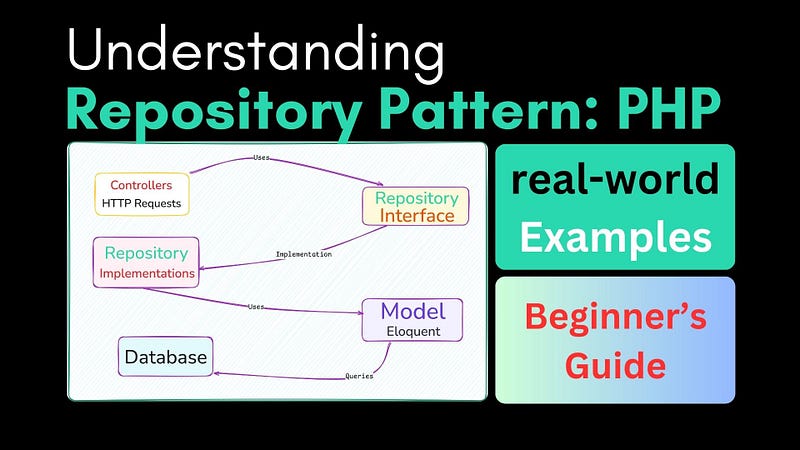
What is the Repository Pattern?
The Repository Pattern is a design pattern that creates an abstraction layer between your application’s business logic and data access layer. Think of it as a middleman that handles all the communication between your application and your database. Instead of writing database queries directly in your controllers, you delegate this responsibility to a dedicated repository class.
Why Should You Use the Repository Pattern?
Before diving into the implementation, let’s understand why you might want to use this pattern:
- Code Organization: Keep all your database queries in one place
- Maintainability: Easier to update and modify data access logic
- Reusability: Reuse data access code across multiple controllers
- Testing: Simplify unit testing with easy-to-mock repositories
- Flexibility: Switch between different data sources without changing your business logic
Real-World Example: E-commerce Product Management
Let’s implement the Repository Pattern for a product management system in an e-commerce application. We’ll create a complete implementation that handles products, including their categories and inventory.
Step 1: Create the Product Model
First, let’s create our Product model:
<?php

namespace App\Models;

use Illuminate\Database\Eloquent\Model;
use Illuminate\Database\Eloquent\Factories\HasFactory;

class Product extends Model
{
    use HasFactory;

    protected $fillable = [
        'name',
        'description',
        'price',
        'sku',
        'stock_quantity',
        'status'
    ];

    public function category()
    {
        return $this->belongsTo(Category::class);
    }

    public function inventory()
    {
        return $this->hasOne(Inventory::class);
    }
}
Step 2: Define the Repository Interface
Create the repository interface that defines all product-related operations:
<?php

namespace App\Repositories\Interfaces;

interface ProductRepositoryInterface
{
    public function getAllProducts();
    public function getProductById($productId);
    public function getActiveProducts();
    public function createProduct(array $productData);
    public function updateProduct($productId, array $productData);
    public function deleteProduct($productId);
    public function getProductsByCategory($categoryId);
    public function updateStock($productId, $quantity);
}
Step 3: Implement the Repository
Now, let’s create the concrete implementation of our repository:
<?php

namespace App\Repositories;

use App\Models\Product;
use App\Repositories\Interfaces\ProductRepositoryInterface;
use Illuminate\Support\Facades\Cache;

class ProductRepository implements ProductRepositoryInterface
{
    protected $model;
    protected $cacheTimeout = 3600; // 1 hour

    public function __construct(Product $product)
    {
        $this->model = $product;
    }

    public function getAllProducts()
    {
        return Cache::remember('all_products', $this->cacheTimeout, function () {
            return $this->model
                ->with(['category', 'inventory'])
                ->orderBy('created_at', 'desc')
                ->get();
        });
    }

    public function getProductById($productId)
    {
        return Cache::remember("product_{$productId}", $this->cacheTimeout, function () use ($productId) {
            return $this->model
                ->with(['category', 'inventory'])
                ->findOrFail($productId);
        });
    }

    public function getActiveProducts()
    {
        return $this->model
            ->where('status', 'active')
            ->where('stock_quantity', '>', 0)
            ->with(['category', 'inventory'])
            ->orderBy('created_at', 'desc')
            ->get();
    }

    public function createProduct(array $productData)
    {
        $product = $this->model->create([
            'name' => $productData['name'],
            'description' => $productData['description'],
            'price' => $productData['price'],
            'sku' => $productData['sku'],
            'stock_quantity' => $productData['stock_quantity'],
            'status' => $productData['status'] ?? 'active'
        ]);

        if (isset($productData['category_id'])) {
            $product->category()->associate($productData['category_id']);
        }

        $this->clearProductCache();

        return $product;
    }

    public function updateProduct($productId, array $productData)
    {
        $product = $this->getProductById($productId);

        $product->update($productData);

        if (isset($productData['category_id'])) {
            $product->category()->associate($productData['category_id']);
            $product->save();
        }

        $this->clearProductCache($productId);

        return $product;
    }

    public function deleteProduct($productId)
    {
        $product = $this->getProductById($productId);
        $this->clearProductCache($productId);
        return $product->delete();
    }

    public function getProductsByCategory($categoryId)
    {
        return Cache::remember("category_products_{$categoryId}", $this->cacheTimeout, function () use ($categoryId) {
            return $this->model
                ->where('category_id', $categoryId)
                ->with('inventory')
                ->get();
        });
    }

    public function updateStock($productId, $quantity)
    {
        $product = $this->getProductById($productId);
        $product->stock_quantity = $quantity;
        $product->save();

        $this->clearProductCache($productId);

        return $product;
    }

    protected function clearProductCache($productId = null)
    {
        Cache::forget('all_products');

        if ($productId) {
            Cache::forget("product_{$productId}");
        }
    }
}
Step 4: Using the Repository in Controllers
Here’s how to use the repository in your controller:
<?php

namespace App\Http\Controllers;

use App\Http\Requests\ProductRequest;
use App\Repositories\Interfaces\ProductRepositoryInterface;

class ProductController extends Controller
{
    private $productRepository;

    public function __construct(ProductRepositoryInterface $productRepository)
    {
        $this->productRepository = $productRepository;
    }

    public function index()
    {
        $products = $this->productRepository->getAllProducts();
        return view('products.index', compact('products'));
    }

    public function store(ProductRequest $request)
    {
        $product = $this->productRepository->createProduct($request->validated());

        return redirect()
            ->route('products.show', $product->id)
            ->with('success', 'Product created successfully');
    }

    public function updateStock($id, Request $request)
    {
        $this->validate($request, [
            'quantity' => 'required|integer|min:0'
        ]);

        $product = $this->productRepository->updateStock($id, $request->quantity);

        return response()->json([
            'message' => 'Stock updated successfully',
            'new_quantity' => $product->stock_quantity
        ]);
    }
}
Best Practices and Tips
- Cache When Appropriate: — Implement caching for frequently accessed data — Clear cache when data is modified — Use appropriate cache timeout values
- Keep Repositories Focused: — Each repository should handle one model/entity — Don’t mix business logic with data access — Use services for complex business logic
- Use Type Hinting: — Always type-hint repository interfaces in controllers — Use return type declarations — Document complex methods
- Handle Errors Gracefully: — Use try-catch blocks for database operations — Return meaningful error messages — Log important errors
Common Pitfalls to Avoid
- Don’t Skip the Interface: — Always create an interface for your repositories — This ensures consistency and maintainability — Makes testing easier with mock objects
- Don’t Make Repositories Too Complex: — Keep methods focused and single-purpose — Move business logic to service classes — Don’t include presentation logic
- Don’t Forget Performance: — Use eager loading when needed — Implement caching for heavy queries — Monitor query performance
Conclusion
The Repository Pattern is a powerful tool for organizing your Laravel application’s data access layer. By implementing this pattern, you’ll create more maintainable, testable, and flexible code. Start with a simple implementation and gradually refactor your existing code to use repositories. Remember, the goal is to make your code more organized and easier to maintain, not to overcomplicate it.
Next Steps
- Implement the Repository Pattern in a small module of your application
- Write tests for your repositories
- Add caching where appropriate
- Refactor existing code gradually
Have you implemented the Repository Pattern in your Laravel application? Share your experiences and questions in the comments below!