avatarSanjay Singh

Free AI web copilot to create summaries, insights and extended knowledge, download it at here

2539

Abstract

oke__">collect</span>(Collectors.<span class="hljs-title function_ invoke__">toList</span>());</pre></div><p id="4255"><b>Explanation</b>:</p><ul><li>The <code>map()</code> method takes each name in the list, applies the <code>toUpperCase()</code> method, and returns a new stream with all names in uppercase. Each input (name) results in one output (uppercase name).</li></ul><p id="23c9">This is a classic one-to-one transformation.</p><h1 id="101f">When to Use flatMap()?</h1><p id="7502">Now, let’s say you have a list of lists, where each list contains some words. You want to combine all the words into a single list, eliminating the nested structure. This is where <code>flatMap()</code> shines.</p><p id="c196"><b>Example</b>:</p><div id="3d9e"><pre>List<List<<span class="hljs-type">String</span>>> listOfWords = Arrays.<span class="hljs-title function_ invoke__">asList</span>( Arrays.<span class="hljs-title function_ invoke__">asList</span>(<span class="hljs-string">"Hello"</span>, <span class="hljs-string">"World"</span>), Arrays.<span class="hljs-title function_ invoke__">asList</span>(<span class="hljs-string">"Java"</span>, <span class="hljs-string">"Streams"</span>), Arrays.<span class="hljs-title function_ invoke__">asList</span>(<span class="hljs-string">"FlatMap"</span>, <span class="hljs-string">"Example"</span>) ); List<<span class="hljs-type">String</span>> flatList = listOfWords.<span class="hljs-title function_ invoke__">stream</span>() .<span class="hljs-title function_ invoke__">flatMap</span>(List::stream) .<span class="hljs-title function_ invoke__">collect</span>(Collectors.<span class="hljs-title function_ invoke__">toList</span>());</pre></div><p id="cbd2"><b>Explanation</b>:</p><ul><li>The <code>flatMap()</code> method first transforms each list of words into a stream of words using <code>List::stream</code>. Then, it flattens the streams of words into a single, unified stream. So, you get a single list containing all the words: <code>[Hello, World, Java, Streams, FlatMap, Example]</code>.</li></ul><p id="918d">This is a many-to-one transformation.</p><h1 id="972c">Visualizing map() vs flatMap()</h1><ul><li><code><b>map()</b></code> is like creating individual packages from a list of items: each package contains one item.</li><li><code><b>flatMap()</b></code> is like opening those packages and combining all the items into a single big package.</li></ul><h1 id="d4bd">Practical Sc

Options

enarios</h1><ul><li><b>Use <code>map()</code></b> when:</li><li>You need to apply a transformation to each element.</li><li>You have a single-level data structure and want to modify it, such as converting integers to their square or strings to uppercase.</li><li><b>Use <code>flatMap()</code></b> when:</li><li>You have nested data structures (like a list of lists or a stream of streams) and need to flatten them.</li><li>You’re dealing with situations where each element may generate multiple elements in the output, such as expanding a list of collections into a flat list.</li></ul><h1 id="d6ee">Key Takeaways</h1><ul><li><code><b>map()</b></code> is for simple one-to-one transformations, like converting each element into something else.</li><li><code><b>flatMap()</b></code> is for handling nested structures, helping you flatten multiple layers into one seamless collection.</li></ul><p id="7509">Next time you’re faced with a stream transformation problem, you’ll know exactly when to reach for <code>map()</code> and when to go with <code>flatMap()</code>.</p><h1 id="d65b">Conclusion</h1><p id="15f0">Understanding the difference between <code>map()</code> and <code>flatMap()</code> is essential for mastering Java Streams. While <code>map()</code> is great for transforming data, <code>flatMap()</code> becomes powerful when you need to flatten complex structures. Once you grasp their differences, you'll find yourself using them to write cleaner, more efficient Java code.</p><figure id="8d0f"><img src="https://cdn-images-1.readmedium.com/v2/resize:fit:800/1*bIIUp8ZvA2j2cGKDIiLBfQ.png"><figcaption></figcaption></figure><p id="132e">If this explanation helped clarify the differences between <code>map()</code> and <code>flatMap()</code>, don’t forget to share this article and follow me for more Java insights. Drop your questions in the comments if you need further clarification or have any specific examples in mind!</p><p id="d985">🌟 <b>Thank You for Reading!</b> 🌟</p><p id="2f41">If you enjoyed this article and found it helpful, please consider following my Medium page! Your support means the world to me and motivates me to keep creating more amazing stories and content for you.</p><p id="3792"><b>Share my latest user story</b> and give it a clap if you liked it! Every interaction helps me reach more readers and inspires me to write even better.</p><p id="fefc">👉 <a href="https://readmedium.com/a9d3d01bff85">Read it here!</a></p><p id="91d1">Thank you for being part of my journey!</p></article></body>

Understanding map() vs flatMap() in Java 8 Streams: A Simple Guide

Overview

As a developer working with Java 8 streams, understanding the difference between map() and flatMap() is crucial. These two methods may sound similar but serve different purposes when transforming data in streams. In this article, I’ll walk you through the core differences between map() and flatMap() with relatable examples to ensure you’re well-prepared for both your coding tasks and interviews.

Understanding map() vs flatMap() in Java 8 Streams

Introduction: The Power of Data Transformation

Imagine you’re managing a collection of objects like lists of words or even entire directories. You want to transform the data or flatten nested structures into one seamless list. How do you do that? This is where map() and flatMap() come into play.

The Basics: What Are map() and flatMap()?

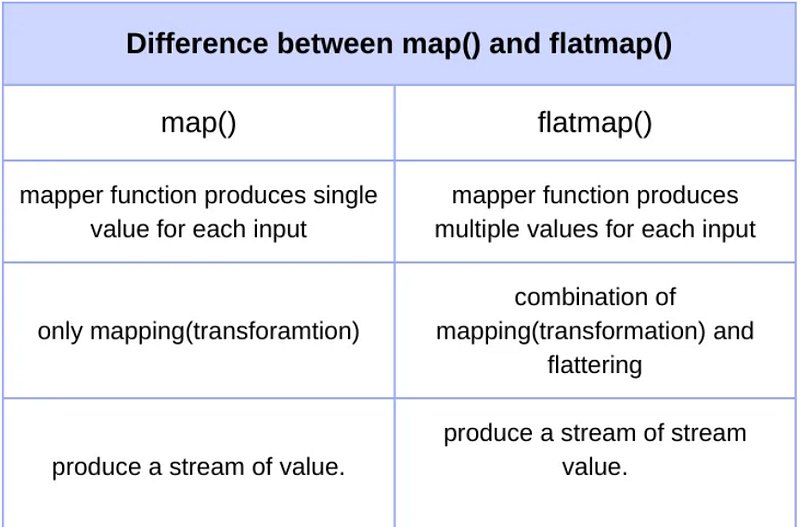
  • map() is used to transform each element in the stream by applying a function. It works on a one-to-one mapping of data, meaning it takes one input and produces one output.
  • flatMap() is more powerful when you need to flatten or merge multiple layers of data structures (like nested collections) into a single layer. It transforms each element and then "flattens" the results into a single stream.

When to Use map()?

Let’s start with a simple example using map(). Suppose you have a list of names and you want to convert each name to uppercase.

Example:

List<String> names = Arrays.asList("Alice", "Bob", "Charlie");
List<String> upperCaseNames = names.stream()
                                   .map(String::toUpperCase)
                                   .collect(Collectors.toList());

Explanation:

  • The map() method takes each name in the list, applies the toUpperCase() method, and returns a new stream with all names in uppercase. Each input (name) results in one output (uppercase name).

This is a classic one-to-one transformation.

When to Use flatMap()?

Now, let’s say you have a list of lists, where each list contains some words. You want to combine all the words into a single list, eliminating the nested structure. This is where flatMap() shines.

Example:

List<List<String>> listOfWords = Arrays.asList(
    Arrays.asList("Hello", "World"),
    Arrays.asList("Java", "Streams"),
    Arrays.asList("FlatMap", "Example")
);
List<String> flatList = listOfWords.stream()
                                   .flatMap(List::stream)
                                   .collect(Collectors.toList());

Explanation:

  • The flatMap() method first transforms each list of words into a stream of words using List::stream. Then, it flattens the streams of words into a single, unified stream. So, you get a single list containing all the words: [Hello, World, Java, Streams, FlatMap, Example].

This is a many-to-one transformation.

Visualizing map() vs flatMap()

  • map() is like creating individual packages from a list of items: each package contains one item.
  • flatMap() is like opening those packages and combining all the items into a single big package.

Practical Scenarios

  • Use map() when:
  • You need to apply a transformation to each element.
  • You have a single-level data structure and want to modify it, such as converting integers to their square or strings to uppercase.
  • Use flatMap() when:
  • You have nested data structures (like a list of lists or a stream of streams) and need to flatten them.
  • You’re dealing with situations where each element may generate multiple elements in the output, such as expanding a list of collections into a flat list.

Key Takeaways

  • map() is for simple one-to-one transformations, like converting each element into something else.
  • flatMap() is for handling nested structures, helping you flatten multiple layers into one seamless collection.

Next time you’re faced with a stream transformation problem, you’ll know exactly when to reach for map() and when to go with flatMap().

Conclusion

Understanding the difference between map() and flatMap() is essential for mastering Java Streams. While map() is great for transforming data, flatMap() becomes powerful when you need to flatten complex structures. Once you grasp their differences, you'll find yourself using them to write cleaner, more efficient Java code.
If this explanation helped clarify the differences between map() and flatMap(), don’t forget to share this article and follow me for more Java insights. Drop your questions in the comments if you need further clarification or have any specific examples in mind!

🌟 Thank You for Reading! 🌟

If you enjoyed this article and found it helpful, please consider following my Medium page! Your support means the world to me and motivates me to keep creating more amazing stories and content for you.

Share my latest user story and give it a clap if you liked it! Every interaction helps me reach more readers and inspires me to write even better.

👉 Read it here!

Thank you for being part of my journey!

Java8
Interview Questions
Java Interview
Internet
Java 8 Stream
Recommended from ReadMedium