
Understanding Cache Memory
The Computer is arguably one of humankind’s greatest inventions. It is an electronic device used to process, store, and display data of any kind. Any computer consists of 5 elements: input, output, memory, datapath, and control unit. The combination of the last two elements is widely known as “processor”. In this article, we are going to tackle the concept of cache memory and its important role in improving the performance of modern-day computers while in the next article, we are going to discuss the three different types of structuring a cache memory. Let’s begin!
The Processor and The Main Memory
Before we dive into the world of cache memories, let us take a moment to remind ourselves how a computer’s processor and main memory work together.
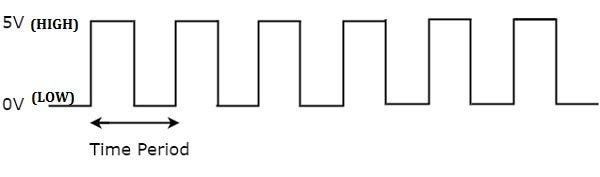
Every computer comes with an internal clock. The clock dictates when events (arithmetic operations, loads from memory, stores in memory, etc) happen on a computer. It is, basically, a stream of pulses. With every pulse, an event happens.
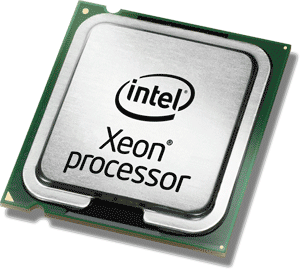
A central processing unit (CPU), also called a central processor, main processor, or just processor is the electronic circuitry that executes instructions comprising a computer program. The CPU performs basic arithmetic, logic, controlling, and input/output (I/O) operations specified by the instructions in the program. — Wikipedia
Loosely speaking, a processor is the part of the computer responsible for executing the instructions of any given program. Data in form of bitstreams come in, the processor manipulates them in some way, and the data comes out.
In computing, memory is a device or system that is used to store information for immediate use in a computer or related computer hardware and digital electronic devices.
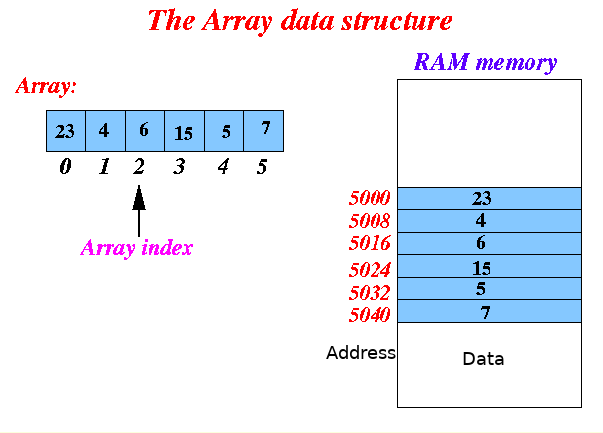
Again, to put it simply, you can imagine the (main) memory of a computer as a big one-dimensional array where the address is used as an index to access the stored data.
One important thing to note is that the binary source code of any program is itself a sequence of bits like any other. Thus, the source code of a given program is stored in memory like any other form of data. This is an idea of great significance in computer science known as the “stored program concept”.
We are not going to go into much detail about the general structure and architecture of a computer. If the reader is interested, however, we strongly recommend one of the best books ever written on the subject: Computer Organization and Design by David A. Patterson and John L. Hennessy, 4th Edition.
With that in mind, you can visualize the process of running a program in the CPU as follows.
A pulse is detected from the clock and the first instruction of the program is loaded into the processor from memory. In the next step, the instruction is decoded, which basically refers to the processor realizing what the instruction wants it to do — e.g. perform an arithmetical operation or maybe store some data in memory —. After the decoding, the processor performs the desired operation with the data provided either from the instruction itself or the data the instruction told it to load from memory. The data is then stored either in main memory or in the registers — see the paragraph below — . The next clock cycle then comes in and the second instruction is loaded. The process is repeated.
Now, the processor of a computer contains on its chip a small set of temporary data holding places known as registers. These registers help in performing the arithmetic and logical operation fast without having to load data from memory which is a very costly procedure time-wise.
However, these registers are few and have a very small storing capacity. As a result data structures like arrays, queues and stacks can only be stored in the main memory and the processor must waste time loading that data from memory in order to manipulate them. This is where cache memories come into play.
Cache Memory
The Concept of Locality
Imagine you have an assignment for a school project concerning the three Punic Wars, and you go to the library to find the necessary information. You leave your bag at a cozy desk you found and you set off to find some books. After you have browsed and looked through the shelves of the library you have spotted six books with similar content that could potentially be of help.
Now, common sense dictates that since there is a strong chance you are going to need information from all six of these books, you should bring all of them with you to the desk instead of going back and forth from desk to shelf when you need to find something. Congratulations, you have successfully exploited the concept of spatial locality.
Okay, you bring the books with you to the desk, you sit down, and you begin writing your assignment. Let’s say, now, that in the paragraph of the assignment where you write about the economic repercussions of the Punic Wars for the Roman empire, you use a specific book, from the six you brought, as reference. Chances are that while you are writing this paragraph you are going to refer again and again to the same book so you keep it constantly open instead of closing and opening it again when you need something. In this case, you have exploited the concept of temporal locality.
Exploiting Locality in a Computer
When it comes to computers, the two aforementioned concepts can be used to understand why cache memories were invented in the first place.
Temporal locality is the principle that states that if a memory address is accessed, it will probably be accessed again in the near future.
Spatial locality is the concept that states that if a memory address is accessed, there is a high probability that its neighbor addresses will be accessed as well in the near future.
In a computer, we exploit these two principles by organizing the memory as a memory hierarchy. A memory hierarchy consists of many memory levels with different speeds and sizes. The fastest memories are more expensive per bit than the smaller ones and as a result, they are significantly smaller.
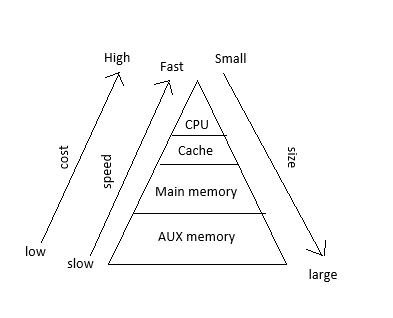
Having said all that it should be obvious why cache memories are used. Since the whole procedure of the CPU accessing the main memory was very time-consuming, we decided to introduce a smaller but faster memory unit between these two in order to improve the overall speed and performance. The name that was chosen for this in-between level is known as “cache memory”.
From an etymological standpoint, “cache” means “a hiding place”. This is a proper name for that memory level since it is not visible by the programmer himself — unlike the registers or the main memory —. Which data is stored in the cache is decided by a unit known as the cache controller.
In our previous analogy, the shelves of the library are the main memory while our desk is the cache memory.
An Instructive Example
Let’s run through an elementary example to make sure we understand the concept. Imagine you write a simple program in C language where a for loop is used to access every element of an integer array of twenty elements. The array is too big to be stored in the registers of the CPU and, thus, it is stored in the main memory.
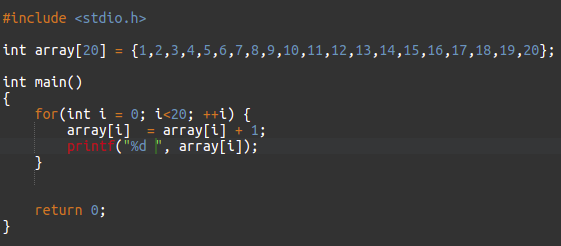
In the first iteration of the loop — where the counter, i, equals 0 — the processor must load the element array[0] from memory. Keeping in mind the concept of temporal locality, it stores the element array[0] in the cache memory because it knows that it will probably use it again shorty after — and in fact, the CPU is correct as the element array[0] is used the line right below in the “printf” function —.
Now, in order to explore the concept of spatial locality, it also loads in the cache memory some of the array[0]’s neighbor addresses (array[1], array[2], array[3], etc…) because the CPU knows that it will probably use them in the near future — and again, it is correct —. In this way, while we wasted time bringing array[0] from memory, we will spend much less time when accessing the elements array[1], array[2], array[3], etc.. because they are already stored in the cache memory.
We can generalize what we discussed in our example right below:
Memory hierarchy exploits the principle of temporal locality by keeping recently-accessed data as close to the CPU as possible.
Memory hierarchy exploits the principle of spatial locality by moving whole groups of data to higher levels.
Final Remarks
Cache memories are used to greatly improve the performance of a computer by keeping groups of data that were recently accessed close to the CPU. In many modern-day computers multiple levels of cache memories are used (typically at least 3 nowadays) to amplify the enhancement. The smaller caches are kept on the same chip as the processor while the bigger ones are outside of the chip but still pretty close.
In the next article, we are going to discuss the three different types of cache structures and their respective characteristics.
Thanks for reading and stay tuned!


