
Understanding Amazon EMR: A Guide to Clusters and Nodes in Big Data Processing
What is Amazon EMR
Amazon EMR, formerly known as Amazon Elastic MapReduce, serves as a managed cluster platform designed to streamline the execution of significant data frameworks like Apache Hadoop and Apache Spark on AWS. Its purpose is to facilitate the processing and analysis of extensive data sets. By leveraging these frameworks and associated open-source initiatives, users can handle data for analytical tasks and business intelligence workloads. Furthermore, Amazon EMR enables the efficient transformation and transfer of substantial data volumes to and from various AWS data repositories and databases, including Amazon Simple Storage Service (Amazon S3) and Amazon DynamoDB.
Understanding clusters and nodes
Primary node
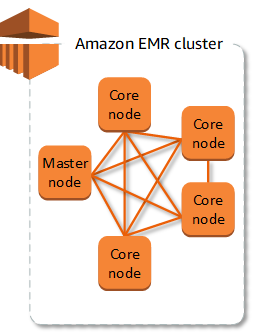
The primary node serves as the cluster manager and typically handles key components of distributed applications. For instance, it runs the YARN ResourceManager service for resource management in applications and operates the HDFS NameNode service. Additionally, it keeps tabs on job statuses within the cluster and monitors the well-being of instance groups.
To Monitor the cluster’s progress and engage directly with applications, connecting to the Primary node via SSH as the Hadoop user is an option. This connection provides access to directories and files, including direct retrieval of Hadoop log files. Furthermore, users can view application interfaces published as websites running on the central node.
Core nodes
The primary node manages the core nodes, which are responsible for executing various tasks within the Hadoop ecosystem. These nodes host the Data Node daemon to coordinate data storage within the Hadoop Distributed File System (HDFS). Additionally, they run the Task Tracker daemon, handling parallel computation tasks required by installed applications. For instance, core nodes execute YARN NodeManager daemons, Hadoop MapReduce tasks, and Spark executors.
Each cluster has a single core instance group or instance fleet, but multiple nodes can run on different Amazon EC2 instances within this group or fleet. Instance groups offer the flexibility to add or remove Amazon EC2 instances while the cluster is operational. Moreover, automatic scaling can be configured to add instances based on specific metric values.
Task Nodes
Task nodes provide additional computational power for executing parallel tasks on data, including tasks like Hadoop MapReduce and Spark executors. Unlike core nodes, task nodes do not run the Data Node daemon and do not store data in HDFS. Similar to core nodes, you can augment a cluster with task nodes by either incorporating Amazon EC2 instances into an existing uniform instance group or adjusting target capacities for a task instance fleet.
In the case of a uniform instance group setup, you can have a maximum of 48 task instance groups. This approach enables the mixing of Amazon EC2 instance types and pricing models, such as On-Demand Instances and Spot Instances. This flexibility allows you to efficiently address workload demands while optimizing costs
Reference:
Are you interested in learning about cloud computing, cybersecurity, and programming? If so, I highly recommend that you check out my YouTube channel. I share regular videos on these topics, providing helpful tips, tutorials, and insights that will help you expand your knowledge and skills.
My videos are designed for anyone who is interested in these topics, whether you are a beginner or an experienced professional. By subscribing to my channel, you will gain access to a wealth of knowledge and insights that will help you stay up-to-date with the latest trends and best practices in cloud computing, cybersecurity, and programming.
So if you’re interested in learning more about these topics, be sure to subscribe to my channel today. Don’t forget to hit the notification bell so that you don’t miss any of my upcoming videos. I look forward to seeing you on the channel!