avatarNnyw

Free AI web copilot to create summaries, insights and extended knowledge, download it at here

6645

Abstract

word">public</span> <span class="hljs-keyword">void</span> <span class="hljs-title function_">add</span><span class="hljs-params">(<span class="hljs-type">int</span> item, <span class="hljs-type">int</span> producerId)</span> { <span class="hljs-keyword">if</span> (list.size() < capacity) { System.out.println(<span class="hljs-string">"Producer "</span> + producerId + <span class="hljs-string">" adding item "</span> + item); list.add(item); System.out.println(<span class="hljs-string">"ITEM COUNT :: "</span> + list.size()); } <span class="hljs-keyword">else</span> { System.out.println(<span class="hljs-string">"Buffer is full now. "</span>); } }</pre></div><p id="abe3">After we run the code, the exception disappeared. However, you may notice some unexpected behavior.</p><figure id="4a6f"><img src="https://cdn-images-1.readmedium.com/v2/resize:fit:800/1*5oe7BeW7-1LdkKoeSkbgaA.png"><figcaption></figcaption></figure><ol><li>The consumer thread starts only after the producer finish adding all the items.</li><li>“Buffer is empty now” went into an infinite loop. (“Buffer is full now” is supposed to be an infinite loop but here we use for loop so it limits to 10 rounds)</li><li>Consumer 1 doesn’t consume anything.</li></ol><p id="9836">Let’s understand the issue here. When <code>p1</code> , <code>c1</code> , and <code>c2</code> threads were started, <code>p1</code>gained the lock, therefore it started to add items into the buffer. <code>p1</code> continues adding items until the for loop ends. <code>p1</code>exits the block, the lock is automatically released and any waiting thread can acquire that lock and enter the synchronized block. Now, <code>c2</code> successfully grabs the lock and enters the block to execute the remove action. Because <code>c2</code> was in <code>while(true)</code> loop, there is no way to stop the <code>c2</code> release of the lock. Hence, “Buffer is empty now” printed infinitely. <code>c1</code> has no chance to gain the lock in this situation.</p><p id="ea89">Let’s understand by printing the thread state status.</p><div id="f5e2"><pre><span class="hljs-comment">// Main.java</span> System.out.println(p1.getState()); System.out.println(c1.getState()); System.out.println(c2.getState());

Thread.sleep((<span class="hljs-type">long</span>) (Math.random() * <span class="hljs-number">1000</span>));

System.out.println(p1.getState()); System.out.println(c1.getState()); System.out.println(c2.getState());</pre></div><div id="0a48"><pre>RUNNABLE BLOCKED BLOCKED Producer 1 adding item 0 ITEM COUNT :: 1 Producer 1 adding item 0 ITEM COUNT :: 2 Producer 1 adding item 0 ITEM COUNT :: 3 Producer 1 adding item 0 ITEM COUNT :: 4 Producer 1 adding item 0 ITEM COUNT :: 5 Buffer is full now. Buffer is full now. Buffer is full now. Buffer is full now. Buffer is full now. Consumer 2 removing item 0 ITEM COUNT :: 4 Consumer 2 removing item 0 ITEM COUNT :: 3 Consumer 2 removing item 0 ITEM COUNT :: 2 Consumer 2 removing item 0 ITEM COUNT :: 1 Consumer 2 removing item 0 ITEM COUNT :: 0 Buffer is empty now. Buffer is empty now. Buffer is empty now. TERMINATED BLOCKED TIMED_WAITING Buffer is empty now. Buffer is empty now. </pre></div><p id="b1b3">In the beginning, when 3 threads were started, only one thread was scheduled to execute, and another 2 threads go into <code>BLOCKED</code>state. Because the for loop ends <code>p1</code>exits the block and went into <code>TERMINATED</code>state. The thread scheduler wakes one of the 2 threads in <code>BLOCKED</code>state to start to consume the item. Since there is no way to ask <code>c2</code> to release the lock, <code>c1</code> will always be in <code>BLOCKED</code>state.</p><p id="bdcb">After we understand the problem, we need some mechanism to wake the consumer when items are available to take and wake the producer to put an item if the buffer has capacity.</p><p id="1e2a">Let’s modify the code to include <code>wait()</code> when the condition is not fulfilled and <code>notifyAll()</code> after the execution.</p> <figure id="4d96"> <div> <div>

            <iframe class="gist-iframe" src="/gist/wynnteo/c726aa46a3773a20ad39136c6ea208cf.js" allowfullscreen="" frameborder="0" height="undefined" width="undefined">
          </div>
        </div>
    </figure></iframe></div></div></figure><p id="b319">Let’s see the result.</p><figure id="41d3"><img src="https://cdn-images-1.readmedium.com/v2/resize:fit:800/1*GFS-rAmKSfXS7KUDLKNevA.png"><figcaption></figcaption></figure><p id="8c44">Everything seems to work perfectly now. But wait a minute!</p><p id="c096">You might observe something abnormally from the code.</p><p id="4f97">Let’s look closely at these two functions.</p><div id="4d6c"><pre><span class="hljs-comment">// Buffer.java</span>

<span class="hljs-keyword">public</span> <span class="hljs-keyword">synchronized</span> <span class="hljs-keyword">void</span> <span class="hljs-title function_">remove</span><span class="hljs-params">(<span class="hljs-type">int</span> consumerId)</span> { <span class="hljs-keyword">if</span> (!list.isEmpty()) { System.out.println(<span class="hljs-string">"Consumer "</span> + consumerId + <span class="hljs-string">" removing item "</span> + list.get(<span class="hljs-number">0</span>)); list.remove(<span class="hljs-number">0</span>); System.out.println(<span class="hljs-string">"ITEM COUNT :: "</span> + list.size()); notifyAll(); } <span class="hljs-keyword">else</span> { System.out.println(<span class="hljs-string">"Buffer is empty now. "</span>); wait(); } }

<span class="hljs-keyword">public</span> <span class="hljs-keyword">synchronized</span> <span class="hljs-keyword">void</span> <span class="hljs-title function_">add</span><span class="hljs-params">(<span class="hljs-type">int</span> item, <span class="hljs-type">int</span> producerId)</span> { <span class="hljs-keyword">if</span> (list.size() < capacity) { System.out.println(<span class="hljs-string">"Producer "</span> + producerId + <span class="hljs-string">" adding item "</span> + item); list.add(item); System.out.println(<span class="hljs-string">"ITEM COUNT :: "</span> + list.size()); notifyAll(); } <span class="hljs-keyword">else</span> { System.out.println(<span class="hljs-string">"Buffer is full now. "</span>); wait(); } }</pre></div><p id="246a">If the list is not fulfilled the condition in the if clause, the thread went into the else statement to wait for the condition update. However, when the thread was notified that the condition

Options

was updated, the thread got nothing to proceed. So, it “gives up” the lock and then back to the queue.</p><p id="ea13">This is somehow not what we want. You may try to remove <code>wait()</code> and <code>notifyAll()</code> methods. You will see the program runs correctly.</p><p id="c672">Here we want the thread to proceed to execute the action after awakening. Let’s remove the else clause and check the wait condition first so that the thread will continue to execute the action after being notified.</p><div id="87d1"><pre><span class="hljs-comment">// Buffer.java</span> <span class="hljs-keyword">public</span> <span class="hljs-keyword">synchronized</span> <span class="hljs-keyword">void</span> <span class="hljs-title function_">add</span><span class="hljs-params">(<span class="hljs-type">int</span> item, <span class="hljs-type">int</span> producerId)</span> <span class="hljs-keyword">throws</span> InterruptedException { <span class="hljs-keyword">if</span> (list.size() >= capacity) { System.out.println(<span class="hljs-string">"Buffer is full now. "</span>); wait(); }

System.out.println(<span class="hljs-string">"Producer "</span> + producerId + <span class="hljs-string">" adding item "</span> + item); list.add(item); System.out.println(<span class="hljs-string">"ITEM COUNT :: "</span> + list.size()); notifyAll(); }

<span class="hljs-keyword">public</span> <span class="hljs-keyword">synchronized</span> <span class="hljs-keyword">void</span> <span class="hljs-title function_">remove</span><span class="hljs-params">(<span class="hljs-type">int</span> consumerId)</span> <span class="hljs-keyword">throws</span> InterruptedException { <span class="hljs-keyword">if</span> (list.isEmpty()) { System.out.println(<span class="hljs-string">"Buffer is empty now. "</span>); wait(); }

System.out.println(<span class="hljs-string">"Consumer "</span> + consumerId + <span class="hljs-string">" removing item "</span> + list.get(<span class="hljs-number">0</span>)); list.remove(<span class="hljs-number">0</span>); System.out.println(<span class="hljs-string">"ITEM COUNT :: "</span> + list.size()); notifyAll(); }</pre></div><p id="399a">Again, the program hit <b><i>java.lang.IndexOutOfBoundsException</i></b></p><figure id="912e"><img src="https://cdn-images-1.readmedium.com/v2/resize:fit:800/1*4gT2HeZ3in5MsKYNFHO9CQ.png"><figcaption></figcaption></figure><p id="81a6">Why does this happen?</p><p id="11e6">In the beginning, because the buffer is still empty so both <code>c2</code> and <code>c1</code> when into <code>WAITING</code>state. Once the <code>p1</code> has added an item into the buffer, it calls <code>notifyAll()</code> to wake the <code>c1</code> and <code>c2</code> up. In this <code>c2</code> managed to execute the action and release the lock. When <code>c1</code> gained the lock it proceeds with the action, however, at this moment the buffer is already empty.</p><p id="4d1f">To resolve this issue, we just need to change the if to while loop. Every time when the thread is awakened, check the condition again before proceeding.</p><div id="c49f"><pre><span class="hljs-comment">// Buffer.java</span> <span class="hljs-keyword">public</span> <span class="hljs-keyword">synchronized</span> <span class="hljs-keyword">void</span> <span class="hljs-title function_">add</span><span class="hljs-params">(<span class="hljs-type">int</span> item, <span class="hljs-type">int</span> producerId)</span> <span class="hljs-keyword">throws</span> InterruptedException { <span class="hljs-keyword">while</span> (list.size() >= capacity) { System.out.println(<span class="hljs-string">"Buffer is full now. "</span>); wait(); }

System.out.println(<span class="hljs-string">"Producer "</span> + producerId + <span class="hljs-string">" adding item "</span> + item); list.add(item); System.out.println(<span class="hljs-string">"ITEM COUNT :: "</span> + list.size()); notifyAll(); }

<span class="hljs-keyword">public</span> <span class="hljs-keyword">synchronized</span> <span class="hljs-keyword">void</span> <span class="hljs-title function_">remove</span><span class="hljs-params">(<span class="hljs-type">int</span> consumerId)</span> <span class="hljs-keyword">throws</span> InterruptedException { <span class="hljs-keyword">while</span> (list.isEmpty()) { System.out.println(<span class="hljs-string">"Buffer is empty now. "</span>); wait(); }

System.out.println(<span class="hljs-string">"Consumer "</span> + consumerId + <span class="hljs-string">" removing item "</span> + list.get(<span class="hljs-number">0</span>)); list.remove(<span class="hljs-number">0</span>); System.out.println(<span class="hljs-string">"ITEM COUNT :: "</span> + list.size()); notifyAll(); }</pre></div><p id="8d86">Now, we understand the producer and consumer problem and how to use <code>syncrhonized</code>keywords to resolve it.</p><p id="3459">Happy coding! 🎉</p><ul><li><i>Leave a comment if you have any questions.</i></li><li><i>Clap if you find this tutorial useful.</i></li><li><i>Follow me to get notified when I publish new tutorials.</i></li><li><i>Buy me a <a href="https://ko-fi.com/wynnteo">coffee</a> to support me.</i></li></ul><div id="9579" class="link-block"> <a href="https://readmedium.com/understand-multi-threading-in-java-part-i-2a1884369e5e"> <div> <div> <h2>Understand Multi-Threading in Java — Part I</h2> <div><h3>Java supports multi-thread operations. Multithreading is a process of executing two or more threads independently and…</h3></div> <div><p>medium.com</p></div> </div> <div> <div style="background-image: url(https://miro.readmedium.com/v2/resize:fit:320/1*CRdFYNeH9HJA7Vv74OS11g.jpeg)"></div> </div> </div> </a> </div><div id="41b2" class="link-block"> <a href="https://readmedium.com/understand-multi-threading-in-java-part-ii-f8da4338c4a5"> <div> <div> <h2>Understand Multi-Threading in Java — Part II</h2> <div><h3>In the previous post, we have learned two thread states, NEW and RUNNABLE. In this article, we will continue to dive…</h3></div> <div><p>medium.com</p></div> </div> <div> <div style="background-image: url(https://miro.readmedium.com/v2/resize:fit:320/1*CRdFYNeH9HJA7Vv74OS11g.jpeg)"></div> </div> </div> </a> </div></article></body>

Understand Producer and Consumer in Java Multithreading
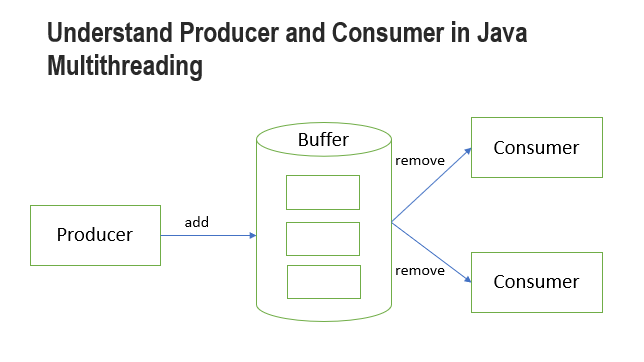
This is a famous interview question that you may be asked by the interviewer. When a Producer and Consumer both are sharing the same queue to put and consume items. This may cause the queue out of synchronize.

Problem

  1. A producer trying to add an item into a full buffer.
  2. A consumer trying to remove an item from an empty buffer.

Let’s understand the problem by running the code below.

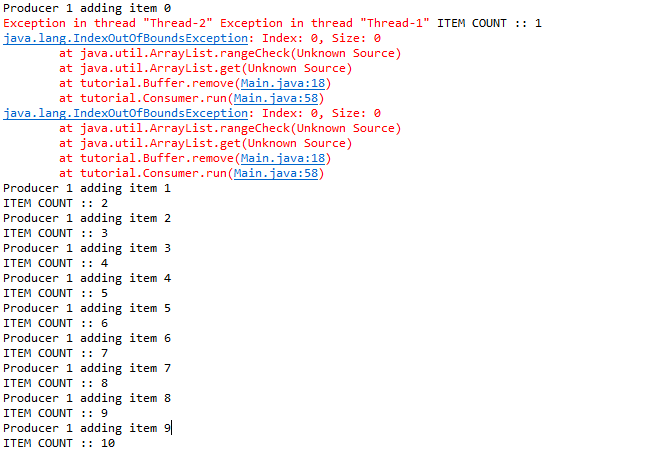
When running the code above, the program hit java.lang.IndexOutOfBoundsException. This is because the consumer tries to remove an item from an empty list.

Buffer’s capacity was set to 5, but the producer added items more than 5.
How about adding a buffer empty check before the consumer can remove the item?

// Consumer.java

public void remove(int consumerId) {
  if (!list.isEmpty()) {
   System.out.println("Consumer " + consumerId + " removing item " + list.get(0));
   list.remove(0);
   System.out.println("ITEM COUNT :: " + list.size());
  }
}

// Producer.java
public void add(int item, int producerId) {
  if (list.size() < capacity) {
   System.out.println("Producer " + producerId + " adding item " + item);
   list.add(item);
   System.out.println("ITEM COUNT :: " + list.size());
  }
}

After a few runs, the program hit java.lang.IndexOutOfBoundsException again.
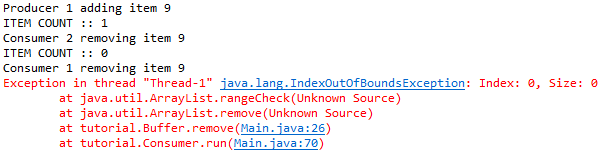
From the output, we notice that consumer 1 and consumer 2 were removing the same item at the same time. After consumer 2 removed the item from the buffer, the buffer become empty and at the same time, the context switched back to consumer 1 to execute the remove function. Because the buffer was empty, hence exception occurred.

Solution

There are a few ways to resolve this. In Understand Multi-Threading in Java — Part II we learned about synchronized keyword.

The synchronized keyword is used to control a block of code (critical section) to be executed by more than one thread. If we never declared the synchronized keyword, more than one thread may enter the add() and remove()methods to modify the list.

Let’s modify the code by adding the synchronized keyword.

// Producer.java
@Override
public void run() {
  for (int i = 0; i < 10; i++)
   synchronized (buffer) {
    try {
     this.buffer.add(i, this.id);
     sleep((long) (Math.random() * 100));
    } catch (InterruptedException e) {
     e.printStackTrace();
    }
   }
}

// Consumer.java
@Override
public void run() {
  while (true)
   synchronized (buffer) {
    try {
     this.buffer.remove(this.id);
     sleep((long) (Math.random() * 100));
    } catch (InterruptedException e) {
     e.printStackTrace();
    }
   }
}

// Buffer.java
public void remove(int consumerId) {
  if (!list.isEmpty()) {
   System.out.println("Consumer " + consumerId + " removing item " + list.get(0));
   list.remove(0);
   System.out.println("ITEM COUNT :: " + list.size());
  } else {
   System.out.println("Buffer is empty now. ");
  }
}

public void add(int item, int producerId) {
  if (list.size() < capacity) {
   System.out.println("Producer " + producerId + " adding item " + item);
   list.add(item);
   System.out.println("ITEM COUNT :: " + list.size());
  } else {
   System.out.println("Buffer is full now. ");
  }
}

After we run the code, the exception disappeared. However, you may notice some unexpected behavior.
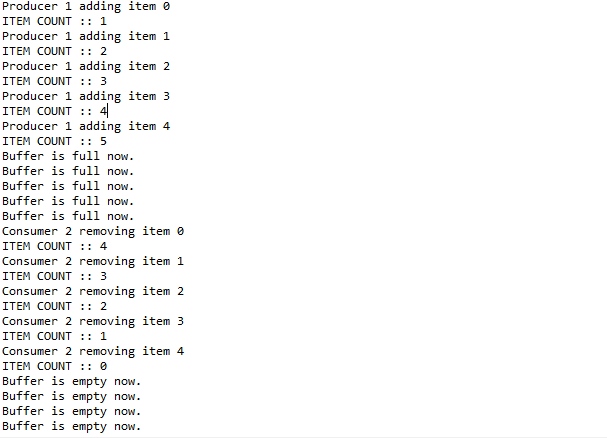
  1. The consumer thread starts only after the producer finish adding all the items.
  2. “Buffer is empty now” went into an infinite loop. (“Buffer is full now” is supposed to be an infinite loop but here we use for loop so it limits to 10 rounds)
  3. Consumer 1 doesn’t consume anything.

Let’s understand the issue here. When p1 , c1 , and c2 threads were started, p1gained the lock, therefore it started to add items into the buffer. p1 continues adding items until the for loop ends. p1exits the block, the lock is automatically released and any waiting thread can acquire that lock and enter the synchronized block. Now, c2 successfully grabs the lock and enters the block to execute the remove action. Because c2 was in while(true) loop, there is no way to stop the c2 release of the lock. Hence, “Buffer is empty now” printed infinitely. c1 has no chance to gain the lock in this situation.

Let’s understand by printing the thread state status.

// Main.java
System.out.println(p1.getState());
System.out.println(c1.getState());
System.out.println(c2.getState());

Thread.sleep((long) (Math.random() * 1000));

System.out.println(p1.getState());
System.out.println(c1.getState());
System.out.println(c2.getState());
RUNNABLE
BLOCKED
BLOCKED
Producer 1 adding item 0
ITEM COUNT :: 1
Producer 1 adding item 0
ITEM COUNT :: 2
Producer 1 adding item 0
ITEM COUNT :: 3
Producer 1 adding item 0
ITEM COUNT :: 4
Producer 1 adding item 0
ITEM COUNT :: 5
Buffer is full now. 
Buffer is full now. 
Buffer is full now. 
Buffer is full now. 
Buffer is full now. 
Consumer 2 removing item 0
ITEM COUNT :: 4
Consumer 2 removing item 0
ITEM COUNT :: 3
Consumer 2 removing item 0
ITEM COUNT :: 2
Consumer 2 removing item 0
ITEM COUNT :: 1
Consumer 2 removing item 0
ITEM COUNT :: 0
Buffer is empty now. 
TERMINATED
BLOCKED
TIMED_WAITING
Buffer is empty now. 

In the beginning, when 3 threads were started, only one thread was scheduled to execute, and another 2 threads go into BLOCKEDstate. Because the for loop ends p1exits the block and went into TERMINATEDstate. The thread scheduler wakes one of the 2 threads in BLOCKEDstate to start to consume the item. Since there is no way to ask c2 to release the lock, c1 will always be in BLOCKEDstate.

After we understand the problem, we need some mechanism to wake the consumer when items are available to take and wake the producer to put an item if the buffer has capacity.

Let’s modify the code to include wait() when the condition is not fulfilled and notifyAll() after the execution.

Let’s see the result.
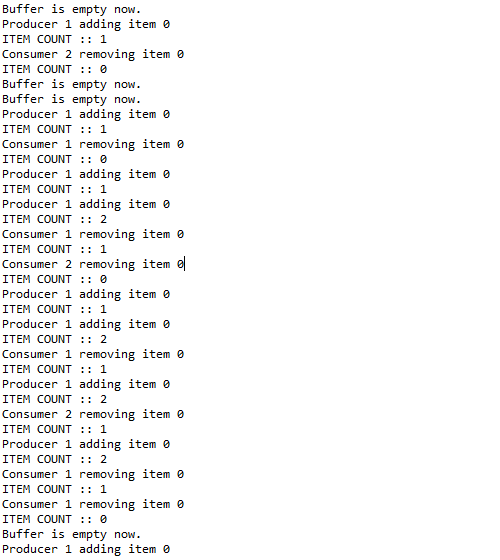
Everything seems to work perfectly now. But wait a minute!

You might observe something abnormally from the code.

Let’s look closely at these two functions.

// Buffer.java
public synchronized void remove(int consumerId) {
  if (!list.isEmpty()) {
   System.out.println("Consumer " + consumerId + " removing item " + list.get(0));
   list.remove(0);
   System.out.println("ITEM COUNT :: " + list.size());
   notifyAll();
  } else {
   System.out.println("Buffer is empty now. ");
   wait();
  }
}

public synchronized void add(int item, int producerId) {
  if (list.size() < capacity) {
   System.out.println("Producer " + producerId + " adding item " + item);
   list.add(item);
   System.out.println("ITEM COUNT :: " + list.size());
   notifyAll();
  } else {
   System.out.println("Buffer is full now. ");
   wait();
  }
}

If the list is not fulfilled the condition in the if clause, the thread went into the else statement to wait for the condition update. However, when the thread was notified that the condition was updated, the thread got nothing to proceed. So, it “gives up” the lock and then back to the queue.

This is somehow not what we want. You may try to remove wait() and notifyAll() methods. You will see the program runs correctly.

Here we want the thread to proceed to execute the action after awakening. Let’s remove the else clause and check the wait condition first so that the thread will continue to execute the action after being notified.

// Buffer.java
public synchronized void add(int item, int producerId) throws InterruptedException {
  if (list.size() >= capacity) {
   System.out.println("Buffer is full now. ");
   wait();
  }
  
  System.out.println("Producer " + producerId + " adding item " + item);
  list.add(item);
  System.out.println("ITEM COUNT :: " + list.size());
  notifyAll();
 }

 public synchronized void remove(int consumerId) throws InterruptedException {
  if (list.isEmpty()) {
   System.out.println("Buffer is empty now. ");
   wait();
  } 

  System.out.println("Consumer " + consumerId + " removing item " + list.get(0));
  list.remove(0);
  System.out.println("ITEM COUNT :: " + list.size());
  notifyAll();
 }

Again, the program hit java.lang.IndexOutOfBoundsException
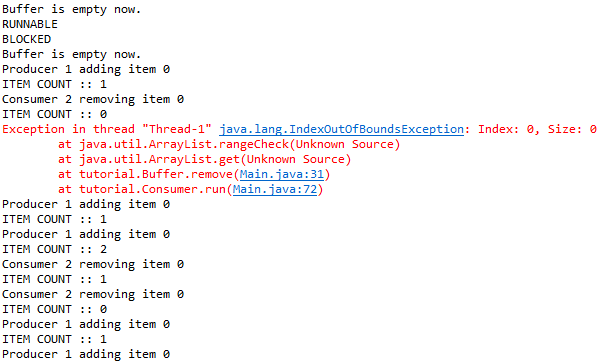
Why does this happen?

In the beginning, because the buffer is still empty so both c2 and c1 when into WAITINGstate. Once the p1 has added an item into the buffer, it calls notifyAll() to wake the c1 and c2 up. In this c2 managed to execute the action and release the lock. When c1 gained the lock it proceeds with the action, however, at this moment the buffer is already empty.

To resolve this issue, we just need to change the if to while loop. Every time when the thread is awakened, check the condition again before proceeding.

// Buffer.java
public synchronized void add(int item, int producerId) throws InterruptedException {
  while (list.size() >= capacity) {
   System.out.println("Buffer is full now. ");
   wait();
  }
  
  System.out.println("Producer " + producerId + " adding item " + item);
  list.add(item);
  System.out.println("ITEM COUNT :: " + list.size());
  notifyAll();
 }

 public synchronized void remove(int consumerId) throws InterruptedException {
  while (list.isEmpty()) {
   System.out.println("Buffer is empty now. ");
   wait();
  } 

  System.out.println("Consumer " + consumerId + " removing item " + list.get(0));
  list.remove(0);
  System.out.println("ITEM COUNT :: " + list.size());
  notifyAll();
 }

Now, we understand the producer and consumer problem and how to use syncrhonizedkeywords to resolve it.

Happy coding! 🎉

  • Leave a comment if you have any questions.
  • Clap if you find this tutorial useful.
  • Follow me to get notified when I publish new tutorials.
  • Buy me a coffee to support me.
Java
Multithreading
Synchronization
Producer Consumer Problem
Threads
Recommended from ReadMedium