
Understand And Learn Regular Expressions for Better Coding

Regular expressions, often abbreviated as “regex,” hold a unique and powerful place in the world of computer science. They are a versatile and compact means of describing and manipulating text patterns.
I’ve known about regular expressions for a long time, but I didn’t really understand them. Now that I really understand them and use them, I find it much easier to write certain programs and manipulate text on my computer.
I’ll try to introduce you to them if you’re not familiar with them.
Understanding Regular Expressions
Regular expressions (regex) are a fundamental tool for searching, manipulating, and validating text patterns. At their core, regular expressions are sequences of characters that form a search pattern. They serve as a powerful means of describing and identifying complex patterns within strings of text.
Your First Pattern
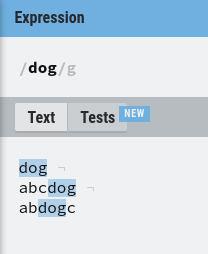
The simplest pattern is just a word, for example: “dog”. “dog” is a regex that will match all the words containing “dog”. For example:
dog- abc
dog - ab
dogc
Usually, a pattern starts with a “/”. So our full pattern becomes “/dog” (but I will omit this first character for the whole article, so as not to make the expressions too long).
Trying Regular Expressions
I advise you try regular expressions by yourself. You can use websites like https://regexr.com/ or https://regex101.com/ to test your regular expressions.
Metacharacters: Unleashing the Power
In regex, certain characters are designated as metacharacters, carrying special meanings that go beyond their literal interpretation. These metacharacters enable you to create flexible and dynamic patterns that can match a wide range of text configurations.
For instance, the period (.) metacharacter represents any single character. This means that the pattern “a.c” would match “abc,” “axc,” or “azc.” Additionally, the asterisk (*) metacharacter signifies zero or more occurrences of the preceding character. So, “ab*” would match “a,” “ab,” “abb,” “abbb,” and so on.
Characters Set
Let’s start with the basics. To find characters, you have some metacharacters available. For example:
- \w: matches a word
- \d: matches a digit
- \s: matches any whitespace character
- \n: matches a newline character
- And more…
You can also specify your own characters set by using brackets ([]). For example:
- [abc]: matches “a”, “b”, or “c”
- [a-Z]: matches any character in the range
- [^abc]: matches any character not in the set
Quantifiers: Specifying Occurrences
Quantifiers provide the means to specify how many times a character or a group of characters should appear in the pattern. These quantifiers help you express repetitive structures in a concise manner.
- The asterisk (*) quantifier (already seen before)
- The plus (+) quantifier: Requires at least one occurrence of the preceding character or group. “go+l” would match “gol” and “goooool” but not “gl.”
- The question mark (?) quantifier: Matches zero or one occurrence of the preceding character or group. “colou?r” would match both “color” and “colour”, but not “colouur”.
You can also use braces({}) to specify the exact number of occurences:
- {n}: matches exactly n times
- {n,}: at least n times
- {n,m}: between n and m times
Escaping Metacharacters
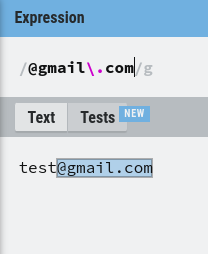
Sometimes, you’ll need to match a metacharacter itself rather than its special meaning. In such cases, you can escape the metacharacter using a backslash (\). For instance, if you want to match a literal period, you would use “\.” in your pattern.
Grouping for Control
Parentheses (()) serve a crucial role in regex by allowing you to group characters or sub-patterns together. This grouping enables you to apply quantifiers and other operations to a specific part of the pattern.
They also allow you to capture text from a regular expression.
For example, let’s say I want to capture the name in an email address. Here is a pattern I can use:
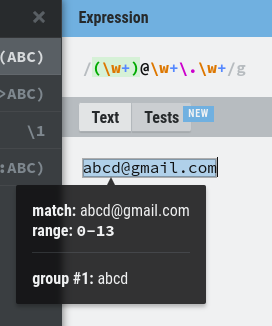
As you can see, we have “group #1: abcd”.
Alternation: Choices Within Patterns
The pipe symbol (|) represents alternation, allowing you to define multiple alternatives within a pattern. For instance, “cat|dog” would match either “cat” or “dog.”
Anchoring Patterns
Anchors are used to specify the position of a pattern within the text. The caret (^) anchor indicates the start of a line, while the dollar sign ($) anchor indicates the end of a line.
- “^Hello” would match “Hello” only if it appears at the beginning of the text
- “world$” would match “world” only if it appears at the end of the text
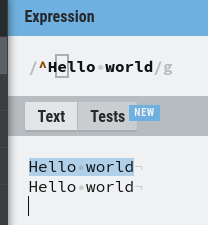
The second line isn’t a match because it is not the start of the text.
Word Boundaries
Word boundaries (\b) allow you to match patterns only at the beginning or end of words. This is useful when you want to find whole words rather than substrings within words.
- “\btest\b” would match “test” but not “testing” or “contest”
- “\btest” would match “test” and “testing” but not “contest”
Putting It All Together
Now it’s up to you to try and use everything I’ve talked about to create patterns. You can try, for example, to create patterns for:
- Extracting phone numbers
- Matching email addresses
- Matching zip codes
- Matching dates
- …
Training
If you want to train, you can use the websites I talked about earlier. You can also check out https://regexone.com/, I initially learned regular expressions with this website, it works perfectly.
Final Note
Welcome to the wonderful world of regular expressions! Now you know how to use them, you’ll feel like you’ve unlocked a superpower when coding.
For me, I write a lot of Python scripts, and I do a lot of webscraping, so the day I really understood regular expressions and started using them, it has become a game-changer.
Thanks for reading! Here are some links that may interest you:


