avatarYitaek Hwang

Free AI web copilot to create summaries, insights and extended knowledge, download it at here

4428

Abstract

75% of the underlying node’s memory and ~95% of the CPU. On the other hand, bigger nodes are less impacted by the system and Kubernetes overhead. As shown below, an n1-standard-96 node leaves 99% of the CPU and 96% of the memory for your applications.</p><p id="4211">(<i>The full list of allocatable memory and CPU resources for each machine type can be found <a href="https://cloud.google.com/kubernetes-engine/docs/concepts/cluster-architecture#memory_cpu">here</a> with caveats for Windows Server nodes</i>.)</p><figure id="2b16"><img src="https://cdn-images-1.readmedium.com/v2/resize:fit:800/1*X84FAZx3l0AxTDzSfQu1Vw.png"><figcaption>GKE Allocatable CPU & Memory Resources — Image Credit: <a href="https://cloud.google.com/kubernetes-engine/docs/concepts/cluster-architecture#memory_cpu">GKE Documentation</a></figcaption></figure><h1 id="e4a1">Resource Asymmetry</h1><p id="e455">Now that we understand allocatable resources, the next challenge is dealing with resource asymmetry. Some applications may be CPU-intensive (e.g. machine learning workloads, video streaming), whereas some may be memory-intensive (e.g. Redis). Given such resource asymmetry, kube-scheduler will try its best to schedule each workload to the most optimal node given the resource constraints. Kube-scheduler’s decision to schedule pods on different nodes is guided by a scoring algorithm influenced by resource requirements, anti-/affinity rules, data locality, and inter-workload interference. Although it is possible to tune the scheduler’s performance in terms of latency (i.e. time to schedule a new pod) and the node scoring threshold for scheduling decisions, selecting the correct node type is critical to avoid unnecessary scaling and unused resources on each node.</p><p id="1c56">One method to deal with resource asymmetry is to create multiple node pools for different application types. For example, stateless applications may run on general-purpose, preemptible nodes, whereas databases may be scheduled to run on CPU or memory-optimized nodes. This can be controlled by <a href="https://kubernetes.io/docs/concepts/scheduling-eviction/taint-and-toleration/">node taints and affinity rules</a> to schedule specific workloads to tainted nodes only.</p><figure id="b67b"><img src="https://cdn-images-1.readmedium.com/v2/resize:fit:800/0*kOo4fHE5PGPbwDR-.png"><figcaption>GKE Example of Multiple Node Pools — Image Credit: <a href="https://cloud.google.com/blog/products/containers-kubernetes/cutting-costs-with-google-kubernetes-engine-using-the-cluster-autoscaler-and-preemptible-vms">GCP Blog</a></figcaption></figure><p id="f544">Even with multiple node pools and affinity rules set, Kubernetes resource usage may become suboptimal over time given its dynamic nature:</p><ul><li>New nodes may be added to the cluster to deal with a higher load.</li><li>Nodes may fail or be recreated for cluster upgrades.</li><li>Taints or pod/node affinity rules may change to deal with new application requirements.</li><li>Some nodes may become under- or over-utilized after applications are deleted or added.</li></ul><p id="970d">To rebalance the pods across the nodes, run <a href="https://github.com/kubernetes-sigs/descheduler">descheduler</a> as a Job or CronJob inside the Kubernetes cluster. Descheduler is a kubernetes-sig project that includes seven strategies (<code>RemoveDuplicates</code>, <code>LowNodeUtilization</code>, <code>RemovePodsViolatingInterPodAntiAffinity</code>, <code>RemovePodsViolatingNodeAffinity</code>, <code>RemovePodsiolatingNodeTaints</code>, <code>RemovePodsHavingTooManyRestarts</code>, and <code>PodLifeTime</code>) to optimize node resource usage automatically.</p><h1 id="2679">Resource Ranges & Quotas</h1><p id="528b">Finally, we must understand and define resource ranges for our application. Kubernetes provides two basic configurable parameters for resource management:</p><ul><li><b>Requests</b>: lower bound on resource usage per workload</li><li><b>Limits</b>: upper bound on resource usage per workload</li></ul><figure id="808c"><img src="https://cdn-images-1.readmedium.com/v2/resize:fit:800/1*o3CZWZh3sy1jVyBPQRqang.png"><figcaption></figcaption></figure><p id="24c6">Kubernetes scheduler takes the request parameter per workload and allocates the prescribed CPU and memory. This is the minimum resource usage of the workload, but the application may actually use less or more than

Options

this threshold. The limit, on the other hand, sets the maximum resource usage. When the workload uses more than the limit, kubelet will throttle the CPU or issue an OOM kill message. In an ideal world, resource utilization will be 100%, but in reality, resource usage is often irregular and hard to predict.</p><p id="de7e">Another thing to consider is the application’s quality of service (QoS). Combining requests and limits, we can provide the following QoS:</p><ul><li><b>Guaranteed</b>: For relatively predictable workloads (e.g. CPU-bound web servers, scheduled jobs), we can explicitly provision set resources for guaranteed QoS. To enable this, specify the limit or set the request equal to the limit.</li><li><b>Burstable</b>: For workloads that need to consume more resources based on traffic or data (e.g. Elasticsearch, data analytics engine), we can set the request resources based on the steady-state usage, but give a higher limit to allow the workload to vertically scale.</li><li><b>Best Effort</b>: Finally, for workloads with unknown resource usage, leave both the requests and limits unspecified to allow the workload to use all available resources on the node. From the scheduler perspective, these workloads are treated as the lowest priority and will be evicted before guaranteed or burstable workloads.</li></ul><p id="ba13">So how do we set reasonable requests and limits to avoid performance degradation and optimize for cost? A good rule of thumb is to benchmark typical usage and give a 25% margin for limits. We don’t want to set the requests or the limits too high to block other applications from utilizing resources and making it harder on the scheduler to allocate resources for our workload. From the initial resource configuration, run some load tests to record performance degradation or failures. If the workload starts to slow down or gets killed, double the limit and continue the tests. On the other hand, if there’s no significant change in performance, try decreasing the requests and limits to free up resources for the cluster.</p><figure id="9d17"><img src="https://cdn-images-1.readmedium.com/v2/resize:fit:800/0*JqcZsatacl-zNIaV.png"><figcaption>Image Credit: <a href="https://sysdig.com/blog/kubernetes-limits-requests/">Sysdig</a></figcaption></figure><p id="9ee6">Finally, we can use <a href="https://github.com/kubernetes/autoscaler/tree/master/vertical-pod-autoscaler">Vertical Pod Autoscaler (VPA)</a> to automatically set requests and maintain ratios between limits and requests based on historical usage. VPA can automatically scale down pods that are over-requesting resources and scale up pods that are under-requesting. However, VPA comes with some limitations:</p><ul><li>Updating running pods is an experimental feature of VPA. Updates from VPA causes all running containers to be restarted.</li><li>VPA cannot be used with Horizontal Pod Autoscaler on CPU or memory currently. A workaround is to specify <a href="https://kubernetes.io/docs/tasks/run-application/horizontal-pod-autoscale/#support-for-custom-metrics">custom or external metrics</a> to combine both VPA and HPA.</li><li>VPA is not ready for use with JVM-based workloads due to limited visibility in actual memory usage.</li></ul><p id="732e">If you do not wish to rely on VPA to update running workloads, we can use VPA in recommendation mode instead or use a tool like <a href="https://github.com/FairwindsOps/goldilocks/">Goldilocks from FairwindsOps</a> to see recommended values on a dashboard. VPA only knows about resource usage on the cluster, so we still need to run some load tests to better characterize our applications.</p><figure id="efef"><img src="https://cdn-images-1.readmedium.com/v2/resize:fit:800/1*w4aOP3RUp2nb-J0CwXMKSA.png"><figcaption>Image Credit: <a href="https://github.com/FairwindsOps/goldilocks/">Goldilocks</a></figcaption></figure><h1 id="fafb">Conclusion</h1><p id="9a6b">Careful resource planning and capacity analysis will add predictability and improve system resiliency. Don’t wait until things break in production to find out what resource requests and limits should be set for your workloads. Profile and benchmark typical resource utilization, choose the appropriate node type and node pools, and define QoS with resource ranges. Take advantage of VPAs or validation tools like Goldilocks to craft the optimized cluster for your applications.</p></article></body>

Ultimate Kubernetes Resource Planning Guide

Understanding allocatable CPU/memory on Kubernetes nodes and optimizing resource usage.
Capacity planning for Kubernetes is a critical step to running production workloads on clusters optimized for performance and cost. Given too little resources, Kubernetes may start to throttle CPU or kill pods with out-of-memory (OOM) error. On the other hand, if the pods demand too much, Kubernetes will struggle to allocate new workloads and waste idle resources.

Unfortunately, capacity planning for Kubernetes is not simple. Allocatable resources depend on underlying node type as well as reserved system and Kubernetes components (e.g. OS, kubelet, monitoring agents). Also, the pods require some fine-tuning of resource requests and limits for optimal performance. In this guide, we will review some Kubernetes resource allocation concepts and optimization strategies to help estimate capacity usage and modify the cluster accordingly.

Allocatable CPU & Memory

One of the first things to understand is that not all the CPU and memory on the Kubernetes nodes can be used for your application. The available resources in each node are divided in the following way:

  1. Resources reserved for the underlying VM (e.g. operating system, system daemons like sshd, udev)
  2. Resources need to run Kubernetes (e.g. kubelet, container runtime, kube-proxy)
  3. Resources for other Kubernetes-related add-ons (e.g. monitoring agents, node problem detector, CNI plugins)
  4. Resources available for my applications
  5. Capacity determined by the eviction threshold to prevent system OOMs
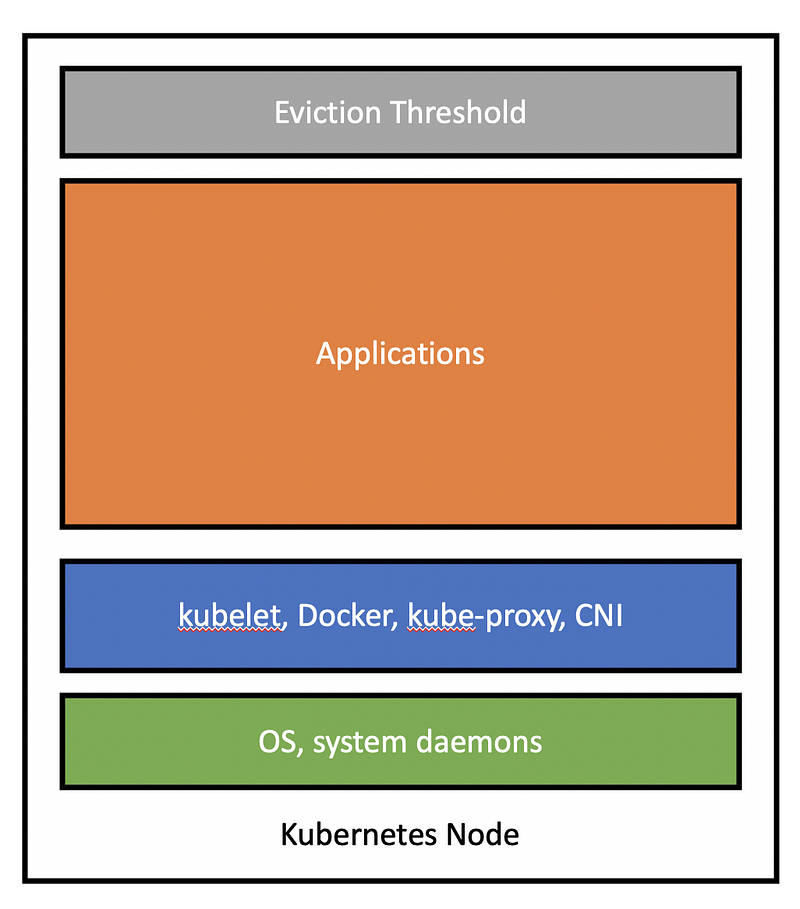
Node Allocation

For self-administered clusters (e.g. kubeadm), each of these resources can be configured via system-reserved, kube-reserved, and eviction-threshold flags. For managed Kubernetes clusters, cloud providers detail node resource allocation per VM type (GKE and AKS explicitly state usage, whereas EKS values are estimated from EKS AMI or EKS bootstrap comments).

Let’s take GKE as an example. First, GKE reserves 100 MiB of memory on each node for the eviction threshold.

For CPU, GKE reserves:

  • 6% of the first core
  • 1% of the next core (up to 2 cores)
  • 0.5% of the next 2 cores (up to 4 cores)
  • 0.25% of any cores above 4 cores

For memory, GKE reserves:

  • 255 MiB of memory for machines with less than 1 GB of memory
  • 25% of the first 4GB of memory
  • 20% of the next 4GB of memory (up to 8GB)
  • 10% of the next 8GB of memory (up to 16GB)
  • 6% of the next 112GB of memory (up to 128GB)
  • 2% of any memory above 128GB

Using the general-purpose n1-standard-1 VM type (1 vCPU, 3.75GB memory), we are then left with:

  • Allocatable CPU = 1vCPU - (0.06 * 1vCPU) = 0.94 vCPU
  • Allocatable memory = 3.75GB - (100MiB - 0.25 * 3.75GB) =2.71GB

Before we run any applications, we can see that we only have ~75% of the underlying node’s memory and ~95% of the CPU. On the other hand, bigger nodes are less impacted by the system and Kubernetes overhead. As shown below, an n1-standard-96 node leaves 99% of the CPU and 96% of the memory for your applications.

(The full list of allocatable memory and CPU resources for each machine type can be found here with caveats for Windows Server nodes.)
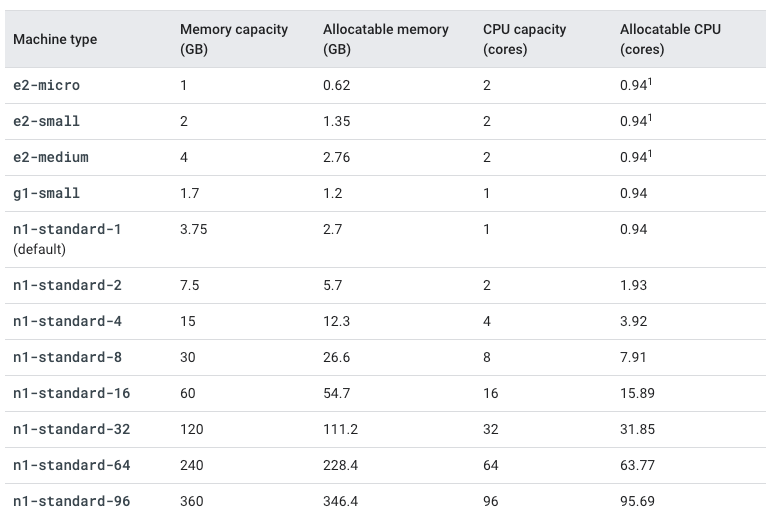
GKE Allocatable CPU & Memory Resources — Image Credit: GKE Documentation

Resource Asymmetry

Now that we understand allocatable resources, the next challenge is dealing with resource asymmetry. Some applications may be CPU-intensive (e.g. machine learning workloads, video streaming), whereas some may be memory-intensive (e.g. Redis). Given such resource asymmetry, kube-scheduler will try its best to schedule each workload to the most optimal node given the resource constraints. Kube-scheduler’s decision to schedule pods on different nodes is guided by a scoring algorithm influenced by resource requirements, anti-/affinity rules, data locality, and inter-workload interference. Although it is possible to tune the scheduler’s performance in terms of latency (i.e. time to schedule a new pod) and the node scoring threshold for scheduling decisions, selecting the correct node type is critical to avoid unnecessary scaling and unused resources on each node.

One method to deal with resource asymmetry is to create multiple node pools for different application types. For example, stateless applications may run on general-purpose, preemptible nodes, whereas databases may be scheduled to run on CPU or memory-optimized nodes. This can be controlled by node taints and affinity rules to schedule specific workloads to tainted nodes only.
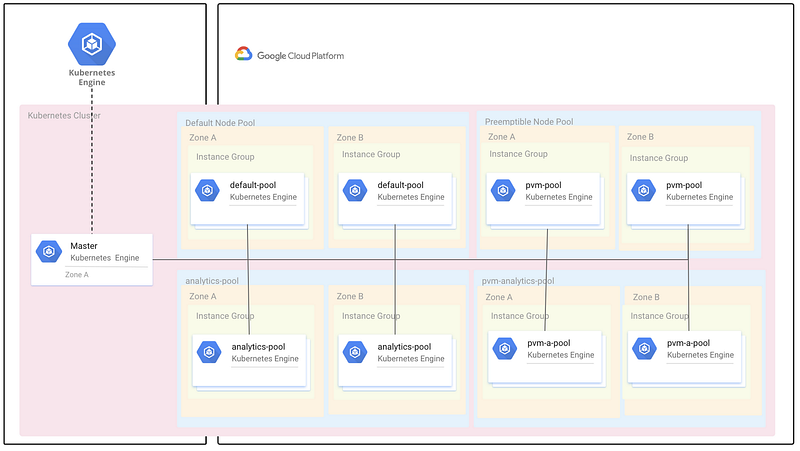
GKE Example of Multiple Node Pools — Image Credit: GCP Blog

Even with multiple node pools and affinity rules set, Kubernetes resource usage may become suboptimal over time given its dynamic nature:

  • New nodes may be added to the cluster to deal with a higher load.
  • Nodes may fail or be recreated for cluster upgrades.
  • Taints or pod/node affinity rules may change to deal with new application requirements.
  • Some nodes may become under- or over-utilized after applications are deleted or added.

To rebalance the pods across the nodes, run descheduler as a Job or CronJob inside the Kubernetes cluster. Descheduler is a kubernetes-sig project that includes seven strategies (RemoveDuplicates, LowNodeUtilization, RemovePodsViolatingInterPodAntiAffinity, RemovePodsViolatingNodeAffinity, RemovePodsiolatingNodeTaints, RemovePodsHavingTooManyRestarts, and PodLifeTime) to optimize node resource usage automatically.

Resource Ranges & Quotas

Finally, we must understand and define resource ranges for our application. Kubernetes provides two basic configurable parameters for resource management:

  • Requests: lower bound on resource usage per workload
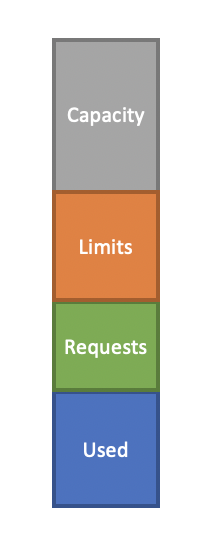
  • Limits: upper bound on resource usage per workload

Kubernetes scheduler takes the request parameter per workload and allocates the prescribed CPU and memory. This is the minimum resource usage of the workload, but the application may actually use less or more than this threshold. The limit, on the other hand, sets the maximum resource usage. When the workload uses more than the limit, kubelet will throttle the CPU or issue an OOM kill message. In an ideal world, resource utilization will be 100%, but in reality, resource usage is often irregular and hard to predict.

Another thing to consider is the application’s quality of service (QoS). Combining requests and limits, we can provide the following QoS:

  • Guaranteed: For relatively predictable workloads (e.g. CPU-bound web servers, scheduled jobs), we can explicitly provision set resources for guaranteed QoS. To enable this, specify the limit or set the request equal to the limit.
  • Burstable: For workloads that need to consume more resources based on traffic or data (e.g. Elasticsearch, data analytics engine), we can set the request resources based on the steady-state usage, but give a higher limit to allow the workload to vertically scale.
  • Best Effort: Finally, for workloads with unknown resource usage, leave both the requests and limits unspecified to allow the workload to use all available resources on the node. From the scheduler perspective, these workloads are treated as the lowest priority and will be evicted before guaranteed or burstable workloads.

So how do we set reasonable requests and limits to avoid performance degradation and optimize for cost? A good rule of thumb is to benchmark typical usage and give a 25% margin for limits. We don’t want to set the requests or the limits too high to block other applications from utilizing resources and making it harder on the scheduler to allocate resources for our workload. From the initial resource configuration, run some load tests to record performance degradation or failures. If the workload starts to slow down or gets killed, double the limit and continue the tests. On the other hand, if there’s no significant change in performance, try decreasing the requests and limits to free up resources for the cluster.
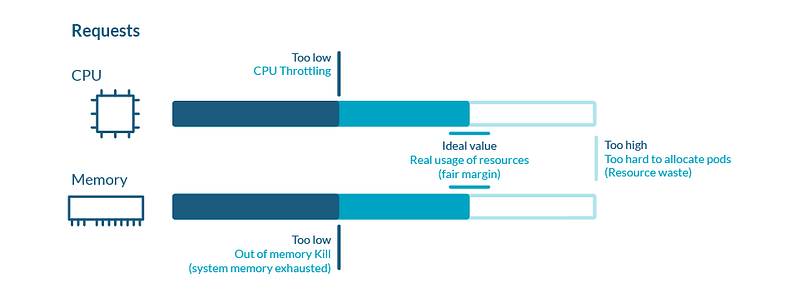
Image Credit: Sysdig

Finally, we can use Vertical Pod Autoscaler (VPA) to automatically set requests and maintain ratios between limits and requests based on historical usage. VPA can automatically scale down pods that are over-requesting resources and scale up pods that are under-requesting. However, VPA comes with some limitations:

  • Updating running pods is an experimental feature of VPA. Updates from VPA causes all running containers to be restarted.
  • VPA cannot be used with Horizontal Pod Autoscaler on CPU or memory currently. A workaround is to specify custom or external metrics to combine both VPA and HPA.
  • VPA is not ready for use with JVM-based workloads due to limited visibility in actual memory usage.

If you do not wish to rely on VPA to update running workloads, we can use VPA in recommendation mode instead or use a tool like Goldilocks from FairwindsOps to see recommended values on a dashboard. VPA only knows about resource usage on the cluster, so we still need to run some load tests to better characterize our applications.
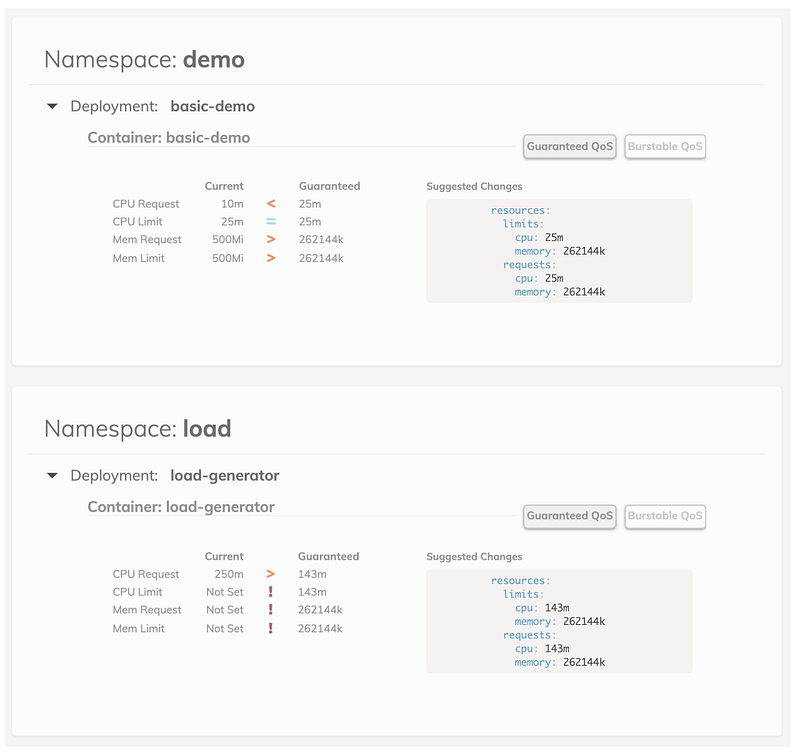
Image Credit: Goldilocks

Conclusion

Careful resource planning and capacity analysis will add predictability and improve system resiliency. Don’t wait until things break in production to find out what resource requests and limits should be set for your workloads. Profile and benchmark typical resource utilization, choose the appropriate node type and node pools, and define QoS with resource ranges. Take advantage of VPAs or validation tools like Goldilocks to craft the optimized cluster for your applications.

Kubernetes
Capacity Planning
Resource Management
Cloud Computing
Software Development
Recommended from ReadMedium