avatar⚡️ Nurkhon Akhmedov ⚡️

Free AI web copilot to create summaries, insights and extended knowledge, download it at here

4374

Abstract

d long-term use.</li><li><b>Collaboration:</b> A design system’s shared language and guidelines facilitate collaboration between teams and stakeholders.</li><li><b>Efficiency: </b>By providing reusable components and best practices, design systems help streamline the design and development process.</li></ul><h2 id="fc04">Disadvantages of Design Systems:</h2><ol><li><b>High initial investment: </b>Design systems require more resources, time, and commitment upfront to create and implement. This can be a barrier for smaller teams or projects with limited budgets.</li><li><b>Maintenance and updates:</b> A design system is a living, evolving framework that needs to be maintained and updated to stay relevant and effective. This requires continuous effort and resources from your organization.</li><li><b>Steeper learning curve: </b>Implementing a design system requires a certain level of understanding and familiarity with the system’s components, guidelines, and processes. This can be challenging for team members who are new to the system, leading to a steeper learning curve and potential delays in adoption.</li></ol><h1 id="70eb">UI Kits vs Design Systems — When to Choose Which</h1><figure id="83bd"><img src="https://cdn-images-1.readmedium.com/v2/resize:fit:800/1*SC5N6Ah0Now89-s1yKG1pA.png"><figcaption>X-axis represents the “Project Scope,” and Y-axis represents the “Design Maturity.” Source: Figma</figcaption></figure><p id="6f20">The matrix presented helps users understand the differences between UI Kits and Design Systems. It consists of two axes: X-axis represents the “Project Scope,” and the Y-axis represents the “Design Maturity.” The matrix is divided into four quadrants to indicate where UI Kits and Design Systems would be most appropriate to use.</p><ol><li><b>Lower-left quadrant: </b>This area represents projects with a small scope and low design maturity. For such projects, using a basic UI Kit would be sufficient, as they don’t require a comprehensive design system. These projects typically involve simple applications or websites with minimal complexity.</li><li><b>Upper-left quadrant: </b>In this quadrant, projects still have a small scope but possess a higher level of design maturity. These projects require a more advanced UI Kit, which offers more customization options and design coherence while still being relatively easy to implement.</li><li><b>Lower-right quadrant: </b>Projects in this area have a larger scope but low design maturity. In such cases, a starter design system might be suitable. These systems provide a foundation for building and scaling design practices while offering a more flexible framework than a UI Kit.</li><li><b>Upper-right quadrant: </b>This quadrant represents projects with a large scope and high design maturity. For these projects, a comprehensive design system is the most appropriate choice. It provides a robust and scalable framework that can be customized and adapted to the specific needs of the organization, ensuring design consistency and efficiency across multiple products and platforms.</li></ol><h2 id="05e8">Additional Factors to Consider</h2><p id="af00">To decide whether to use a UI kit or a design system, consider the following factors:</p><ul><li><b>Project size and complexity: </b>UI kits are more suitable for small to medium-sized projects, while design systems are ideal for large, complex projects that require scalability and collaboration.</li><li><b>Resources and budget:</b> UI kits are generally more affordable and require less time investment, while design systems demand more resources and commitment.</li><li><b>Long-term goals: </b>If you plan to develop multiple products or platforms, a design system may be a better choice for long-term consistency and efficiency.</li></ul><p id="db8a">Based on the factors above, you can determine which solution is best for your project:</p><blockquote id="7edc"><p>Choose a UI kit if you’re working on a smaller project with limited resources, need to quickly prototype an interface, or want a ready-to-use set of components to jump-start your design process.</p></blockquote><blockquote id="bc3c"><p>Choose a design system if you’re working on a large, complex project that requires long-term consistency, collaboration, and scalability, or if your organization plans to develop multiple products or platforms.<

Options

/p></blockquote><p id="4b36">UI kits and design systems are both powerful tools that can streamline your design process and improve your project’s outcome. By understanding the differences between the two and considering your project’s specific needs, you can make an informed decision on which solution is best for you.</p><p id="54d6">If you need the examples of best UI Kits and Design Systems in 2023, the following article will help you to choose appropriate ones:</p><div id="b17d" class="link-block"> <a href="https://bootcamp.uxdesign.cc/10-must-have-ui-kits-and-design-system-figma-plugins-for-2023-that-will-skyrocket-your-workflow-58441295ad2a"> <div> <div> <h2>10 Must-Have UI Kits and Design System Figma Plugins for 2023 That Will Skyrocket Your Workflow</h2> <div><h3>Unlock your design potential with these game-changing tools for UX/UI designers</h3></div> <div><p>bootcamp.uxdesign.cc</p></div> </div> <div> <div style="background-image: url(https://miro.readmedium.com/v2/resize:fit:320/1*g5WMddr9xp3Hd0t6sCUuFw.jpeg)"></div> </div> </div> </a> </div><blockquote id="626a"><p><i>If you found this article helpful, attractive, useful and would like to support me, make sure to:</i></p></blockquote><blockquote id="4e75"><p>👏 Clap for the story (50 claps) to help this article be featured</p></blockquote><blockquote id="49ad"><p>☑️ Follow me on <a href="https://medium.com/@nurxmedov">Medium</a></p></blockquote><blockquote id="6c8e"><p>🔔 Follow Me: <a href="https://www.linkedin.com/in/nurkhon-akhmedov-437b11104/">LinkedIn</a> | <a href="https://twitter.com/nurxmedov">Twitter</a></p></blockquote><blockquote id="35c3"><p>☕️<a href="https://www.buymeacoffee.com/nurxmedov">“buy me a coffee.”</a></p></blockquote><h1 id="0e72">🎉 You made it to the end! But wait, there’s more! 🎉</h1><p id="2ed7">Don’t miss out on our top-rated articles that will keep you inspired and motivated! 🚀 Check them out and continue your journey to greatness! 🌟</p><div id="0a17" class="link-block"> <a href="https://bootcamp.uxdesign.cc/xdesign-digest-april-2023-8196ff0d9e16"> <div> <div> <h2>xDesign Digest: April 2023 🚀</h2> <div><h3>Unveiling top trends, techniques, and tips from leading design blogs and websites.</h3></div> <div><p>bootcamp.uxdesign.cc</p></div> </div> <div> <div style="background-image: url(https://miro.readmedium.com/v2/resize:fit:320/1*J5iEsews3B4r3FjEF7_MLA.png)"></div> </div> </div> </a> </div><div id="e234" class="link-block"> <a href="https://bootcamp.uxdesign.cc/top-ux-portfolios-that-landed-jobs-at-industry-giants-examples-why-we-need-it-what-it-consists-70834e5cca6"> <div> <div> <h2>Top UX portfolios that landed jobs at industry giants — Examples, Why we need it, What it consists…</h2> <div><h3>Discover the key elements and best practices from exceptional UX portfolios that secured positions at leading companies</h3></div> <div><p>bootcamp.uxdesign.cc</p></div> </div> <div> <div style="background-image: url(https://miro.readmedium.com/v2/resize:fit:320/0*YivD06V2xeB63Cs1.gif)"></div> </div> </div> </a> </div><div id="978d" class="link-block"> <a href="https://bootcamp.uxdesign.cc/top-200-figma-plugins-boost-your-design-workflow-in-2023-part-2-content-text-efea6877bc9a"> <div> <div> <h2>Top 200 Figma plugins: boost your design workflow in 2023. Part 2: Content & Text.</h2> <div><h3>Discover the ultimate collection of Figma plugins for streamlining your UI/UX Design process and enhancing productivity</h3></div> <div><p>bootcamp.uxdesign.cc</p></div> </div> <div> <div style="background-image: url(https://miro.readmedium.com/v2/resize:fit:320/1*nEszRv73vsA13OoJ6qKm8Q.png)"></div> </div> </div> </a> </div></article></body>

UI Kits vs. Design Systems: how to choose the right solution for your Project in 2023

Understanding the difference between UI kits and design systems, and when to use each for optimal results.

Summary: This article delves into the differences between UI Kits and Design Systems, helping designers make informed decisions based on their project’s scope and design maturity. It covers the advantages and disadvantages of each approach and provides a matrix to visualize when to opt for a UI Kit or a Design System. By understanding the nuances between the two, designers can make the best choice for their projects and create efficient, consistent, and scalable designs.
Image created by ⚡️ Nurkhon Akhmedov ⚡️

In the world of digital design, UI kits and design systems are essential tools that help designers and developers create consistent, efficient, and user-friendly interfaces. But which one should you choose for your project? In this article, we will dive deep into the differences between UI kits and design systems, their pros, and cons, and when to use each for the best results. Let’s get started!

What are the UI Kits?
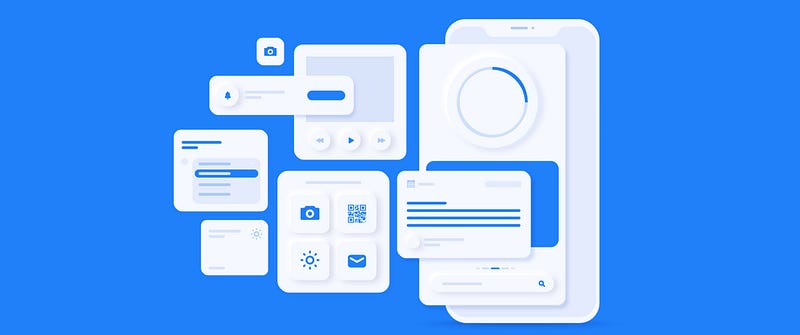
Source: https://buildfire.com/wp-content/uploads/2022/03/[email protected]

UI kits are collections of pre-designed user interface elements, such as buttons, forms, navigation bars, and more, that can be used to quickly assemble a user interface for a website or application. They typically come in the form of Sketch, Figma, or Adobe XD files and can save designers and developers time by providing a starting point for their designs.

Advantages of UI Kits:

  • Time-saving: UI kits provide ready-to-use components, allowing designers to create interfaces more quickly.
  • Consistency: By using a UI kit, you ensure a consistent look and feel across your project, improving the user experience.
  • Customizability: UI kits can be easily customized to match your brand’s visual identity and requirements.

Disadvantages of UI Kits:

  1. Limited flexibility: UI kits may not cover all the unique requirements of your project. They provide a set of predefined components, which may not be sufficient for more complex or custom designs.
  2. Inconsistency across projects: If you’re working on multiple projects, using different UI kits can lead to inconsistencies in the user experience, as each kit may have its own design language and style.
  3. Lack of scalability: UI kits are generally not designed to evolve or adapt to your organization’s growth. As your project or product lineup expands, you may find that the UI kit cannot accommodate the new requirements, leading to the need for a more comprehensive solution like a design system.

What are the Design Systems?
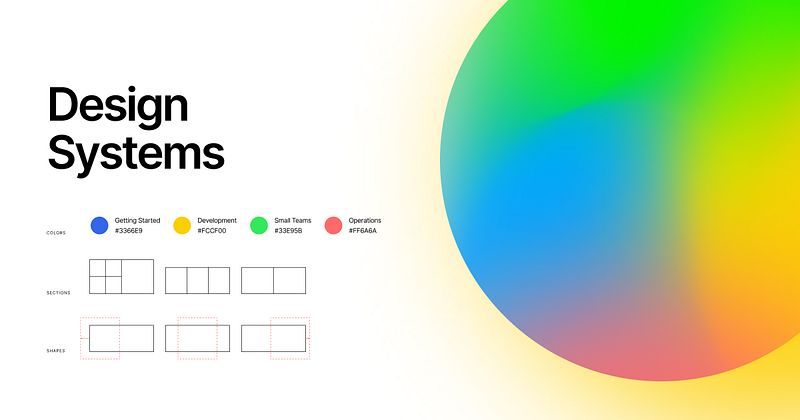
Source: https://images.ctfassets.net/7jw9uvgmirvi/5a15Ibf9FLqROCcRHaWL5X/022b34dcda4d52970ff01e784fa6914d/home_OG.png?w=1200

Design systems are comprehensive frameworks that include not only UI components but also guidelines, principles, and processes for designing and building digital products. They provide a shared vocabulary for designers, developers, and other stakeholders, enabling collaboration and ensuring consistency across products and platforms.

Advantages of Design Systems

  • Scalability: Design systems are designed to grow and evolve with your organization, making them suitable for large-scale projects and long-term use.
  • Collaboration: A design system’s shared language and guidelines facilitate collaboration between teams and stakeholders.
  • Efficiency: By providing reusable components and best practices, design systems help streamline the design and development process.

Disadvantages of Design Systems:

  1. High initial investment: Design systems require more resources, time, and commitment upfront to create and implement. This can be a barrier for smaller teams or projects with limited budgets.
  2. Maintenance and updates: A design system is a living, evolving framework that needs to be maintained and updated to stay relevant and effective. This requires continuous effort and resources from your organization.
  3. Steeper learning curve: Implementing a design system requires a certain level of understanding and familiarity with the system’s components, guidelines, and processes. This can be challenging for team members who are new to the system, leading to a steeper learning curve and potential delays in adoption.

UI Kits vs Design Systems — When to Choose Which
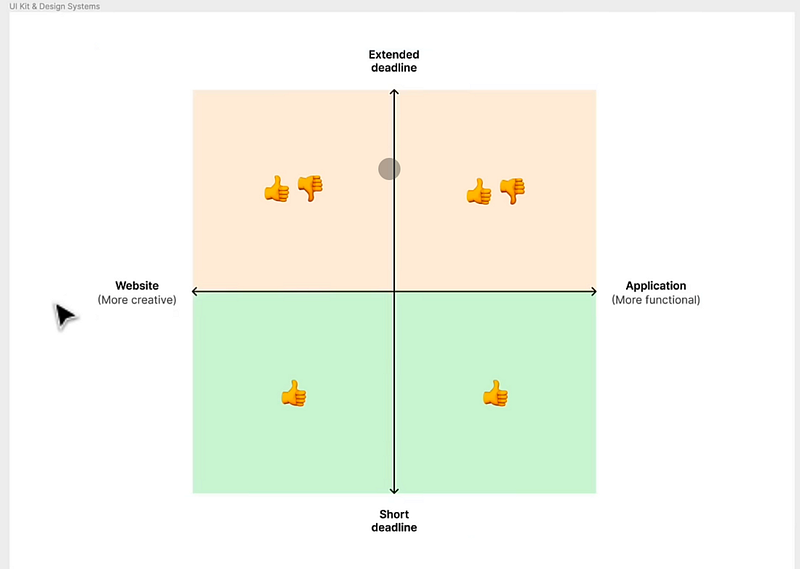
X-axis represents the “Project Scope,” and Y-axis represents the “Design Maturity.” Source: Figma

The matrix presented helps users understand the differences between UI Kits and Design Systems. It consists of two axes: X-axis represents the “Project Scope,” and the Y-axis represents the “Design Maturity.” The matrix is divided into four quadrants to indicate where UI Kits and Design Systems would be most appropriate to use.

  1. Lower-left quadrant: This area represents projects with a small scope and low design maturity. For such projects, using a basic UI Kit would be sufficient, as they don’t require a comprehensive design system. These projects typically involve simple applications or websites with minimal complexity.
  2. Upper-left quadrant: In this quadrant, projects still have a small scope but possess a higher level of design maturity. These projects require a more advanced UI Kit, which offers more customization options and design coherence while still being relatively easy to implement.
  3. Lower-right quadrant: Projects in this area have a larger scope but low design maturity. In such cases, a starter design system might be suitable. These systems provide a foundation for building and scaling design practices while offering a more flexible framework than a UI Kit.
  4. Upper-right quadrant: This quadrant represents projects with a large scope and high design maturity. For these projects, a comprehensive design system is the most appropriate choice. It provides a robust and scalable framework that can be customized and adapted to the specific needs of the organization, ensuring design consistency and efficiency across multiple products and platforms.

Additional Factors to Consider

To decide whether to use a UI kit or a design system, consider the following factors:

  • Project size and complexity: UI kits are more suitable for small to medium-sized projects, while design systems are ideal for large, complex projects that require scalability and collaboration.
  • Resources and budget: UI kits are generally more affordable and require less time investment, while design systems demand more resources and commitment.
  • Long-term goals: If you plan to develop multiple products or platforms, a design system may be a better choice for long-term consistency and efficiency.

Based on the factors above, you can determine which solution is best for your project:

Choose a UI kit if you’re working on a smaller project with limited resources, need to quickly prototype an interface, or want a ready-to-use set of components to jump-start your design process.

Choose a design system if you’re working on a large, complex project that requires long-term consistency, collaboration, and scalability, or if your organization plans to develop multiple products or platforms.

UI kits and design systems are both powerful tools that can streamline your design process and improve your project’s outcome. By understanding the differences between the two and considering your project’s specific needs, you can make an informed decision on which solution is best for you.

If you need the examples of best UI Kits and Design Systems in 2023, the following article will help you to choose appropriate ones:

If you found this article helpful, attractive, useful and would like to support me, make sure to:

👏 Clap for the story (50 claps) to help this article be featured

☑️ Follow me on Medium

🔔 Follow Me: LinkedIn | Twitter

☕️“buy me a coffee.”

🎉 You made it to the end! But wait, there’s more! 🎉

Don’t miss out on our top-rated articles that will keep you inspired and motivated! 🚀 Check them out and continue your journey to greatness! 🌟

UX
UI
Design Systems
Uikit
Figma
Recommended from ReadMedium