
Two FREE Tools That Will Make Your Life as a Student Easier This Semester.
Have you had to introduce yourself in multiple discussion forums this semester? Yeah, me too.

School is back in session for most of us college students, and the vast majority of us are spending way more of it on our learning portals than usual.
It’s time to get used to watching pre-recorded lectures from your professor on some platform that you can’t put at 2x speed, and then get used to making up responses to your peers comments in discussion forums.
All of those elements of the online learning environment are tedious and can get very annoying, but there are much more substantial issues that a lot of us are facing as well.
Having all classes run with an online or hybrid model makes it significantly more difficult for a lot of us to keep track of meeting times, due dates, etc.
I speak for myself, as I am currently taking 21 credits this semester, in the hybrid education model.
These two tools have helped me significantly though… and I would recommend them to anybody.
Google Calendar
That’s right. This probably isn’t anything new and sexy to you… but Google Calendar has been a lifesaver for me so far this semester.
I use my Google Calendar for everything that I do, whether it’s school, work, or even leisure.
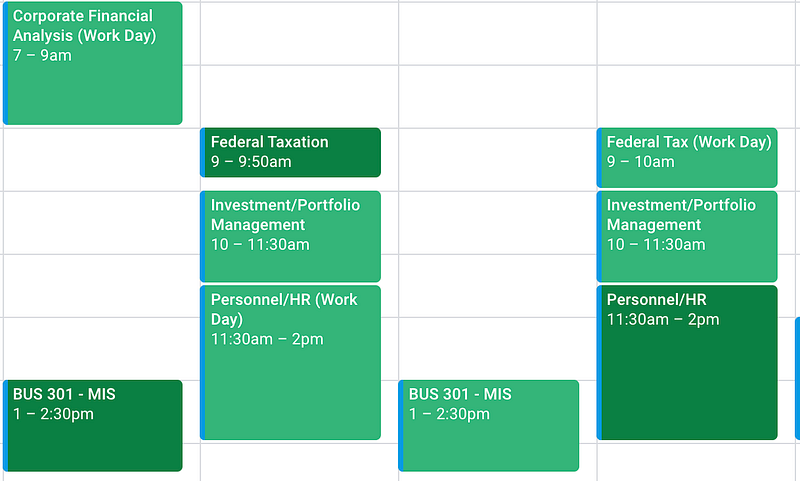
Having the ability to segment, color code, adjust, and synchronize all of my calendars is essentially what has kept me sane over the past few weeks.
It is really easy to do all of this with a Google Calendar.
I keep track of my in-person classes, online classes, work meetings, and disc golf time all in one place.
Everything has it’s own color, and everything is also shared with the people that need to see it.
If you’re not already using a calendar tool, go straight to Google and get started.
Trello
The second tool that has been a lifesaver for me is Trello… and this is one that some of you may not have heard of before.
Trello is essentially a task management software, and I have found that it is an amazing tool for students.
I found out about Trello through working with various companies over the internet, and studying about online business, but what I’ve come to find is that the software is actually much more useful for my schoolwork than it is for business.
Here is a picture of my Trello Board for this semester.
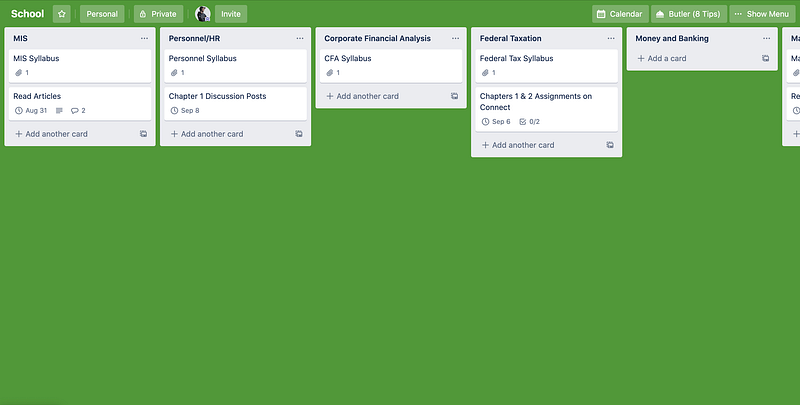
Trello allows you to create a board, and then add lists and cards to that board.
I have a “School” board, with a list for each class I’m taking, and then cards to keep track of my assignments and files.
You can also add files, due dates, comments, descriptions, and more to cards which gives you everything that you need to keep track of everything that you have going on.
I will give the warning that Trello comes with a bit of a learning curve, but it is more than worth it to get through that learning curve, and using it for school is probably one of the best ways to learn the software.
You can also use Trello for free, so head over to trello.com and make yourself a board!