avatarDr Mehmet Yildiz

Free AI web copilot to create summaries, insights and extended knowledge, download it at here

3812

Abstract

</figcaption></figure><p id="b455"><b>Step 4:</b></p><p id="a813">Click on the Next button.</p><p id="6040"><b>Step 5:</b></p><p id="a0dc">You will be prompted with your followers as shown in the following screen capture.</p><p id="1317">Add the members to your List and click on <b>Done </b>button.</p><figure id="7895"><img src="https://cdn-images-1.readmedium.com/v2/resize:fit:800/1*5SP5YSlvoJFWSArxTwsi_w.png"><figcaption>Image: Add members window on Twitter Lists</figcaption></figure><p id="366d"><b>Step 6:</b></p><p id="25d4">In this example, I added one member to this test list as shown in the following screen shot.</p><p id="3d27">It show members and subscribers.</p><figure id="af6e"><img src="https://cdn-images-1.readmedium.com/v2/resize:fit:800/1*V2w9bi8pBOhMiZRfM01yXw.png"><figcaption>Image: Sample Twitter List window</figcaption></figure><p id="8979"><b>Step 7:</b></p><p id="fadc">Click on the <b>Edit List</b> button to edit the List.</p><p id="bf00">As shown below, in this window you can add more members, delete members, change the list name and description, make the list private or public, or delete the entire list.</p><figure id="3599"><img src="https://cdn-images-1.readmedium.com/v2/resize:fit:800/1*jJXo4KDI5HQzyyysnVVY4A.png"><figcaption>Image: showing how to edit Twitter list</figcaption></figure><p id="9e6a">That’s it.</p><h2 id="4dee">Invitation to Join Medium Writers List</h2><p id="074c">My main purpose in this article is to inform you that I created a <b>Twitter List for Medium Writers.</b></p><p id="c546">As mentioned in my previous article, I have a new Twitter handle now. It is called <a href="https://twitter.com/DigitalMehmet"><b>DigitalMehmet</b></a><b>.</b></p><p id="ca34">Unfortunately, I lost my previous Twitter Lists. It is painful. I shared my situation in this article for those who want to learn from my situation.</p><div id="27be" class="link-block"> <a href="https://readmedium.com/i-lost-9000-followers-e1c78134d122"> <div> <div> <h2>The Pain &amp; Joy of Losing 9000 Followers</h2> <div><h3>The metaphor of rebuilding a burnt house.</h3></div> <div><p>medium.com</p></div> </div> <div> <div style="background-image: url(https://miro.readmedium.com/v2/resize:fit:320/1*1mqQH2ehqkn5iiBpDQZEmg.jpeg)"></div> </div> </div> </a> </div><p id="f4e5">Since the last few days, I started rebuilding the <a href="https://twitter.com/i/lists/1230485852033187840"><b>Medium Writers List</b></a>.</p><p id="62c7">So far I found<b> 28 Medium writers </b>from my recent reading of the articles.</p><figure id="b94b"><img src="https://cdn-images-1.readmedium.com/v2/resize:fit:800/1*A8kqyEqa6VhA-JbsH8Bjqw.png"><figcaption>Image: Medium Writers List crated by Dr Mehmet Yildiz on his Twitter account</figcaption></figure><p id="a84e">You can follow this List and can see the tweets from the Medium Writers.</p><p id="4fab">If you follow me <a href="https://twitter.com/DigitalMehmet">on Twitter</a>, this will enable me to locate your articles easily.</p><p id="0dd4">I also enjoy sharing the articles with my followers after reading them.</p><p id="bbb9">I look forward to following as many Medium writers as possible.</p><blockquote id="5df1"><p>One important thing, many Medium Writers do not add their Twitter accounts to the Medium account. If you want to be informed when a reader tweet your article, you need to connect your Twitter account to Medium account.</p></blockquote><h2 id="aaab">How to add Twitter account to your Medium account</h2><p id="ea16">Here are the two steps you need to follow.</p><p id="8fb4"><b>Step 1:</b></p><p id="efa5">From the <b>Settings </b>window, cli # Options ck on (the 2nd item in the list.</p><figure id="bc12"><img src="https://cdn-images-1.readmedium.com/v2/resize:fit:800/1*sUuAiNnMcJIJbJsSAHMCsw.png"><figcaption>Image: Showing Setting options on Medium profile</figcaption></figure><p id="603e"><b>Step2:</b></p><p id="2069">You can select the second item to link your Twitter account to Medium.</p><p id="8387">By the way, you can also link to Facebook account.</p><figure id="34b8"><img src="https://cdn-images-1.readmedium.com/v2/resize:fit:800/1*-NOgSg065ARAY1LXTiWeZA.png"><figcaption>Image: Showing Connections in Medium Settings</figcaption></figure><p id="7f12">When you connect your Twitter, it shows the Twitter icon on your profile next to your followers as shown in the following screen capture.</p><figure id="21cd"><img src="https://cdn-images-1.readmedium.com/v2/resize:fit:800/1*su2VN61pFU9XzhNcvlIq8A.png"><figcaption></figcaption></figure><p id="5005">The Twitter icon also shows on your articles as shown in the following screen capture.</p><p id="b074">Medium articles also show Facebook and Linkedin icons as depicted in the following screen capture of one of my articles.</p><figure id="1d52"><img src="https://cdn-images-1.readmedium.com/v2/resize:fit:800/1*mbTqWFpEHOLH1DtfKr5oNg.png"><figcaption>Image: Sample article showing social network connections</figcaption></figure><p id="913b" type="7">This means that when a reader click on these icons the article is posted to your Twitter, Facebook, and Linkedin accounts.Interestingly, Medium profiles do not show other social networks.</p><p id="b024">I am not sure whether this is a feature or bug.</p><blockquote id="0b0c"><p>Hope someone experienced on the platform (perhaps <a href="undefined">Casey Botticello</a>) can verify this point. Casey gratefully clarified and confirmed several ambiguous features on Medium for me.</p></blockquote><h2 id="d27f">Conclusion</h2><p id="0500">One of the advantages of receiving the posts is to retweet or share the Facebook or LinkedIn posts within your own network for further visibility of your article. From my experience this is a useful approach to increase number of readers for your articles.</p><p id="e45a">Look forward to connecting with you on as many networks as possible.</p><blockquote id="5d4b"><p>You can connect my networks (LinkedIn, Facebook, Twitter, Instagram, Pinterest etc.) using <a href="https://linktr.ee/digitalmehmet"><b>my Linktree account</b></a>.</p></blockquote><p id="87ac">If you want to learn how to use Linktree to create similar form check my article below for instructions.</p><div id="c928" class="link-block"> <a href="https://readmedium.com/increase-your-linkedin-twitter-facebook-instagram-followers-with-a-simple-free-tool-d40201aa1ab8"> <div> <div> <h2>Increase your LinkedIn, Twitter, Facebook , &amp; Instagram followers with a simple &amp; free tool</h2> <div><h3>In this article, I introduce a simple yet powerful tool and a technique which helped me increase my followers on…</h3></div> <div><p>medium.com</p></div> </div> <div> <div style="background-image: url(https://miro.readmedium.com/v2/resize:fit:320/1*bM3SdH9nQA4KHts9aa1skQ.jpeg)"></div> </div> </div> </a> </div><h2 id="4af0">References</h2><p id="f2fc">If you want to learn creative ways to use Twitter Lists, you may check the following book from <a href="undefined">Mark Schaefer</a>. Serendipitously, I found that Mark was one of the Medium Writers.</p><p id="2e5f"><a href="https://www.amazon.com/Tao-Twitter-Changing-Business-Characters-ebook/dp/B008O2Q6R2">The Tao of Twitter: Changing Your Life and Business 140 Characters at a Time</a>.</p></article></body>

Twitter Lists

Manage your followers and tweets effectively

Image by Clker-Free-Vector-Images from Pixabay

Purpose of this article

This article has 3 key objectives.

The first objective is to introduce Twitter Lists and provide step by step guide to create a Twitter List.

The second objective is to highlight importance of connecting Twitter to your Medium profile and show you how to achieve this.

The third objective is to invite Medium writers to a new Twitter List that I created for collaborating with Medium writers.

Why do we need Twitter Lists?

One of the most useful features in Twitter is the Lists.

Twitter Lists allow us to curate our tweets based on selected categories.

Twitter Lists allow us to manage our tweets effectively and efficiently.

It is as if we curate our tweets for better utilisation and discard unnecessary ones. This save us time and increase our efficiency. Our followers may generate hundreds even thousands of tweets in a day. Using Twitter is like drinking from a fire hose.

For example, we can create various lists and name them such as customers, friends, hobbies. In this example, tweets from customers, friends, and hobbies can be viewed separately.

It can be practical and time saving to categorise our followers and view tweets based on categories.

We can also easily access our target group of followers by using a specific Twitter List, rather than checking our contacts.

For example your target group my have only 10% of your followers. By using the list you focus on only 10% followers and ignore the 90%. Based on number of your followers, this can save substantial time.

How to create a Twitter List

Creating a Twitter List is simple and easy.

Here are the steps:

Step 1:

On the left side of the Twitter screen, click on Lists icon ( In the following screen capture it is 5th item from top in the menu)
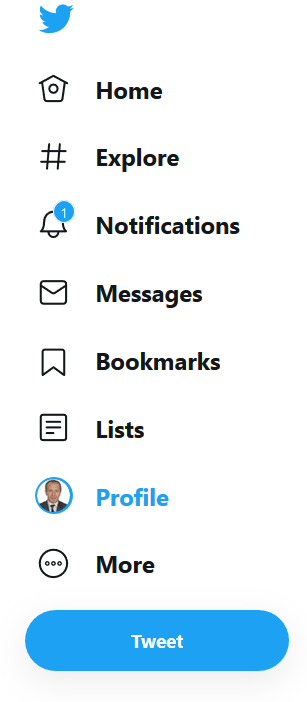
Image: Twitter Menu

Step 2:

Click on the icon on the top right side of the screen as shown in the attached screen shot.

Image: Showing List icon on Twitter

Step 3:

As shown in the following screen capture, give a new name to your List.

The name length can but up to 25 characters.

You can describe your List up to 100 characters.

If you want to share your list with others leave the “Make private” box empty. You may have a reason to make your list private. For example, you may not want others to see your customer Lists.
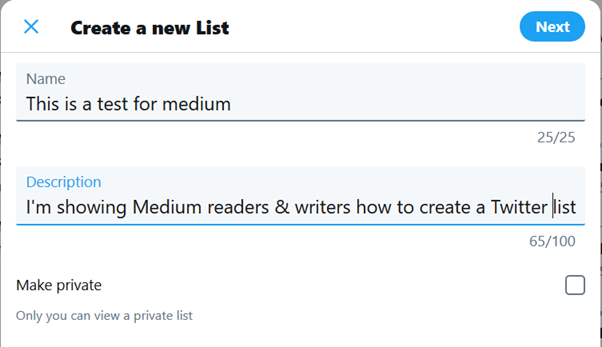
Image: Create a new list window on Twitter

Step 4:

Click on the Next button.

Step 5:

You will be prompted with your followers as shown in the following screen capture.

Add the members to your List and click on Done button.
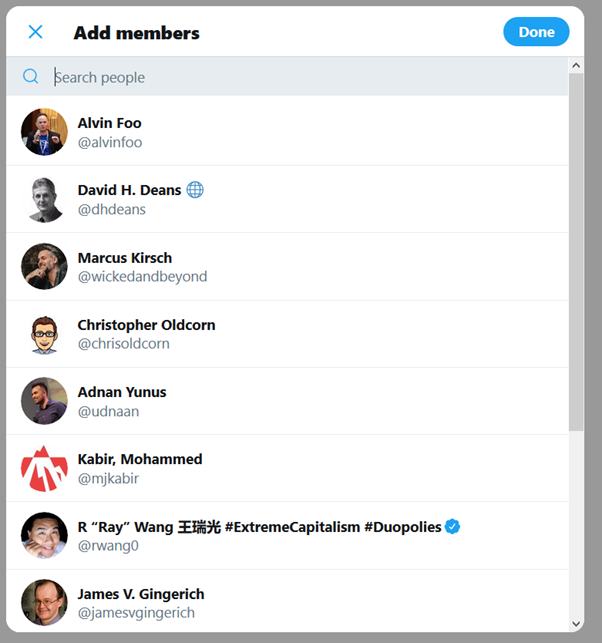
Image: Add members window on Twitter Lists

Step 6:

In this example, I added one member to this test list as shown in the following screen shot.

It show members and subscribers.
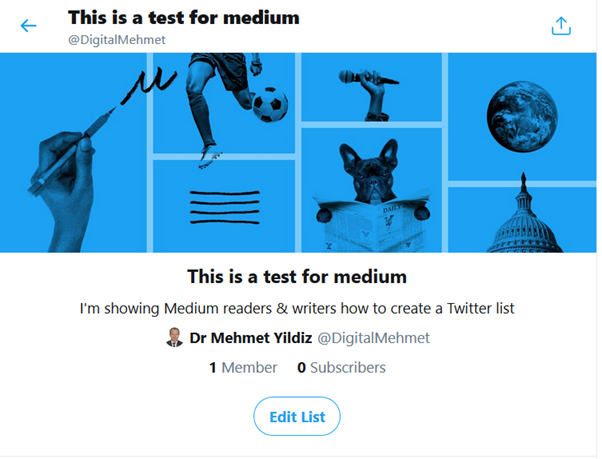
Image: Sample Twitter List window

Step 7:

Click on the Edit List button to edit the List.

As shown below, in this window you can add more members, delete members, change the list name and description, make the list private or public, or delete the entire list.
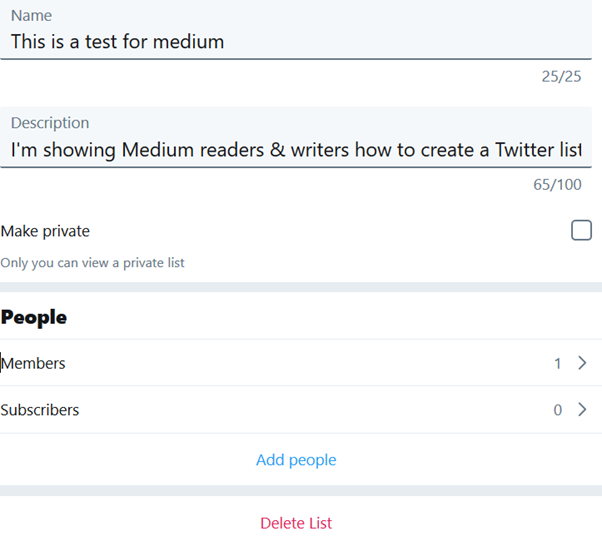
Image: showing how to edit Twitter list

That’s it.

Invitation to Join Medium Writers List

My main purpose in this article is to inform you that I created a Twitter List for Medium Writers.

As mentioned in my previous article, I have a new Twitter handle now. It is called DigitalMehmet.

Unfortunately, I lost my previous Twitter Lists. It is painful. I shared my situation in this article for those who want to learn from my situation.

Since the last few days, I started rebuilding the Medium Writers List.

So far I found 28 Medium writers from my recent reading of the articles.
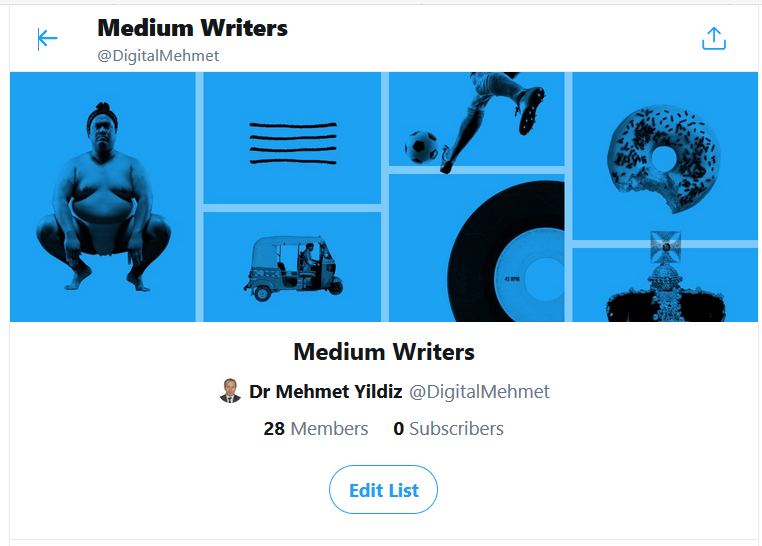
Image: Medium Writers List crated by Dr Mehmet Yildiz on his Twitter account

You can follow this List and can see the tweets from the Medium Writers.

If you follow me on Twitter, this will enable me to locate your articles easily.

I also enjoy sharing the articles with my followers after reading them.

I look forward to following as many Medium writers as possible.

One important thing, many Medium Writers do not add their Twitter accounts to the Medium account. If you want to be informed when a reader tweet your article, you need to connect your Twitter account to Medium account.

How to add Twitter account to your Medium account

Here are the two steps you need to follow.

Step 1:

From the Settings window, click on (the 2nd item in the list.
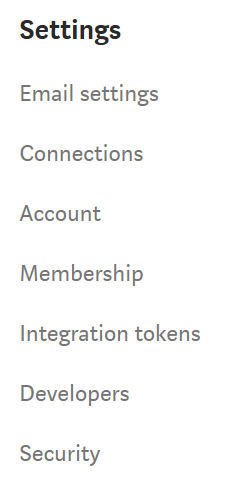
Image: Showing Setting options on Medium profile

Step2:

You can select the second item to link your Twitter account to Medium.

By the way, you can also link to Facebook account.

Image: Showing Connections in Medium Settings

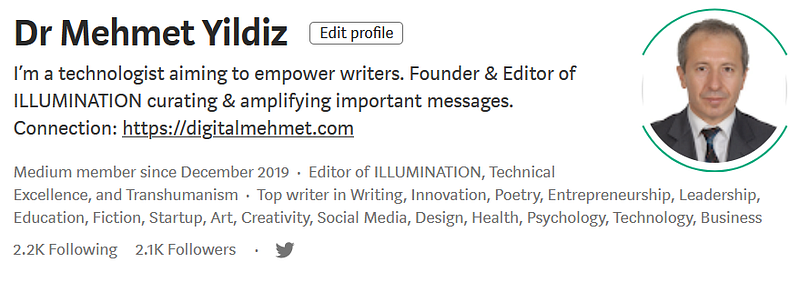
When you connect your Twitter, it shows the Twitter icon on your profile next to your followers as shown in the following screen capture.
The Twitter icon also shows on your articles as shown in the following screen capture.

Medium articles also show Facebook and Linkedin icons as depicted in the following screen capture of one of my articles.

Image: Sample article showing social network connections

This means that when a reader click on these icons the article is posted to your Twitter, Facebook, and Linkedin accounts.Interestingly, Medium profiles do not show other social networks.

I am not sure whether this is a feature or bug.

Hope someone experienced on the platform (perhaps Casey Botticello) can verify this point. Casey gratefully clarified and confirmed several ambiguous features on Medium for me.

Conclusion

One of the advantages of receiving the posts is to retweet or share the Facebook or LinkedIn posts within your own network for further visibility of your article. From my experience this is a useful approach to increase number of readers for your articles.

Look forward to connecting with you on as many networks as possible.

You can connect my networks (LinkedIn, Facebook, Twitter, Instagram, Pinterest etc.) using my Linktree account.

If you want to learn how to use Linktree to create similar form check my article below for instructions.

References

If you want to learn creative ways to use Twitter Lists, you may check the following book from Mark Schaefer. Serendipitously, I found that Mark was one of the Medium Writers.

The Tao of Twitter: Changing Your Life and Business 140 Characters at a Time.

Twitter
Social Media
Facebook
Innovation
Collaboration
Recommended from ReadMedium