
Tweet Like Trump with a One2Seq Model
In this article, I am going to walk you through most of my project where I created a one-to-sequence model that can generate tweets similar to Trump. The actual model is very similar to the one I built in my “How to Build Your First Chatbot” article. The two key differences for this model are the inputs and not including attention. Attention was excluded because it didn’t significantly improve the quality of the generated tweets. The steps to create the inputs will be the main focus of this article. As a preview, we are going to follow this path:
- Clean Trump’s tweets.
- Create words vectors using pre-trained word vectors (GloVe — Twitter 200d).
- Average the dimensions of a tweet’s word vectors.
- Use PCA to reduce the dimensions to 1.
- Order the tweets by their PCA values.
- Limit the tweets by the quality of their text.
What I really like about this model, and I hope you will too, is how we can use such a simple input, one value, to generate a tweet. Plus, from how we create our input data, we will be able to, somewhat, control the style of our generated tweet.
To set your expectations, here are a few examples of tweets that you will be able to create with this model:
- thank you arizona ! # makeamericagreatagain # trump2016
- hillary must be stopped # crookedhillary
- remember to come out and vote ! # maga # trump2016
Note: I will be removing the comments from my code to help keep things short. If you would like to see the comments, and my full code, visit this project’s GitHub page.
Let’s get started!
The data for this project is from a dataset on Kaggle, it contains 7375 tweets. The first thing that we need to do is clean our tweets.
def clean_tweet(tweet):
tweet = tweet.lower()
tweet = re.sub(r'https?:\/\/.*[\r\n]*', '', tweet, flags=re.MULTILINE)
tweet = re.sub(r'[_"\-;%()|.,+&=*%]', '', tweet)
tweet = re.sub(r'\.', ' . ', tweet)
tweet = re.sub(r'\!', ' !', tweet)
tweet = re.sub(r'\?', ' ?', tweet)
tweet = re.sub(r'\,', ' ,', tweet)
tweet = re.sub(r':', ' : ', tweet)
tweet = re.sub(r'#', ' # ', tweet)
tweet = re.sub(r'@', ' @ ', tweet)
tweet = re.sub(r'd .c .', 'd.c.', tweet)
tweet = re.sub(r'u .s .', 'd.c.', tweet)
tweet = re.sub(r' amp ', ' and ', tweet)
tweet = re.sub(r'pm', ' pm ', tweet)
tweet = re.sub(r'news', ' news ', tweet)
tweet = re.sub(r' . . . ', ' ', tweet)
tweet = re.sub(r' . . . ', ' ', tweet)
tweet = re.sub(r' ! ! ', ' ! ', tweet)
tweet = re.sub(r'&', 'and', tweet)
return tweetThis code will remove any links and unhelpful characters, as well as reformat the text so that we can maximize the use of GloVe’s pre-trained word vectors. For example, all hashtags are separated from their text. This is because GloVe does not have a pre-trained word vectors for hashtagged words, so if we want to make use of these pre-trained vectors, we need to do this separation.
Note: We will be using GloVe’s Twitter vectors.
Here are some examples of cleaned tweets:
- today we express our deepest gratitude to all those who have served in our armed forces # thankavet
- rt @ ivankatrump : such a surreal moment to vote for my father for president of the united states ! make your voice heard and vote ! # election2
- watching the returns at 9 : 45 pm # electionnight # maga
To make our word vectors, we will first need to create an embedding index from GloVe’s word vectors.
embeddings_index = {}
with open('/Users/Dave/Desktop/Programming/glove.twitter.27B/
           glove.twitter.27B.200d.txt', encoding='utf-8') as f:
    for line in f:
        values = line.split(' ')
        word = values[0]
        embedding = np.asarray(values[1:], dtype='float32')
        embeddings_index[word] = embedding
Within this file there are 1,193,514 word embeddings, each with 200 dimensions.
We will use this embedding index to create an ‘average’ embedding for each tweet. To do this, we will start with an ‘empty’ embedding (all 200 values [for the 200 dimensions] will be 0). If a word from a tweet is in the index, its embedding will be added to the ‘empty’ embedding. If a word from the tweet is not in the index, nothing will be added to the ‘empty’ embedding. After each word from the tweet has been accounted for, we will average each dimension by the number of words in the tweet. These averaged dimensions will create our ‘average’ embedding for each tweet.
Here is the associated code for this:
embedding_dim = 200 embed_tweets = [] # Contains the 'average' embedding for each tweetfor tweet in clean_tweets:
avg_embed = np.zeros(embedding_dim)
for word in tweet.split():
embed = embeddings_index.get(word)
if embed is not None:
avg_embed += embed
embed_tweets.append(avg_embed/len(tweet.split()))To create these tweet embedding, we could have used other methods, such as Word2Vec. The benefit of Word2Vec is that there wouldn’t be any null embeddings, but given the amount of data that we are working with, only 7375 tweets, I thought it would be better to make use of GloVe’s larger dataset. As you will see shortly, using GloVe works very well.
Our next step is to reduce the dimensionality of our data from 200 to 1. We set the reduction to 1 to simplify and organize our input data, as well as make it easy to generate the type of tweet that we want, ex. if we want a tweet with more hashtags or just text.
As you might have predicted, we are going to use PCA (Principal Component Analysis) to reduce the dimensionality of our data.
pca = PCA(n_components=1, random_state = 2)
pca_tweets = pca.fit_transform(embed_tweets)
Now that each of our tweets have a PCA value, we are going to rank them from the smallest value to the largest, so that similar tweets will be closer together.
pca_tweets_list = [] # Contains the pca values
for tweet in pca_tweets:
    pca_tweets_list.append(tweet[0])
order = np.array(pca_tweets_list).argsort()
pca_labels = order.argsort()
pca_labels *= 2 We multiply our pca_labels by two to make it simpler to generate new tweets. Although we will not be using all tweets to train our model, all training tweets will have even numbers. To ensure that you are generating a new tweet, all you need to do is use an odd number as your input. This generated tweet should look similar to tweets in the training data that have values near your input value.
To understand the types of tweets that Trump makes, we are going to use KMeans to divide the tweets into groups. pca_tweets will be our input for KMeans, and after checking the results of this function using 3-10 clusters, I think that 4 clusters best groups Trump’s tweets into distinct groups.
kmeans = KMeans(n_clusters=4, max_iter = 1000, n_init = 20, random_state=2).fit(pca_tweets)
labels = kmeans.labels_
Each group contains the following number of tweets:
1 (Red): 315, 2 (Orange): 2600, 3 (Yellow): 1674, 4 (Blue): 2782
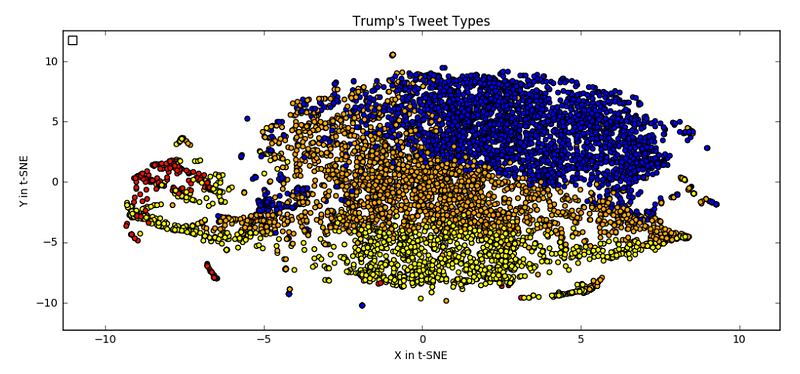
The tweets are coloured by their KMeans labels, but the input data to TSNE was the embed_tweets. This plot shows that you can sort the tweets into some reasonably distinct groups. It’s not perfect, and you can create some plots for yourself, if you would like, but I thought this was the best result.
Next, we can take a look at how well the PCA labels compare with the tweet groups.
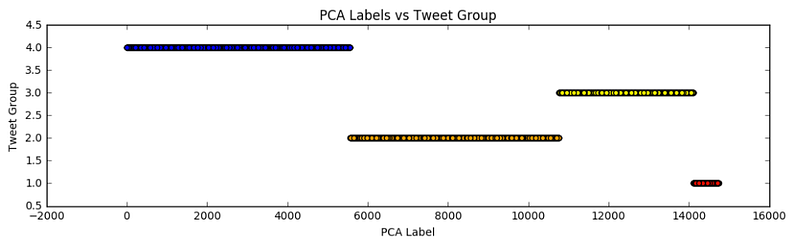
As can be somewhat expected, given that the tweet groups were created using PCA data, we can see four clear groups. This also provides a nice visualization to compare the different sizes of the tweet groups, and can help you to select a tweet type when you want to generate a tweet.
In my iPython Notebook, I go into greater detail about the words and tweets that are in each group, but to give you a sample, here are some tweets from each group:
Group # 1 - short tweets with hashtags
#1: # electionday
#2: rt  @ donaldjtrumpjr :  thanks new hampshire ! !
    # nh  # newhampshire  # maga
#3:  # draintheswamp !

Group # 2 - long tweets that are retweeted
#1: rt  @ ivankatrump :  such a surreal moment to vote for my father
    for president of the united states ! make your voice heard and
    vote !  # election2
#2: rt  @ erictrump :  join my family in this incredible movement to
    # makeamericagreatagain ! now it is up to you ! please  # vote
    for america ! https :
#3: rt  @ donaldjtrumpjr :  final push ! eric and i doing dozens of
    radio interviews we can win this thing ! get out and vote !  #
    maga  # electionday ht

Group # 3 - typically involve a data/time/location
#1: watching the returns at 9 : 45 pm # electionnight  # maga
#2: monday  11/7/2016
    scranton pennsylvania at 5 : 30 pm
    grand rapids michigan at 11 pm
#3: rt  @ ivankatrump :  thank you new hampshire !

Group # 4 - longer tweet, mostly just text
#1: today we express our deepest gratitude to all those who have
    served in our armed forces  # thankavet
#2: busy day planned in new york will soon be making some very
    important decisions on the people who will be running our
    government !
#3: love the fact that the small groups of protesters last night
    have passion for our great country we will all come together and
    be proud !
To help the model generate the best tweets, we are going limit our training data with a few measures. The first thing we want to do is to build a vocabulary to integer (vocab_to_int) dictionary and int_to_vocab dictionary, which include only words that appear 10 or more times in Trump’s tweets. Why 10? I don’t have any ‘hard’ reasons for this, but it will help our generated tweets to sound more like Trump’s typical tweets, and it will help the model to better understand what each word means because it will see it at least 10 times. If the threshold was just 2 or 3, the model would struggle to understand and use words that rarely appear.
threshold = 10vocab_to_int = {}value = 0
for word, count in word_counts.items():
if count >= threshold:
vocab_to_int[word] = value
value += 1int_to_vocab = {}
for word, value in vocab_to_int.items():
int_to_vocab[value] = wordNext we are going to limit the lengths of the tweets that we will use. I selected 25 as the maximum length for a tweet in the training data. This value was chosen because it was the maximum length that could still be learned rather well by the model. Any longer and the model struggles to learn the tweet, any shorter and we would be further limiting our training data.
We are also going to set an
max_tweet_length = 25
min_tweet_length = 1
unk_limit = 1
short_tweets = []
short_labels = []for i in range(len(int_tweets)):
unk_count = 0
if len(int_tweets[i]) <= max_tweet_length and \
len(int_tweets[i]) >= min_tweet_length:
if len(int_tweets[i]) == 1:
if int_tweets[i][0] != vocab_to_int['<UNK>']:
short_tweets.append(int_tweets[i])
short_labels.append(pca_labels[i])
else:
for word in int_tweets[i]:
if word == vocab_to_int['<UNK>']:
unk_count += 1
if unk_count <= unk_limit:
short_tweets.append(int_tweets[i])
short_labels.append(pca_labels[i])As a final step to prepare the data for the model, we are going to sort the tweets by length. Doing so will help our model to train faster because the earlier batches will contain shorter tweets. The tweets in each batch need to have the same length, so by sorting the tweets, it will avoid long tweets being batched together with short tweets.
sorted_tweets = []
sorted_labels = []
for length in range(1,max_tweet_length+1):
for i in range(len(short_tweets)):
if length == len(short_tweets[i]):
sorted_tweets.append(short_tweets[i])
sorted_labels.append([short_labels[i]])That’s it for creating our training data! It’s a bit of work, but one could argue that your input data is the most important part of a model. Without good training data, a model will be unable to generate good outputs.
The last part of this article is how to generate tweets. There are a two different methods that you can use.
Option 1: Find a Similar Tweet
With this method, you can type words or a phrase that will be matched to the most similar tweet.
create_tweet = "I need your help to make america great again! #maga"create_tweet = clean_tweet(create_tweet)create_tweet_vect = vectorize_tweet(create_tweet)create_tweet_pca = pca.transform(create_tweet_vect)similar_tweet = min(pca_tweets_list,
key=lambda x:abs(x-create_tweet_pca))for tweet in enumerate(pca_tweets_list):
if tweet[1] == similar_tweet:
print("Most similar tweet:", pca_labels[tweet[0]])
break- In
create_tweet, write any text that you want to be matched. - This tweet will be cleaned then converted to a vector using the same method as our input data when we made the ‘average’ embeddings.
- The tweet’s ‘average’ embedding will be used to find its PCA value. This value will be matched to the tweet with the closest value.
- The matched tweet’s PCA value will be used to find its PCA label. This label is the input to the model.
If you are curious about what the text of this closest tweet is, then here’s the code for you!
tweet_type = 3464closest_type = min(short_labels, key=lambda x:abs(x-tweet_type))
words = []
for tweet in enumerate(short_labels):
if tweet[1] == closest_type:
for num in short_tweets[tweet[0]]:
words.append(int_to_vocab[num])
print(" ".join(words))tweet_type can be thought of as the PCA label. This value will be matched to the closest label that was used to train the model. The text that is related to the closest label will be printed out.
As an example of the limitations of this method, I used the phrase “I need your help to make america great again! #maga” as my create_tweet and the returned tweet_type and text were: 3464, “ hillary is the most corrupt person to ever run for the presidency of the united states # draintheswamp”.
These text are rather different, but their structure is similar, multiple common words with one hashtag. I agree with the model that this is a group 4 style of tweet.
Option 2: Input a value
This is this the simpler option, and includes a bit more randomness. All you need to do is select a tweet_type , and I recommend that you reference the tweet groups’ ranges to control for the style of tweet. You can also control the length of the tweet that you want to generate by setting the sequence_length’s value, but I have it set to a random integer because I like to live dangerously.
tweet_type = 3464checkpoint = "./best_model.ckpt"loaded_graph = tf.Graph()
with tf.Session(graph=loaded_graph) as sess:
loader = tf.train.import_meta_graph(checkpoint + '.meta')
loader.restore(sess, checkpoint) input_data = loaded_graph.get_tensor_by_name('input:0')
logits = loaded_graph.get_tensor_by_name('logits:0')
sequence_length =
loaded_graph.get_tensor_by_name('sequence_length:0')
keep_prob = loaded_graph.get_tensor_by_name('keep_prob:0')tweet_logits = sess.run(logits,
{input_data: [[tweet_type]],
sequence_length: np.random.randint(3,15),
keep_prob: 1.0})[0]# Remove the padding from the tweet
pad = vocab_to_int["<PAD>"]print('Tweet')
print(' Word Ids: {}'.format(
[i for i in np.argmax(tweet_logits, 1) if i != pad]))
print(' Tweet: {}'.format(" ".join([int_to_vocab[i] for i in
np.argmax(tweet_logits, 1) if i != pad])))That’s all for this project! I hope that you enjoyed learning about it and if you would like to see the whole thing, then head on over to my GitHub. If you have any questions, comments, or suggestions then please post them below.
If your interested in expanding on this work, one thought that I had was providing greater control over the generated tweets. I thought it would be neat if we could include a keyword (or multiple words) to our input data. This should help us to control for the style and context of the tweets that we want to generate.
Thanks for reading!