
[Tutorial] FastAPI with SQLAlchemy Async ORM and Alembic

If you go through the FastAPI docs, you will see that the recommended way to use SQLAlchemy asynchronously is by using the package databases and SQLAlchemy core since SQLAlchemy ORM did not have support for async operations. I have already created a tutorial describing how to use FastAPI with databases with SQLAlchemy core. But now SQLAlchemy ORM with support for async is finally here. The full code can be found here on Github.
I would recommend checking out this tutorial first.
First, let's start with our development environment, I will be using Docker and Pipenv but feel free to use your favorite Python package manager. I’ll be using Python 3.9.
Dependencies
- fastapi
- sqlalchemy ≥ 1.4
- Alembic
- asyncpg
- uvicorn
let’s create our virtual-env and install our initial dependencies.
pipenv install fastapi sqlachemy alembic asyncpg uvicornPostgres
we will utilize the power of Docker to pull a Postgres db.
docker run \
  --rm   \
  --name  postgres \
  -p 5432:5432 \
  -e POSTGRES_USER=postgres \
  -e POSTGRES_PASSWORD=postgres \
  -e POSTGRES_DB=postgres \
  -d postgres
Let’s test our database.
docker exec -it postgres psql -U postgres
To exit from the Postgres shell.
#\qApplication
Here is our directory structure
dir
|__ config.py
|__ database.py
|__ models.py
|__ views.py
|__ main.py
Application Config
Create config.py file and add the database configuration.
import osclass Config:
DB_USER = os.getenv("DB_USER", "postgres")
DB_PASSWORD = os.getenv("DB_PASSWORD", "postgres")
DB_NAME = os.getenv("DB_NAME", "postgres")
DB_HOST = os.getenv("DB_HOST", "localhost") DB_CONFIG = f"postgresql+asyncpg://{DB_USER}:{DB_PASSWORD}@{DB_HOST}/{DB_NAME}"Database Session Config
Create database.py and add the database session config.
from sqlalchemy.ext.asyncio import AsyncSession, create_async_engine
from sqlalchemy.orm import declarative_base, sessionmaker
from config import Config
Base = declarative_base()class AsyncDatabaseSession:
def __init__(self):
self._session = None
self._engine = Nonedef __getattr__(self, name):
return getattr(self._session, name)def init(self):
self._engine = create_async_engine(
Config.DB_CONFIG,
future=True,
echo=True,
)
self._session = sessionmaker(
self._engine, expire_on_commit=False, class_=AsyncSession
)()async def create_all(self):
async with self._engine.begin() as conn:
await conn.run_sync(Base.metadata.create_all)db=AsyncDatabaseSession()Database Models
Create models.py file and let’s add a simple user model.
from sqlalchemy import Column, String, DateTime
from sqlalchemy import update as sqlalchemy_update
from sqlalchemy.future import select
from datetime import datetime
from database import Base, dbfrom uuid import uuid4class User(Base):
__tablename__ = "users"
id = Column(String, primary_key=True)
full_name = Column(String)
created_at = Column(DateTime, index=True, default=datetime.utcnow) def __repr__(self):
return (
f"<{self.__class__.__name__}("
f"id={self.id}, "
f"full_name={self.full_name}, "
f")>"
) @classmethod
async def create(cls, **kwargs):
user = cls(id=str(uuid4()), **kwargs)
db.add(user) try:
await db.commit()
except Exception:
await db.rollback()
raise
return user @classmethod
async def update(cls, id, **kwargs):
query = (
sqlalchemy_update(cls)
.where(cls.id == id)
.values(**kwargs)
.execution_options(synchronize_session="fetch")
)
await db.execute(query)
try:
await db.commit()
except Exception:
await db.rollback()
raise @classmethod
async def get(cls, id):
query = select(cls).where(cls.id == id)
users = await db.execute(query)
(user,) = users.first()
return user @classmethod
async def get_all(cls):
query = select(cls)
users = await db.execute(query)
users = users.scalars().all()
return users @classmethod
async def delete(cls, id):
query = sqlalchemy_delete(cls).where(cls.id == id)
await db.execute(query)
try:
await db.commit()
except Exception:
await db.rollback()
raise
return TrueAlembic
Initialize alembic
alembic init -t async migrationsNow you will see a file and a subdirectory added.
dir
|__ config.py
|__ database.py
|__ models.py
|__ views.py
|__ main.py
|__ alembic.ini
|__ migrations
   |__ versions
   |__ env.py
Now we will need to edit migrations/env.pyto get the database URL from config.py
import asyncio
from logging.config import fileConfig
from sqlalchemy import engine_from_config
from sqlalchemy import pool
from sqlalchemy.ext.asyncio import AsyncEnginefrom alembic import context# this is the Alembic Config object, which provides
# access to the values within the .ini file in use.
config = context.config# Interpret the config file for Python logging.
# This line sets up loggers basically.
if config.config_file_name is not None:
fileConfig(config.config_file_name)# add your model's MetaData object here
# for 'autogenerate' support
import modelstarget_metadata = models.Base.metadata# other values from the config, defined by the needs of env.py,
# can be acquired:
# my_important_option = config.get_main_option("my_important_option")
# ... etc.from config import Configconfig.set_main_option("sqlalchemy.url", Config.DB_CONFIG)def run_migrations_offline():
"""Run migrations in 'offline' mode....Now we could create and run our first database migration.
alembic revision --autogenerate -m 'adds user table'
alembic upgrade head
let’s create our first user, open python shell.
>>> from database import db
>>> db.init()
>>> from models import User>>> import asyncio
>>> asyncio.run(User.create(full_name="John Doe"))
Let’s check our database.

Now we can see our new users and alembic_versiontables.
We can as well get the record we just created.

Views
Create views.py file and add the CRUD views.
from fastapi import APIRouter
from pydantic import BaseModel
from models import User
class UserSchema(BaseModel):
full_name: strclass UserSerializer(BaseModel):
id: str
full_name: strclass Config:
orm_mode = Trueapi = APIRouter(
prefix="/users",
)@api.post("/", response_model=UserSerializer)
async def create_user(user: UserSchema):
user = await User.create(**user.dict())
return user@api.get("/{id}", response_model=UserSerializer)
async def get_user(id: str):
user = await User.get(id)
return user@api.get("/", response_model=List[UserSerializer])
async def get_all_users():
users = await User.get_all()
return users@api.put("/{id}", response_model=UserSerializer)
async def update(id: str, user: UserSchema):
user = await User.update(id, **user.dict())
return user@api.delete("/{id}", response_model=bool)
async def delete_user(id: str):
return await User.delete(id)Entry point
Create main.py file and add the following.
from database import db
from fastapi import FastAPI
def init_app():
db.init() app = FastAPI(
title="Users App",
description="Handling Our Users",
version="1",
) @app.on_event("startup")
async def startup():
await db.create_all() @app.on_event("shutdown")
async def shutdown():
await db.close() from views import api app.include_router(
api,
prefix="/api/v1",
) return appapp = init_app()Testing
Now it is time to run and test our applications.
uvicorn main:app --reloadchecking /docs
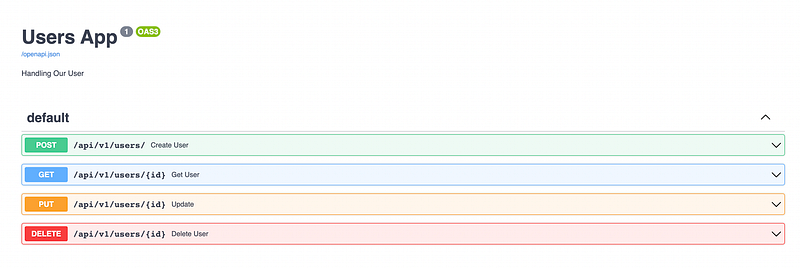
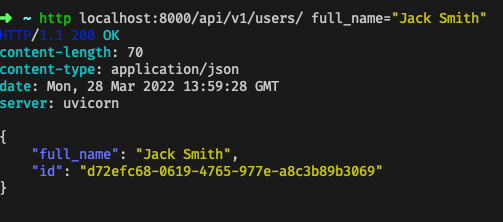
Let’s test the API endpoints, I know the OpenAPI docs are amazing, but I would recommend using httpie for a change.
- Create user
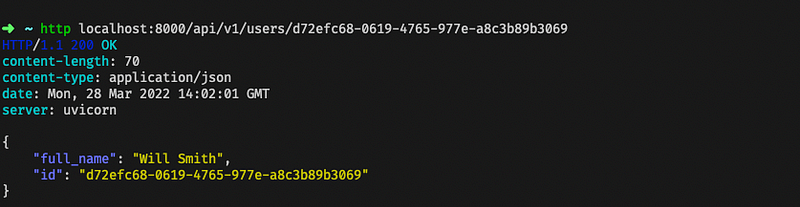
2. The wrong name, update to Will Smith

3. Let’s get the user we just updated.
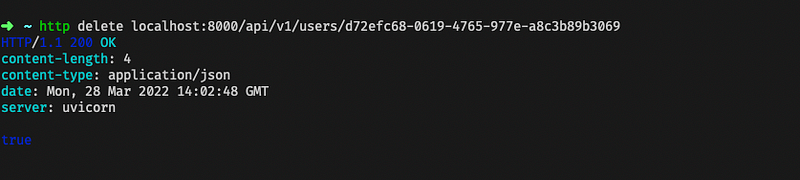
4. Time to remove it
To stop the running Postgres db
docker stop postgres
This is a simple implementation for FastAPI with the SQLAlchemy Async ORM. The full code can be found here on Github.
Hint: A new article has been released with SQLAlchemy 2.0, check it out here


