
Productivity hacks
Turbocharge your Productivity with Python’s Game-Changing Techniques
Unleash the Power of Python for Smarter Time Management and Work Optimization.

In today’s fast-paced digital environment, optimizing productivity has become essential. Python, a user-friendly and powerful programming language, offers a variety of tools to boost efficiency in both professional and personal settings. This guide will explore practical ways to leverage Python to streamline tasks, automate repetitive processes, and enhance productivity.
Automating File Management
Managing files can be time-consuming, especially when working with large volumes of data. Python can help you automate file management tasks like renaming, moving, and organizing files. Let’s look at a simple example that renames files in a directory.
import os

source_dir = "/path/to/your/files"
file_prefix = "new_prefix_"

for i, filename in enumerate(os.listdir(source_dir)):
    os.rename(os.path.join(source_dir, filename),
              os.path.join(source_dir, f"{file_prefix}{i}.{filename.split('.')[-1]}"))
In this example, we import the ‘os’ module, which allows us to interact with the operating system. We define the source directory and a file prefix. The script iterates through each file in the source directory, renames it with the new prefix, and maintains its original file extension.
Web Scraping for Data Collection
Web scraping is a technique to extract information from websites. Python libraries, such as BeautifulSoup and Requests, make it easy to automate this process. Suppose you want to collect job postings from a website. The following example demonstrates using BeautifulSoup and Requests to extract job titles from a sample website.
import requests
from bs4 import BeautifulSoup

url = "https://www.example.com/job-listings"
response = requests.get(url)
soup = BeautifulSoup(response.text, "html.parser")

job_titles = [job.text.strip() for job in soup.find_all("h2", class_="job-title")]

print(job_titles)
This script sends a request to the specified URL and parses the HTML content using BeautifulSoup. It then extracts the job titles by finding all elements with the tag “h2” and the class “job-title.” Finally, the script prints the list of job titles.
Data Analysis and Visualization
Python’s rich ecosystem of data analysis and visualization libraries, such as Pandas and Matplotlib, allows you to gain insights and make informed decisions quickly. Let’s examine a simple example of data analysis using Pandas.
First, let’s assume you have a CSV file containing sales data:
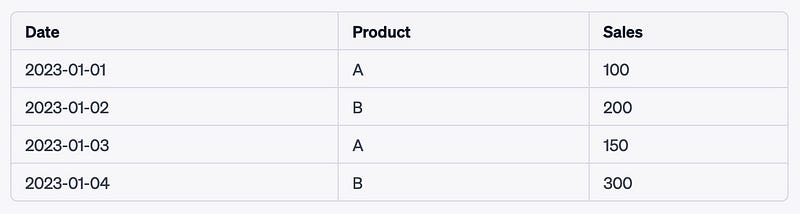
To analyze the data, install the Pandas library using the following command:
pip install pandas
Now, let’s calculate the total sales for each product using Python and Pandas:
import pandas as pd

data = pd.read_csv("sales_data.csv")
total_sales = data.groupby("Product")["Sales"].sum()
print(total_sales)
This script reads the CSV file into a Pandas DataFrame, groups the data by the “Product” column, and calculates the total sales for each product.
Generating Reports with Python
Python can generate automated reports using data visualization and PDF generation libraries. You can create professional-looking reports with minimal effort by combining libraries like Matplotlib (for creating charts) and ReportLab (for generating PDFs).
n this example, we will create a simple bar chart using Matplotlib and then generate a PDF report containing the chart using ReportLab.
First, install the required libraries:
pip install matplotlib reportlab
Now, let’s create a Python script that generates the chart and report:
import matplotlib.pyplot as plt
import numpy as np
from reportlab.lib.pagesizes import letter
from reportlab.pdfgen.canvas import Canvas

# Create a simple bar chart using Matplotlib
labels = ['A', 'B', 'C', 'D', 'E']
values = [3, 6, 4, 8, 2]

plt.bar(labels, values)
plt.xlabel('Categories')
plt.ylabel('Values')
plt.title('Sample Bar Chart')

# Save the chart as an image
plt.savefig('chart.png')

# Create a PDF report using ReportLab
pdf_file = "report.pdf"
canvas = Canvas(pdf_file, pagesize=letter)
canvas.setFont("Helvetica", 14)

# Add a title to the report
canvas.drawString(30, 750, "Sample Report with Bar Chart")

# Insert the chart image into the report
canvas.drawImage('chart.png', 30, 500, width=500, height=200)

# Save the PDF report
canvas.save()
This script creates a simple bar chart using Matplotlib and saves it as an image file called ‘chart.png’. Next, it uses ReportLab to create a PDF report, add a title, insert the chart image, and save the PDF file.
Monitoring Website Uptime
You can use Python to create a script that monitors your website’s uptime and notifies you if it goes down. By leveraging the Requests library, you can periodically check your website’s status and send email notifications when it’s unreachable.
The following example demonstrates how to monitor a website’s uptime using Python’s Requests library and send an email notification if the website is down.
First, install the required library:
pip install requests
Now, let’s create a Python script that checks the website’s uptime and sends an email notification if it’s down:
import requests
import smtplib
import time

# Website URL to monitor
url = "https://www.example.com"

# Email settings
SMTP_SERVER = "smtp.example.com"
SMTP_PORT = 587
EMAIL_ADDRESS = "[email protected]"
EMAIL_PASSWORD = "your_email_password"
TO_EMAIL = "[email protected]"
SUBJECT = "Website Down"
MESSAGE = f"{url} appears to be down."

def send_email():
    with smtplib.SMTP(SMTP_SERVER, SMTP_PORT) as server:
        server.starttls()
        server.login(EMAIL_ADDRESS, EMAIL_PASSWORD)
        message = f"Subject: {SUBJECT}\n\n{MESSAGE}"
        server.sendmail(EMAIL_ADDRESS, TO_EMAIL, message)

def check_website():
    try:
        response = requests.get(url)
        if response.status_code != 200:
            send_email()
    except requests.exceptions.RequestException:
        send_email()

while True:
    check_website()
    time.sleep(60 * 5)  # Check every 5 minutes
This script checks the website’s uptime by sending a request to the specified URL. If the response status code is not 200, or if there is an exception, it calls the send_email function to send an email notification. The script checks the website's uptime every 5 minutes.
Conclusion
Python’s versatility and rich library ecosystem make it an excellent tool for improving productivity. With Python, you can automate file management, web scraping, data analysis, email notifications, and task scheduling, among other tasks. Leveraging Python’s capabilities can save time, minimize errors, and optimize your daily workflows. So, why not give Python a try and unlock your productivity potential?


