TryHackMe: Security Principles Explained + Walkthrough
Why did the hacker break up with the security principle? Because it kept saying, ‘Trust but verify,’ and that just felt too clingy!

Security is all the rage these days — every company wants to slap a “secure” label on their product. But is it really secure?
Before we dive into the principles of security, let’s take a moment to figure out who we’re actually trying to keep out. Are we guarding your laptop from a mischievous toddler? Or are we defending a laptop with designs worth millions from serious industrial spies? Using the same security for both would be hilarious, like locking your laptop in a massive vault to keep a toddler from pushing buttons. So, knowing your enemy is step one if you want to put the right protections in place.
Oh, and by the way, perfect security? Yeah, that’s a myth. But we can at least make things harder for the bad guys!
CIA
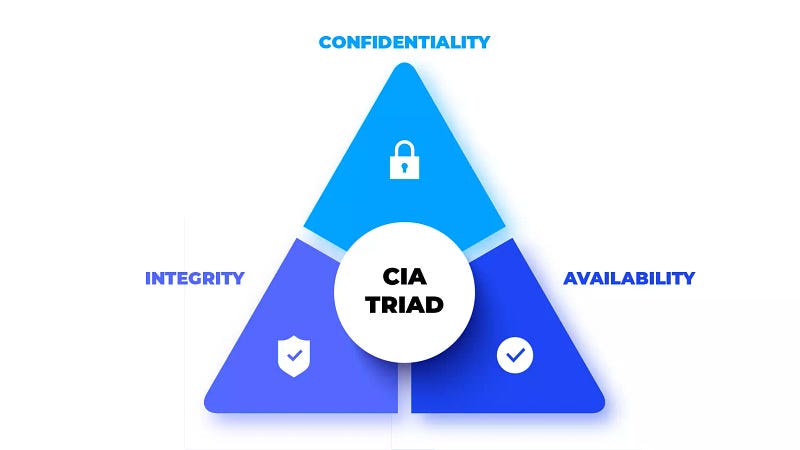
Before calling anything “secure,” it’s important to understand what that really means. When we talk about security, we use the CIA triad — no, not the secret agents, but three key principles: Confidentiality, Integrity, and Availability.
- Confidentiality means keeping your data secret, like making sure only the right person sees your credit card info when you’re shopping online.
- Integrity is about keeping your data unaltered — so no one can sneak in and change your shipping address to send your package somewhere else.
- Availability ensures that the system is up and running when you need it — like being able to place your online order instead of staring at a “Service Unavailable” page.
Now, think of placing an order. You wouldn’t want the price to mysteriously multiply by ten after you clicked “buy,” right? That’s where integrity comes in! And no one’s happy if the website crashes before you can pay — that’s a classic availability fail.
But wait, there’s more! Beyond CIA, we’ve got two extra goodies:
- Authenticity ensures the order is really from the customer (not some prankster).
- Nonrepudiation makes sure the customer can’t deny placing the order after it’s shipped. Imagine a guy ordering 1,000 pizzas and then saying, “Oops, wasn’t me!”
Finally, we have the Parkerian Hexad, which adds two more:
- Utility means the information is useful — if you lose your decryption key, that data might as well be garbage.
- Possession is about controlling the information. If someone steals your backup drive, you’ve lost control, even if you still have a copy.
In short, security isn’t just about keeping data safe — it’s about making sure it’s usable, trustworthy, and protected from pranksters and cyber villains alike!
Question: Click on “View Site” and answer the five questions. What is the flag that you obtained at the end?
Answer: THM{CIA_TRIAD}
DAD
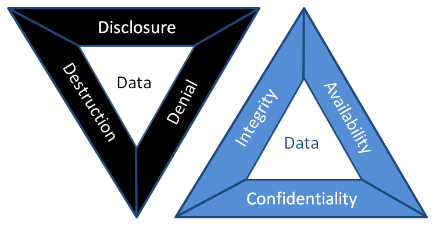
When it comes to attacking a system, hackers usually go for one of three things: spilling secrets, messing with data, or breaking stuff.
- Disclosure is the opposite of Confidentiality. If someone leaks your secret info, it’s like breaking the “confidentiality” rule.
- Alteration is the opposite of Integrity. Imagine someone scribbling on a check — yep, that’s a big no-no for integrity!
- Destruction (or denial) is the opposite of Availability. Think of it as the digital equivalent of breaking the “Open” sign on a shop’s door.
Together, these attacks form the evil counterpart to the CIA Triad, cleverly called the DAD Triad: Disclosure, Alteration, and Destruction.
Now, Let’s Look at Patient Records:
- Disclosure: If an attacker leaks medical records online, the healthcare provider takes a big hit for failing to protect confidentiality.
- Alteration: Imagine if someone changes a patient’s medical record — giving them the wrong treatment could be dangerous or even life-threatening.
- Destruction/Denial: If an attacker shuts down the hospital’s systems, no patient records are accessible, and the whole facility grinds to a halt.
Balancing security is tricky. Protecting confidentiality and integrity too much might make the system hard to use while boosting availability might put your secrets at risk. The key is finding that sweet spot between the three!
Question: The attacker managed to gain access to customer records and dumped them online. What is this attack?
Answer: Disclosure
Question: A group of attackers were able to locate both the main and the backup power supply systems and switch them off. As a result, the whole network was shut down. What is this attack?
Answer: Destruction/Denial
Fundamental Concepts of Security Models
We’ve learned that security is all about the CIA triad: Confidentiality, Integrity, and Availability. But how do we actually build systems that ensure these things? Enter the security models! Let’s look at three classic ones:
1. Bell-LaPadula Model (for Confidentiality)
This model is all about keeping secrets safe, using three simple rules:
- Simple Security Property (“no read up”): If you’re at a lower security level, you can’t peek at info above your clearance level. Think of it as “Sorry, that’s classified!”
- Star Security Property (“no write down”): If you’ve got high clearance, you can’t spill the beans to anyone below you.
- Discretionary-Security Property: There’s a chart (access matrix) that says who can read or write to what.
In short: you can read down and write up — basically, you can see stuff below your level and share secrets with those above you. But, Bell-LaPadula isn’t great for file sharing.
2. Biba Model (for Integrity)
The Biba model is all about protecting data from being messed with, and it flips Bell-LaPadula’s rules:
- Simple Integrity Property (“no read down”): If you’re at a high integrity level, don’t trust anything from lower levels.
- Star Integrity Property (“no write up”): If you’re at a low integrity level, you can’t change anything at a higher level.
So here it’s all about reading up and writing down — the reverse of Bell-LaPadula. But Biba doesn’t do well with insider threats (those sneaky co-workers!).
3. Clark-Wilson Model (for Integrity)
Clark-Wilson takes integrity to the next level by focusing on:
- Constrained Data Item (CDI): The data you want to protect.
- Unconstrained Data Item (UDI): The rest, like user input.
- Transformation Procedures (TPs): Operations that safely handle the CDIs (like read/write).
- Integrity Verification Procedures (IVPs): They check if the CDIs are still legit.
In a nutshell, Clark-Wilson focuses on keeping important data clean and valid.
There are tons of other models out there, like the Brewer and Nash or Graham-Denning models, but these three are a great starting point for thinking about security.
Question: Click on “View Site” and answer the four questions. What is the flag that you obtained at the end?
Answer: THM{SECURITY_MODELS}
Defense-in-Depth
It’s like setting up layers of protection, also called Multi-Level Security. Imagine it like this:
You’ve got a locked drawer where you keep your important papers and valuables. But would you really want that drawer lock to be the only thing stopping a thief from grabbing your stuff? Probably not! With multi-level security, you’d want more layers: lock the drawer, lock the room, lock the front door, lock the building gate, and maybe add some security cameras for good measure.
Sure, it might not stop every thief, but most will give up or at least take much longer trying!
ISO/IEC 19249
Alright, let’s break this down in a simpler and fun way!
So, the ISO/IEC 19249 is like a rulebook made by some international pros who are super serious about security. They’ve come up with fancy design ideas for building secure stuff — whether it’s an app, a system, or something else.
Here’s a Peek Into the Five Big Ideas from their Secret Recipe:
- Domain Separation: Imagine your computer as a VIP party. The cool operating system guys are in the VIP section (ring 0), and the regular apps? They’re chilling in general admission (ring 3). This is like keeping your friends from crashing your boss’s dinner party.
- Layering: Picture your system like a big, delicious layer cake. Each layer has its own flavor (responsibility), and the security rules can be applied at different stages. Think of it like baking a cake while making sure no one adds anything weird, like hot sauce, in the middle.
- Encapsulation: This is like owning a car. You don’t need to know how the engine works — just use the gas pedal to go! In programming, you use specific functions (like the gas pedal) without poking around the complex stuff underneath.
- Redundancy: Backup on backups! If one thing fails, the show still goes on. Like when your phone dies, but you’ve got a backup power bank. Or, in tech terms, if one hard drive goes kaput, the others keep your data safe.
- Virtualization: One set of hardware, multiple systems — it’s like having one body, but being able to control a robot army. It’s also super handy for security because each “robot” (virtual machine) can be kept in its own little sandbox, so one bad apple doesn’t ruin the bunch.
Now, ISO/IEC 19249 also has Five Design Tips for making your system tough:
- Least Privilege: Give people just enough power to do their job — no more. Like when your roommate asks to borrow your phone, but you make sure they can only use the calculator, not snoop in your photos.
- Attack Surface Minimization: The smaller the target, the less likely it gets hit. So, if you don’t need a service running, turn it off! It’s like locking all doors in your house, except the one you actually use.
- Centralized Parameter Validation: Double-check everything! Just like when you don’t let your friends enter gibberish into your Netflix account. You centralize this so no one slips in any shady stuff.
- Centralized Security Services: Keep all your security rules in one place. Think of it like a bouncer at the club’s entrance — one person handling all the IDs instead of having someone check at every table.
- Preparing for Error Handling: Things go wrong; it’s life. But when they do, don’t let the whole system crash. Plan for it! It’s like having a lifeboat on a ship: when the ship sinks, you don’t want to scramble, you want to have a way to stay afloat!
So, these are the rules of the game for making sure systems stay secure, even when things go sideways!
Question: Which principle are you applying when you turn off an insecure server that is not critical to the business?
Answer: 2
Question: Your company hired a new sales representative. Which principle are they applying when they tell you to give them access only to the company products and prices?
Answer: 1
Question: While reading the code of an ATM, you noticed a huge chunk of code to handle unexpected situations such as network disconnection and power failure. Which principle are they applying?
Answer: 5
Zero Trust versus Trust but Verify
Trust is one tricky business. We can’t live without it, but sometimes it makes us paranoid. Like, if you thought your laptop vendor slipped some spyware onto your machine, you’d be rebuilding your whole system in no time! And if you seriously doubted the hardware, you’d probably toss that thing out the window. On a business level, trust gets even messier, so we need a couple of solid rules to live by:
Trust but Verify
This one says, “Sure, you can trust someone, but you better check on them too!” It’s like letting your friend borrow your car but secretly tracking their route to make sure they didn’t take it on a joyride. For computers, it means setting up logging systems to monitor what users or systems are doing, just in case. But let’s be real, no one has time to check every single thing, so we let fancy tools like proxies and intrusion detection systems handle it.
Zero Trust
Zero Trust takes things a step further — it’s the “trust nobody” rule. It treats trust like it’s some kind of dangerous bug. Instead of assuming everything’s cool because the device is on your network, Zero Trust makes everyone and everything prove they’re legit before they get in. It’s like having your friend show ID to enter your house, even though you know them.
This approach requires authentication and access control at every turn, so even if something bad happens, it’s harder for things to spiral out of control. One way to implement this is with micro-segmentation, where each part of the network is kept in its own little bubble, and nothing can move between them without permission — kind of like making each person in your house ask permission to enter different rooms.
Of course, you can’t take Zero Trust to the extreme, or nothing would get done, but as long as it’s practical, it’s worth using!
Threat versus Risk
Alright, let’s make this fun!
- Vulnerability: This is your weak spot — like leaving the front door wide open with a “Do Not Enter” sign. In security terms, it’s a flaw that makes you an easy target.
- Threat: Here comes the villain, thinking, “Oooh, an open door!” This is the potential danger that can exploit that weakness.
- Risk: Now, how likely is it that the villain walks through that open door, and if they do, what kind of mess are they going to make? That’s a risk!
Picture this: You’ve got a showroom with fancy glass windows. The glass is vulnerable because, well, it’s glass! The threat is someone with a rock who’s feeling destructive. The risk? How likely is someone going to smash that window, and how many dollars will you cry over if they do?
Now, in the tech world: You’re working for a hospital, happily storing patient records in a database. One day, the internet drops a bombshell: your database is vulnerable, and hackers have got the keys to break in (threat). Now you’re sweating as you assess the risk — how soon is this going to hit you, and how big will the explosion be? Time to act before the villains strike!
Stay Connected!
📸 Instagram: Cyfer.Nest
📹 YouTube: CyferNest
💼 LinkedIn: CyferNest Academy
🎶 TikTok: CyferNest
Let’s share some laughs, learn something new, and connect in the digital world! 🚀


