Transformations of Stack, Melt, Pivot Table in pandas
3 ways to shake up your data representation and recover

Full notebook at https://gist.github.com/gitgithan/0ba595e3ef9cf8fab7deeb7b8b533ba3 Alternatively, click “view raw” at the bottom right of this scrollable frame and save the json as an .ipynb file
In this article i will explore how dataframe.stack(), dataframe.melt(), dataframe.pivot_table from pandas data manipulation library of python interact with each other in a transformation pipeline to reshape dataframes and recover the original dataframe, along with numerous caveats along the way by following along the code.
from IPython.core.interactiveshell import InteractiveShell
InteractiveShell.ast_node_interactivity = “all”
import pandas as pdBy default, jupyter notebooks only display the last line of every cell. The first two lines make jupyter display the outputs of all variables as a convenience to avoid wrapping print() around every single variable I wish to see. Next, we import the pandas library where we call the dataframe reshaping functions from.
Method 1: df →stack →reset_index →pivot →df
df= pd.DataFrame([[0, 1], [2, 3]],index=['cat', 'dog'],columns=['weight', 'height'])print('{:*^80}'.format('dataframe'))
dfprint('{:*^80}'.format('stacked dataframe'))
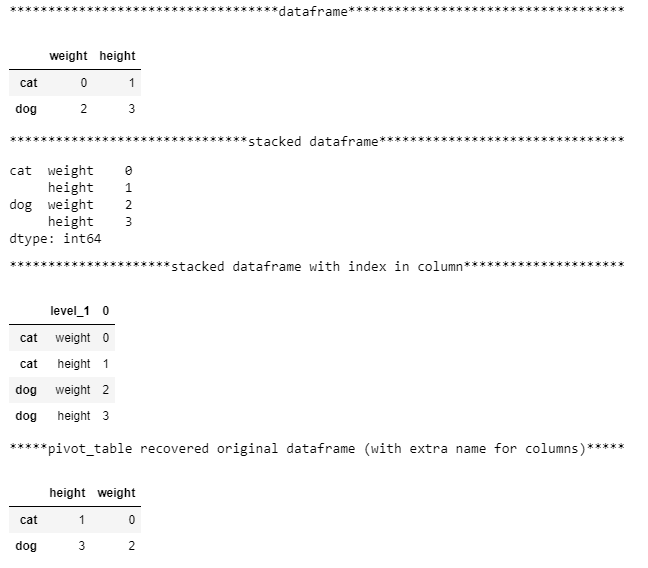
df.stack()Here, we create the dataframe. Then df.stack() turns our single-level column df into a dataseries with a multi-index index by fitting the columns into a new inner index (index level 1) for each value in the old outer index (index level 0). The outer level looks like it has only 2 values [cat,dog], but it is only for neat display and is really 4 values [cat,cat,dog,dog]. Something useful to note from: https://pandas.pydata.org/pandas-docs/stable/generated/pandas.DataFrame.stack.html if the columns have multiple levels, the new index level(s) is (are) taken from the prescribed level(s) and the output is a DataFrame. So it’s good to keep in mind whether the transformation output is a dataseries or dataframe.
print('{:*^80}'.format('stacked dataframe with index in column'))
df.stack().reset_index(level = 1) #AttributeError: 'Series' object has no attribute 'pivot_table' , so must convert to dataframe before pivot_table
stacked = df.stack().reset_index(level = 1)The values are aligned accordingly to the indexes, turning the dataframe from a wide format to a long format dataseries. Because pivot_table is a dataframe method and does not apply to dataseries, we can extract level 1 of the multi-index using reset_index(level = 1) to prepare for pivoting back. Specifying level = 0 would have extracted the outer index into a column. Note that ‘level_1’ is automatically added as a column name after reset_index(). This will be extra information that can be used or cleaned and ignored later. The 0 column above values is added automatically too.
It does not matter if you extracted level 0 or level 1 at this stage. You can simply switch the inputs to index and columns parameters of pivot_table later to achieve the same output (barring the tiny df.columns.name difference) and recover the original dataframe.
print('{:*^80}'.format('pivot_table recovered original dataframe (with extra name for columns)'))
recovered_df1 = df.stack().reset_index(level = 1).pivot_table(index = stacked.index, columns = 'level_1',values = 0) #pivot_table orders columns alphabetically,specifying values parameter prevents creation of useless multiindex column
recovered_df1.columns.name = None #remove 'level_1' column.name
recovered_df1Finally, we specify index and columns parameters in pivot_table by selecting from the current column names to describe how the final pivoted dataframe should look like. The values parameter is optional, but not specifying it will add column names not yet specified in index or columns parameters to the outerlevel of current columns to create multi-indexed columns that look ugly and make data access unnecessarily difficult.
Method 2: df →stack →convert to dataframe →pivot →df
print('{:*^80}'.format('dataframe'))
df
print('{:*^80}'.format('stack and convert to dataframe to expose pivot_table'))
stacked_df = pd.DataFrame(df.stack())
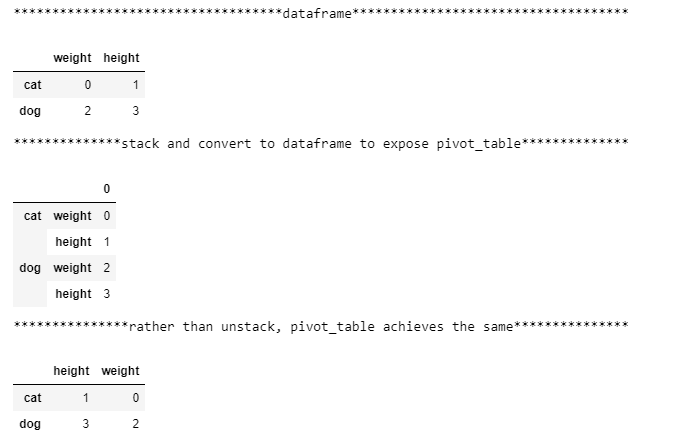
stacked_dfRemember that pivot_table is a dataframe method and does not apply to dataseries, so rather than reset_index as in part1, we can directly construct a dataframe from the series using pd.DataFrame(df.stack()) to create a multi-indexed dataframe to make the pivot_table method available and work harder in specifying its parameters correctly.
print('{:*^80}'.format('rather than unstack, pivot_table achieves the same'))
idx_lvl0, idx_lvl1 = stacked_df.index.get_level_values(0), stacked_df.index.get_level_values(1)
recovered_df2 = stacked_df.pivot_table(index=idx_lvl0,columns = idx_lvl1,values = 0)
recovered_df2
index.get_level_values(0) is a way to get the index values of the specified muti-index level (in this case, 0) as a pandas.core.indexes.base.Index object which can be conveniently used by functions accepting sequences/lists. In part 2, we match the correct index information from each level into the index and columns parameters of pivot table to recover the original dataframe. Part 2 is cleaner than part 1 because there was no reset_index to create an extra ‘level_0’ or ‘level_1’ in df.columns.name that we set to None in part 1.
Method 3: df →melt →add index →pivot →df
print('{:*^80}'.format('dataframe'))
df
print('{:*^80}'.format('melting loses index information'))
melted = df.melt()   #melt appends columns into new "variable" column, while stack adds columns to new inner index layer (same information end up different places)
melted
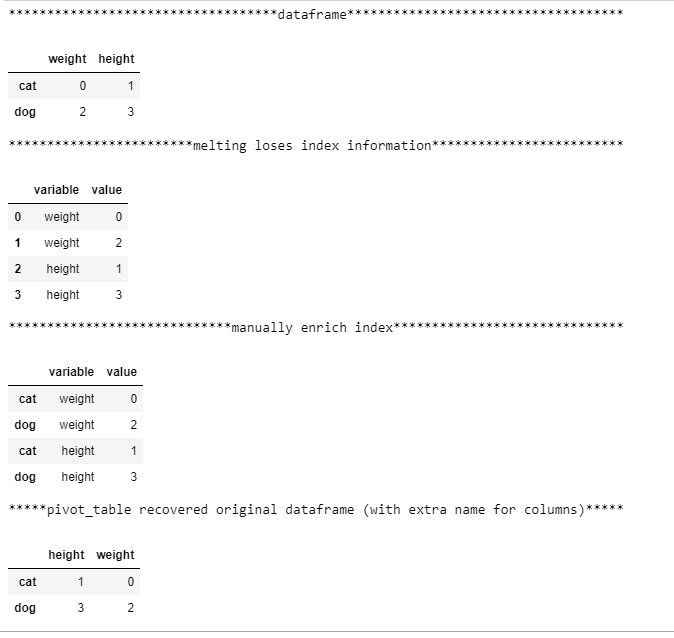
Similar to stacking, melt turns wide format data to long format data by putting compressing columns into a single list. The difference is that stack inserted this list into the inner index, while melt inserts this list as a new column called ‘variable’ (can be renamed).
print('{:*^80}'.format('manually enrich index')) # until this is solved: https://github.com/pandas-dev/pandas/issues/17440
melted.index = ['cat','dog']*2   #list(df.index)*len(df.columns) for more generalizable index generation
melted
Note that melt has made the cat dog information in the index disappear. This makes it impossible to recover the original dataframe. Until this issue (https://github.com/pandas-dev/pandas/issues/17440) is fixed, we have to manually add back the index.
print('{:*^80}'.format('pivot_table recovered original dataframe (with extra name for columns)'))
recovered_df3 = melted.pivot_table(index = melted.index, columns = 'variable',values = 'value')
recovered_df3.columns.name=None  #remove 'variable' column.name
recovered_df3
Finally, pivot_table with the right parameters will recover our original dataframe. Like in part 1, ‘variable’ is removed from df.columns.name for exact recovery.
Conclusion
I hope these transformations have given beginners to these functions a better understanding of how flexible pandas is. The same information can be placed in Index or Columns using set_index and reset_index depending on where they serve the greatest purpose. For example, instead of df.loc[df.col == value] to filter when the information is in a column, setting col to the index, and doing df.loc[value] is much simpler. Whether information is in the index or column will also greatly affect how pd.merge, pd.concat, dataframe.join work on such dataseries/dataframes, but that would be another whole article by itself.
Stack allows information from columns to swing to indexes and vice versa (with unstack()). Melt combines columns to a standard 3-column format of id_vars, variable, value to allow columnar processing of variable before pivoting back with edited column values. Pivot_table is the most powerful among the 3 with other parameters such as aggfunc (aggregation) that allows custom functions so possibilities there are limitless. Finally, here is a practical example that helped me a lot: http://pbpython.com/pandas-pivot-table-explained.html


