
Traditional MVVM with Jetpack Compose and StateFlow

With the introduction of Jetpack Compose some developers may assume that using it requires a different architectural approach to how you build Android app. People start mentioning the mysterious UDF 🕵️♀️. My goal today is to show how you can adapt the base principals of MVVM we have used for years but with the Compose UI.
Disclaimer: MVVM is UDF or at least it should be implemented that way 😉.
Let’s refresh what we know about MVVM and establish some theory here.
For the recap purposes and to make sure we are on the same page of what MVVM is (based on my experience that is something we need to clarify before entering a conversation 😅 ), here is a quick diagram I put together that also reflects how my mini app works.
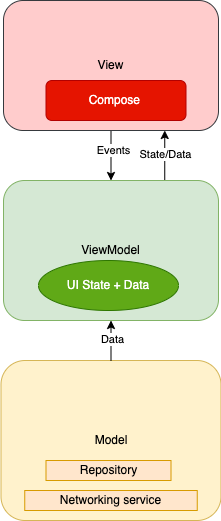
As you can see, there is no revelations here. Just old good base stuff you may already have seen several times when speaking about MVVM and representing it.
We have the Model layer containing the data source which is accessed through a repository. There is the ViewModel containing State and all the logic acting as a mediator between the datasource and View. The main difference is in the View layer where our Jetpack Compose code will reside.
Just a note on MVVM in general — when using this pattern no matter with Compose or not you need to make sure that you have a uni-directional data flow (yes! UDF). That basically means that View doesn’t push or change State in ViewModel. ViewModel will provide State in response of Events coming from View (for example, clicks or user input).
For more info on my recommended MVVM approach check my other article.
For the StateFlow part — we need a way to observe State and notify our View of changes. There is multiple ways to do it and there is definitively an evolution of widely used libraries and API. From the recent ones we can consider LiveData but the thing is Compose was designed in Kotlin for Kotlin and there is first class support for Flow apis. So using LiveData is possible but it is almost as if we would be going off the proposed path which makes things more difficult usually and there is no reward in doing that in this case. So Flow it is!
Let’s dive into the code and check Model and ViewModel.
We don’t have any changes in the repository or networking layer when using Compose or Flow. Check the GitHub repository for the implementation details.
In the ViewModel layer we will introduce UI State which will be a sealed class of all possible View states to alert View of State changes and to support the concept of ViewModel being the source of truth for the State of our UI.
As you can observe we have listed all UI states we expect as a sealed class. This will make our syntax and state handling easier in the future.
This State is going to be posted through StateFlow for the View to collect and be notified of changes. We will have a MutableStateFlow in ViewModel and a backing field to encapsulate the mutability of this producer inside the ViewModel class.
As the next step we can implement the logic of querying data from Repository and updating UI State.
A couple of things are going on here. Let’s break in down line by line.
We start with triggering the state as Loading to show our progress UI.
_uiState.value = WeatherUiState.LoadingThen we invoke our suspend fun from the repo that returns a response object. We now can parse it and set the UI State into Loaded to display the data appropriately.
If we hit an exception we are also going to set it into the UI State Flow like this, for example.
_uiState.value = WeatherUiState.Error(              applicationContext.getString(R.string.query_limit_reached)
)
Let’s now observe how our consumer looks like.
On the consumer side we have View that is implemented with Jetpack Compose.
Since it’s not a Compose tutorial I will touch on the UI itself only briefly. The weather app is a one page app so we can just use MainActivity and have our composables rendered there.
We are going to collect the value of our producer Flow right in the composable function that represents the full page view basically.
mainViewModel.uiState.collectAsState().valueDepending on which UI State we receive we can load different composables inside our main frame.
Note we accept data in the constructor of the loaded screen composable which allows us to, first, maintain testability as you can always stub mock data into the constructor and, second, avoid logic inside the loaded screen composable to keep it lean and responsible only for component rendering to represent the data we have.
@Composable
fun WeatherLoadedScreen(data: WeatherUiModel)
*The full class is in the GitHub repo.
That’s it.
Now we have all our traditional MVVM layers wired up using Compose and StateFlow. The example app is pretty lean and basic but that is done on purpose to strip down noise and showcase the architecture. The architecture and the approach don’t change much.
The main takeaways are:
- Keep all logic in ViewModel. If you can put Kotlin code containing logic into composables it doesn’t mean you should.
- Do not put any data source/network interactions into composables. Provide data uni-directionally from ViewModel to View.
- Provide all dependencies into composables from outside as well as state to keep them lean and allow for mocks and data swaps in testing.
- Use ViewModel as the source of State to keep things consistent and for the same reasons as before — to persist the state.
- Break composables down to fewer components to avoid crazy fat functions. If your linter shouts at you at 28-line functions, composables are just the same.
- Keep in mind that composables can recompose multiple times and heavy computations within them will affect performance.
I hope you enjoyed the reading. My main concern with the Compose adoption has always been the “God” class pattern. I felt like they made it too easy to go back to “God” ~Activities~, well now — Composables. So it is on us to maintain all the positive things we have achieved with the code in terms of clean code and testability with the Compose adoption.
GitHub project:


