
Top 8 Tips Every Data Scientist Should Know !

In this article, I will share with you some tips that, I learned from senior Data Scientists and throughout my career as well, that you should know and that will save you a lot of time.
Some of the tips that I am going to share to you will surely be familiar to some of you depending on how far you are into your career.
I. Tips For Univariate Analysis
When I started my journey as a data scientist, I spent a lot of time on univariate analysis. I was looking to see if we had missing data, extreme values, the distribution of each variable, etc.
This part was very boring and it feels like a waste of time but that is wrong. This part is very important.
And when i discover pandas_profiling library, that changed my life. This part take juste few minutes now and I can spend more time in other tasks.
You can use it like that :
from pandas_profiling import ProfileReportprofile = ProfileReport(df, title="Pandas Profiling Report")
profile.to_file("path/profile.html")All information about this library are available here.
II. Tips For Feature Engeneering
This part looks a lot like the one above. Create new features takes me a lot of time and it was very boring.
So I wanted to find a solution that would allow me to automate this task and free myself up a lot of time to focus on other tasks.
A simple way to save a lot of time is to use featuretools library. This Library will create for you a lot of new features.
One of the best solution that i found is featuretools library.
This library will automate this process and give you the explanation of the created features.
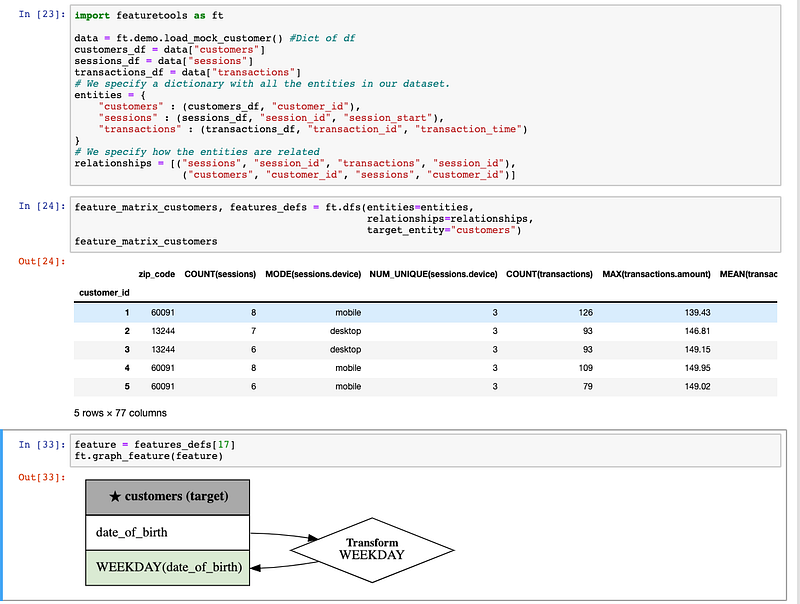
featuretoolsHere you can find the source code and if you want more information go there :
import featuretools as ftdata = ft.demo.load_mock_customer() #Dict of df
customers_df = data["customers"]
sessions_df = data["sessions"]
transactions_df = data["transactions"]
# We specify a dictionary with all the entities in our dataset.
entities = {
"customers" : (customers_df, "customer_id"),
"sessions" : (sessions_df, "session_id", "session_start"),
"transactions" : (transactions_df, "transaction_id", "transaction_time")
}
# We specify how the entities are related
relationships = [("sessions", "session_id", "transactions", "session_id"),
("customers", "customer_id", "sessions", "customer_id")]feature_matrix_customers, features_defs = ft.dfs(entities=entities,
relationships=relationships,
target_entity="customers")
feature_matrix_customersfeature = features_defs[17]
ft.graph_feature(feature)III. Hiding Password In Scripts
As you may have noticed, we often have to use passwords (for example to connect to databases, SMTP server etc) and we have the bad habit of harding the passwords in our scripts which can cause some clumsiness (if you share your script without deleting the passwords for example).
And there, the getpass library makes its appearance. It will allow you to hide your passwords in your script when using jupyter notebook, spyder, your terminal, etc.
To install getpass you can run : pip install getpass
You can use it like that :
from getpass import getpasspassword = getpass()
IV. Monitoring looping
As a Data Scientist, loops are part of my life. I spend a lot of time waiting loops to finish without knowing in which step it was. Sometime I wait only few seconds but sometime more than 10 minutes and needed to know in which step we were.
So for that i found the tqdm library. This library will display a progress bar with the loop state at each step.
from tqdm import tqdm
for i in tqdm(range(1000)):
    # Do Something
    ...
V. Use Freeze To Create Requirements.txt File
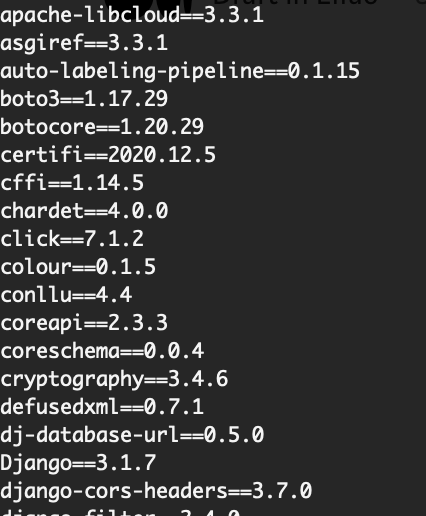
When I use a virtual environment for my project, one of best practices is to create a requirements.txt file with all needed library. This file will allow any one to install the needed library and avoid crashs caused by ModuleNotFoundError (because the library is not installed).
At the begining I was created this file manually and some time I can forget some library and when I use à new virtual environnement that crash.
The solution to avoid that is to use freeze command. This command will allow you to create automatically a requirements.txt file with all needed library.
You can use it like that:

VI. Install Library Directly on Jupiter Notebook
Using Jupyter notebook is a habit for me. And I used to install the libraries via the terminal (shell) which was not very practical. A solution to bypass terminals or shells is to install them directly via Notebook. It is a very simple and much more practical solution.
To install a new library, just follow the following step:
!pip install library_name .

VII. You Can Use Pandas To Import Data From DataBases
When you want to import data from databases, you can use Pandas for that. It can be very practical :
import pandas as pd
import psycopg2
from getpass import getpass
# Define user_name and password
user_name, password = getpass(), getpass()# Define function to import data from Database
def import_data(host, user_name, password, request_sql):
conn_string = "host='%s' dbname='toto_db' user='%s' password='%s'" %(host, user_name, password)
conn = psycopg2.connect(conn_string)
df = pd.read_sql(request_sql, conn)
conn.close()
return df# Importing Data
df = import_data(host='127.0.0.1', user_name=user_name, password=password, request_sql="select * from users;")VIII. Stop using “Print” for Debugging
print('test1')
... some code ...
print('test2')
...
If these few lines are familiar to you then you like me have some progress to accomplish to coding like a pro.
One of the best solution for debugging is to use logging.
The advantage of logging are:
- It’s easy to put a timestamp in each message, which is very handy
- You can have different levels of urgency for messages, and filter out less urgent messages (info, debug, error …)
- Ignore or not log function calls according to the need (You don’t have to constantly pull out print() calls)
Conclusion:
Hope this article helps you improve your kills and productvity. If you have any comment, please do not hesitate to comment.

Are you new on Medium ? Don’t hesitate to subscribe for less than $ 5 here to benefit without limits and improve your skills.