

Top 10 VS Code Extensions for Data Science
Enhance Your Productivity with These Must-Have Tools!
As the field of data science continues to grow and becomes more and more integral to modern industries, the need for tools facilitating data analysis has grown accordingly. One tool that has gained popularity among data scientists is VS Code, an integrated development environment (IDE) with a wide range of customizable extensions that can significantly improve productivity.
In this article, we will explore selected VS Code extensions for data science that can streamline your workflow and ultimately save time. Whether you are a beginner or a seasoned data scientist, these extensions are designed to enhance your coding and make carrying out analyses simpler.
My top 10 VS Code extensions for data science
All the extensions covered in this article are available on the official VS Code Extension Marketplace.
Python
The Python extension is typically the first extension a data scientist will install. This extension provides various features such as IntelliSense code completion, debugging, linting, code navigation, code formatting, refactoring, variable explorer, and more. Additionally, when you install the Python extension, Pylance, Jupyter, and isort (used for imports sorting) extensions are automatically installed as well.
Pylance
Pylance is an extension that provides performant language support. Pylance supercharges your Python IntelliSense experience in order to help you write better code faster. Some of the Pylance’s features include:
- Docstrings
- Signature help, with type information
- Parameter suggestions
- Code completion
- Auto-imports
- Reporting of code errors and warnings
- Type checking mode
- Semantic highlighting
A possible alternative to Pylance is IntelliCode, which aims to provide content-aware code completion. While it is similar to Pylance, it focuses on analyzing what you are working on to offer more relevant suggestions.
Jupyter
This extension allows us to run and edit Jupyter Notebooks directly within VS Code. On top of that, it provides features like interactive debugging and variable inspection.
GitLens
GitLens is an extension that enhances the built-in Git capabilities of VS Code. It adds a range of advanced features to make it easier to work with Git repositories directly from within the editor.
The extension dds features such as inline blame annotations, which show changes to lines of code over time as well as who made them and why those changes were made. Other features include CodeLens (additional information about the author of the code and recent changes), revision navigation, sidebar view, Git command palette, and a range of other tools that can help you better understand your code and its history.
Excel Viewer
As a data scientist, you will undoubtedly work with CSV and XLSX files. Excel Viewer allows us to inspect CSV files in a clean, tabular format instead of the text file representation. What is more, for XLSX files we finally don’t need to open another application to inspect the file, we can do it directly from VS Code.
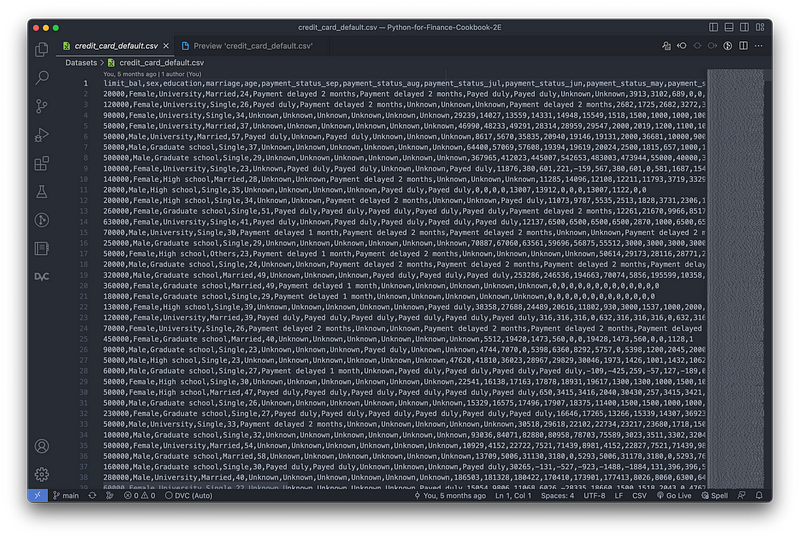

To make it even better, when working with CSV/XLSX files, we can also sort the rows based on any of the columns and filter values using an interactive GUI.

Rainbow CSV
If you still prefer to inspect your CSV files as text files, Rainbow CSV will mark each column with a different color to make the files much easier to read.

Python Indent
Python Indent is a VS Code extension that provides youwith the correct Python indentation every time you type a line of code and hit Enter. It works with bracket pairs, hanging indents, keywords, and extended comments.
Indent-rainbow
Indent-rainbow uses colors to mark indentations, which can help with quick debugging and writing better code.

Code Spell Checker
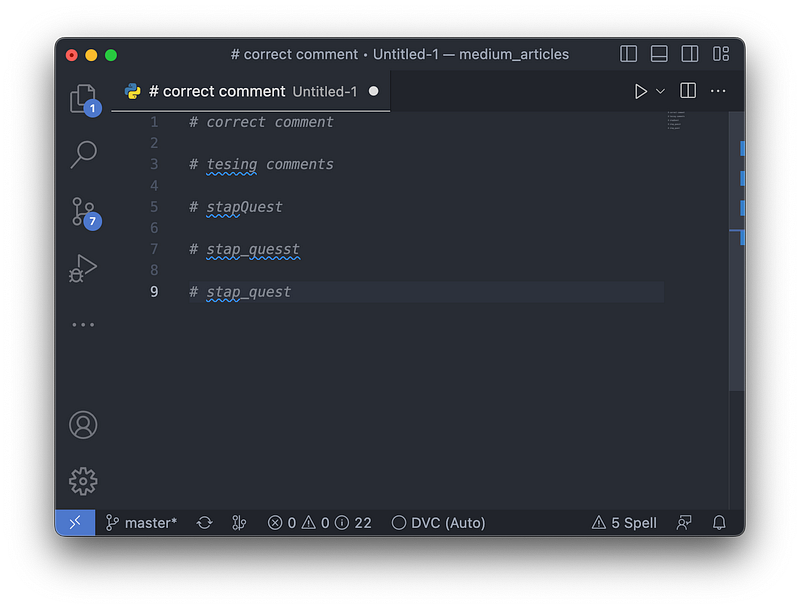
Code Spell Checker is a very handy tool that helps us with spelling errors. As you can see in the following image, the extension also helps when we make typos while using snake case or camel case.
DVC
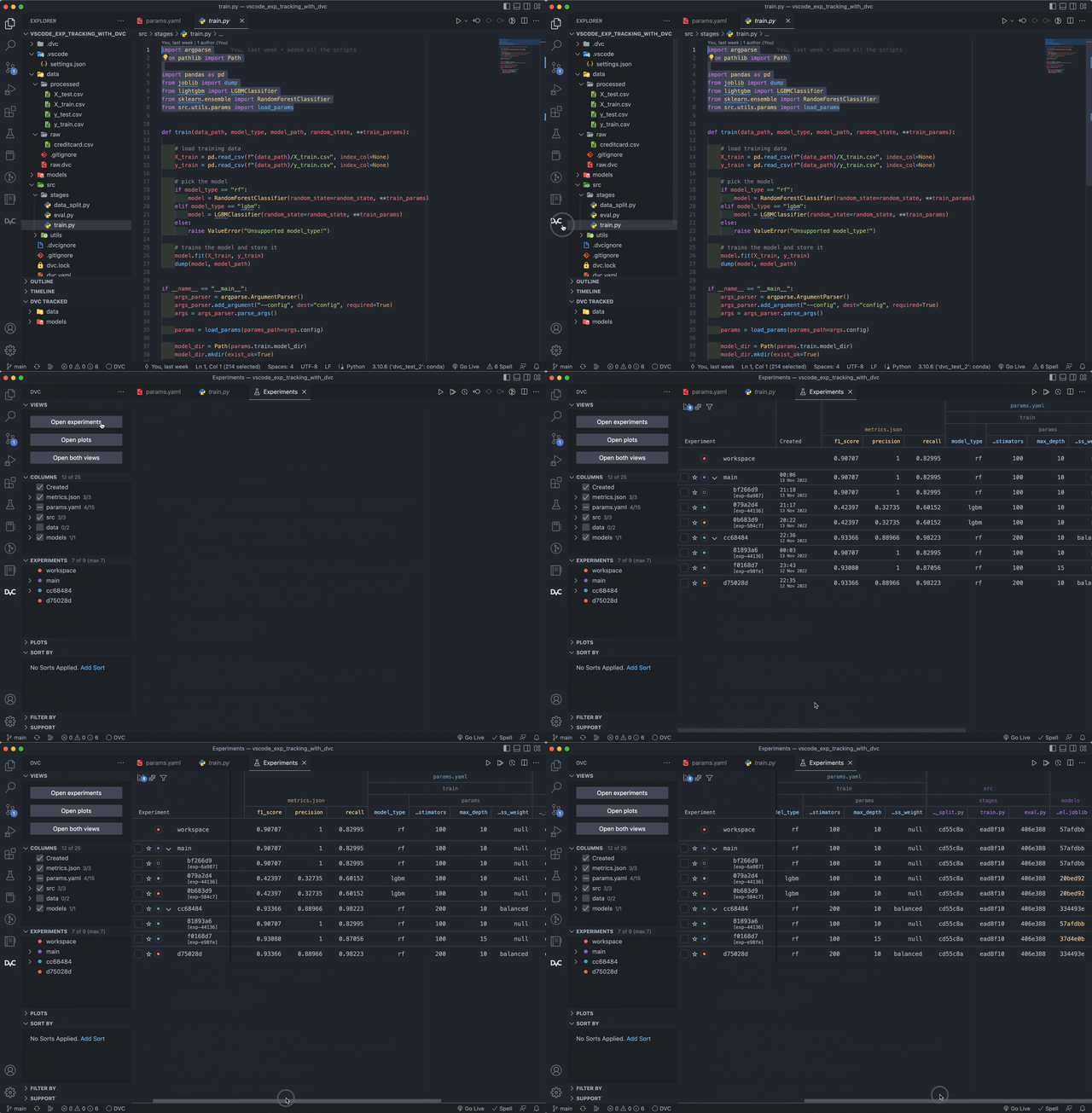
DVC (data version control) is a very useful tool for versioning data and keeping track of ML experiments. Recently, a dedicated VS Code extension was released, which offers experiment bookkeeping with an emphasis on reproducibility. We can quickly run new experiments, track their versions (code, models, parameters, data, etc.), and compare their results in a comprehensive table. Then, with a click of a button, we can switch our codebase and artifacts to any of the experiments we have run. You can see a quick preview of the evaluation table in the following GIF.
The extension also provides comprehensive plotting functionalities. With DVC, we can track, visualize, and evaluate the performance of our experiments using interactive plots. For example, we can display two ROC curves or confusion matrices side by side to examine which experiment achieved better performance. On top of that, the extension also offers live plotting of specific metrics. For instance, we can visualize the model’s current loss or validation performance over epochs/estimators while it is still being trained.
Honorable mentions
The list above does not include all the extensions that I use regularly. You can find additional extensions I find useful in the following list:
- autoDocstring: It should not come as a surprise that an extension that helps with creating docstrings is beneficial for any data scientist or software engineer. The extension directly generates docstring templates (supporting the most popular formats) from function signatures, together with relevant type-hints.
- Better Comments: This extension creates more human-friendly comments in our code. Using slightly modified syntax, we can distinguish between color-coded alerts, queries, TODOs, highlights, commented-out code, and any other comments.
- One Dark Pro: This extension brings Atom’s iconic theme to VS Code.
- Python Preview: It’s a tool that offers debugging help by visualizing the execution of Python code.
- Docker: This extension allows us to manage Docker containers and images directly within VS Code.
- Remote Development: This extension enables us to open any folder in a container or on a remote machine while taking advantage of VS Code’s full feature set. For example, we can use it to connect to a GPU server with a Linux installation while working on a Windows machine.
- GitHub Copilot: This extension provides us with AI-powered code suggestions while we type. It can even write code based on the comments we provide.
- GistPad: This extension makes it easier and faster to create and reuse GitHub gists, all from within VS Code.
- Carbon-now-sh/Polacode: These handy extensions allow us to create visually appealing code snippets. They are definitely useful for sharing short snippets on Twitter or in presentations.
- File Tree Generator: This extension generates a text file containing the contents of a directory in the form of a tree, along with meaningful file icons.
Wrapping up
VS Code extensions mentioned in this article can significantly improve our productivity and streamline our workflow. They offer various features such as debugging assistance, documentation generation, code suggestion, and much more. By utilizing these extensions, we can accomplish more in less time and focus on the more important aspects of data science, such as analysis and modeling.
As always, any constructive feedback is more than welcome. I’m curious if you know of any other useful VS Code extensions. If that is the case, please let me know in the comments.
Liked the article? Become a Medium member to continue learning by reading without limits. If you use this link to become a member, you will support me at no extra cost to you. Thanks in advance and see you around!
You might also be interested in one of the following:
All images, unless noted otherwise, are by the author.


