
TLDR: How to Connect to a Bluetooth Device with a MacBook and Python
A quickstart version of our popular article on Python for Bluetooth LE.
This article assumes you know the basics of Bluetooth LE and writing Python code on a Mac. If not, check out our in-depth article here.
Requirements
- A Mac OS computer (12.x+)
- Python 3
- Bleak (a Python Bluetooth LE library)
- A Bluetooth LE device (smart watch, smart lightbulb, etc.)
Step 0: Install Bleak
Bleak is a Bluetooth LE library for Python.
Install with pip install bleak.
Step 1: Scan for Nearby Bluetooth Devices
This step is optional if you already know your device’s MAC address or UUID.
Put the code below in a file called scanner.py and run it.
# scanner.py

import asyncio
from bleak import BleakScanner

async def main():
    devices = await BleakScanner.discover()
    for device in devices:
        print(device)

asyncio.run(main())
The output will be a list of nearby devices, with their UUIDs and names.

Copy the UUID of your device. If we want to connect to the first Xsens DOT listed, we’ll have to use address 338312FA-C3D1–183F-325A-0726AFDBEB78.
AsyncIO is a Python library that helps our code wait to hear from Bluetooth devices. That way, however long it takes for Bluetooth devices to send our computer a message, this won’t pause our code or causes errors for taking too long.
Step 2: Connect to the Device
Now that we know our device’s address, we can connect to it with BleakClient().
In a new file, connect.py, put the following:
# connect.py

import asyncio
from bleak import BleakClient

async def main():
    address = "ABCDEFG1-XXXX-XXXX-XXXX-XXXXXXXXXX"

    async with BleakClient(address) as client:
        print(client.is_connected) # prints True or False

asyncio.run(main())
Replace ABCDEFG1-XXXX-etc… with the address of your Bluetooth device.
For example, for the Xsens DOT, that line will be:
address = "338312FA-C3D1–183F-325A-0726AFDBEB78"The Full Script
This is the full script for connecting to a Bluetooth device.
# connect.py

import asyncio
from bleak import BleakClient

async def main():
    address = "ABCDEFG1-XXXX-XXXX-XXXX-XXXXXXXXXX"

    async with BleakClient(address) as client:
        print(client.is_connected) # prints True or False

asyncio.run(main())
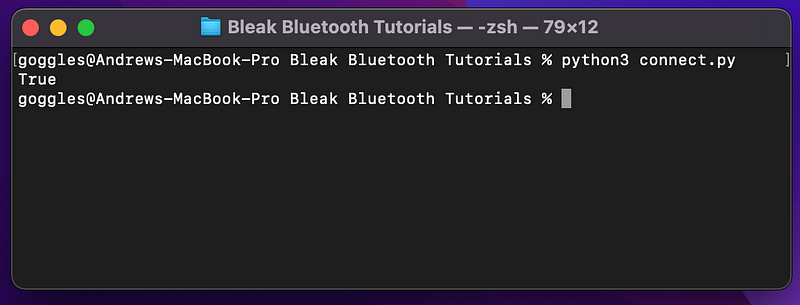
The output will be True if we have successfully connected to the device.
That is all you need to connect to a Bluetooth LE device with Python and Bleak.
Questions and Feedback
If you have questions or comments, email us at [email protected] or message us on Instagram (@protobioengineering).
If you liked this article, consider supporting us by donating a coffee.


