
TinderGPT: How To Create Tinder Bot using ChatGPT-4 & Python For Marketing Strategy in 2023

If you are a business owner and you have not tried to use Tinder yet to get your first sale or subscription, consider giving it some thought, it’s a unique and powerful social media dating app, and it can be pretty challenging to automate swiping and neither is developing a tinder bot
On the other hand, tinder automation is currently, that there are only a few people using it,
which means that you’ve got your job to chop off for you.
But that doesn’t mean no one is benefiting from using a Tinder bot, it just means that the market for it is small.
As a clever and savvy marketer, you can use a combination of social engineering, a Tinder bot, ChatGPT-4 and social media marketing to create an effective strategy to make friends as well as money
What is TinderGPT?
TinderGPT is a piece of software that can help you to automate common tasks on Tinder, including generating message sending, prompt generator, swipes, location updates and much more
What is a prompt Generator? (Note Important)
This is the most important part of the code because you can determine how you can use TinderGPT depending on the prompt you will give to TinderGPT
Prompts are basically hints or commands that we give to large pre-trained languages such as GPT-4 to generate Text.
Where do we use TinderGPT?
If you are a business owner, marketing agency, blogger, or onlyfans account Manager who wants to promote your products and get more views or subscriptions, TinderGPT is the best tool to help you achieve your target
Pre-built Tool
If you find this tutorial helpful and would like to add GPT-4 to your TinderGPT and Custom Prompt Dm Users, I’ve listed the script Gumroad for just 9.98 USD if you want to save yourself some time and try it out for yourself.
Let’s get started!
1. Tinder+
We need to buy Tinder+ which gives us unlimited swiping power so we keep swiping without any limitations and passport features we can Change locations once nobody has lefts to be swiped in that specific location
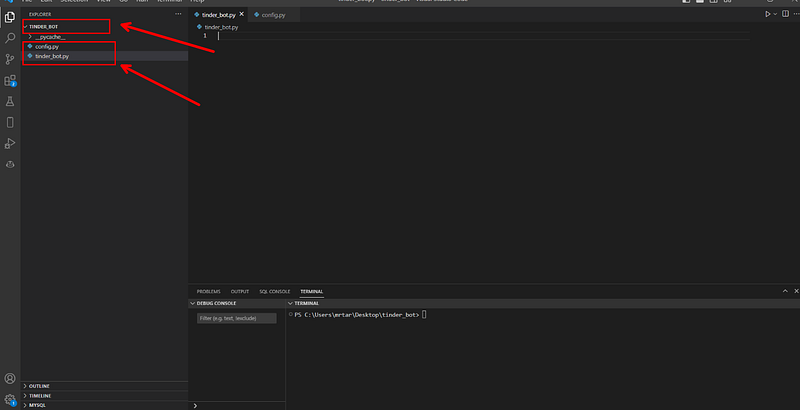
2. Create files and folders in Visual Studio Code
In the left pane, click the Folder Icon
3. Set up your environment
1. You’ll want to start by creating a venv on your local machine. Use
First, open your terminal and create a virtual environment.
python -m venv venv
and activate it:
venv\Scripts\activate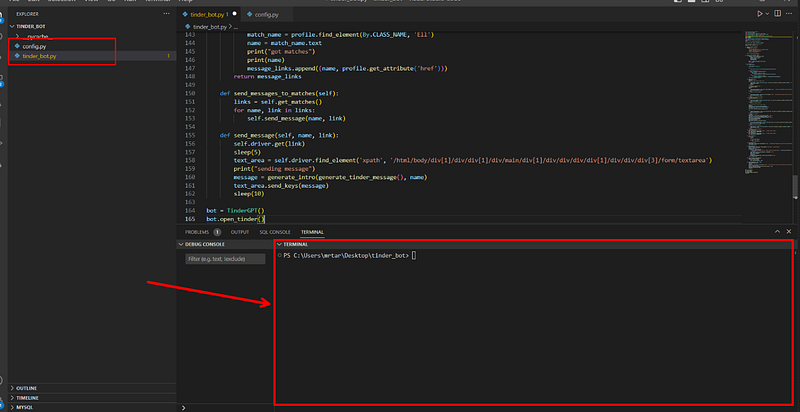
3. Use Command Prompt
Copy and paste the following Commands
pip install selenium Open AI webdriver_manager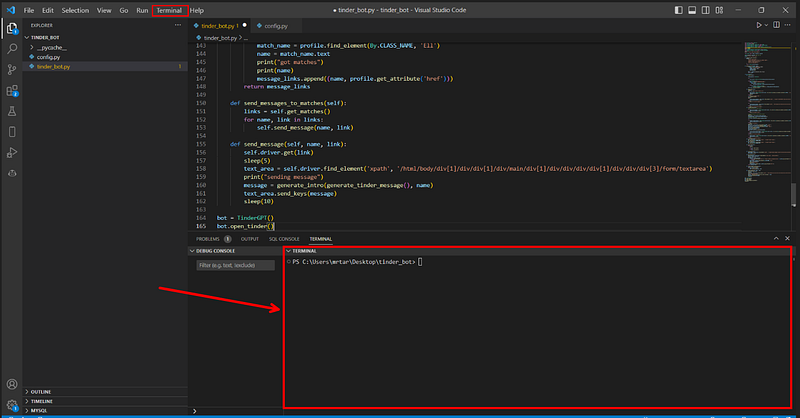
Create folder name TINDER_Bot
Create a file name tinder_bot.py
Create another file called .config.py to store Openai API, Facebook username and password
4. Write code in the .env file
- Go to the .config.py file
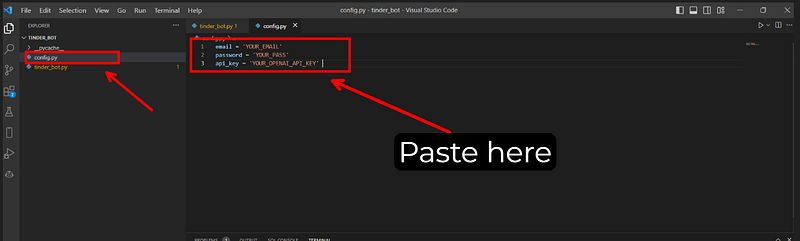
2. Type the following command and write your username and password
email = 'YOUR_EMAIL'
password = 'YOUR_PASS'
api_key = 'YOUR_OPENAI_API_KEY'
5. Get the OPENAI key
Now, that we’re all set, let’s start coding!
First, let’s import the required dependencies:
from selenium import webdriver
from time import sleep
from selenium.webdriver.common.keys import Keys
from selenium.webdriver.support.ui import WebDriverWait
from selenium.webdriver.common.by import By
from selenium.webdriver.support import expected_conditions as EC
import openai
import random
from selenium.common.exceptions import StaleElementReferenceException
import time

from config import email, password, api_key
Read the file
openai.api_key = api_key # your api key6. Write code in the Tinder_bot.py file
We going to define a class Called TinderGPT that initializes a web driver for controlling the Chrome browser.
class TinderGPT():
    def __init__(self):
        self.driver = webdriver.Chrome()
 def open_tinder(self):
        sleep(2)
        self.driver.get('https://tinder.com')
create a function called open_tinder()
def open_tinder(self):
        sleep(2)
        self.driver.get('https://tinder.com')
        try:
            login_button = WebDriverWait(self.driver, 10).until(EC.presence_of_element_located((By.XPATH, '//div[contains(text(), "Log in")]')))
            login_button.click()
            sleep(5)
        except:
            print('no element found ')
        self.facebook_login()
        sleep(6)
        try:
            allow_location_button = self.driver.find_element('xpath', '//*[@id="t-1917074667"]/main/div/div/div/div[3]/button[1]')
            allow_location_button.click()
        except:
            print('no location popup')


        try:
            notifications_button = self.driver.find_element('xpath', '/html/body/div[2]/main/div/div/div/div[3]/button[2]')
            notifications_button.click()
        except:
            print('no notification popup')
create a function called facebook_login()
def facebook_login(self):
        # find and click FB login button
        login_with_facebook = WebDriverWait(self.driver, 10).until(EC.presence_of_element_located((By.XPATH, '//div[contains(text(), "Log in with Facebook")]')))
        login_with_facebook.click()
 # save references to main and FB windows
        sleep(8)
        base_window = self.driver.window_handles[0]
        fb_popup_window = self.driver.window_handles[1]
        # switch to FB window
        self.driver.switch_to.window(fb_popup_window)

        try:
            cookies_accept_button = WebDriverWait(self.driver, 10).until(EC.presence_of_element_located((By.XPATH, '//div[contains(text(), "Accept Cookies")]')))
            cookies_accept_button.click()
        except:
            print('no cookies')
        sleep(10)
        email_field = self.driver.find_element(By.NAME, 'email')
        pw_field = self.driver.find_element(By.NAME, 'pass')
        login_button = self.driver.find_element(By.NAME, 'login')
        email_field.send_keys(email)
        pw_field.send_keys(password)
        login_button.click()
        self.driver.switch_to.window(base_window)
        try:
            allow_location_button_again = WebDriverWait(self.driver, 10).until(EC.presence_of_element_located((By.XPATH, '//div[contains(text(), "Allow")]')))
            allow_location_button_again.click()
        except:
            print('no location popup')
        try:
            enable_button = WebDriverWait(self.driver, 10).until(EC.presence_of_element_located((By.XPATH, '//div[contains(text(), "Enable")]')))
            enable_button.click()
        except:
            print('no location enable')
create a function called right_swipe ()
 def right_swipe(self):
        doc = self.driver.find_element('xpath', '//*[@id="Tinder"]/body')
        doc.send_keys(Keys.ARROW_RIGHT)
create a function called left_swipe ()
def left_swipe(self):
        doc = self.driver.find_element('xpath', '//*[@id="Tinder"]/body')
        doc.send_keys(Keys.ARROW_LEFT)
create a function called auto_swipe ()
def auto_swipe(self):
        while True:
            sleep(2)
            try:
                self.right_swipe()
            except:
                self.close_match()
create a function called close_match ()
 def close_match(self):
        match_popup = self.driver.find_element('xpath', '//*[@id="modal-manager-canvas"]/div/div/div[1]/div/div[3]/a')
        match_popup.click()
create a function called get_matches()
This function uses web scripting to pull links and names to store in message_link for later use
def get_matches(self):
        match_profiles = self.driver.find_elements('class name', 'matchListItem')
        print(str(match_profiles))
        message_links = []
        for profile in match_profiles:
            if profile.get_attribute('href') == 'https://tinder.com/app/my-likes' or profile.get_attribute('href') == 'https://tinder.com/app/likes-you':
                continue
            match_name = profile.find_element(By.CLASS_NAME, 'Ell')
            name = match_name.text
            print("got matches")
            print(name)
            message_links.append((name, profile.get_attribute('href')))
        return message_links
Create a function a send_messages_to_matches():
 def send_messages_to_matches(self):
        links = self.get_matches()
        for name, link in links:
            self.send_message(name, link)
Create a function called send_message()
def send_message(self, name, link):
        self.driver.get(link)
        sleep(5)
        text_area = self.driver.find_element('xpath', '/html/body/div[1]/div/div[1]/div/main/div[1]/div/div/div/div[1]/div/div/div[3]/form/textarea')
        print("sending message")
        message = generate_intro(generate_tinder_message(), name)
        text_area.send_keys(message)
        sleep(10)
7. We Call The Class
bot = TinderBot()
bot.open_tinder()
sleep(10)
# bot.auto_swipe()
# bot.send_messages_to_matches()
Conclusion:👍
This is all it takes to create a Tinder bot powered by ChatGPT, The next steps depend on your imagination and creativity to draw traffic to your website and stimulate sales.
📻 Stay tuned for more details on trending AI-related implementations and discussions on my personal blog .
🧙♂️ I am an AI application expert! If you want to collaborate on a project, drop an inquiry here or Book a 1-On-1 Consulting Call With Me.
📚Feel free to check out my other articles:
Level Up Coding
Thanks for being a part of our community! Before you go:
- 👏 Clap for the story and follow the author 👉
- 📰 View more content in the Level Up Coding publication
- 💰 Free coding interview course ⇒ View Course
- 🔔 Follow us: Twitter | LinkedIn | Newsletter
🚀👉 Join the Level Up talent collective and find an amazing job


