
Tic Tac Toe Game in Python for Beginners
In programming, the best way to learn is to practice. I will give you a chance of practicing through a little exercise: a Tic Tac Toe game.
Prerequisites
To complete this exercise, you need to know Python basics such as lists, conditions, loops, and functions.
Statement
- We’re building a console Tic Tac Toe game playable against a computer
- The board is a 3x3 grid numbered from 1 to 9 so that we can ask the player a cell to play by number.
- There is no A.I., the computer is playing random.
Tips
- We can modelize the board with a list of characters which can be either “X”, “O” or an empty string.
- To generate random numbers, we import Python’s
randompackage and we use therandint(a, b)function which generates an int between a and b.
import randomrandom.randint(1, 10)
# 3- The game should be played this way :
- Board drawing.
- The player is asked which square he wants to play.
- Update the board according to the chosen square.
- Check the board to see if the player has won or if the game is over.
- The computer chooses a random square.
- Update the board according to the chosen square.
- Check the board to see if the computer has won or if the game is over.
- Return to the first step until there is a winner or the game is over.
Now you know everything there is to know about creating this game. I advise you to try to do it yourself with the help of my indications and if you don’t succeed, continue this article. The best way to learn is to practice, it won’t be useful to just read the correction without trying.
Correction
Board Drawing
There is no real difficulty here, except that drawing in console mode can be quite confusing at first, as you have to draw line by line.
Let’s have a look at how I have done it. Below is how my Tic Tac Toe looks. The numbers are just for orientation and are not visible in the final version.
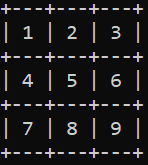
The idea is always to try to make the code as short and clear as possible, without repetition. So you have to try to identify the elements that are repeated in what you want to do. Here, you can see that the board can be divided into 3 rows and that the only thing that differs between these rows is the content of the squares they contain. For each row, we have to draw the top line (+ — -+ — -+ — -+) and then the contents of the cells (| X | | O |). Repeat this twice since you have a total of 3 rows, and once you have finished, you must draw the bottom row.
If you have followed the advice above, you have modeled the tray with either a list or a dictionary, in which case you just need to iterate over it and use the index to draw, for example drawing a line every 3 indexes.
Here is the code of the function to draw the board:
def draw_board(board):


    for index, box in enumerate(board):

        if index // 3 != (index - 1) // 3:
            print("+---+---+---+")

        if box:
            print("| " + box + " ", end="")

        else:
            print("|   ", end="")

        if index % 3 == 2:
            print("|")

        if index == 8:
            print("+---+---+---+")
I won’t explain the whole code because the purpose of this article is to make your practice. So if you can’t understand this code by yourself, try to create your code.
Player’s turn
You must be careful to check the value of the box entered by the player. Indeed, the input function allows any type of value in input, what happens if the player enters a string of characters? This will probably cause your program to crash, and the same will happen if the player enters a negative value or a value that is too large, for example. So you need to do some checking before working with the input value.
box_number = -1
valid_input = False
while not valid_input:
    box_number = int(input("Choose a box"))

    if box_number < 1 or box_number > 9:
        print("Choose a box between 1 and 9")

    elif board[box_number - 1]:
        print("Please choose an empty box")

    else:
        board[box_number - 1] = "X"
        valid_input = True
Computer’s turn
If you understood how randint works it should be easy.
computer_play = -1
while board[computer_play - 1] or computer_play == -1:
    computer_play = random.randint(1, 9)

board[computer_play - 1] = "O"
Checking the board
Each time the player or the computer plays, the board must be checked to see if there is a winner or not. This is done with 8 conditions, since there are 3 conditions on the rows, 3 on the columns, and 2 on the diagonals. We also have to check if the board is full or not. To do this, we count the number of occupied squares, and if it is equal to 9, it means that the board is full.
def verify_winner(board):

    if board[0] == board[1] == board[2] != "":
        return board[0]
    if board[3] == board[4] == board[5] != "":
        return board[3]
    if board[6] == board[7] == board[8] != "":
        return board[6]

    if board[0] == board[3] == board[6] != "":
        return board[0]
    if board[1] == board[4] == board[7] != "":
        return board[1]
    if board[2] == board[5] == board[8] != "":
        return board[2]

    if board[0] == board[4] == board[8] != "":
        return board[0]
    if board[2] == board[4] == board[6] != "":
        return board[2]


def check_full_board():
    counter = 0

    for box in board:
        if box:
            counter += 1
    if counter == 9:
        return True
    return False
Whole code
import random

board = [
    "", "", "",
    "", "", "",
    "", "", ""
]

winner = ""
full_board = False


def verify_winner(board):

    if board[0] == board[1] == board[2] != "":
        return board[0]
    if board[3] == board[4] == board[5] != "":
        return board[3]
    if board[6] == board[7] == board[8] != "":
        return board[6]

    if board[0] == board[3] == board[6] != "":
        return board[0]
    if board[1] == board[4] == board[7] != "":
        return board[1]
    if board[2] == board[5] == board[8] != "":
        return board[2]

    if board[0] == board[4] == board[8] != "":
        return board[0]
    if board[2] == board[4] == board[6] != "":
        return board[2]


def check_full_board():
    counter = 0

    for box in board:
        if box:
            counter += 1
    if counter == 9:
        return True
    return False


def draw_board(board):

    for index, box in enumerate(board):

        if index // 3 != (index - 1) // 3:
            print("+---+---+---+")

        if box:
            print("| " + box + " ", end="")

        else:
            print("|   ", end="")

        if index % 3 == 2:
            print("|")
if index == 8:
print("+---+---+---+")
while not winner and not full_board:
draw_board(board)
box_number = -1
valid_input = False
while not valid_input:
box_number = int(input("Choose a box"))
if box_number < 1 or box_number > 9:
print("Please choose a box between 1 and 9")
elif board[box_number - 1]:
print("Please choose an empty box")
else:
board[box_number - 1] = "X"
valid_input = True
winner = verify_winner(board)
if winner:
break
computer_play = -1
while board[computer_play - 1] or computer_play == -1:
computer_play = random.randint(1, 9)
board[computer_play - 1] = "O"
print("Computer played box " + str(computer_play))
winner = verify_winner(board)
if full_board:
break
if winner:
draw_board(board)
print("Winner is "+winner)
else:
print("No winner")And now?
Now you can try to improve this game. For example, you can add a feature to make the game playable by two humans.
Or you can just move to another project.
It’s up to you to be creative and train your Python skills!
To explore more of my Python stories, click here!
If you liked the story, don’t forget to clap and maybe follow me if you want to explore more of my content :)
You can also subscribe to me via email to be notified every time I publish a new story, just click here!
If you’re not subscribed to medium yet and wish to support me or get access to all my stories, you can use my link: