
Productivity and Apple
Three Years Later, I’ve Analysed Over 2,500 Articles Using Apple Notes. Was It Worth It?
Apple has dramatically improved its note-taking app, which takes me closer than ever to having a second brain. Close enough?

You might have noticed the many, many note-taking apps available for the iPad. Despite that, in May 2020, I wrote about how I had decided to build my Zettelkasten second brain using Apple Notes — yes, that Apple Notes: a stock iOS/iPadOS/Mac app.
Was there something wrong with me? Didn’t I understand the dire consequences of supplier lock-in? Didn’t I yearn to tag and link ideas, functionality unavailable in Notes?
Supplier lock-in didn’t bother me much, no. I’m an Apple enthusiast, and as I commented about Notes in the article:
I use this system every day because it’s on the devices that I use every day. Everything here is freely available on Apple iPhones and iPads.
Yeah, I know, crazy. But it was more than just brand loyalty: Notes is tightly integrated into the Apple ecosystem, and it has impressive search capabilities. Even in 2020, it could search for text and objects in note attachments:
I spend a significant amount of time searching my notes, so that was an important benefit. Most note-taking apps can’t do that, or make the functionality a premium feature.
It was significant enough for me to work around Notes’ shortcomings. I did that by implementing a simplified form of the Zettelkasten methodology. This is well known and much loved among note-taking nerds (see later). I also implemented some Apple Shortcuts to fill gaps.
So, how’s it working out for me? Did I make a wise choice? While I’m thinking about it, was it worth the pain? Let’s explore.
A Zettelkasten refresher
Rather than attempting to fully implement Zettelkasten, I cherry-picked the components that made most sense to me. Here’s a quick overview.
Zettelkasten is a note-taking methodology devised by an outrageously productive individual, Niklas Luhmann. It predates computers, and provides researchers with a framework for creating a database of topics and themes from multiple information sources over time.
Simplified, Zettelkasten works something like this:
- You create a database of notes, each about a unique topic or idea.
- Every note is uniquely identifiable.
- You link together notes over time, identifying themes and ideas organically.
There are several types of notes in Zettelkasten:
Fleeting Note — a simple note that captures a thought or an idea when it occurs; for example, an idea for a story.
Literature Note — this records key points from a book or article written in your own words.
Permanent Note — these are refined versions of fleeting and literature notes.
It’s a massive area, but you’ll find a solid start here:
My use of Zettelkasten has been fairly light touch. All of my notes are uniquely identified, and keywords are used consistently and frequently.
However, I’m less happy with my use of note types. I rarely convert fleeting or literature notes into permanent notes.
One exception is my notes about cooking and baking. I regularly save and refine these recipes. For example, I’m moving away from using sugar as a sweetener, replacing it with honey. I’m using keywords and links to find recipes to update.
I could definitely benefit from creating more permanent notes. So, why don’t I? It takes time, and I have a packed schedule. Perhaps, I need to make time.
Note Identifiers
No one is ever going to make a summer blockbuster about note identification, but it’s actually important. A good identifier will not only be unique, but can also provide useful information about the note it identifies.
If this extra information is in a human-readable way, it will make links between notes much more useful. To that end, I created this convention for naming notes.
YYYY.MM.DD HH:mmt:ss A Title.
YYYY = year
MM = number of month (01 → January)
DD = day of month
HH:mm:so = time note was created
The title is what it sounds!
I created an Apple Shortcut to make creating note convenient.
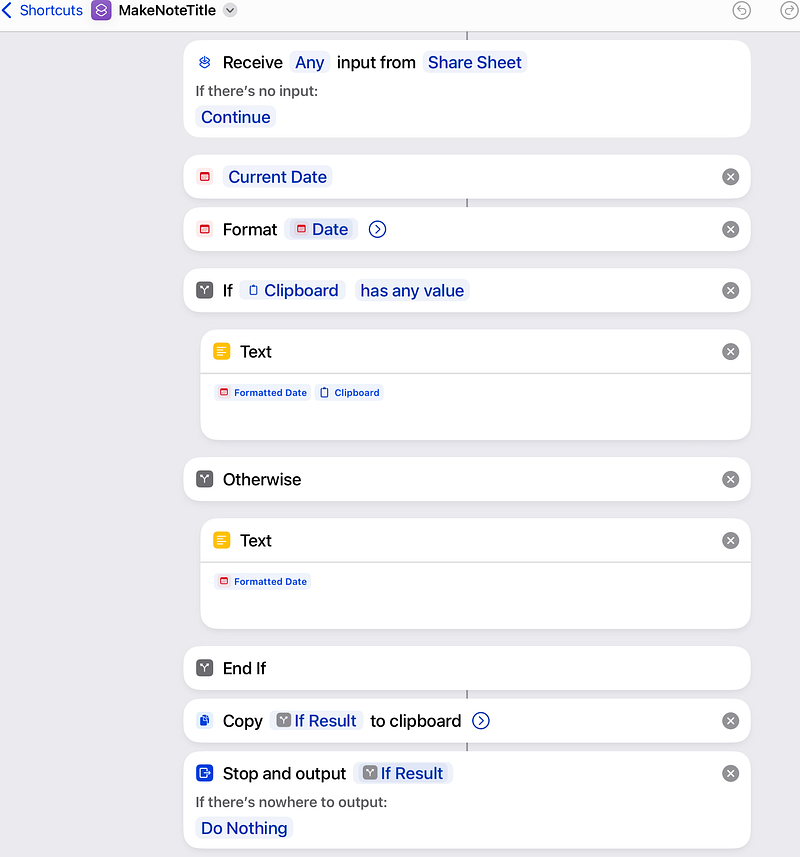
The gist of is:
- Format the current date and time according to the convention.
- Copy the user’s proposed name for the note from the clipboard.
- Combine both to make the full note title.
- Put the complete note title in the clipboard.
This is a link to the shortcut on iCloud.
How do you use it?
- Create a new note and add a name for the note on the first line (e.g. Double Chocolate Brownie Recipe).
- Highlight this text and long press to bring up the share menu.
- Tap on the share menu and run MakeNoteTitle.
- When it finishes, paste the clipboard to create a fully encoded title.
This note naming convention serves me well. Using the date and time to uniquely identify notes also tells me how old the note is, suggesting whether it is still relevant.
Document links
Document links are one of the most important features of Zettelkasten, but Apple Notes didn’t support links between until this year. I got around this using the document identifiers.
By convention, all my notes have the same header structure; for example:
20200423 19:42:14 Overview Zettelkasten Method
#productivity #writing #research # #

Related:
20200423 20:04:29 The Barbell Method of Reading Zettelkasten Method
20200426 15:58:54 The Difference Between Good and Bad Tags: Zettelkasten Method
Want to know which notes to link to a particular note? Look at the list of related notes identifiers at the head of the document, and search for an appropriate identifier.
This workaround was okay, but (thankfully) the iPadOS 17 version of Notes supports proper links between notes. For example, I created a note with links to notes with recipes, a sort of hub note:
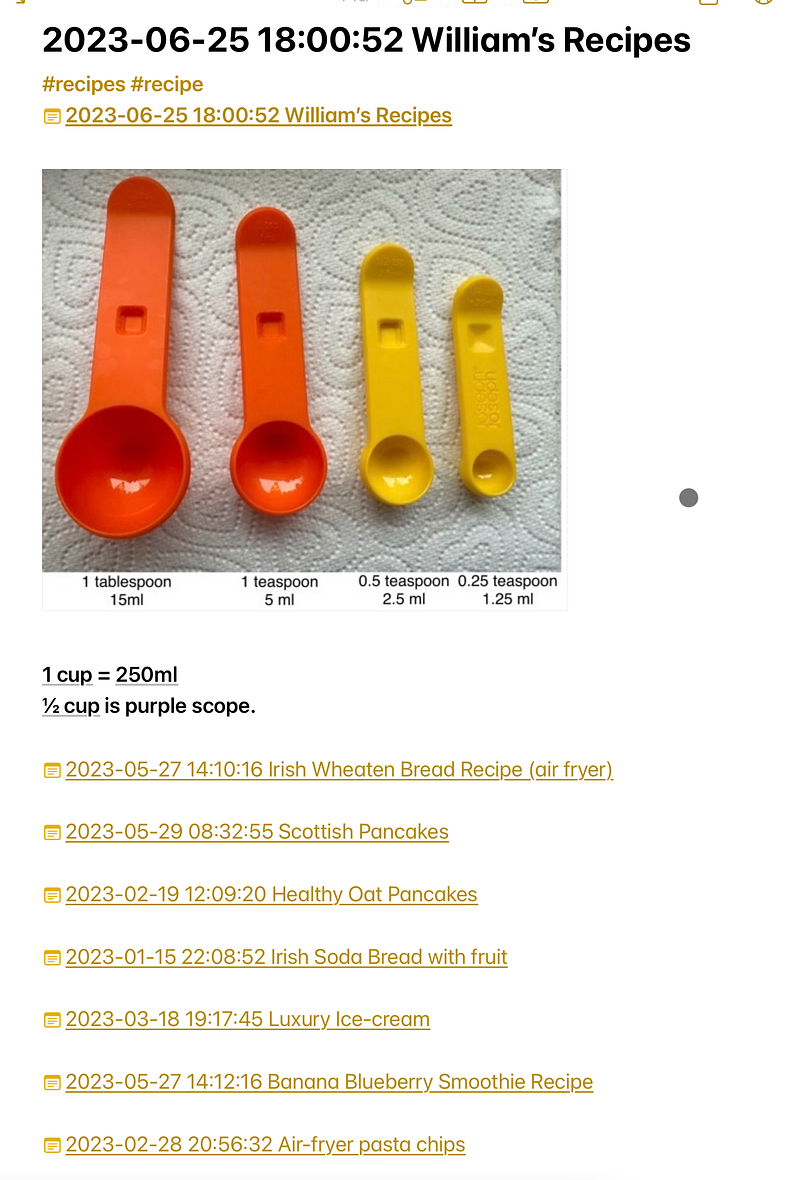
Notes doesn’t automatically create double-linking, but it’s not hard to do manually.

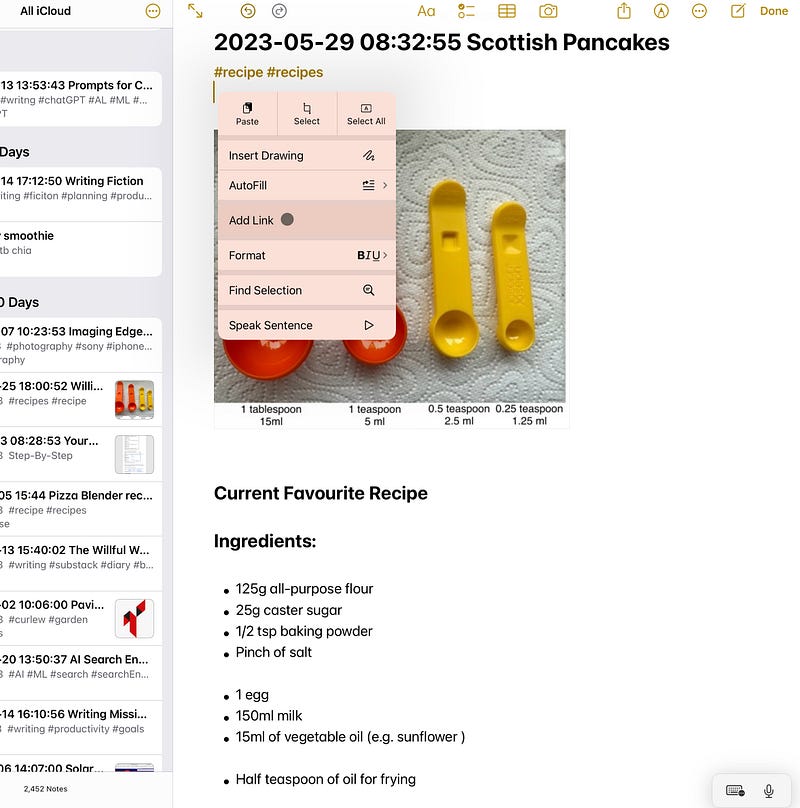
To create links, you can long tap on a note, and you’ll get an option to Add Link.
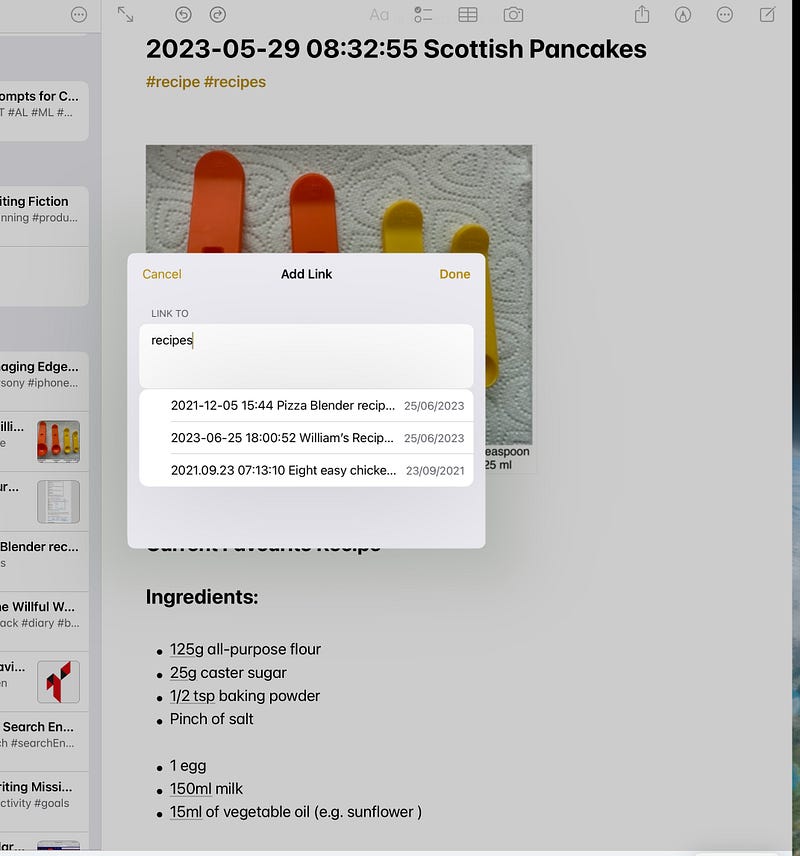
Tap on Add Link, and then you can choose from a list of notes.
If you type >> while editing a note, you can add links too.
By the way, you can copy and paste links, so it’s easy to add them to other documents.
This note-linking capability is available in iOS/iPadOS 17 and works really well. It has made my workaround obsolete.
Support for tags
In May 2020, Apple Notes didn’t support keywords or tags, but it was introduced in 2021 with iOS 15. As it happened, predictably Apple used the # symbol to differentiate tags from normal text, which is what I proposed in my May 2020 note.
I originally intended to have two types of tags: topic tags and object tags. A theme tag referred to an area of study; for example, physics. An object would be more specific; for example, quantum super-position.
In practice, I just used tags. The line between what was a theme and what was specific was often blurry.
I wanted tags to be used consistently within my notes, which would be a problem if I just typed them. Using Apple Shortcuts, I set up a system to pick tags from an existing list.
Now that Notes supports tags, this shortcut is redundant. The app displays notes in the sidebar, and when you type a tag, it autocompletes.
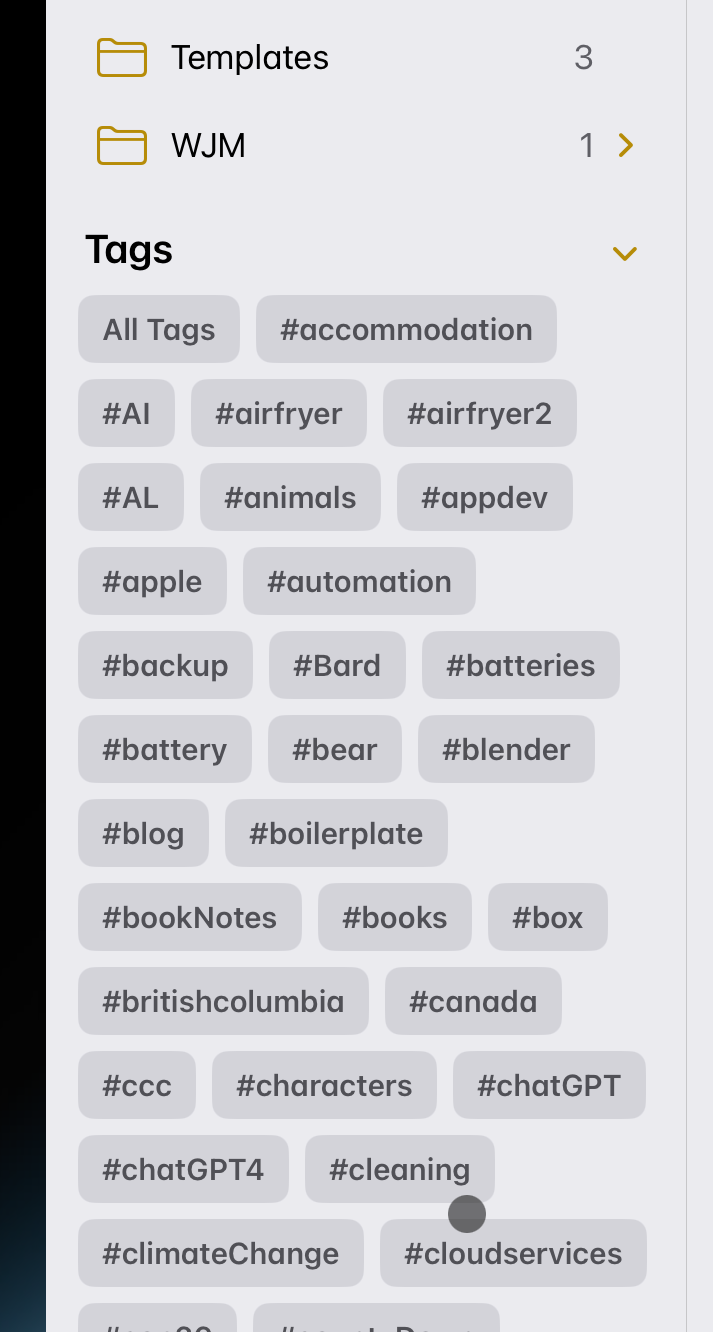
The main issue I have with Apple’s implementation is the need to type in a space manually after each tag. If you don’t type a space, Notes won’t recognise the text as a tag.
This means that Notes won’t recognise my existing tags as tags. I have to manually type a space in front of each. Worse, the Shortcut action to add tags to a note, requires you to manually choose tags ahead of time. This means you can’t use automation to convert text into tags.
I don’t understand why Apple insists you manually type spaces after a tag to make it a tag. Just another weird Apple quirk.
Improved Information capture — Quick Notes
Zettelkasten is all about collecting information from multiple sources, and Notes’ integration with iOS/iPadOS makes it a natural fit for this.
It’s easy to add screenshots to a note:
Anything you can print, you can turn into a PDF and embed in a note.
Apple Notes’ Quick Note capability takes this even further. Wherever you are on iOS/iPadOS, you can swipe up from the bottom right ht, and create a Quick Note.
A Quick Note is actually just a note, and you can them in the Notes’ sidebar. Have a look at this story:
I view quick notes as being equivalent to Zettelkasten’s fleeting notes. What makes it especially good for creating these types of notes is its ability to deep link to source data.
A deep link is a reference to a location within a web page or document. Not every iOS/iPadOS app supports deep linking, but where it is available, it’s great. When looking up references, you no longer have to manually search through a long document.
It’s still not perfect
What do I wish worked better?
- Apple’s implementation of tags needs work. Notes should auto-detect legally formatted tags.
- It should be possible to zoom in and out of a Note. It’s ridiculous that Notes doesn’t do that.
Final thoughts
Choice of app
Apple is quietly making its Notes app powerful. It has tags, easy-to-use note linking, AI-enhanced search, and tight integration within the Apple ecosystem.
I’m glad that Apple continues to invest in Notes, but even if it doesn’t, I’d stick with it. Why? Is it because I” m an Apple enthusiast? I am, but that’s not why.
Creating a system of notes over a period of years requires a considerable investment of time and effort. I would rather not make that investment unless I can be certain the note-taking system will be there for the long haul.
I could also go with a text-based note-taking approach, which would be easy to migrate to a new note -taking system. The downside is that I’d lose that fancy searching, and I do like a good search!
Is it worth having a second brain?
The greatest barrier preventing someone from creating a Zettelkasten, a second brain, is not choosing the right app, or even adopting the best methodology. The greatest barrier is the sustained effort over a long period of time.
If you really want to have a second brain, every time you read a book or article or watch a video, you should be thinking about a potential fleeting note, and how it might link into your Zettelkasten. That’s no small ask.
Has that been my life over the last three years? Hand on heart, I can say that I’ve created many fleeting notes and tagged them properly. Proactively looking for links between notes — maybe not. Using tags/keywords with discipline is much more practical.
I think if I were engaged in a course or specific research area, the story would be different. I certainly wish that I’d known about Zettelkasten when I did my two degrees. The benefits clearly justify the effort.
There are benefits, however, for everyday life. There are documents, for example, that you look at infrequently, but when you need them, you really need them. Receipts for preparing tax returns, for example. A proper knowledge management system should make that easy.
And here’s a delicious feeling. I moved house and country a few years ago, and I needed an old address. I felt panic growing within me, but I did the search on Notes. It picked the address out of a scanned attachment. Yes, that was sweet.


