
Three Best Python Packages for Acquiring Financial Data (Free of Charge)

The acquisition of financial data is as important as the development of an algorithm in a quantitative financial project. Without data, there is no way we can implement and backtest our trading strategy or algorithms.
In this article, I am going to introduce three Python packages that enable us to easily acquire financial data without any cost. They are:
- yFinance
- Alpha Vantage
- Pandas-DataReader
Apart from being open-source, the three Python packages above permit us to obtain not only the technical data but also including the fundamental data that is useful in some investment strategy development.
We will go through some simple demonstrations for each of the Python packages above to gain further understandings of their usage.
Prerequisite Python Packages
- yFinance — https://pypi.org/project/yfinance/
- Alpha Vantage— https://pypi.org/project/alpha-vantage/
- Pandas-DataReader— https://pandas-datareader.readthedocs.io/en/latest/
Github
The original full source codes presented in this article are available on my Github Repo. Feel free to download it (data_sources.py) if you wish to use it to follow my article.
1. yFinance
yFinance is a real gem for the Python community. It is a Python package that allows us to fetch historical prices data of securities and their fundamental info from Yahoo Finance. Since Yahoo Finance decommissions its official Data API in 2017, yFinance has become an alternative method to acquire financial data.
Demo: Acquire Historical Price from Single Ticker
Line 1: Import the yFinance package. Commonly we import it with an alias name as yf.
Line 3: Set a ticker name (e.g. AAPL)
Line 4: Use the yFinance download method to fetch historical prices. We can set a starting date and end date to specify a data period to download the financial data.
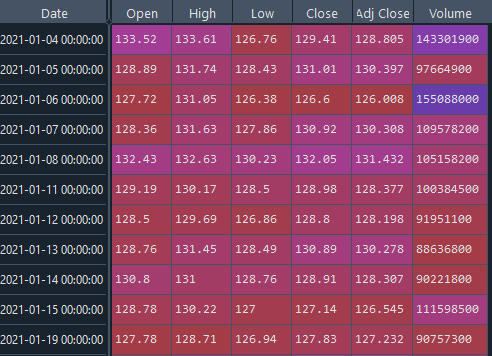
The yFinance will fetch the OHLC data from Yahoo Finance and return it to us in a data frame format.
Demo: Acquire Historical Prices from Multiple Tickers
Line 1: We define our target tickers in a list.
Line 2: Use the tickers list as the yFinance first parameter. We set the returned data grouped by ticker name.
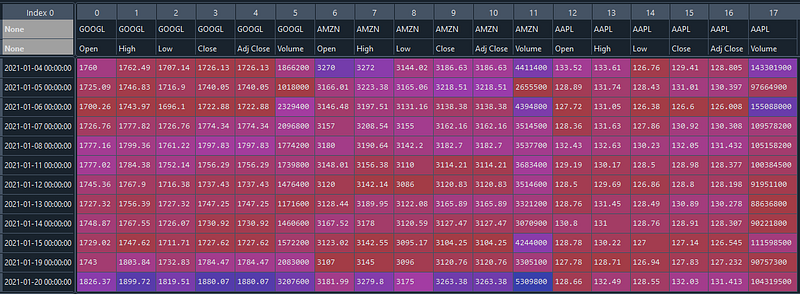
To access the closing price for Google, we should use: stock_data[“GOOGL”][“Close”]
Demo: Acquire Fundamental Data
Line 1: Set a ticker name (e.g. MSFT).
Line 2: Use the yFinance Ticker to download the fundamental info of the company.
Line 3: The fundamental info will be returned in a dictionary format. Print out the keys to show the available info.
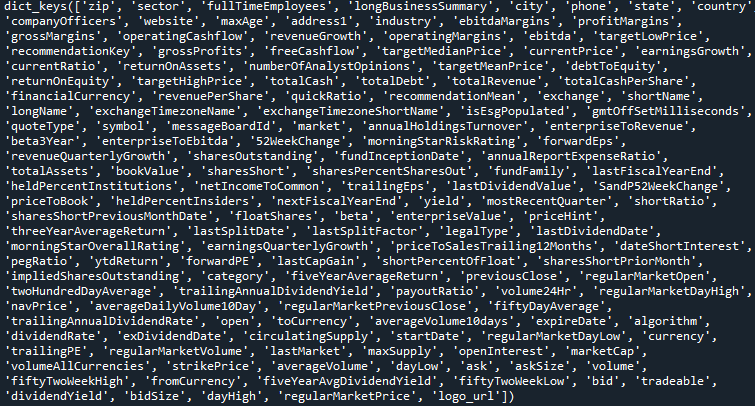
Line 4: Try to access several fundamental info and print them out using some dictionary keys.

Comments:
yFinance is a completely free Python package. There is no daily usage quota. Even being an open-source package, yFinance has provided almost everything we can gain from Yahoo Finance from OHLC data to fundamental info.
There are much more details about the usage of yFinance. You may visit this blog for further guidance.
2. Alpha Vantage
Similar to the yFinance, Alpha Vantage is another Python package that permits us to obtain the historical prices data as well as the fundamental data through the Alpha Vantage API. One additional bonus of Alpha Vantage is that it also offers technical indicator data such as SMA, EMA, MACD, Bollinger Bands, and etc.
Sign Up API Key
To use the Alpha Vantage package, we first need to sign up for a free API key from the Alpha Vantage website.
The free API key permits 5 requests per minute and a maximum of 500 requests per day.
Demo: Acquire Historical Price
Line 1: Import the TimeSeries modules from the Alpha Vantage package
Line 3: Define a ticker (e.g. IBM)
Line 4: Use the TimeSeries modules to create a handler. This handler will need a registered API key. We can set the output format as Pandas dataframe.
Line 5: Use the handler to call the get_daily_adjusted method to acquire the stock prices data of the ticker.
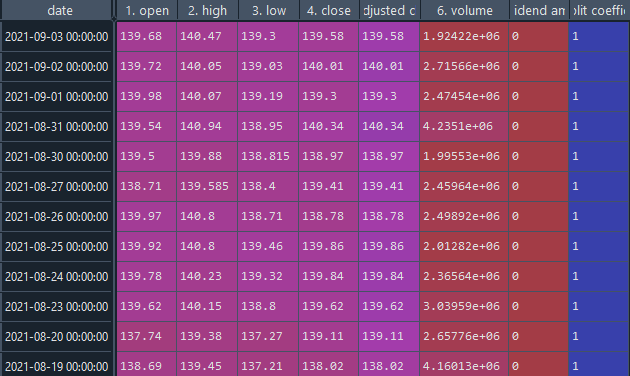
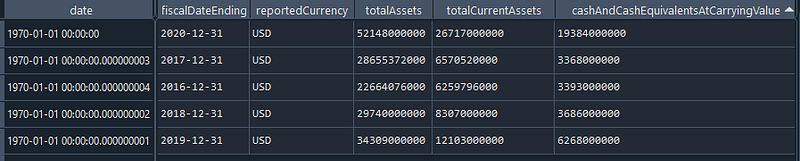
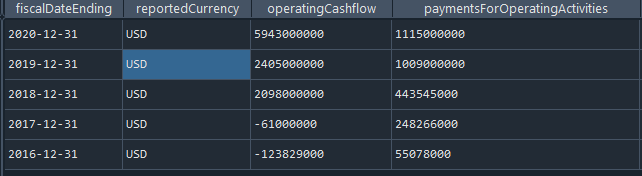
Demo: Acquire Fundamental Data
Line 1: Import the FundamentalData module from the Alpha Vantage package.
Line 3: Define a ticker
Line 4: Use the FundamentalData module to create a handler by using the API key.
Line 5–7: We can use three different methods to obtain the fundamental data of income statement, balance sheet and cash flow.

Demo: Acquire Technical Data
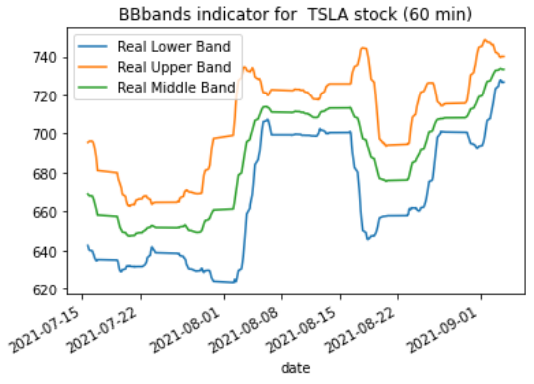
Line 1–2: Import the TechIndicators module from the Alpha Vantage and also the Matplotlib library.
Line 4: Define a ticker
Line 5: Use the TechIndicators module to create a handler using the API Key
Line 6: Use the get_bbands method to get the Bollinger Bands data by setting the interval to 60 minutes and time period = 60 days.
Line 7–9: Plot the Bollinger Bands.
Comments
As shown by the results above, Alpha Vantage has not only given us the accessibility to historical prices and fundamental info but also the technical indicator data. This can save us from using other third-party libraries to calculate those technical indicators. Besides, Alpha Vantage also offers other financial data apart from stocks such as the forex and cryptocurrency.
Despite the daily limit quota, the free package should be sufficient to meet the need for most individual or personal projects.
For more information or guidance on using the Alpha Vantage, you may refer to:
- Alpha Vantage API Documentation
- Alpha Vantage Python Package Page
- Alpha Vantage Tutorial
- My another Medium Article about Piotroski Score
3. Pandas-DataReader
In addition to the stock OLHC and fundamental data, the Pandas-DataReader permits us to extract other alternative financial data such as the Federal Reserve Economic Data, Fama/French Data, World Bank Development Indicators, etc.
Here I will only show the examples of the Federal Reserve and World Bank in the demo below.
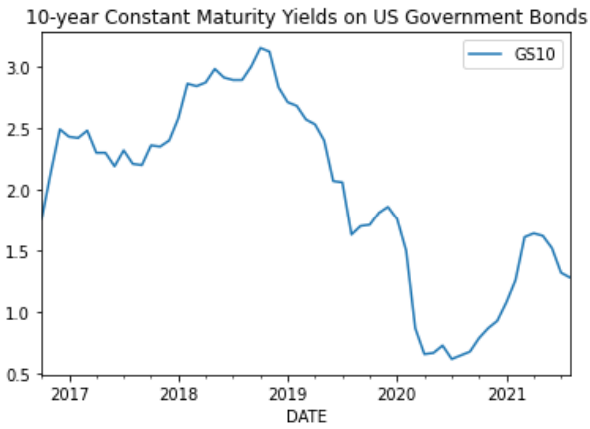
Demo: Acquire Federal Reserve Economic Data
Line 1: Import Pandas-DataReader package
Line 2: Use the get_data_fred method to get the 10–year constant maturity yields on US Government Bonds.
Line 3–4: Plot the maturity yields.
Demo: Acquire World Bank Data
Line 1: Import Pandas-DataReader package
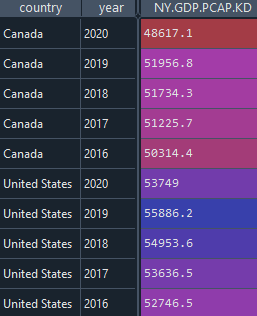
Line 2: Use the download method to obtain the Gross Domestic Products per capita in constant dollars in North America.
Comments
Pandas-DataReader is a very versatile package that enables us to obtain a variation of financial data to meet our different project objectives. This is the package we should consider whenever we need financial data other than the stock, forex and cryptocurrency markets. It can be a great supplementary package to yFinance and Alpha Vantage in financial project development.
For further info about the Pandas-DataReader, you may refer to its own documentation page that has given quite comprehensive guidance.
Conclusions
All three Python financial packages introduced here can work seamlessly with Python Pandas and also the Matplotlib library. This has permitted an easier way to manipulate and visualize the data. Besides, all three packages are well maintained by their developers and are ready for use in the long term. As a Python developer for a financial project, we should not miss these great tools.
I wish you enjoy reading this article.
If you like my article and would like to read more similar articles, feel free to subscribe to Medium. You will be able to read unlimited articles from me and other authors on Medium. Thanks for your support.


