
Threading in Swift Simply Explained
Using Grand Central Dispatch (GCD) to speed up your app

Threading in iOS can be difficult to understand if you’re coming from other platforms, or if you are a beginner at Swift. Here’s a few tips to get you off on the right foot with threading, by using GCD.
First a precursor, threading is all about managing how work is prioritized in your app. Making your code execute faster is great, but what matters more is how fast the user perceives your app to be.
Your goal as a developer is to prioritize anything that the user can see and interact with. It makes your app feel faster and snappier. Don’t make the user wait for something to load that they don’t notice or care about.
1 — Only Use the Main Thread for Updating Views
This is the easiest way to avoid issues. The basic idea is making sure that all views and interface elements are not blocked by other items in the main queue.
A good example of this:
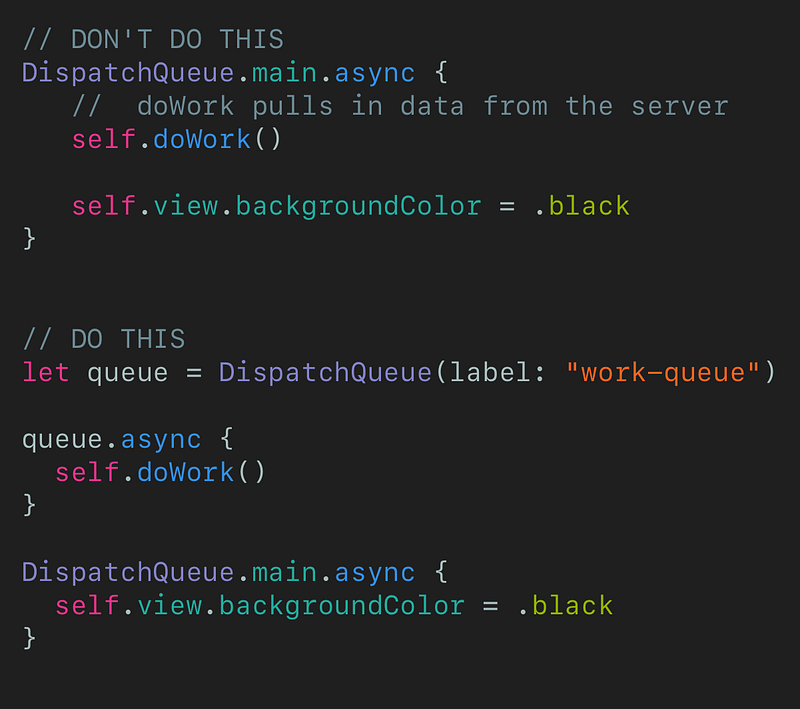
You make sure that the user won’t be blocked from loading a view, or exiting a view, by only doing UI related work on the main thread. Avoid functions which have side effects that load data, images, etc on the main thread.
2 — Know the Different GCD Quality of Service (QoS) Types
There are a few different priorities for performing work in iOS. The higher qualities are prioritized first and are handled right away, whereas the lower qualities of service are handled when the system frees up some resources.
The different qualities, ranked from highest to lowest, are listed below.
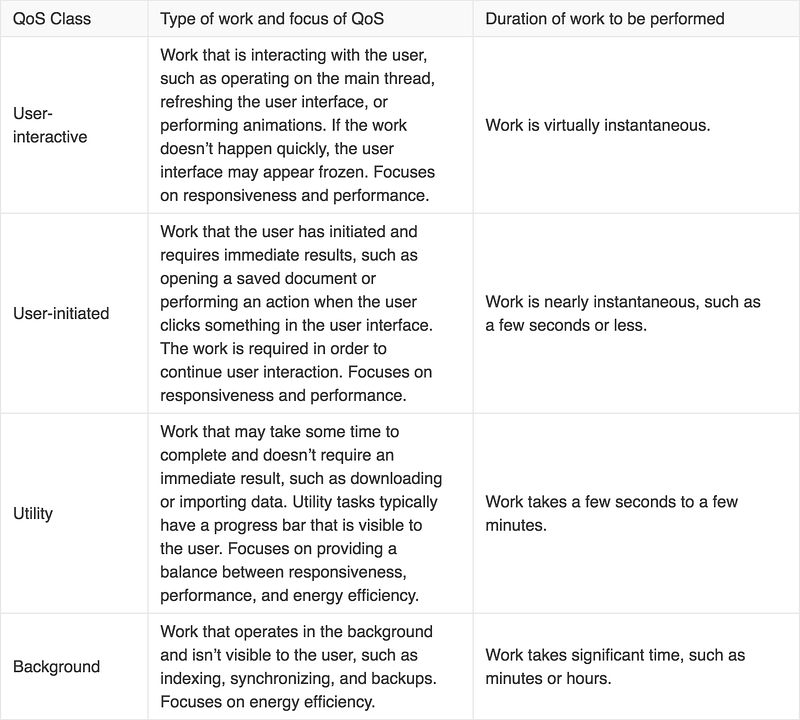
Creating your own queue with quality of service is really easy. You just have to give it a label and a QoS.

3 — Know What Thread You Are On
To find out what the current thread is, at any given spot in your code: Thread.current.

With this, you can see exactly which priority the function is running on.
You can also check if you are specifically on the main thread with Thread.current.isMainThread.
4 — Almost Always Use Async
This is one of the easiest ways to make a mistake when threading, but it is also the easiest to avoid.
There are benefits to using sync in your code, and some special cases require it, but for someone just starting iOS development it’s probably best to avoid it.
Note: Never call sync on the main DispatchQueue such as in this example:
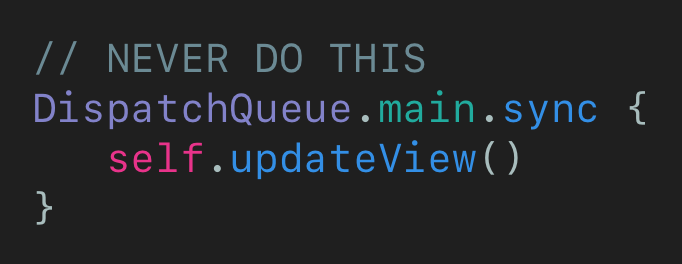
Also avoid using the sync on the .userInteractive queue because it is at the same priority level as the main queue.
Threading Resources
- Dive deeper with the WWDC video on concurrency.
- If you are a visual learner, read this post. It really helped me understand how the different quality of service levels interact, and how the different priorities are called.
- Ray Wenderlich also has a great guide on threading


