This “Two Dozen Favicons” Rubbish Is Getting Out Of Control
I’m working on a site for a client right now I can’t go into too many details about — NDA and all — but one of the most ridiculous things in their existing site is this:
<link rel="shortcut icon" href="/favicon.ico" type="image/x-icon">
<link rel="shortcut icon" sizes="196x196" href=“/images/favicon-196.png" type="image/png">
<link rel="icon" href="/images/favicon-32.png" sizes="32x32" type="image/png">
<link rel="icon" href="/images/favicon-57.png" sizes="57x57" type="image/png">
<link rel="icon" href="/images/favicon-76.png" sizes="76x76" type="image/png">
<link rel="icon" href="/images/favicon-96.png" sizes="96x96" type="image/png">
<link rel="icon" href="/images/favicon-128.png" sizes="128x128" type="image/png">
<link rel="icon" href="/images/favicon-144.png" sizes="144x144" type="image/png">
<link rel="icon" href="/images/favicon-192.png" sizes="192x192" type="image/png">
<link rel="icon" href="/images/favicon-228.png" sizes="228x228" type="image/png">
<link rel="shortcut icon" sizes="196x196" href=“/images/favicon-196.png" type="image/png">
<link rel="apple-touch-icon" href="/images/favicon-120.png" sizes="120x120" type="image/png">
<link rel="apple-touch-icon" href="path/to/favicon-152.png" sizes="152x152" type="image/png">
<link rel="apple-touch-icon" href="path/to/favicon-180.png" sizes="180x180" type="image/png">
<link rel="icon" href="/favicon.svg" type="image/svg+xml">
<link rel="mask-icon"  color="#90FF00" href="/safari-pinned-tab.svg" type="image/svg+xml">
And that’s before we even talk about their manifest.json which was ridiculous since it’s a normal website. NORMAL WEBSITES DON’T NEED A MANIFEST! Anyone telling you to add one “for the icons on android” is talking out their backside. Those are for progressive web apps and certain types of packaging, not websites!
{
 "name": "App",
 "icons": [
  {
   "src": "\/images\/android-icon-36x36.png",
   "sizes": "36x36",
   "type": "image\/png",
   "density": "0.75"
  },
  {
   "src": "\/images\/android-icon-48x48.png",
   "sizes": "48x48",
   "type": "image\/png",
   "density": "1.0"
  },
  {
   "src": "\/images\/android-icon-72x72.png",
   "sizes": "72x72",
   "type": "image\/png",
   "density": "1.5"
  },
  {
   "src": "\/images\/android-icon-96x96.png",
   "sizes": "96x96",
   "type": "image\/png",
   "density": "2.0"
  },
  {
   "src": "\/images\/android-icon-144x144.png",
   "sizes": "144x144",
   "type": "image\/png",
   "density": "3.0"
  },
  {
   "src": "\/images\/android-icon-192x192.png",
   "sizes": "192x192",
   "type": "image\/png",
   "density": "4.0"
  }
 ]
}
ARE YOU KIDDING ME! I’ve been seeing this more and more for quite some time, and honestly it’s ridiculous. Why is it ridiculous? What if I told you that ALL of that could be replaced by:
<link rel="apple-touch-icon" href="apple-touch-icon.png">
<link rel="icon" href="favicon.ico">
<link rel="icon" href="favicon.svg" type="image/svg+xml">
And work in 99% or more of all currently relevant user-agents?
Note, updated 17 August 2023 to remove IE5/earlier “shortcut” declaration, add apple-touch-icon, and removing mask-icon. Thanks to Roman Shpount for pointing out the errors and or changes since this article was initially published.
Pretty much all modern UA’s support SVG icons, and for those that don’t an .ICO file can contain more than one image, multiple sizes and colour depths of each. It is not a “image file format”, it (and .CUR) are CONTAINER formats for multiple image files… in BMP, RLE, and recently PNG encoding was added. One file could provide the majority of these sizes to all UA’s that want raster images. Much less in all modern UA’s you could just tell them to use an SVG.
Why Don’t People Put Them All Into One FAVICON.ICO?
There are multiple reasons for this, and I think the big ones are:
1) Ignorance
Now, I’ve said this before, ignorant is not an insult. It just means you don’t know any better. We can FIX ignorant. The very idea that a single “image file” can hold multiple images is quite different from other image formats. It makes it more like a zip or rar than most image formats. If you are used to working with PNG/GIF/JPEG it’s a counterintuitive idea.
2) Disinformation And Web Rot
There’s a lot of wrong and/or just plain outdated information about them.
For example:
Compression : A lot of people say that there’s no compression available, when that’s actually old editors failing to keep up. ICO files have supported PNG encoding since 2007, it was introduced in Vista and most browser makers implemented it immediately. As of 2022 even Safari supports it. More interesting is that even if it’s not compressed, you can gzip it reasonably effectively.
Limited Resolutions : For some noodle-doodle reason people seem to think that .ICO files are “only 16x16”, or “can’t do anything larger than 64x64” or “can’t do 32 bit colour depth” . At various points in their history some (but not all) of these claims were true, but honestly you have to go back to Windows 1.0 circa the mid ‘80’s. 256x256 resolution support — overkill for an ICON — was added with Win32 (NT 3) and by the time of WinXP was commonplace. Vista added to the spec with support for higher resolutions, 32 bit colour depth, and so forth. Any claims of the limitations of the format are basically people talking out their backsides, or blindly parroting nonsense that hasn’t been true in decades.
Proprietary : Technically true, this is the type of dirty hippy “wah wah muh social movement” flavor-aid drinking FLOSS fanboy BS where “rawrz rawrz, anything made by teh evils Microshaft sucks” is what’s really being said. The format itself is an open spec, well documented, and in the decades it’s been in use M$ has repeatedly stated “go ahead and use it”. To me the claims of “Wah wah it’s M$ Proprietary” when every browser and OS out there has support for the format is akin to the idiocy “wah wah they trademarked the logo” that led to the creation of “IceWeasel”. Crybaby paranoid tinfoil hat whackjob asshat bullshit! There’s a reason when people talk about open licensing as a “social movement” my brain replaces that first word with “bowel”.
For the most part all of these complaints are utter nonsense.
What About File Size?
This could be a legitimate worry. By creating a single container file holding our desired base sizes, you end up sending to ALL browsers ALL that data. One of the reasons to have all those is so that only the image most relevant gets sent to the user. This used to make sense… but honestly?
Now that people want dozens of different resolutions it’s diminishing returns, particularly when we’re using PNG encoding in an ICO file as a fallback for SVG! The raster version is only sent to older UA’s anyways. In cases where we want the raster .ico file, it ends up cached anyways so the only place it really creates a problem is the cache-empty first-load… and I’m increasingly dismissive of that concern.
Why dismissive? It seems that those who scream about a 40k .ICO file the most, are the same clowns who thanks to idiocy like frameworks and poor education of HTML/CSS seem to have no problem slopping out 100k of HTML to do 16k’s job, 500k of CSS in a half dozen files to do 48k in one file’s job, and megabytes of scripttardery over dozens of files on websites that might not even warrant the presence of JavaScript! So excuse me if I don’t take their filesize concerns seriously.
There is also the fact that we’re removing 2k of code from the markup, so if you have a site where users are viewing lots and lots of separate pages, you can eventually break even… not only that, whilst we create a small delay first-load, EVERY page after that will be faster since we’ve got less crap in the markup. NOT that favicon slow page loads in modern browsers because I don’t know if you’ve looked at a waterfall lately, but favicons don’t start downloading until after all other loaded content, including other defers.
You also have to consider that if we limit ourselves to the sizes that are practical/common enough to include, and multiply their dimensions for the total number of pixels — that’s 16x16, 20x20, 24x24, 32x32, 48x48, 64x64, 96x96, 128x128, and 192x192 — we end up with 71,089 pixels. That’s barely larger than a single 256x256 image of 65536 pixels. If png compressed a 71k raw amount of pixels is a deal breaker, there’s something WRONG with your hosting, site, or the world as a whole.
So How Do We Make These ICO Files
For the longest time I used IcoFX, but it has aged poorly and not been updated to modern specs. There are lots of export filters for things like Photoshop, but they often tend to be single image only or poorly handle compression.
***WARNING*** be leery of online .ico generators such as “x-icon editor” as they will correctly generate the 32px and up, but will often replace the smaller sizes with porn or the words “sex”. I’ve also see a couple of the less reputable fly-by-night ones put QR codes in the larger less used sizes linking to auto-installing malware! And people wonder why I don’t trust or like online crapplets.
Recently though I discovered a good, free, full featured editor I’m more than happy to pimp.
http://greenfishsoftware.org/gfie.php
Greenfish Icon Editor Pro has all the features we need for doing .ICO files properly. That it’s free and available for both Winblows and Linsux makes it all the nicer. (sorry crApple users) I’m not in any way affiliated with them, but seriously if you can throw a couple bucks the author’s way, they deserve it!
SVG FIRST!
I also suggest you get a good SVG editor that has a proper stripping/minimized save feature. For this I like to use Inkscape:
Again free software, but more importantly is that at save time it has a feature a lot of people miss. When you go to save, go into the file-type dropdown and choose “Optimized SVG”
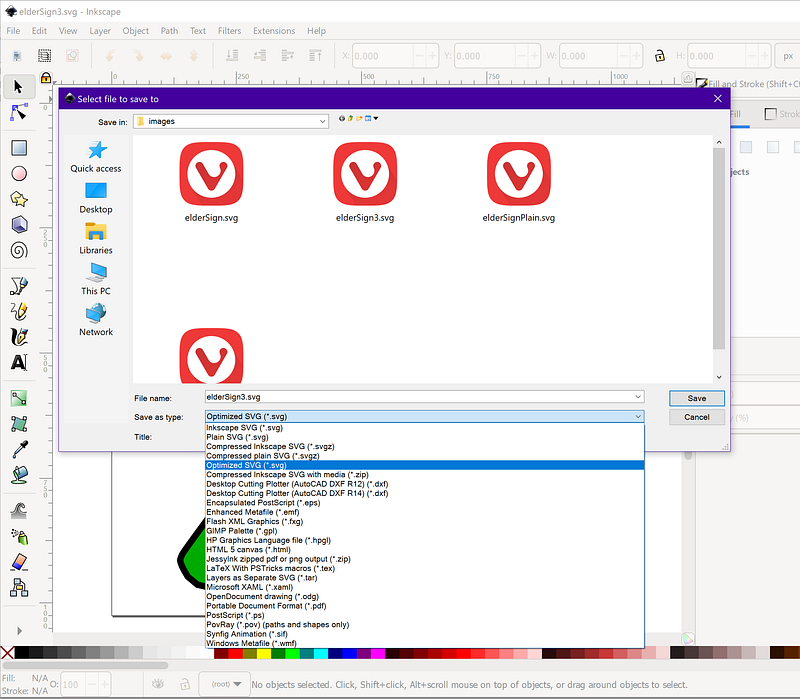
When you go to save, you’ll get a tabbed dialog. I suggest the following settings if you’re going to use the result as a SVG icon.
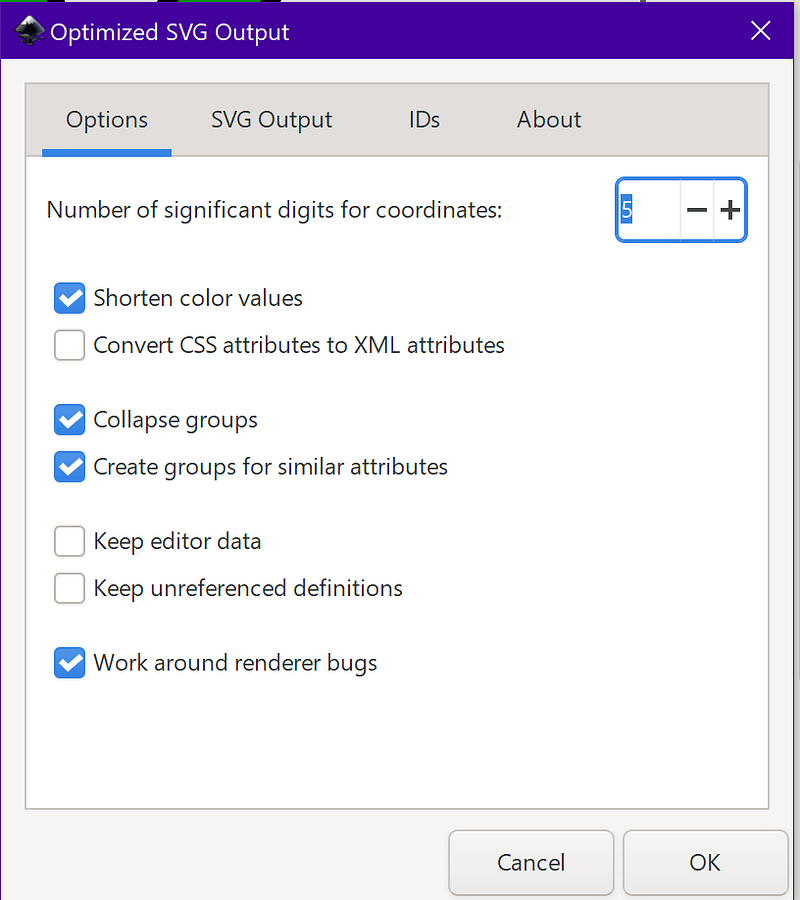
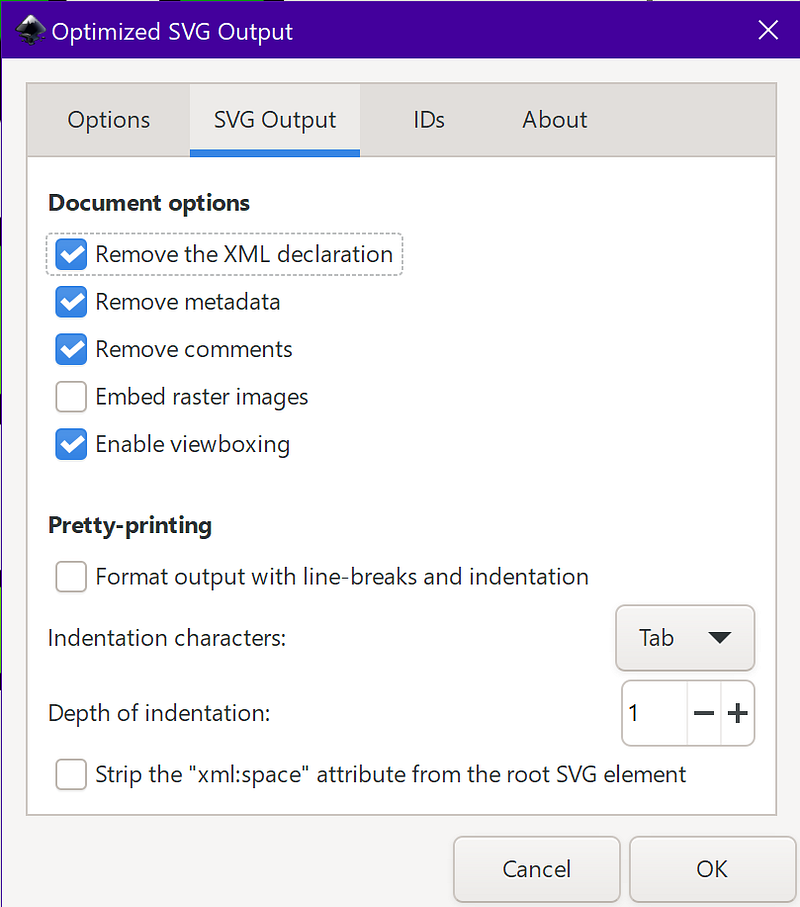
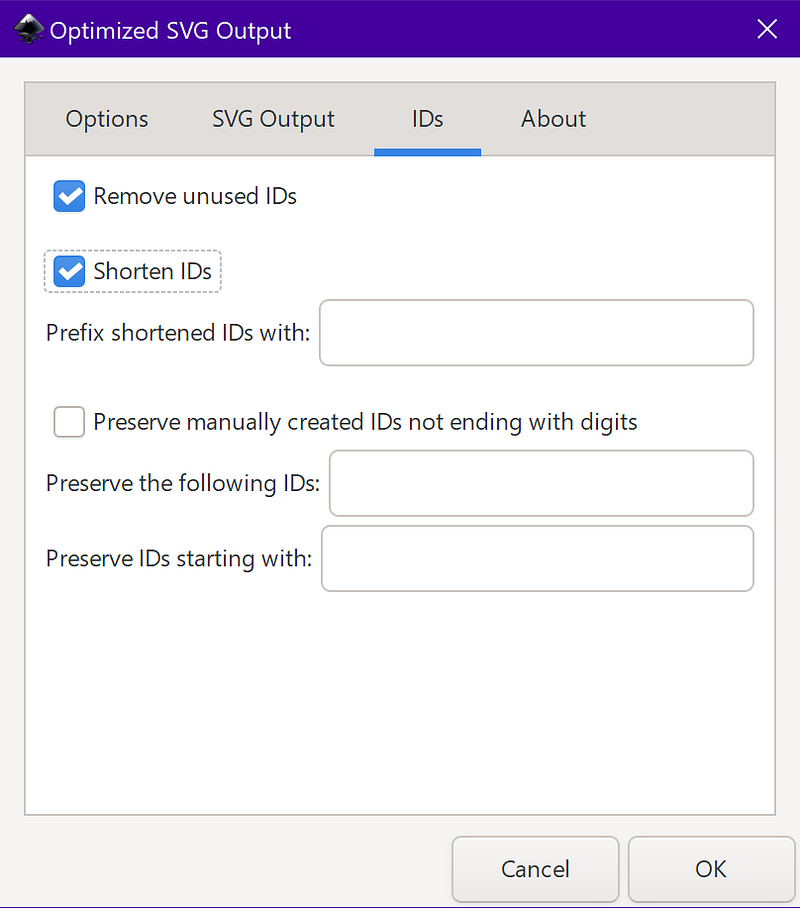
Even after you save with these settings, I suggest making a manual tweak to the file. Remove the version=”1.1" or any other version lines. For example my eldersign3.svg file starts out:
<svg width="1024" height="1024" version="1.1" viewBox="0 0 16000 16000" xmlns="http://www.w3.org/2000/svg">Some browsers cock up and won’t render your SVG if they don’t like the version value, even if it’s a valid file they support. So I manually get rid of that. I also suggest that when you make your SVG you use a nice big crazy number — like 16000x16000 — in the editor, but declare the render size as 1024x1024. It covers the most bases and gives you the best render output in my experience.
Let’s make an ICO out of that!
The first step is to turn that SVG into an alpha transparent PNG. I suggest doing so at a 512x512 resolution regardless of what tool you use to do so. If you are using inkscape as I suggest, just go to file > export PNG, and it will open up a panel on the right side of the program window from which you can set dimensions and export the file.
From here you can handle it one of two ways, you can export each and every desired size from Inkscape, or you can do the resizing in Greenfish. I find that for simpler images Greenfish does “crisper” resizing if you make each smaller one from the 512x512 original, but if there’s lots of detail you don’t want lost, you’re better off doing inkscape exports.
Either way you need to open up Greenfish and choose “ICO” from the 5 big selections on screen. It will ask you the starting size, just click ok as the starting one won’t matter.
Instead go to the main menu and choose “Icon > Import Pages”. If you are going to do all the smaller sizes in Greenfish, just choose the 512x512.
If you did all your sizes, select each of those files. Do NOT include the 512x512, as Greenfish doesn’t support saving that large a size.
Next, delete the default empty “page” it created (typically a 48x48)
If you did all your resizing one at a time as Inkscape exports, you’re done. Save as ICO.
If however we’re doing this in Greenfish, select that 512x512 then click on “new page” from below it.
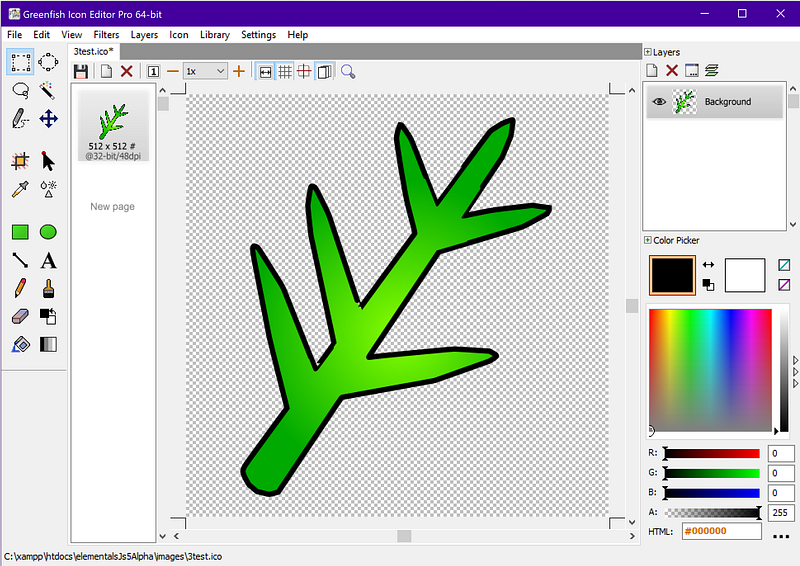
You’ll get this dialog, type in 192 into the width box, and it should auto-fill the height as “square” should be auto-selected.
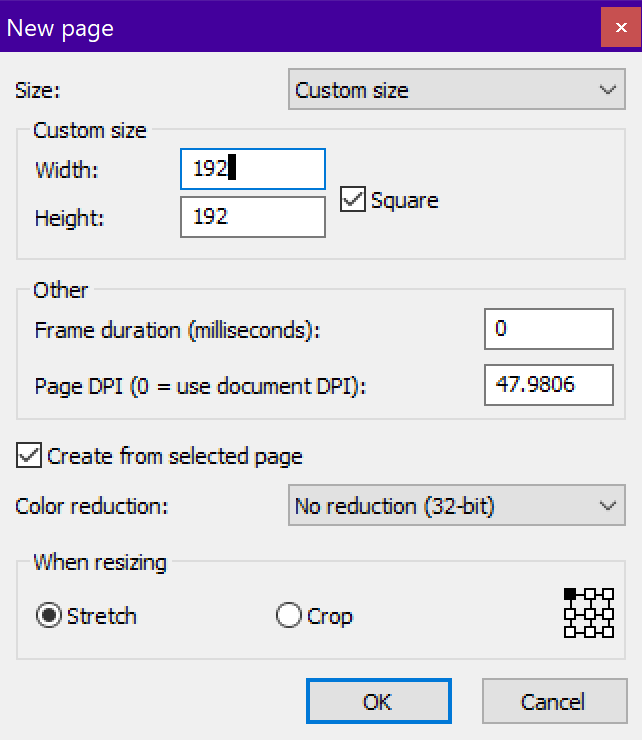
And boom, you have your second size.
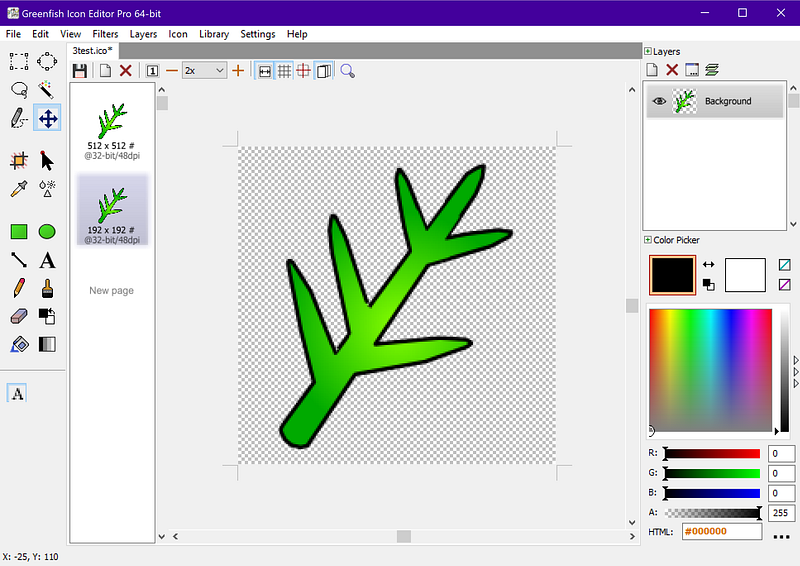
Lather, rinse, repeat until you’ve got all of the following:
192x192 128x128 96x96 64x64 48x48 32x32 24x24 20x20 16x16
Those are the only sizes that really matter, and any in-betweens will dynamically resize from the next largest up. THEN — and this is where a lot of people pitch it sideways — delete the 512x512 original from the page list, save, and done.
Now, you might be thinking, why always create new ones off the 512x512, then delete it when done? In audio production there’s a concept called “Garbage in, garbage out”, where you always use the highest quality recordings possible — 192khz or higher at 24 bit — and then mix at even higher bit depth, even though 15 bits is 50% more dynamic range than the best human ear can hear. The reason for this is that as you mix these things together you can incur data loss. The better the quality of the master, the better the copies will be. Kind of like the photocopy of a photocopy issue. A copy of the master is always better than a copy of a copy of a copy.
This is just as true in image resizing. When you resize from a low res image to a lower resolution, you’re just compounding your data loss. By using a overkill resolution like 512x512 or 1024x1024 as the master for each and every smaller image, you are providing more detail for the rescaler to try and preserve. For example below on the left is what happens if we go from 512x512 directly to 16x16. On the right is the result of resizing down through each and every size on our list, using the previous smaller size as our master for the next.
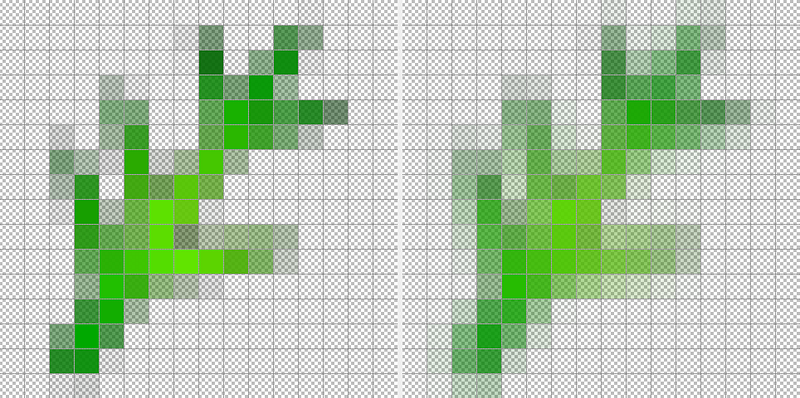
At 16x16 there’s not a lot to work with for detail, but we certainly got a lot better a result with a lot less blur working from the high res master. Every time you resize you lose data and that loss multiplies every time you do it.
That said, you may still want to go in with the editor and touch-up the resized smaller copies. Both SVG scaling and image scaling — no matter how good the source — can often mangle things when you get down to a 16x16 grid. Sometimes you’ve just GOT to go in there by hand for the smaller size.
But boom, you get an ICO file that has multiple image sizes stored inside it!
A Brief Word About The Link Code
Up above I said to use three link lines. I want to review those as people screw these up a LOT. No, I said a LOT!
<link rel="icon" href="favicon.svg" type="image/svg+xml">The “icon” for SVG must have the type=”image/svg+xml” set or it will be ignored. It is only type icon, and should have no other attributes. This is the default/modern icon we HOPE will be used.
<link rel="icon" href="favicon.ico">The .ICO “fallback”. DO NOT INCLUDE TYPE=”” SETTING A MIME-TYPE as browsers on Windows Mobile and Embedded will throw an error and ignore you even having a favicon. Anyone telling you to set type=”image/x-icon” on a .ico file is flapping their arse-cheeks in the breeze.
Note if you need IE 5/earlier support, you would say rel=”shortcut icon”. You’d think in 2023 you wouldn’t need that, but I occasionally deal with medical facilities still using Geode powered Windows CE thin clients, running IE 5.5 or 6 out of ROM.
There used to also be “mask-icon” for Apple specific behaviors, but they seem to have dropped that as of around 2012.
Manifest
If you actually need to put it into a manifest for ACTUAL “progressive web apps” — something I’m NOT a fan of — you would simply put it thus:
"icons": [
  {
    "src": "favicon.ico",
    "sizes": "16x16 20x20 24x24 32x32 48x48 64x64 96x96 128x128 192x192"
  }, {
    "src": "favicon.svg",
    "sizes": "any"
  }
]
As per the MDN page about adding icons to your manifest.json https://developer.mozilla.org/en-US/docs/Web/Manifest/icons
Conclusion
If we look at a typical file built this way: https://cutcodedown.com/for_others/medium_articles/images/favicon.demo.ico
It’s 35k. In an age where people are slopping out two to ten times the HTML and CSS needed to do the job, I really don’t see a measly 30–40k file (the typical sizes) as an issue. Especially if it is for a fallback when SVG is not supported. MOST browsers would use the SVG using that code I said up top, and that is a 2.2k plaintext file that a properly configured server will gzip down to 1.5k!
So please, stop pissing all over the markup with all these pointless, redundant, garbage <link> and bloating out your manifest for nothing, send SVG as your primary, and use .ICO the way it was intended to be used from the day it was introduced in Windows way the blazes back in 1985!
Side note, apologies for the interruption in my ongoing series about JS classes, but work came first, then this cropped up and yanked my chain so hard I had do deal with it first.


