
This Small Gmail Hack Has Been A Gift to My Brain
You can set this up to effectively manage newsletters and keep your attention intact throughout the day.
Some email newsletters have me wondering: “when the hell did I agree to this?”
You know the ones. You give them a chance and then they never leave you alone— like a pushy door-to-door salesman who keeps knocking because he knows you’re ignoring him.
But some are great. They offer actual value, don't pester you, and rarely request anything in return. I see those ones more like the good samaritan neighbor who comes to your door with cookies every now and again.
Still, when I’m in work mode and trying to concentrate, I don’t want anyone calling to my door — even if they come bearing gifts.
That’s how I’ve come to see the arrival of all newsletters and other promotional emails— like someone coming and knocking on the door when I’m trying to concentrate. It’s distracting.
Here’s a scenario that would happen a few times per day: I open my inbox to check for an important work-related email, and there, waiting for me, are new shiny, bolded unopened newsletters.
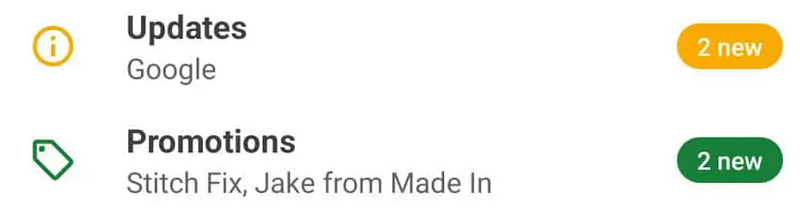
Just look at those colors…
Just look at those well-crafted catchy subject lines…
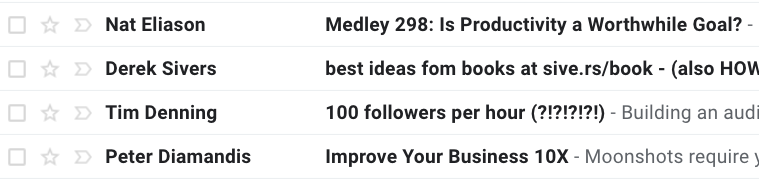
The suspense and the lure of the imminent dopamine hit to click and find out what’s inside is often too strong to resist.
I usually give in. 5 minutes later I’m wondering why I opened up my inbox in the first place.
Task-switching kills your productivity
“It’s not a big deal,” I told myself for years. But it actually is.
As inconsequential as it might seem to get sidetracked for a few minutes opening a newsletter, the problem is we’re task-switching — and it’s been proven to be detrimental to our ability to concentrate and gain momentum in a task.
Doing it a few times per day adds up and can really affect your output.
I could just unsubscribe, but I still want to get the ones I like. I just don’t want them to disturb me at random times.
Here’s a solution and it’s a real attention saver
There’s a little hack (a feature really) you can set up in Gmail (and other providers) which makes newsletters skip your inbox completely. Instead, they automatically go to a dedicated folder where you only see them once you open it.
That means you still receive them, but they don’t interrupt you at inconvenient times, or get mixed up with your more important daily email.
Here’s how to set this system up in a few simple steps.
Step 1
- The cull: It’s ok to break up with email newsletters. If you aren’t getting value from them on a regular basis, say goodbye.
- Remember, quality > quantity. Identify a list of all the newsletters you actually read and want to keep. Delete the rest.
Step 2
- Search your inbox for the latest edition of a newsletter you want to keep and open it.
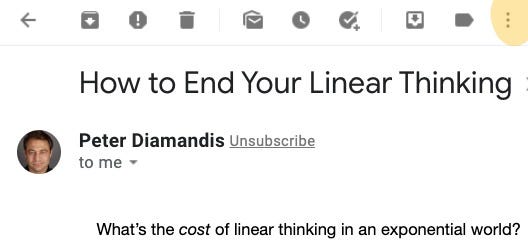
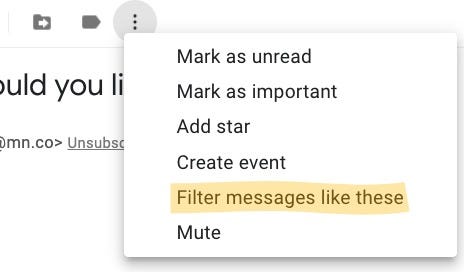
- Click on the three dots icon at the top
Step 3
- In the drop-down menu, click on “Filter message like these.”
Step 4
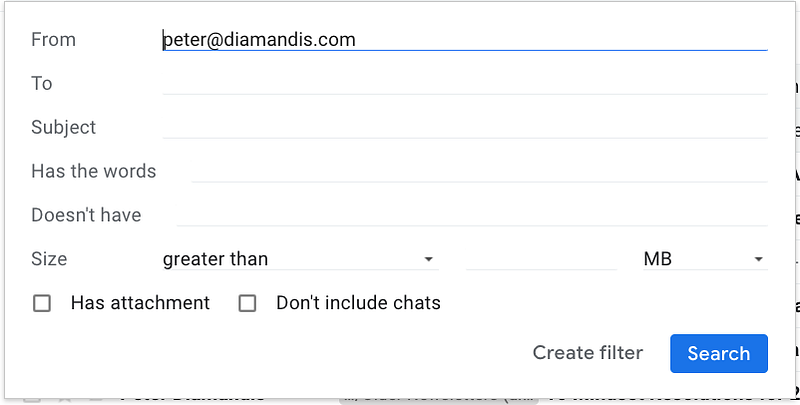
- The “From” address should automatically populate. If not, copy and paste the address into that field.
- Note: You can also filter by “subject” or by certain “words” it contains. (This is useful if, for example, you want to filter only “promotional mail” from a source but keep other more important mail from the same source going to your inbox)
- When happy, click “Create filter.”
Step 5
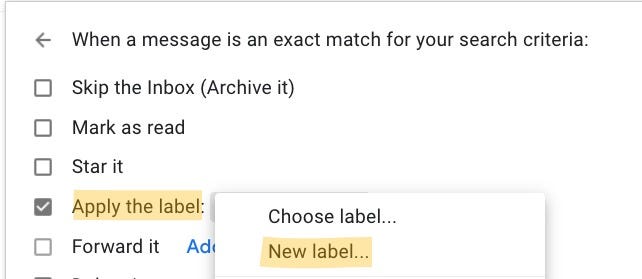
- Next, you need to create a new “Label.” A label is really a folder where your email newsletters will go from now on.
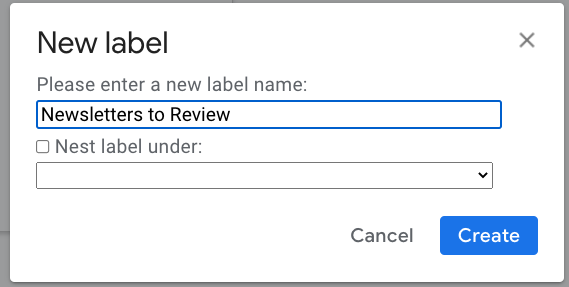
- Pick a name for the New label, and click “Create.”
Step 6
- Select the “Skip the Inbox” checkbox (this makes sure mail goes directly to the label instead of your inbox).
- Apply the label you’ve created from the drop-down menu.
- Select the “Also apply….” box a the bottom if you want all previous correspondence from this source to be put into that new label too.
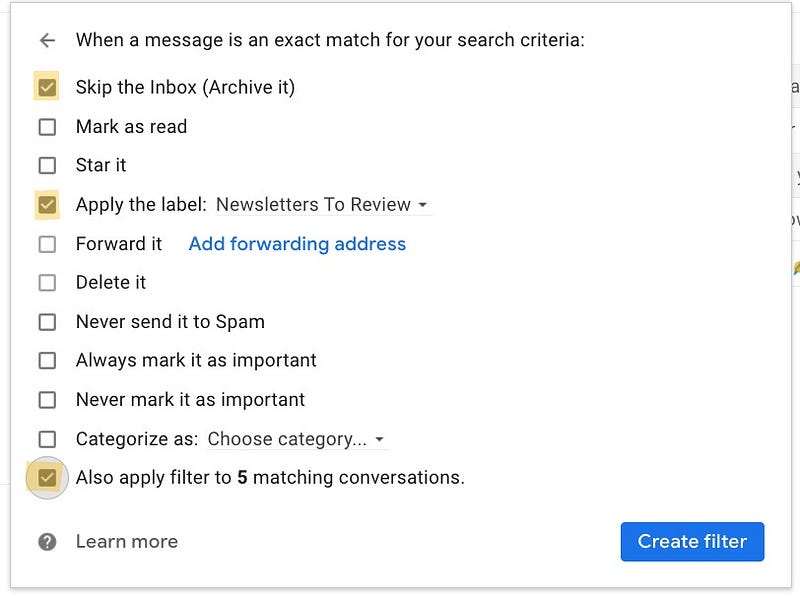
- Finally, click on the “Create filter” button.
That’s it. Repeat that process for all the newsletters that you want to send directly to that Label/folder.
The value of a clean inbox
Let’s face it, we’re human, and we get easily distracted. That’s why setting this filter up has worked wonders for me. Now, when I open my inbox, I no longer get sidetracked by the 3 to 4 daily newsletters that used to be there waiting for me.
Might I miss something important, like a “24-hour discount” deal? Yes, it’s possible — but I’ll live. I’ve come to realize that my uninterrupted attention is more precious than any content or promotional deal that is sent my way.
Tip: Pick a weekly slot to process your newsletters
I believe in batching tasks in many areas of my life. It reduces task switching and means I make more progress on something by sticking to it for one long period of time.
In the spirit of batching, I now read and process all my email newsletters on Mondays. It only takes about 30 minutes. I open up the “Newsletters to Review” Label in Gmail, scan the 15–20 unopened emails, extract the key points and ideas (if there are any) and then archive them.
Once I’m done, I feel a sense of peace. I don’t read another newsletter until the following week.
Here’s an unexpected benefit: Since I’ve started batching the reading and processing of newsletters, I actually look forward to it much more.
Why? Before, when I’d sporadically read them, I’d feel guilty. I knew it wasn't good for my concentration, and that I was loading my brain with information that wasn’t necessarily useful at that moment in time.
Now, I read my newsletters guilt-free every Monday.
Final Word & Recap of the benefits to expect
The simple filtering hack is easy to implement in Gmail and other email providers. It might seem small, but it pays dividends over time.
To recap, here are some of the benefits I’ve felt:
- I’ve more mental energy because I’m switching tasks less often.
- Because I get distracted less often when I do open my inbox, I get more “real work” done.
- I now enjoy reading my email newsletters on Mondays because there’s no guilt associated with it.
If you haven’t got a filtering system in your email, give it a go. It will be a gift to your brain.
Thanks for reading 👇
- Follow me here so you see my articles when they come out. People are busy these days, so I only publish 1 quality article/week with useful Tips & Takeaways.
- New to Medium? Click here to join for $5 per month. You’ll get full access to all articles. It’s “the best place on the internet to read.” If you join using my link, I get a small commission which helps support my work. Thank you :)


