
This Pandas Alternative is 350X Faster When Processing 100 Million Rows
Data analytics in Python done right — Here’s how you can read and process 111 million rows in under 2 seconds!

Everyone and their mother knows Pandas. It’s a good library for newcomers to data analytics, but among the slowest ones if you’re interested in processing huge volumes of data.
Enter DuckDB — an open-source, embedded, in-process, relational OLAP DBMS. A lot of jargon, but essentially, it’s an analytical columnar database running in memory that is designed for speed and efficiency. It’s several orders of magnitude faster than Pandas, especially when working with large datasets.
The best part? DuckDB has a Python library, meaning you can replace your slow Pandas aggregations in no time, especially if you know SQL.
Today you’ll see just how these two compare when aggregating more than 100 million rows of data. Let’s dig in!
Pandas vs. DuckDB Benchmark Setup
This section provides information on the dataset and Pandas/DuckDB code for the benchmark. For the frame of reference, I’m using M2 Pro MacBook Pro 12/19 core with 16 GB of RAM, so your results may vary.
Dataset Info
I’ll use the following dataset today:
- New York City Taxi and Limousine Commission (TLC) Trip Record Data was accessed on April 18, 2024, from https://www.nyc.gov/site/tlc/about/tlc-trip-record-data.page. The data is free to use. License info can be found on nyc.gov.
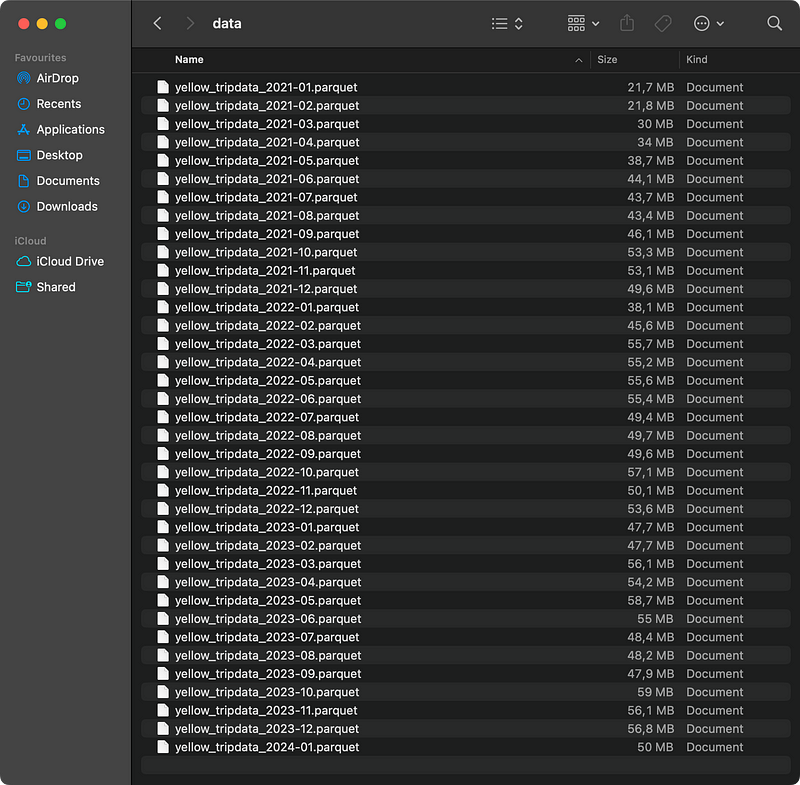
To be more precise, I’ve downloaded monthly Yellow Taxi data from January 2021 to January 2024. Individual Parquet files take 1.79 GB of disk space:
Benchmark Goal
The goal of the benchmark is to firstly load the Parquet files with Pandas/DuckDB and then calculate monthly statistics, such as the number of trips, average duration, distance, fare amount, and tip amount. To find these, you’ll need to create a couple of datetime columns, filter the results based on the date period, and in Pandas, deal with the multilevel index.
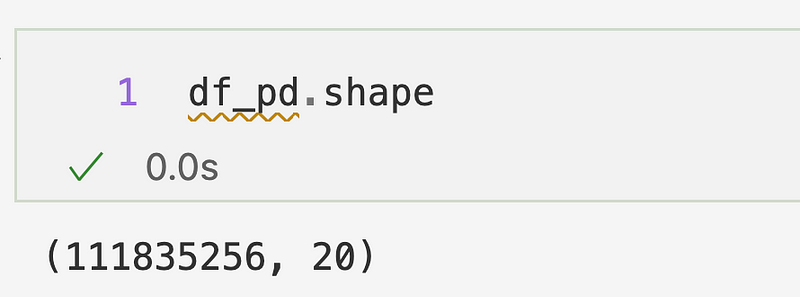
Once the data is loaded, you’ll see that you’re dealing with more than 111 million records:
And for the result, you’re looking to get the following DataFrame:
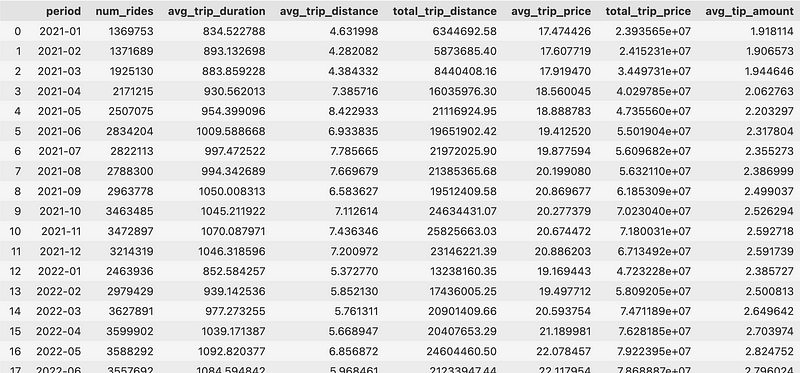
So monthly averages and totals — nothing fancy. However, it will take some time to calculate due to the sheer volume of data.
Pandas Setup
Pandas is a single-threaded library built for convenience, not for processing large amounts of data fast. It first needs to load all data into memory, and in the case of Parquet files, it needs to read them one by one. Not great.
You’ll also have to deal with the hassle of resetting a multi-level index, so individual columns are easier to access:
import os
import pandas as pd


# Load the data
base_path = "path/to/the/folder"
parquet_files = [os.path.join(base_path, file) for file in os.listdir(base_path) if file.endswith('.parquet')]
dfs = [pd.read_parquet(file) for file in parquet_files]
df_pd = pd.concat(dfs, ignore_index=True)

# Benchmark function
def calculate_monthly_taxi_stats_pandas(df: pd.DataFrame) -> pd.DataFrame:
    df = (
        df
            .assign(
                trip_year=df["tpep_pickup_datetime"].dt.strftime("%Y").astype("int32"),
                period=df["tpep_pickup_datetime"].dt.strftime("%Y-%m"),
                trip_duration=(df["tpep_dropoff_datetime"] - df["tpep_pickup_datetime"]).dt.total_seconds()
            )
            .query(f"trip_year >= 2021 and trip_year <= 2024")
            .loc[:, ["period", "trip_duration", "trip_distance", "total_amount", "tip_amount"]]
            .groupby("period")
            .agg({
                "trip_duration": ["count", "mean"],
                "trip_distance": ["mean", "sum"],
                "total_amount": ["mean", "sum"],
                "tip_amount": ["mean"]
            })
    )
    df.columns = df.columns.get_level_values(level=1)
    df = df.reset_index()
    df.columns = ["period", "num_rides", "avg_trip_duration", "avg_trip_distance", "total_trip_distance", "avg_trip_price", "total_trip_price", "avg_tip_amount"]
    df = df.sort_values(by="period")
    return df


# Run
res_pandas = calculate_monthly_taxi_stats_pandas(df=df_pd)
DuckDB Setup
There are many ways to interact with DuckDB from Python, but the simplest one is through SQL-like commands. It turns out you can replicate the above Pandas code with two SELECT statements.
Also, DuckDB provides a neat parquet_scan() function that can read all Parquet files from a given path in parallel:
import duckdb


# Database connection
conn = duckdb.connect()

# Benchmark function
def calculate_monthly_taxi_stats_duckdb(conn: duckdb.DuckDBPyConnection, path: str) -> pd.DataFrame:
    return (
        conn.sql(f"""
            select
                period,
                count(*) AS num_rides,
                round(avg(trip_duration), 2) AS avg_trip_duration,
                round(avg(trip_distance), 2) AS avg_trip_distance,
                round(sum(trip_distance), 2) as total_trip_distance,
                round(avg(total_amount), 2) as avg_trip_price,
                round(sum(total_amount), 2) as total_trip_price,
                round(avg(tip_amount), 2) as avg_tip_amount
            from (
                select
                    date_part('year', tpep_pickup_datetime) as trip_year,
                    strftime(tpep_pickup_datetime, '%Y-%m') as period,
                    epoch(tpep_dropoff_datetime - tpep_pickup_datetime) as trip_duration,
                    trip_distance,
                    total_amount,
                    tip_amount
                from parquet_scan("{path}")
                where trip_year >= 2021 and trip_year <= 2024
            )
            group by period
            order by period
        """).df()
    )


# Run
res_duckdb = calculate_monthly_taxi_stats_duckdb(conn=conn, path="path/to/the/folder/*parquet")
And that’s the setup for you! Now, let’s take a peek at the results.
Benchmark Results — DuckDB is 352X Faster Than Pandas
Ready for results? The title of the section says it all:
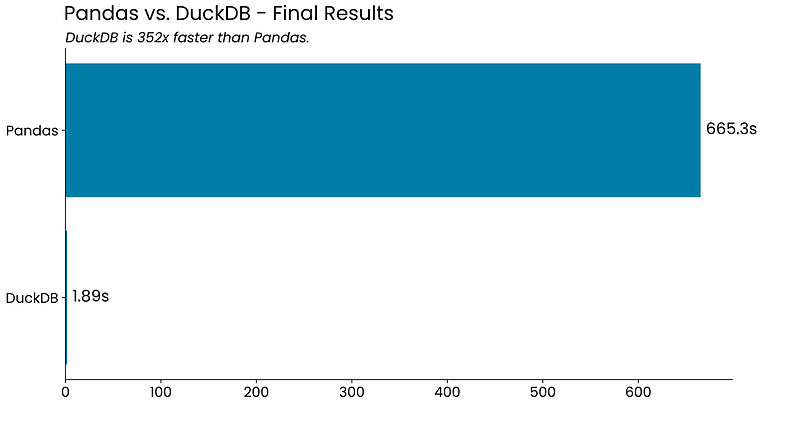
It’s not even funny. The sheer ability to aggregate gigabytes of data with more than 100 million rows in under two seconds seems unreal, but the numbers don’t lie.
If you can live with some of DuckDB’s limitations, it sure can be a viable Pandas alternative.
Summing up Pandas vs. DuckDB
To conclude, DuckDB allows you to write data aggregation queries in the language everyone knows — SQL — and to get the results several orders of magnitude faster.
DuckDB also works with other file formats (JSON, CSV, Excel), and several database vendors, so you’ll have options if you’re looking to implement it in a more serious environment.
What are your thoughts on DuckDB? Do you use it as a Pandas alternative for larger datasets? Let me know in the comment section below.
Read next:


