avatarMatthew Hardman

Free AI web copilot to create summaries, insights and extended knowledge, download it at here

3512

Abstract

dium.com/v2/resize:fit:800/1*[email protected]"><figcaption>iPad Camera feed when using Teams on external monitor has wrong orientation</figcaption></figure><p id="6e5e">To get the orientation right, I had to hold the iPad in portrait mode, and it had to have the camera at the top of the iPad.</p><figure id="9913"><img src="https://cdn-images-1.readmedium.com/v2/resize:fit:800/1*[email protected]"><figcaption>Manually holding the iPad to get the correct orientation</figcaption></figure><p id="5ad9">However, if the application is running from the iPad itself, then you will see the orientation is correctly positioned in the application.</p><figure id="be4f"><img src="https://cdn-images-1.readmedium.com/v2/resize:fit:800/1*[email protected]"><figcaption>Running the Teams application on the iPad yields the correct orientation</figcaption></figure><p id="3000">So, Teams on the iPad… all good, on an external monitor… not so good, we get orientation issues.</p><h2 id="f042">Zoom</h2><p id="c21c">Next test was using Zoom, and surprise surprise… no difference, we experienced the same issue. When running on an external monitor, we see the same camera orientation lock.</p><figure id="f864"><img src="https://cdn-images-1.readmedium.com/v2/resize:fit:800/1*[email protected]"><figcaption>Incorrect orientation on Zoom when running the app on the external display</figcaption></figure><p id="99c4">What is worse, and I am not sure if this is a Zoom issue, but I only get Oscar’s forehead… might be something to do with video positioning… but the same main issue, I am coming out of the side of the screen… neck pains ensue!</p><p id="19ad">However running the Zoom application on the iPad, everything comes up well.</p><figure id="b15f"><img src="https://cdn-images-1.readmedium.com/v2/resize:fit:800/1*[email protected]"><figcaption>Zoom running on iPad directly presents the right orientation</figcaption></figure><p id="1c00">Well apart from the fact, that a trick of the light makes me look like I have massive eye-brows and Oscar is somewhat concerned.</p><h2 id="554f">FaceTime</h2><p id="25f5">So for our final comparison, we check out the native video calling application FaceTime, which Apple is starting to push in to commercial space.</p><figure id="89f5"><img src="https://cdn-images-1.readmedium.com/v2/resize:fit:800/1*[email protected]"><figcaption>FaceTime orientation works perfectly fine on external monitor</figcaption></figure><p id="1416">This time running on the external monitor, the orientation of the camera feed seems to be correct, I am properly in landscape mode both on the external monitor, and on the iPad itself.</p><figure id="4172"><img src="https://cdn-images-1.readmedium.com/v2/resize:fit:800/1*[email protected]"><figcaption>FaceTime running directly on iPad, same orientation correct</figcaption></figure><p id="34a2">That’s a win for FaceTime, iPad Pro and external monitor support…, but we aren’t anywhere near critical adoption of FaceTime in the enterprise, so it doesn’t necessarily help.</p><h1 id="5193">The Big Question</h1><p id="7ebe">So the big question is, “Why does FaceTime work, when Teams and Zoom does not?”. Is there an API (Application Programming Interface) that has not been coded correctly for the applications to use in their code, have other collaboration applications done it incorrectly, who knows… but this is a big blocker for enterprise usage, unl

Options

ess you want your iPad in Portrait mode the whole day.</p><figure id="3a85"><img src="https://cdn-images-1.readmedium.com/v2/resize:fit:800/1*[email protected]"><figcaption>The CharJenPro MagFlott Stand for iPad (<a href="https://amzn.to/3HlEiSW">https://amzn.to/3HlEiSW</a>)</figcaption></figure><p id="b85a">Sure there are some nice stands you can get like these MagFlott Magnetic stands (<a href="https://amzn.to/3HlEiSW">https://amzn.to/3HlEiSW</a>), but you probably aren’t going to be carrying one around with you every day if you are moving from desk to desk, and even if you bought a little mini stand, remember you would need to orient the iPad in a portrait mode, meaning the USB-C port is at the base, how do you plug it in, if its close to the desk. I imagine for most people like myself I am going to be using an external monitor with the iPad in landscape.</p><h1 id="82a0">What can be done to fix it?</h1><p id="e631">To resolve this issue, I would propose three very viable options, well in my mind at least, to make this a more compelling experience.</p><h2 id="224f">Fix the Camera API for third-party apps</h2><p id="8b73">Based on the test for both Zoom and Teams, its definitely not application specific, but both applications more than likely access the same API. If that is the case, then there is some sort of indicator, or function not being represented to the other applications to orient the camera properly, or the image being fed to the apps is not being oriented properly. The fact that FaceTime handles this correctly means that either FaceTime is doing it correctly, or FaceTime has access to a different method to get the camera feed.</p><h2 id="ddc6">Bring Continuity Camera to iPad</h2><p id="4d7e">I know a lot of people are clamoring for this one, as it would bring a much higher resolution image for a webcam, and I would definitely put my hand up in support, but could this also address the orientation issue. If the camera has to be in a portrait mode, even if using the iPhone, at least you could set the phone up in portrait, and the iPad in landscape. In addition to having the phone propped up behind the monitor, so you are looking more directly at the monitor, rather than looking up at a screen and the camera getting a great shot of your nostril hair.</p><h2 id="25f0">External Webcam Support for iPad</h2><p id="76b0">This was another one I have seen people talk about, the ability to plug in an external webcam. I would love this feature, you might notice I have many different webcams that I use, and some I like to try just for the fun of it. I have 4K webcams from Logitech, high end enterprise cams from HP/Poly, all of which have incredible features. All of these cameras are plugged in to some sort of a docking station solution, which makes it easier to switch out machines for usage.</p><p id="a533">If I could have the iPad plug in to some sort of dock, and the external webcam gets picked up automatically, this would be a compelling experience for hotdesk-ing.</p><h1 id="ea3a">Final Thoughts</h1><p id="c7a0">As I said at the beginning, the ability to use the iPad as a primary work device is very compelling barring this one massive irritation. Apple, there is an opportunity to not only work with your ecosystem of software providers to help them bring a compelling experience to the iPad, but to also unblock the daily usage in the commercial space, with your enhanced support for external monitors in iPadOS 16.2.</p></article></body>

This one major flaw is the daily driver blocker for iPad in the enterprise, and the three options to fix it.
Photo by Ernest Ojeh on Unsplash

I like many others have been enjoying using the iPad as a primary work machine, especially since the introduction of external monitor support, and sure its not completely perfect, I am sure if I sat down and really wrote a comprehensive list there would be things which are more challenges vs absolute blockers. There is however this one, well let’s say “feature”, which really does my head in, and if this could be addressed… it would remove a massive challenge for people with external screen usage.

The Daily Driver Applications in Enterprise

There is a whole slew of applications that people use on a daily basis to get their work done… email apps, productivity suites, note taking applications, music service (let’s be honest sometimes you just need those background tracks from the Deftones to give you that real focus).
Photo by Iyus sugiharto on Unsplash

The one category which has seen massive growth in recent years, has been the one around collaboration, and while not necessarily new, the requirement for many to work remotely during the recent pandemic has accelerated its adoption in to our daily lives. For this article, I am going to focus on the two main players Zoom and Microsoft Teams, and for the sake of comparison I will also bring in to the discussion FaceTime as the native app on iPad. I recognize there are other collaboration apps, but in the enterprise space, these are the ones that I see occur the most.

These apps all work on iPad, so what is the blocker?

I am sure I am not the first person to encounter this one, but I have seen very little talking about this. For some very strange reason, when you are using a collaborative application like Teams or Zoom, and have the application on the external screen, the webcam on the iPad, regardless of orientation, is locked in a portrait mode. This essentially results in you coming out the side of the screen in any meeting. Let me showcase this here… with my incredible demo buddy, my son Oscar.

Microsoft Teams

The one collaboration tool I have been most familiar with for the last three years, prior to the pandemic, during and beyond. Teams for me has become as crucial a part as anything like email has been, presence combined with the ability for quick fire chats, and the evolving application ecosystem making Teams an almost operating system within itself has been nothing short of incredible, but…
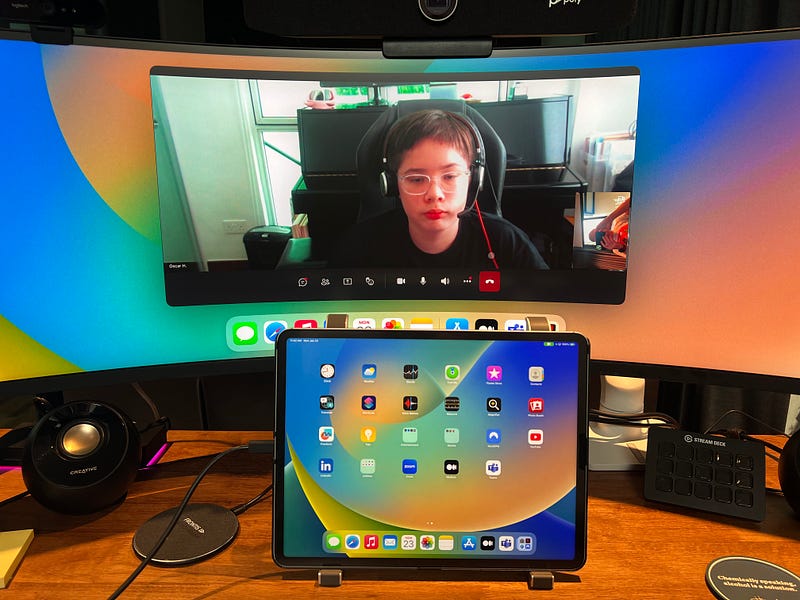
Teams on an iPad on an external display (my orientation incorrect)

What you can see here, is that when the Teams app is on the external monitor, the webcam is locked, and I am coming out the side of the view, and this was not just what I was seeing, but Oscar was too, much to his amusement.
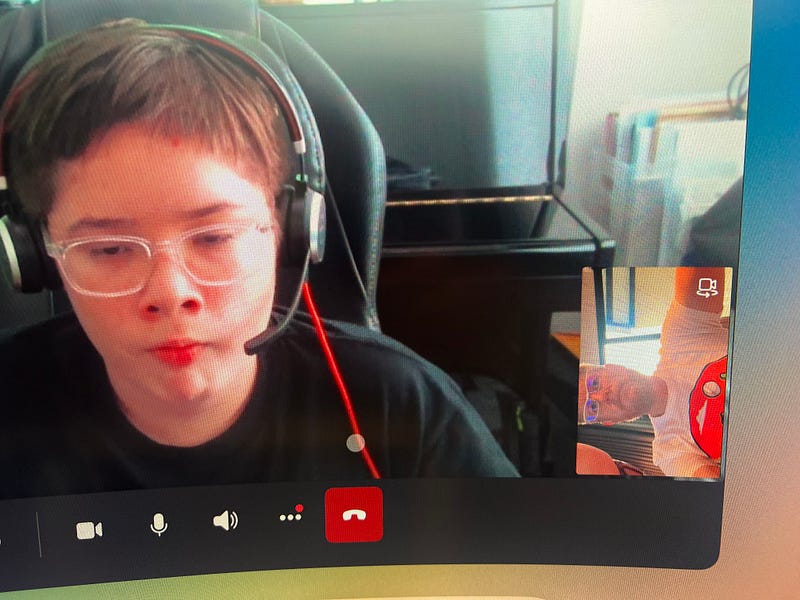
iPad Camera feed when using Teams on external monitor has wrong orientation

To get the orientation right, I had to hold the iPad in portrait mode, and it had to have the camera at the top of the iPad.
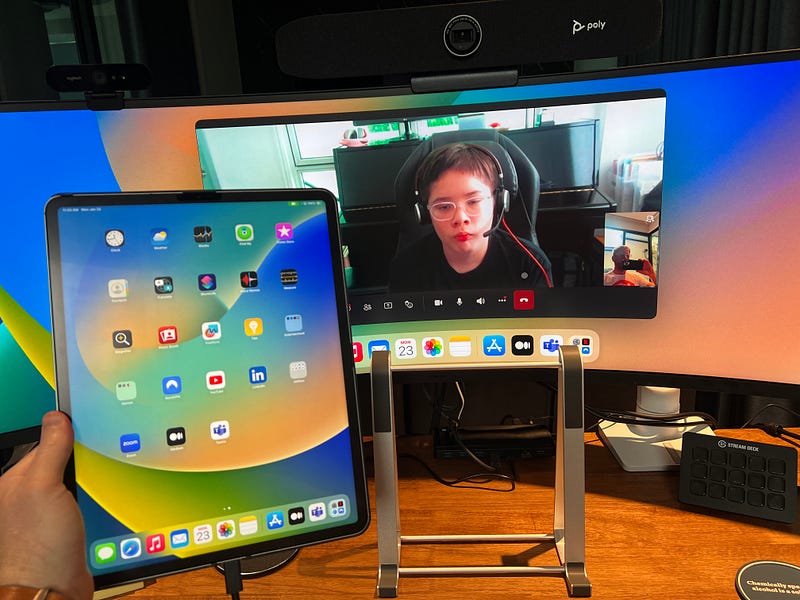
Manually holding the iPad to get the correct orientation

However, if the application is running from the iPad itself, then you will see the orientation is correctly positioned in the application.
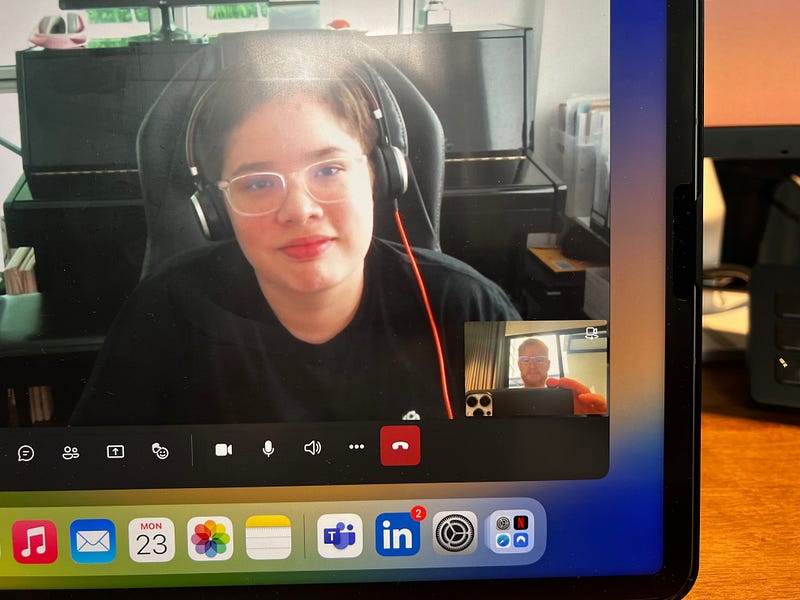
Running the Teams application on the iPad yields the correct orientation

So, Teams on the iPad… all good, on an external monitor… not so good, we get orientation issues.

Zoom

Next test was using Zoom, and surprise surprise… no difference, we experienced the same issue. When running on an external monitor, we see the same camera orientation lock.
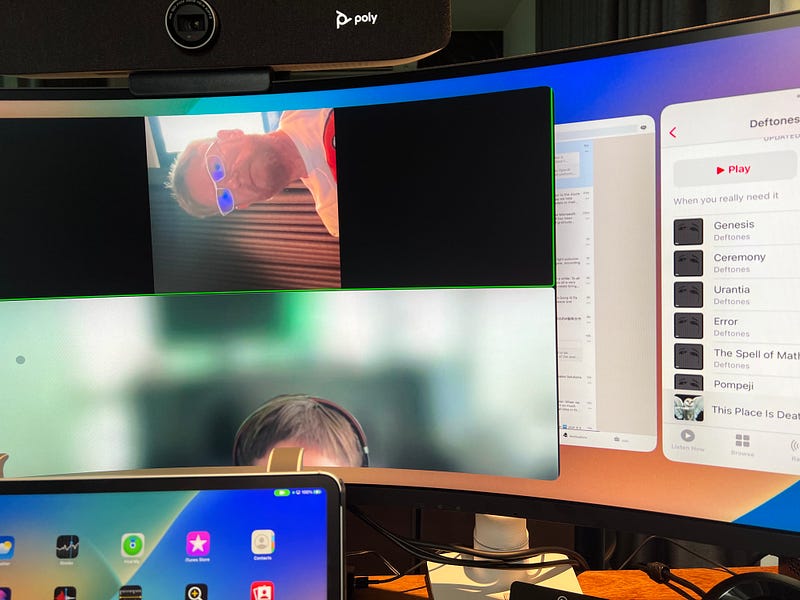
Incorrect orientation on Zoom when running the app on the external display

What is worse, and I am not sure if this is a Zoom issue, but I only get Oscar’s forehead… might be something to do with video positioning… but the same main issue, I am coming out of the side of the screen… neck pains ensue!

However running the Zoom application on the iPad, everything comes up well.
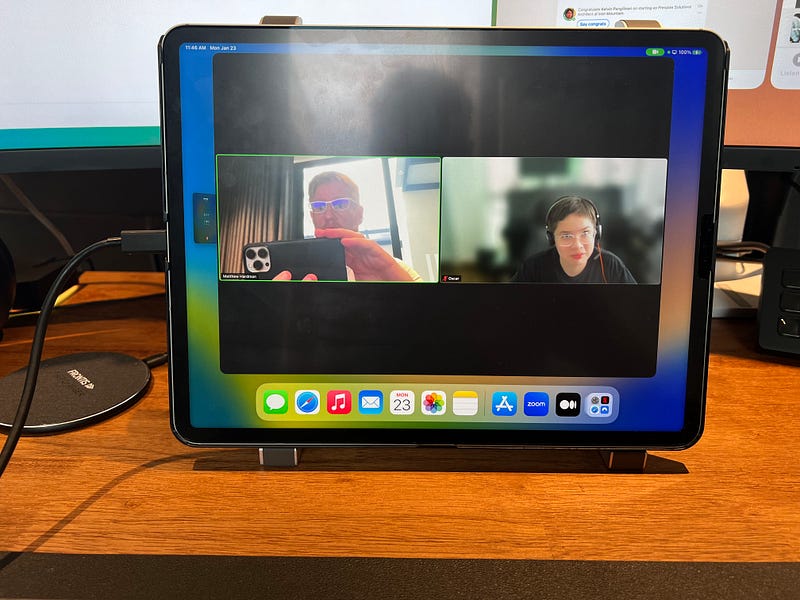
Zoom running on iPad directly presents the right orientation

Well apart from the fact, that a trick of the light makes me look like I have massive eye-brows and Oscar is somewhat concerned.

FaceTime

So for our final comparison, we check out the native video calling application FaceTime, which Apple is starting to push in to commercial space.
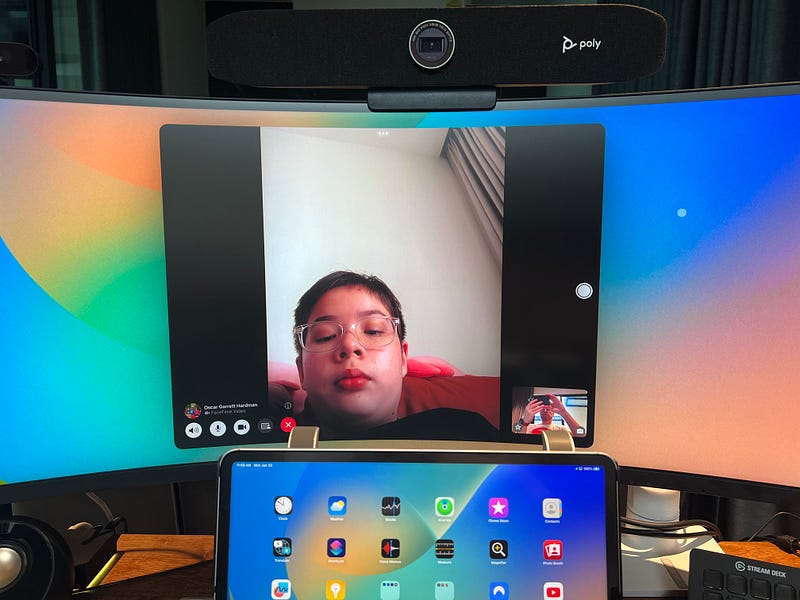
FaceTime orientation works perfectly fine on external monitor

This time running on the external monitor, the orientation of the camera feed seems to be correct, I am properly in landscape mode both on the external monitor, and on the iPad itself.
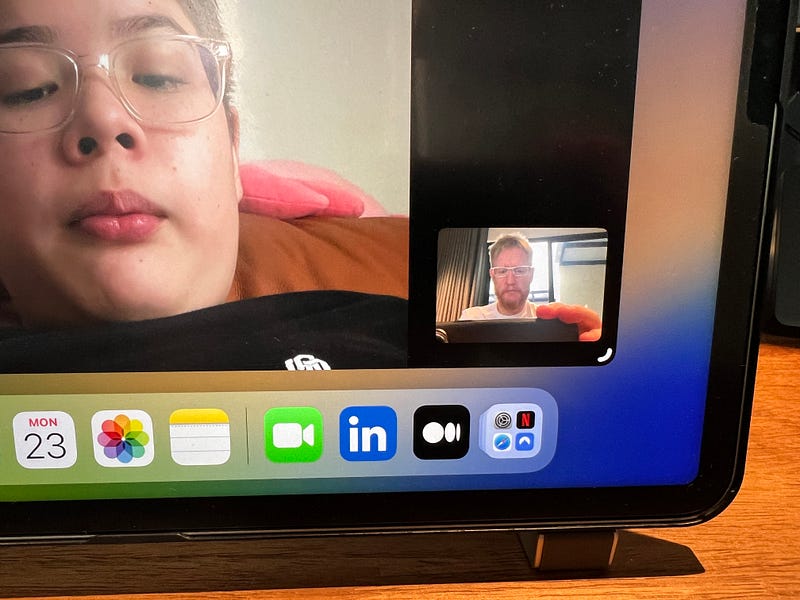
FaceTime running directly on iPad, same orientation correct

That’s a win for FaceTime, iPad Pro and external monitor support…, but we aren’t anywhere near critical adoption of FaceTime in the enterprise, so it doesn’t necessarily help.

The Big Question

So the big question is, “Why does FaceTime work, when Teams and Zoom does not?”. Is there an API (Application Programming Interface) that has not been coded correctly for the applications to use in their code, have other collaboration applications done it incorrectly, who knows… but this is a big blocker for enterprise usage, unless you want your iPad in Portrait mode the whole day.
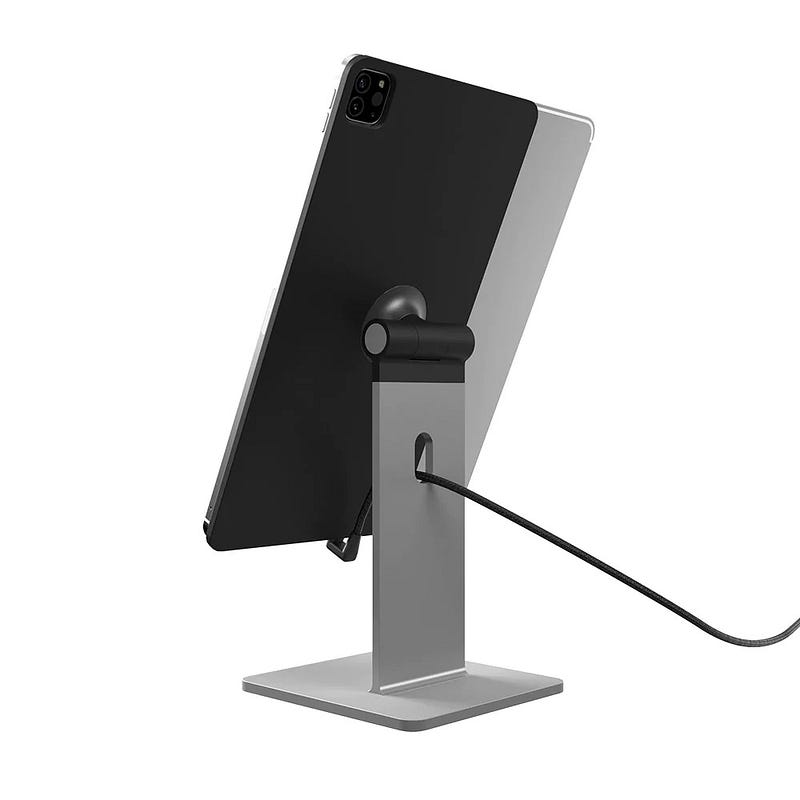
The CharJenPro MagFlott Stand for iPad (https://amzn.to/3HlEiSW)

Sure there are some nice stands you can get like these MagFlott Magnetic stands (https://amzn.to/3HlEiSW), but you probably aren’t going to be carrying one around with you every day if you are moving from desk to desk, and even if you bought a little mini stand, remember you would need to orient the iPad in a portrait mode, meaning the USB-C port is at the base, how do you plug it in, if its close to the desk. I imagine for most people like myself I am going to be using an external monitor with the iPad in landscape.

What can be done to fix it?

To resolve this issue, I would propose three very viable options, well in my mind at least, to make this a more compelling experience.

Fix the Camera API for third-party apps

Based on the test for both Zoom and Teams, its definitely not application specific, but both applications more than likely access the same API. If that is the case, then there is some sort of indicator, or function not being represented to the other applications to orient the camera properly, or the image being fed to the apps is not being oriented properly. The fact that FaceTime handles this correctly means that either FaceTime is doing it correctly, or FaceTime has access to a different method to get the camera feed.

Bring Continuity Camera to iPad

I know a lot of people are clamoring for this one, as it would bring a much higher resolution image for a webcam, and I would definitely put my hand up in support, but could this also address the orientation issue. If the camera has to be in a portrait mode, even if using the iPhone, at least you could set the phone up in portrait, and the iPad in landscape. In addition to having the phone propped up behind the monitor, so you are looking more directly at the monitor, rather than looking up at a screen and the camera getting a great shot of your nostril hair.

External Webcam Support for iPad

This was another one I have seen people talk about, the ability to plug in an external webcam. I would love this feature, you might notice I have many different webcams that I use, and some I like to try just for the fun of it. I have 4K webcams from Logitech, high end enterprise cams from HP/Poly, all of which have incredible features. All of these cameras are plugged in to some sort of a docking station solution, which makes it easier to switch out machines for usage.

If I could have the iPad plug in to some sort of dock, and the external webcam gets picked up automatically, this would be a compelling experience for hotdesk-ing.

Final Thoughts

As I said at the beginning, the ability to use the iPad as a primary work device is very compelling barring this one massive irritation. Apple, there is an opportunity to not only work with your ecosystem of software providers to help them bring a compelling experience to the iPad, but to also unblock the daily usage in the commercial space, with your enhanced support for external monitors in iPadOS 16.2.

iPad
Collaboration
Apple
Challenge
Recommended from ReadMedium