avatarJim Clyde Monge

Summary

The web content discusses a lesser-known feature that allows users to copy and paste content between an iPhone and iPad using a simple three-finger pinch gesture, facilitated by Wi-fi and Bluetooth connectivity, introduced with iOS 13 in 2019.

Abstract

The article reveals a sophisticated yet user-friendly trick for Apple device users, highlighting the ability to copy and paste content across iPhones and iPads using just a finger pinch gesture. This functionality, which has been available since the release of iOS 13 in 2019 but has largely evaded public attention, relies on a combination of Wi-fi and Bluetooth to transfer data seamlessly. The feature requires users to be logged in with the same Apple ID on both devices, have Bluetooth enabled, be connected to the same Wi-fi network, and have Handoff settings turned on. The author provides a gif demonstration and emphasizes the ease and speed of this method, drawing comparisons to AirDrop but with a more streamlined process. The article concludes with the author's reflection on how such features contribute to the appeal of Apple's ecosystem, enhancing user experience by integrating software that allows devices to work together intuitively.

Opinions

  • The author suggests that the feature is not widely known, implying that it may have been overshadowed by other updates.
  • The author expresses admiration for the feature, describing it as "way faster and no doubt slicker" than other methods.
  • There is an appreciation for the seamless integration within the Apple ecosystem, which is presented as a key selling point for Apple products.
  • The author encourages readers to support their work by becoming a Medium premium member or by donating through a 'buy me a coffee' link, indicating a personal investment in the content provided.

This Mysterious iPhone and iPad Trick is Blowing People’s Mind
Photo by Jeremy Bezanger on Unsplash

Did you know that you can copy and paste stuff between your iPhone and iPad with just a finger pinch?

If you already knew about that, congratulations. But the rest of the internet seem to not be aware of it. Michael Tobin shared it first on Twitter and TikTok.

Here’s a little gif I made to show you how it works.
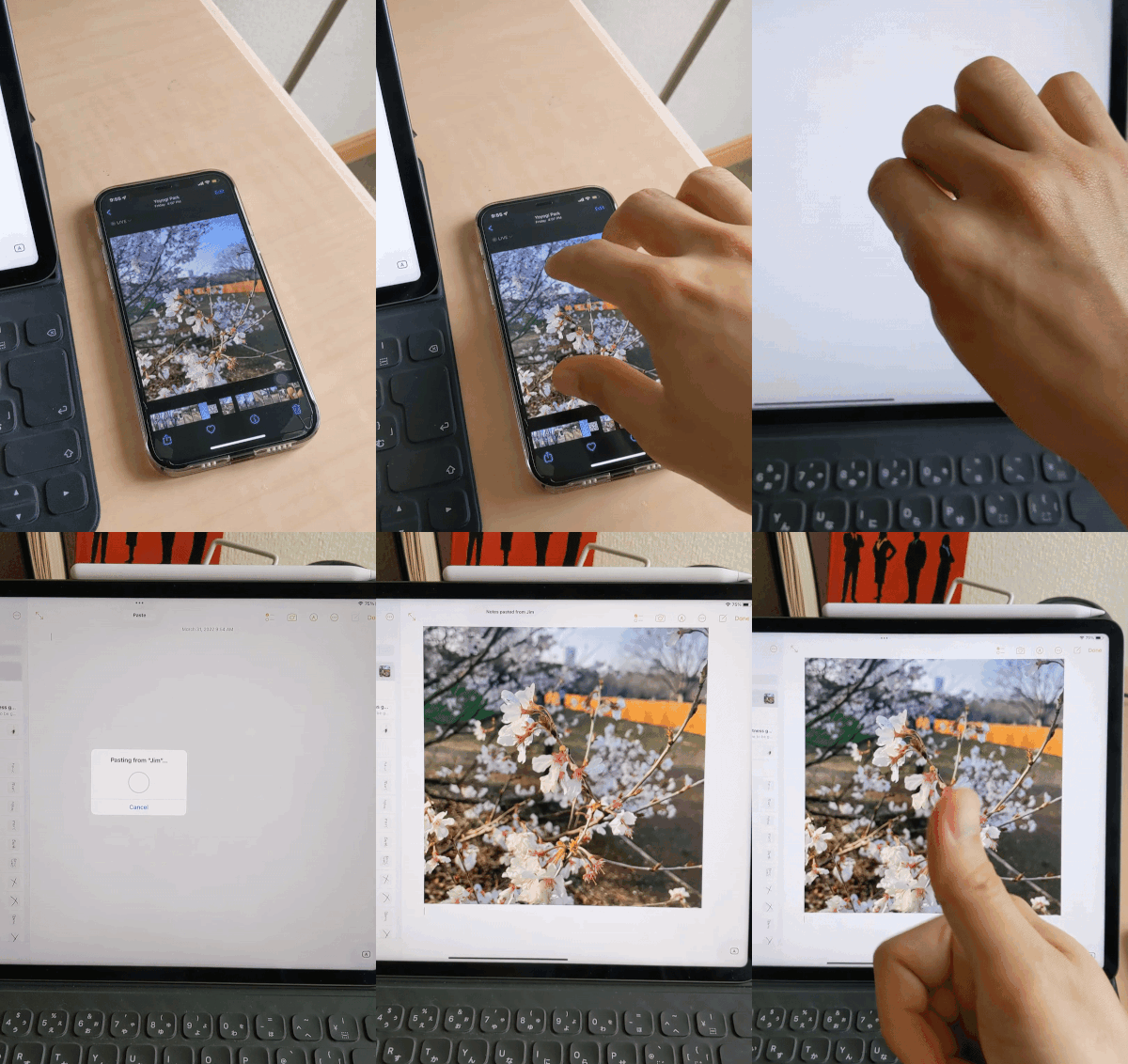
GIF by Author

How does it work?

You do a three finger inward pinch to copy something from one device, and then do a pinch-out gesture to paste on another.

The tech uses Wi-fi and Bluetooth to transfer data between Apple devices. Similar to how AirDrop works — just way faster and no doubt slicker.

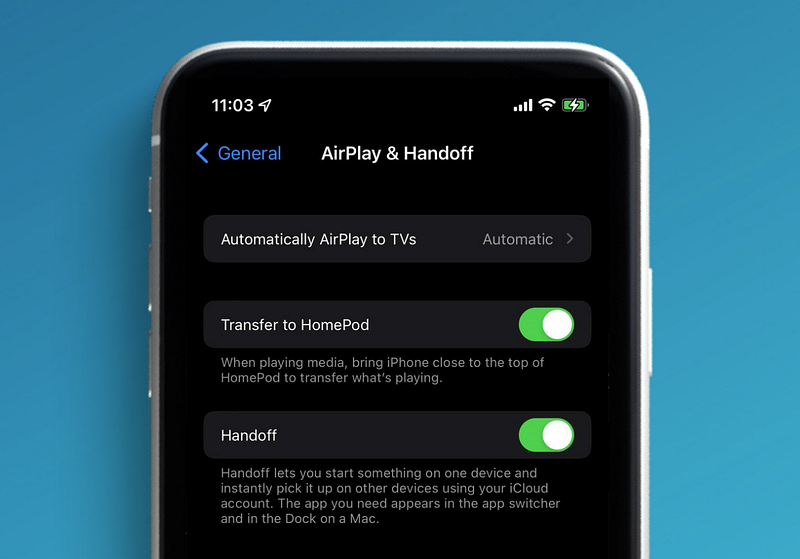
To enable this feature

  1. Sign in to your Apple ID in both devices
  2. Enable Bluetooth and connect to the same Wi-fi network
  3. Enable Handoff in system settings
Image by Author

That’s it. You can now amaze your friends with this trick of grabbing a photo from your iPhone and throwing it to your iPad — like magic.

Final thoughts

I just knew today that this feature was actually added all the way back in 2019, with the release of iOS 13. It was just not highlighted enough that it went under the radar.

Features like this is one of the many reasons people are drawn to buy Apple products. The software is what ties these devices to work together seamlessly and create an ecosystem that essentially make our lives better.

Support me! — If you like this content, you can be a Medium premium member via this link. Or you can buy me coffee here instead. Have a nice day :)

Technology
Apple
Tutorial
Tips
iOS
Recommended from ReadMedium