avatarCharlie J 🕊️

Free AI web copilot to create summaries, insights and extended knowledge, download it at here

4001

Abstract

re pinned at the top. Every week or so, I change what I have pinned.</p><p id="6ba4">Also, this helps me maintain my <a href="https://medium.com/@thewritecharlie/list/my-best-performers-dbae75cc6dcf?source=user_lists---------6-------dbae75cc6dcf---------------------">Best Performers</a> list. I keep this list so you can study what is already working for me.</p><div id="1f74" class="link-block"> <a href="https://readmedium.com/this-1-super-simple-trick-is-behind-90-of-my-success-as-a-writer-1fefe8307b1a"> <div> <div> <h2>This 1 Super Simple Trick is Behind 90% Of My Success As A Writer</h2> <div><h3>It’s only two steps!</h3></div> <div><p>medium.com</p></div> </div> <div> <div style="background-image: url(https://miro.readmedium.com/v2/resize:fit:320/0*KLxR7gK--I8KX3dQ)"></div> </div> </div> </a> </div><p id="f9ce">Sorting by lowest engagement also helps me to know what article topics did not do so well so I can focus more on what is already working.</p><h2 id="b53b">Actual Title vs. Name</h2><p id="dd60">Why do I have a section for the name and a section for the title?</p><p id="015e">Well, the name is the idea as it existed in the first list view. The title is the final headline I decided upon.</p><p id="b507">I keep both of these for two reasons:</p><ol><li><b>In my head, I think of every article as its shorter central idea</b></li></ol><p id="db11">Keeping the short name helps me quickly reference each article. 3 words are much easier to read than 7–13.</p><p id="be89">2.<b> Keeping the actual headline helps me when cross-referencing my stats page on Medium</b></p><p id="9d5a">I can move around the actual title column while inserting other data in other parts of the table.</p><h2 id="cae3">Friend Link</h2><p id="dd05">There are 3 reasons I keep the friend link in this table.</p><ol><li>I often link to other articles while writing</li><li>I get many questions I have already answered in other articles</li><li>If a member reads via a friend link, I get paid either way — giving free access to non-members means more exposure.</li></ol><p id="58f0">Notion allows you to copy a link with one single click. Having the table view saves me from going to my profile, finding the story, and copying the link over and over again.</p><figure id="ca98"><img src="https://cdn-images-1.readmedium.com/v2/resize:fit:800/1*aP6wr3jPq62HdUtloWwehg.png"><figcaption>Just click here to copy! Screenshot by <a href="https://medium.com/@thewritecharlie">Charlie J</a></figcaption></figure><h2 id="1529">Publication</h2><p id="584b">Not all publications are created equal.</p><p id="89e2">To keep an eye on where I do best, I include the publication for each article. If I want a glimpse at my results in a given publication, all I need to do is sort my data.</p><p id="104b">Here’s how my stories have done in Illumination’s Mirror. Pretty varied results, right?</p><figure id="680f"><img src="https://cdn-images-1.readmedium.com/v2/resize:fit:800/1*DgZyWfjw7ZExNMYuOfyh3w.png"><figcaption>All the way from 10 engagers until 200+ Screenshot by <a href="https://medium.com/@thewritecharlie">Charlie J</a></figcaption></figure><h2 id="9c6c">Pub Date & Bucket</h2><p id="4d04">More or less, these two function together.</p><p id="b4cf">This helps me see how varied my content is. I don’t want to talk about one thing too many days in a row. Since I have ideas spread across 9 different topics, it doesn’t make sense to build a brand just on one aspect alone.</p><figure id="73d5"><img src="https://cdn-images-1.readmedium.com/v2/resize:fit:800/1*bTCoqSVZoJzJKYbodTxM4g.png"><figcaption>Here’s a week of content. Screenshot by <a href="https://medium.com/@thewritecharlie">Charlie J</a></figcaption></figure><p id="dfae">My general niche is writing. Many other sub-niches exist within writing. I want to make sure I

Options

spread my content out enough to not sub-niche into one specific part of writing.</p><h2 id="3470">Pictures</h2><p id="2a05">My second to last column is a brief summary of the thumbnail I used. If I sort by engagement, I can see which pictures perform well, and which perform poorly.</p><figure id="b3bf"><img src="https://cdn-images-1.readmedium.com/v2/resize:fit:800/1*lt1ouNAjmDTR2j3ts5lkMQ.png"><figcaption></figcaption></figure><figure id="66aa"><img src="https://cdn-images-1.readmedium.com/v2/resize:fit:800/1*1m1yWA5_SX6giEIKhxJHPQ.png"><figcaption>On the left, we have the best performers. On the right are the worst performers. Screenshot by <a href="https://medium.com/@thewritecharlie">Charlie J</a></figcaption></figure><p id="f0ce">Originally, I thought images of people working were more effective. Interestingly, they are not. Or perhaps, people are just tired of the same old stock images everyone uses.</p><p id="b57d">This tells me it’s time to start looking for photos outside of Unsplash. My non-Unsplash photos usually perform better.</p><h2 id="9509">Tags</h2><p id="ccef">Would I even be me if I wasn't keeping track of my <a href="https://medium.com/@thewritecharlie/list/tagged-topics-659a620126c4">tags</a>?</p><p id="ebf6">Like many of the other columns, this helps for quick analysis. If I sort by engagement, I can see which tags consistently perform well and which are better left behind.</p><p id="8d95">For right now, <a href="https://readmedium.com/the-7-tags-i-used-that-made-me-70-15-on-medium-this-week-d3ff6f845a2a?sk=93536c3eb9678952dc43c64c21d9aeda">these tags</a> are performing very well for me:</p><figure id="b683"><img src="https://cdn-images-1.readmedium.com/v2/resize:fit:800/1*WExfh_dYoI4yEi5JHk3-pg.png"><figcaption>Screenshot by <a href="https://medium.com/@thewritecharlie">Charlie J</a></figcaption></figure><p id="dcd9">These tags were duds and have been removed from the list of contenders:</p><figure id="16fe"><img src="https://cdn-images-1.readmedium.com/v2/resize:fit:800/1*bobTaQ0LrzuXRI3HnCtNeQ.png"><figcaption>Screenshot by <a href="https://medium.com/@thewritecharlie">Charlie J</a></figcaption></figure><p id="cb24"><i>Interested in upping your tag game?</i></p><div id="0f46" class="link-block"> <a href="https://readmedium.com/im-giving-you-all-my-tag-research-for-free-3-months-of-work-bd6fa51aed87"> <div> <div> <h2>I’m Giving You All My Tag Research For Free (3 Months of Work!)</h2> <div><h3>Here’s how to use my Medium Tag Database.</h3></div> <div><p>medium.com</p></div> </div> <div> <div style="background-image: url(https://miro.readmedium.com/v2/resize:fit:320/1*75Hpeq0xLcYGF_yyG2tTlQ.png)"></div> </div> </div> </a> </div><h2 id="ea4b">Is It Worth The Effort?</h2><p id="fbd0">In my opinion, yes.</p><p id="db03">It is more leg work upfront, but after doing it (and keeping up with it), it saves me a lot of time. I don’t have to go searching for links, nor do I have to constantly circle back to each individual stats page.</p><p id="af28">I can quickly analyze my stories with just a few clicks.</p><p id="4af3">I’m not going to lie to you — I don’t update this spreadsheet after every story. However, once a week, I set aside a half hour to update it, analyze it, and adjust my content plans as necessary.</p><h1 id="2762">Would You Be Interested in My Notion Template?</h1><p id="b911">I talk a lot about Notion because I use Notion a lot. If you’d like to have my Notion template,<b> leave a comment down below,</b> and I’ll get to work making one.</p><h1 id="a728">Thanks for reading!</h1><p id="db12">If you’d like to maximize your growth as efficiently as possible, sign up for my free 5-day email course <a href="https://thewritecharlie.ck.page/newsletter">here</a>. I’d love to help you become the best writer you can be.</p></article></body>

Become a Better Writer

This is How I Organize 150+ Article Ideas (And Save Myself Hours While Writing)

An in-depth look at my Notion spreadsheet for all stages of article development.

Photo by Kaleidico on Unsplash

Non-members can read for free here.

As a writer, I am constantly going back and forth between what I’ve already published and what I will publish next. To help me out, my Notion account is home to all of my research, stats, and content plans.

I have a Notion spreadsheet for all my content in all stages of development — ideas, drafts, and final products.

This spreadsheet is invaluable to me. Let’s take a look at how it works.

The Raw View

The raw view of all my content ideas. Screenshot by Charlie J

My content ideas live in a list view like this. I have about 150 ideas spread across 9 different topics. Every time I think of a new idea, I simply add it to the list.

Organizing by topic idea helps me pick the topic I’d like to write about. Sometimes, I feel like talking about formatting, and other times analytics.

I draft my articles in this view, and once they’re published, they get moved to a table view.

The Published View
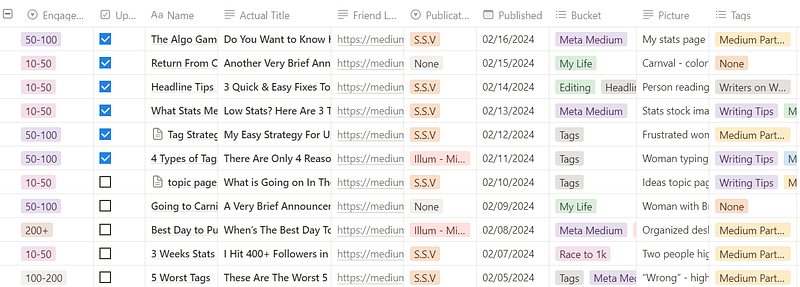
A peak at some of my article tracking. Screenshot by Charlie J

This table is a goldmine.

Let me explain what each column is and why it’s helpful to me.

Engagement

In the first column, I put a ballpark range of engagement. I take these stats from the last graph of the stats page for each story.
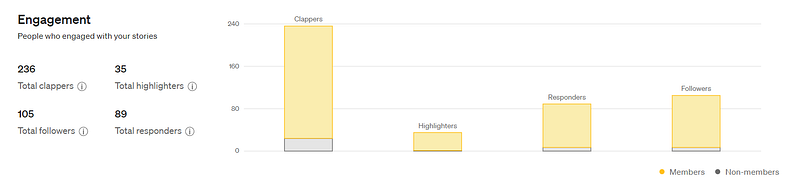
This is the last graph in the stats view for every article. Screenshot by Charlie J

Only the first number, clappers, lives in the Notion table. I do this because I feel it’s rare to highlight, follow, or respond without clapping. Also, claps don't mean much. You can leave 1 or 50. A story with 500 claps and 10 engagers is not the same as a story with 500 claps and 500 engagers.

I include engagement instead of reads, views, or claps because I find engagement to be a better metric of how much your audience loves your work.

My next column, the check mark, is an “Update Engagement” marker. Since my articles take about a week for stats to level out, I make sure to note which articles I need to re-note after they get a bit older.

Having engagement metrics makes it easy for me to sort my stories by their performance.
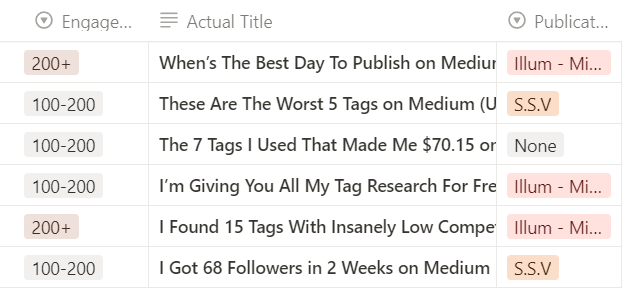
These are some of my articles with more than 100 engagers. Screenshot by Charlie J

This is especially helpful when organizing my profile. I like to make sure my best 3 stories are pinned at the top. Every week or so, I change what I have pinned.

Also, this helps me maintain my Best Performers list. I keep this list so you can study what is already working for me.

Sorting by lowest engagement also helps me to know what article topics did not do so well so I can focus more on what is already working.

Actual Title vs. Name

Why do I have a section for the name and a section for the title?

Well, the name is the idea as it existed in the first list view. The title is the final headline I decided upon.

I keep both of these for two reasons:

  1. In my head, I think of every article as its shorter central idea

Keeping the short name helps me quickly reference each article. 3 words are much easier to read than 7–13.

2. Keeping the actual headline helps me when cross-referencing my stats page on Medium

I can move around the actual title column while inserting other data in other parts of the table.

Friend Link

There are 3 reasons I keep the friend link in this table.

  1. I often link to other articles while writing
  2. I get many questions I have already answered in other articles
  3. If a member reads via a friend link, I get paid either way — giving free access to non-members means more exposure.

Notion allows you to copy a link with one single click. Having the table view saves me from going to my profile, finding the story, and copying the link over and over again.
Just click here to copy! Screenshot by Charlie J

Publication

Not all publications are created equal.

To keep an eye on where I do best, I include the publication for each article. If I want a glimpse at my results in a given publication, all I need to do is sort my data.

Here’s how my stories have done in Illumination’s Mirror. Pretty varied results, right?
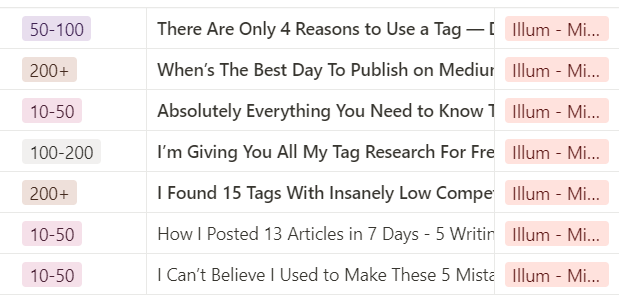
All the way from 10 engagers until 200+ Screenshot by Charlie J

Pub Date & Bucket

More or less, these two function together.

This helps me see how varied my content is. I don’t want to talk about one thing too many days in a row. Since I have ideas spread across 9 different topics, it doesn’t make sense to build a brand just on one aspect alone.
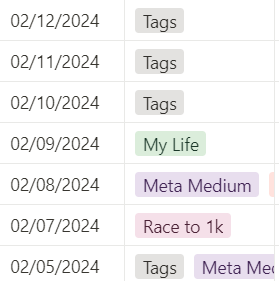
Here’s a week of content. Screenshot by Charlie J

My general niche is writing. Many other sub-niches exist within writing. I want to make sure I spread my content out enough to not sub-niche into one specific part of writing.

Pictures

My second to last column is a brief summary of the thumbnail I used. If I sort by engagement, I can see which pictures perform well, and which perform poorly.
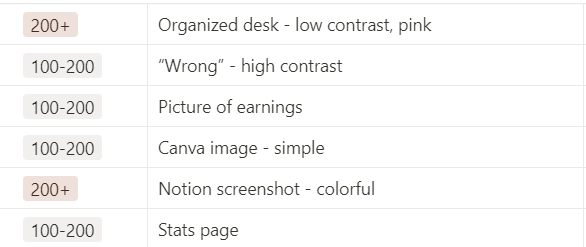
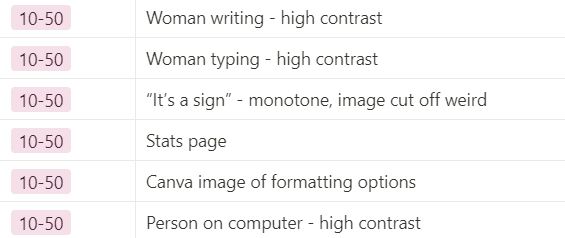
On the left, we have the best performers. On the right are the worst performers. Screenshot by Charlie J

Originally, I thought images of people working were more effective. Interestingly, they are not. Or perhaps, people are just tired of the same old stock images everyone uses.

This tells me it’s time to start looking for photos outside of Unsplash. My non-Unsplash photos usually perform better.

Tags

Would I even be me if I wasn't keeping track of my tags?

Like many of the other columns, this helps for quick analysis. If I sort by engagement, I can see which tags consistently perform well and which are better left behind.

For right now, these tags are performing very well for me:
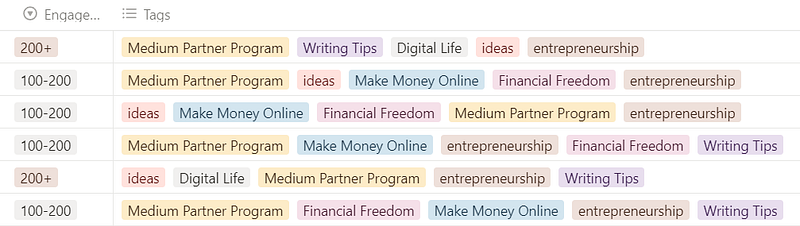
Screenshot by Charlie J

These tags were duds and have been removed from the list of contenders:
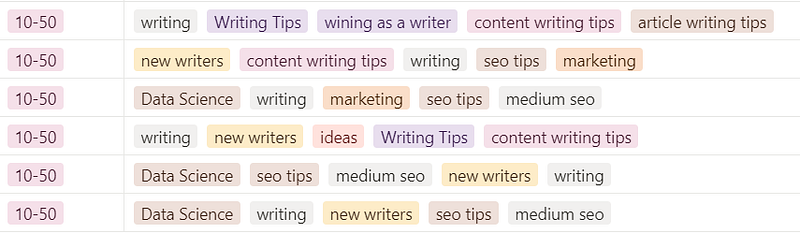
Screenshot by Charlie J

Interested in upping your tag game?

Is It Worth The Effort?

In my opinion, yes.

It is more leg work upfront, but after doing it (and keeping up with it), it saves me a lot of time. I don’t have to go searching for links, nor do I have to constantly circle back to each individual stats page.

I can quickly analyze my stories with just a few clicks.

I’m not going to lie to you — I don’t update this spreadsheet after every story. However, once a week, I set aside a half hour to update it, analyze it, and adjust my content plans as necessary.

Would You Be Interested in My Notion Template?

I talk a lot about Notion because I use Notion a lot. If you’d like to have my Notion template, leave a comment down below, and I’ll get to work making one.

Thanks for reading!

If you’d like to maximize your growth as efficiently as possible, sign up for my free 5-day email course here. I’d love to help you become the best writer you can be.

Career Advice
Technology
Writing Tips
Entrepreneurship
Data Engineering
Recommended from ReadMedium