This Amazing Medium Feature Can Detect Plagiarism — And More!
And no one seems to know it

Everyone has heard of content plagiarism. For most people, it is just an abstract notion. Until it occurs to them.
But how can someone realize that? One or more of your articles may have been plagiarized — and you might have no idea whatsoever!
This is what happened to me. In my case, the target of plagiarism was my first and my best article at that time. I wrote an extensive description of what happened here
Fortunately, I accidentally found the plagiarized version of my article, because someone had shared it on social media. In the meantime, I discovered a new Medium functionality that is far more efficient: among its various benefits, it also catches plagiarism!
But first, I briefly describe why plagiarism is a critical issue. I can’t stress enough how it feels when someone steals your best work.
If you want to learn more cool tips, check my freelance writng guide. I have put a lot of hard work and research into it!
Why plagiarism is a serious issue?
Generally speaking, plagiarism will cost you these things:
- Reads and user engagement (which translates to income).
- Content exposure (meaning less growth).
- Strategic connections on social media.
In my case, the first two were not an issue. But the latter cost me a lot.
Eventually, I probably lost a few thousand views. Also, my article was mildly successful: It reached between 20 and 30 thousand views the first 3 days, but then the traffic dropped dramatically, especially after a couple of weeks. As a new writer, I couldn’t have known if there was something else siphoning traffic or this was how things worked.
But as I said, the third issue was the most harmful to me. The fake article of the plagiarist was shared on Linkedin by a distinguished professor. That’s how I found that my article was plagiarized in the first place. It was mere chance. For reference, these are the two articles:
- The original article that I wrote.
- The plagiarized one.
The plagiarized article was later removed, after contacting the hosting platform. That’s the winning scenario, but keep in mind this is not always the case.
How to spot Plagiarism
First, I want to emphasize that plagiarized articles are usually detected by Medium automatically when they are published, especially if they are submitted to a publication. Thus, they are easily removed.
The technique described in this article works if your article is plagiarized outside of Medium. It works on social media too!
Let’s begin:
- Go to the Stats page
First, click on your profile thumbnail, and select the Stats option. Once you are transferred to this page, you will be able to see your monthly statistics, as well as the statistics of your articles.
2. Find the article of your choice
Proceed by selecting the article of your choice. Specifically, click the Details option:

3. Pay close attention to the Traffic Section!
This action will transfer you to the page which shows a collection of various statistics of that article, such as views and read ratio. What’s interesting to us however is the bottom-left panel, which displays the number of views per traffic source:
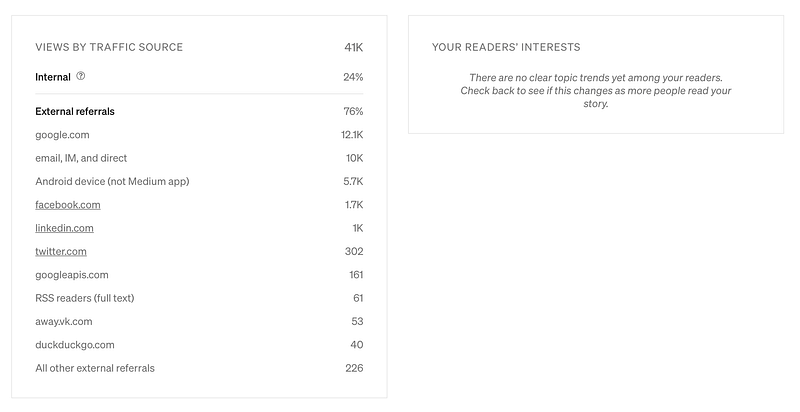
This summary table is invaluable: You can use it to identify the strengths and weaknesses of your article in terms of traffic direction. As your article starts gaining traction, the table becomes populated. To most writers, this is not news — any writer with a few months of experience is aware of this table’s usefulness.
Now, pay attention to this:
Some sources are greyed out, while some others are hyperlinked, which means they are clickable! Let’s click on Linkedin and see what happens!

This launches Linkedin:
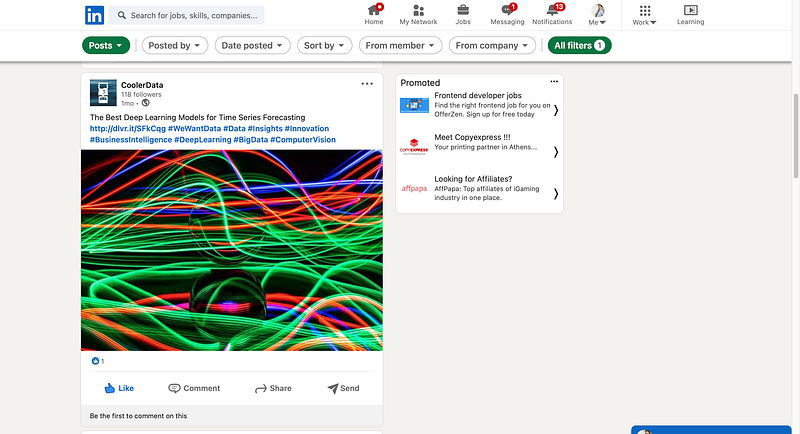
How cool is that?!
Using this feature, you can access every post on a particular channel (in our case Linkedin) which uses the same title as your article.
Unfortunately, I cannot show you the original Linkedin post for the sake of anonymity. Some pretty important people in the Data Science academia were tagged in that post and I would like to protect them from unnecessary exposure.
However, I assure you it works! The article that is displayed above is my original article that a user shared on Linkedin.
4. But what happens exactly?
Essentially, clicking on the Linkedin section initiates a URL redirection that uses the Linkedin API (through the URL) to trigger a search. The search is conducted using the article’s terms in its title as keywords. Therefore, even if the plagiarist does not use the same title as your article, the fake article would still be returned as a search result.
Keep in mind that other users may share your articles — those results will appear first. If the plagiarist has paraphrased the title, the fake article would probably show after the genuine results.
That’s what happened in my case. Still, the exact functionality is based on the platform’s internal API, which is hidden from us.
I guess that some kind of token similarity is performed under the hood. Even if the post does not contain the URL of the fake title (but other information such as text excerpts or quotes), the algorithm would still be able to match it.
You could also try to experiment with the search filters:
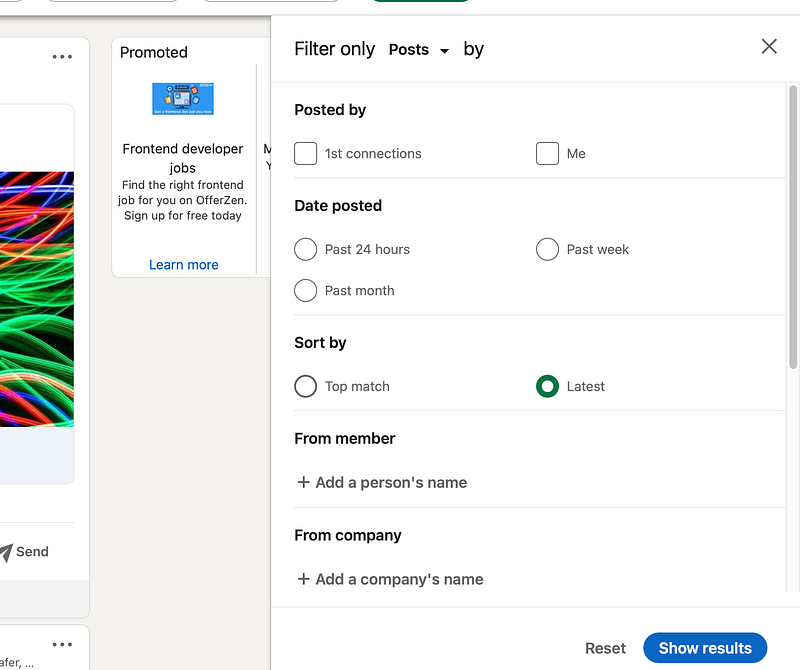
For example, if I change the “Sort By” option from Top match to Latest, I get completely different results!
In other words:
- For each social platform, try to experiment with all available options (e.g. filters). Of course, each platform has its configurations.
- Remember to comb through all search results. A plagiarist would probably try to paraphrase your article, which means the fake article will not be the top match.
Beyond Plagiarism
You would have noticed by now that this feature is not only useful for detecting plagiarism!
That’s right! This feature also helps you locate all different sources that drive traffic to your articles. Besides, this is how I became aware of this functionality in the first place.
Many publications are kind enough to share your published articles on various social media platforms. This feature helps you track all these different sources effortlessly. And of course, you can take additional actions that could boost your growth. For instance, in my case:
- I have figured out which social media platforms are suitable for each type of my article.
- If a posted article has gained a lot of traction (e.g. through comments or likes), I repost it a few days later to take advantage of the momentum and make it viral again!
- If a posted article has limited traffic, I try re-sharing it by myself on a different platform. Don’t waste time trying to boost a ‘flopped’ post whose likes are close to zero. If it doesn’t gain traction right off the bat, leave it as it is and take your chances on a different platform.
- I always leave a “thank you for sharing” type of comment. I cannot believe that no one does that! In many cases, the person or the entity who shared my post follows me afterward. Since I usually write technical articles I was even offered a job!
I bet many of you are thinking right now:
“Wow, who cares about plagiarism! This is an extremely powerful tool that comes in handy in many situations.”
Closing Remarks
By now, I hope that I have made a good argument for how beneficial this feature is. To sum up:
- Every kind of content (especially quality content) is susceptible to plagiarism. Use this feature to detect plagiarists and protect your highly valuable work.
- Think of this feature as a mini Google analytics dashboard: You could track the traffic from social media channels and use this insight to your advantage. Also, a heartwarming “thank you” as a comment would put a face to that post and some people might reciprocate accordingly!
Thank you for reading!


