
This AI Tool is Better for Researchers Than Google and ChatGPT Combined
And it’s practically free


De-Perplexing Research With Perplexity.ai
Key Value: Get answers to all your questions with perplexity·ai
For most people, Google is the starting point for searching the internet.
And while the addition of Google Scholar made it slightly more researcher-friendly, it is all still a linear search engine.
If, for example, you search Google for “Who are the current leading researchers in evolutionary psychology?”, you get something that looks like this:
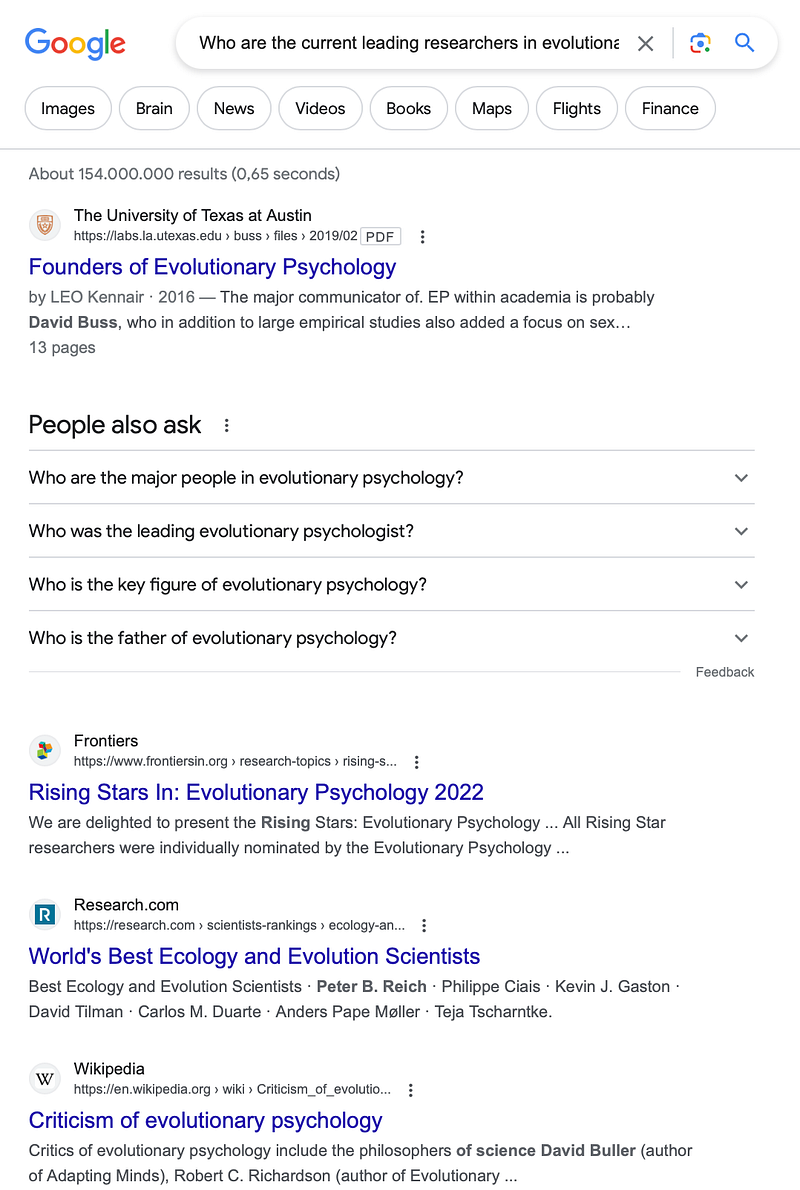
- The first link misses the point — it may provide some important names in the field, but I want to know who is currently leading the research, not who made important or foundational contributions.
- The second link sounds promising but isn’t not broad enough — it includes a small group of researchers with impactful papers published in Frontiers, but I want to know about researchers across the entire discipline, not just those published in Frontiers.
- The third is a long list of ecology and evolution scientists, which is close, but I wanted evolutionary psychologists, so even if that list of people contains what I was looking for, I would need to do a lot of filtering to figure out which of them are focused on the specific field.
- The rest of the links are about evolutionary psychology as a subject, but I wanted to know about the researchers.
These are close, and they might get me somewhere, but they’re not really what I’m looking for.

Answering Questions vs Searching For Answers
The problem is that Google isn’t trying to answer your question, it’s trying to provide web pages most relevant to the keywords in your question.
But you don’t need to see everything loosely connected to those keywords.
You don’t need to see the sponsored links that someone has paid to make sure you see.
You don’t need to see ads or hotel discounts or news articles that have irresponsibly repurposed words from your questions into buzzwords.
But if someone hasn’t created a page specifically answering your question, then you’ll have to go through the search results.
And you’re not going to go through 154 million links or more in the hopes of finding an answer.
Perplexity
What you can do, instead, is use perplexity.ai
Perplexity is built around questions. And, more importantly, answering them.
It’s basic function is somewhere between Google and ChatGPT — you ask it a question and it searches the internet for an answer.
To do that, simply enter your question into the Quick Search bar from the Home page.
Unlike Google, it doesn’t just give you a long list of the most relevant webpages, and unlike ChatGPT it doesn’t give you some long-winded and unverified response that sounds like it was written by the most cringey person in the sales and marketing department of Generic Web-Based Business Company Pty. Ltd.
Instead, it gives you a summary or an explanation or whatever is relevant to the question you asked, and it provides useful links for more information and gives numbered citations in the text.
You can also click on the list icon at the bottom right of the text to bring up the list of sources.

From there you can follow the links to delve deeper or remove any you think are irrelevant.
If the answer was a bit useless or straight-up wrong, you can help improve the model by giving it a thumbs down for inaccuracy or for being unhelpful.
Focus
One major benefit above both Google and ChatGPT is that you can specify where you want Perplexity to go looking for answers by clicking on the Focus button in the search bar, which opens up this menu:
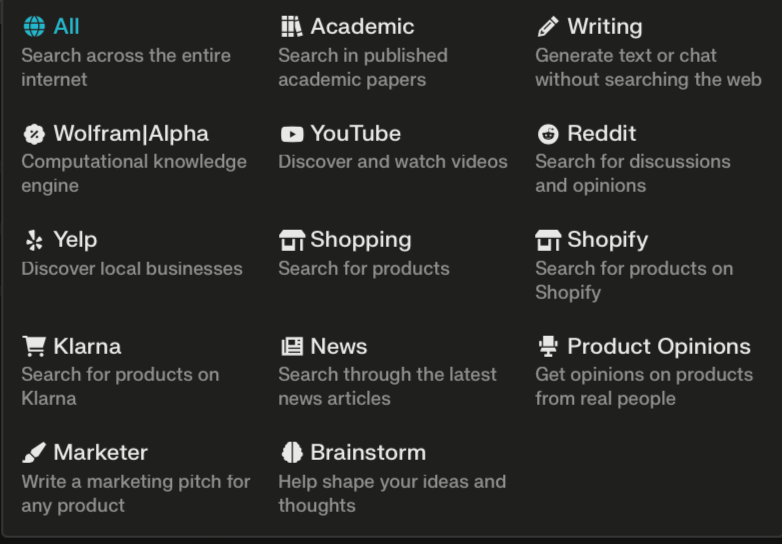
Note: This full spectrum of options seems to be only sometimes accessible, and only by first asking a question and then clicking on the New Thread search section and then Focus.
For instance, if you want an explainer video for a concept you could set the search to YouTube and Perplexity will provide links to relevant videos as well as give you a short answer to your question based on theinformation available in those videos.
The Wolfram|Alpha feature is also handy for STEM researchers who just want a straight answer and not the involved response the Wolfram|Alpha site usually gives you.
Attach
If, instead of searching the internet, you want to ask questions about a specific piece of research, you can click on Attach and upload a PDF of a research paper and ask Perplexity to summarise the findings, or to answer anything else about the paper, the research or the researchers.
Also, if you’re not sure what to ask, you can use the suggested prompts that it generates once it’s finished reading the paper.
Copilot
You can take all of this further by flicking on Copilot.

Copilot is like having someone who’s better at using Perplexity than you are helping you along in your question-answering journey.
It does all the same things — looks for answers to your questions and provides a summary with links to sources — but if your question isn’t clear, it asks follow-up questions to help narrow down what you’re looking for.
This really solves the “Google search results being a bit messy because my keywords have various nuanced meanings” problem.
The Simple Research Tool
While there are more thorough AI tools for research out there that also do this, like ResearchRabbit, Litmaps or Connected Papers, if you want something less perplexing, then Perplexity is a good place to start.
This isn’t going to get you from A to published, but as a research-starter, as a tool for getting a grip on topics, finding ideas or answering pesky questions you have throughout your research, Perplexity is a solid tool.
As always, check your sources.
Tools like these are doing their best to give you accurate information to your question. But they can only give you what’s already on the internet, and the internet is a minefield of misinformation.
Be a good researcher — check your sources.
The Cost
You can ask as many questions as you want in the Quick Search section.
You also get 5 free queries with Copilot, and these reload every 4 hours.
If you want more, you can commit and pay $20 per month, or $200 per year for the Pro version.
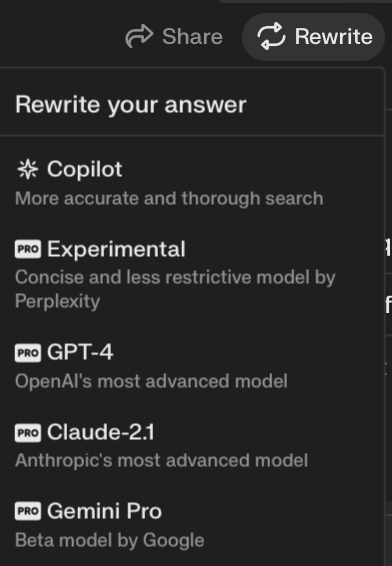
It says the Pro version gives you “Unlimited Copilot Queries” which apparently means “Over 300 daily queries”.
Last time I checked, 300 was slightly less than unlimited, but perhaps 300 queries are more than you’d practically need. Still, that would seem to be a limit.
Either way, with Pro, you can have the response rewritten by GPT-4, Claude-2.1, Gemini or Perplexity’s own experimental model, if you think the response could do with some help from the heavyweights.
If you like my writing and want to help me write more, you can buy me a coffee or subscribe here to get my posts by email.
You can also hire me for writing jobs on Upwork or email me: [email protected]