
The Worst Password Mistakes Companies Make
Inadequate passwords requirements, unsafe token handling, and more

Nowadays, data is one of a company’s most valuable assets. It should be kept secure at all costs, since a leak can have catastrophic consequences in terms of users’ trust and business development. Many companies, though, make huge mistakes when it comes to security. This is especially true for small and medium businesses, although even big enterprises sometimes happen to get hacked because of a fatal mistake, that may lead to scandals.
Bad password requirements for users
Most web applications require you to sign up for an account to use them. We’re all familiar with password requirements certain login systems enforce, from a minimum length to the use of at least one special character. Some companies, though, get this completely wrong.
What’s the dumbest password rule you can think of? You can probably find it in this GitHub repository. It contains a list of inadequate requirements real companies enforced on their customers
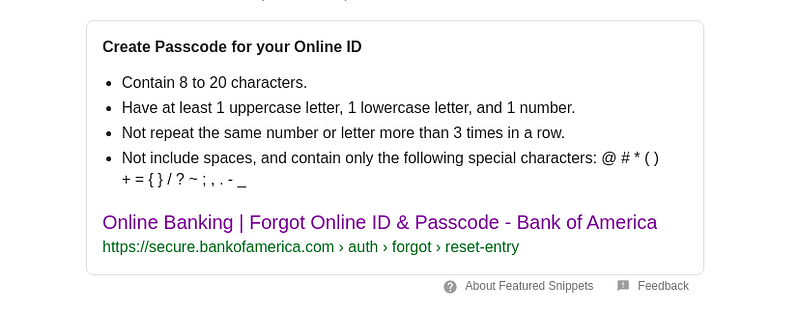
What about Bank of America not allowing more than 20 characters or disallowing special characters? Isn’t it supposed to keep your money safe?
What do you think instead of disallowing passwords longer than 10 characters? BlackRock has actually made it!
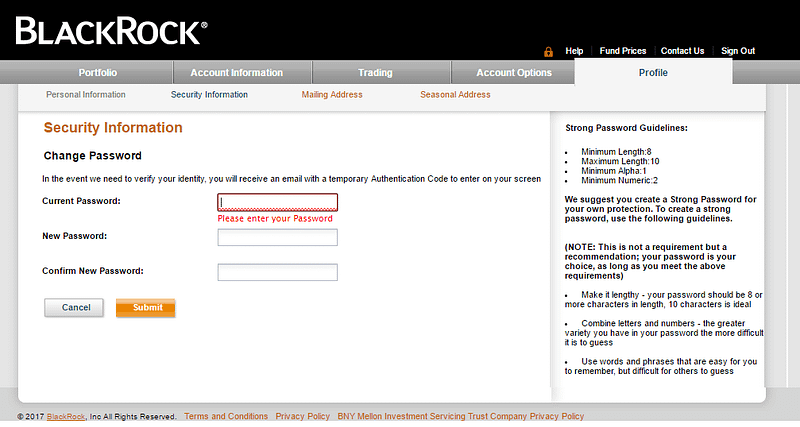
Enforcing such restrictions greatly reduces the hash cracking time and also tells hackers what passwords for that specific website look like, totally for free.
Treating tokens as passwords
Many companies make their services available via some kind of authentication token. This isn’t inherently a bad practice, but you should always check whether tokens come from a trustworthy source or could have been compromised. You should neither allow the same session token to be used by different devices nor let a token alone grant access to an authenticated session.
The problem with tokens is that they can be stolen with relative ease since they are mostly stored in the browser under little protection. This opens your application to session hijacking attacks or even fake login pages. Recently, I’ve encountered a school management software company — whose name I won’t share, since they haven’t currently fixed the issue — that doesn’t perform checks on their session and login request tokens.
Storing passwords in plain text
This may seem like an error only an inexperienced developer could make, but many big companies like Facebook, Google, and GitHub have actually done this.
We all know that in case of a data breach in your database systems, all your user accounts can easily get compromised. You may not think, though, of sensitive information leaching through misconfigured logging systems. In 2019 millions of Facebook and Instagram users had their passwords found in logs stored in a readable format (about.fb.com).
Giving too much power to a password
Passwords shouldn’t be enough to be able to perform any critical operation in any system. Privileged roles must always be protected by two-factor authentication, since a single compromised privileged account could be the cause of catastrophic attacks.
Another similar issue is not providing your users with a two-factor authentication option. It’s unbelievable how many companies still don’t support this method at all.
Enforcing periodic password change
It’s no secret that the more time passes, the more likely is a password to be cracked. This is why many companies require their customers to change their authentication credentials periodically, leaving the responsibility of choosing strong passwords to them.
This can be a problem, though, because users normally stick to predictable patterns such as modifying “Summer2020” to “Summer2021” and they will usually try to work around insecure password policies. Instead of this approach, the National Institute of Standards and Technology (NIST) recommends enforcing a banned password list in order to block users from choosing weak and predictable secrets, including dictionary words, usernames and sequential characters such as “1234”.
Moreover, credentials should be periodically checked against public data breach databases in order to find out whether using a specific password is secure. Be careful, though, not to send your precious strings unencrypted through the Internet: it’s much more secure if done locally.
Not salting and peppering
As much as computers have become more powerful than ever, password cracking has never been faster. The problem is that technology greatly advances, but common passwords remain the same.
Salting consists in adding unique randomized data as an additional input to the password hashing function. The random salt would then be stored in a database and retrieved upon login requests.
Peppering consists in adding a secret piece of data as an additional input to the password hashing function. The pepper, unlike salt and hashes, are stored separately in order not to be leaked in case of a database breach.
This additional data that gets added to the password makes it unique and thus harder to crack using rainbow tables. Salting and peppering can increase the security of weak passwords and make complex ones nearly uncrackable.
Conclusion
To wrap it up, security isn’t about being 100% fail-proof. It’s rather about researching the best practices to protect systems against already-known threats and finding new vulnerabilities before malicious hackers do.
These are only a few of the many mistakes that get made in the password handling field, but they are nonetheless significant and should be avoided in any kind of application that requires some level of security.
I hope you enjoyed this article. If you know of any other big mistakes regarding passwords, please share them in a comment. Thanks for reading!
If you liked this article, I suggest you check out also this story below:
More content at plainenglish.io. Sign up for our free weekly newsletter here.


