
The World’s Fastest LLM Inference: 3x Faster Than vLLM and TGI
How fast can LLMs get? The answer lies in the latest breakthrough in LLM inferencing.
TogetherAI claims that they have built the world’s fastest LLM inference engine on CUDA, which runs on NVIDIA Tensor Core GPUs. Looking at the benchmarks, it seems that it isn’t just a step forward; it’s a giant leap.
We obsess over system optimization and scaling so you don’t have to. As your application grows, capacity is automatically added to meet your API request volume. — TogetherAI
Together Inference Engine lets you run 100+ open-source models like Llama-2 and generates 117 tokens per second on Llama-2–70B-Chat and 171 tokens per second on Llama-2–13B-Chat. Although I’m not sure whether it’s the fastest, it’s indeed an impressive performance!
In this article, I will walk you through:
- The techniques behind the scenes
- Using Python API for LLM Inferencing
- Integration with LangChain
- Managing chat history
Let’s get started!

TogetherAI Pushing Limits of LLM Inference
GPU resources are limited and precious, and the efficiency of your inference stack is critical, but here’s the good news: TogetherAI rolled out a new inference engine for LLMs, showcasing impressive performance metrics.
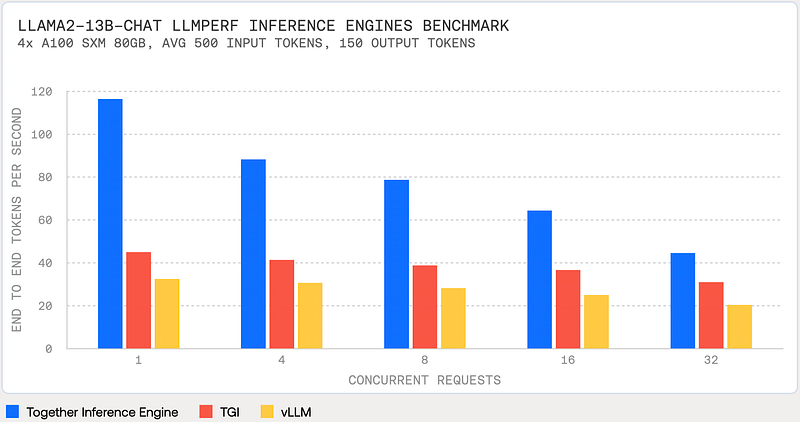
Its pricing also looks good, Llama-2–13b-Chat is not only 6 times more affordable than GPT 3.5 Turbo, but it also outperforms it by being 1.85 times faster.

You can either use Serverless Endpoints or Dedicated Instances which you can manage via API or Web UI.
Together AI’s approach incorporates three key techniques:
- FlashAttention-2, speeds up training and fine-tuning of LLMs by up to 4x and achieves 72% model FLOPs utilization for training on NVIDIA A100s. This is important because traditional attention computation often involves extensive memory swapping, constrained by memory bandwidth. Flash Attention restructures matrix operations to reduce memory swapping, potentially doubling model speed or more.
- Flash-Decoding, speeds up attention during inference, bringing up to 8x faster generation for very long sequences. It reorganizes matrix operations, specifically by batching attention computations for multiple tokens in the input sequence. While the impact on short prompts is minimal, for longer sequences (e.g., 10k tokens), the performance can double.
- Medusa, introduces multiple heads on top of the last hidden states of the LLM and offers up to 2x speed-ups. It predicts the next token and then efficiently uses the model to verify this prediction.
Let’s see how it works in practice.
Getting Started
Visit TogetherAI and sign up to receive $25 in free credits.
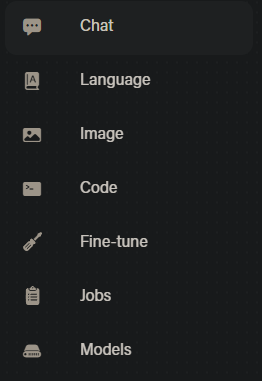
The platform offers various capabilities to work with LLMs, you can see some of those in the left navigation pane.
You can find both your API Keys and Billing information in Settings.
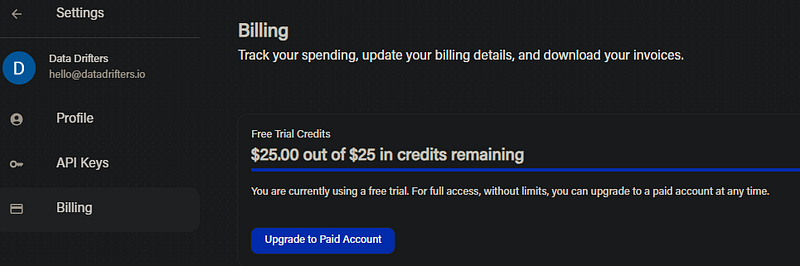
You can test different capabilities on UI, but what we really want is to set up programmatic access.
Setting up Environment
Let’s start by setting up our virtual environment:
mkdir togetherai-serving && cd togetherai-serving
python3 -m venv togetherai-serving-env
source togetherai-serving-env/bin/activate

pip3 install ipykernel jupyter
pip3 install python-dotenv
pip3 install --upgrade together
pip3 install langchain huggingface_hub

# Optionally, fire up VSCode or your favorite IDE and let's get rolling!
code .
Create .env file and add your TogetherAI API Key:
TOGETHER_API_KEY=<Your API Key>and import required libraries:
import os
import time
import json
import logging
from datetime import datetime

import together
from langchain.llms.base import LLM
from langchain import PromptTemplate,  LLMChain

from dotenv import load_dotenv # The dotenv library's load_dotenv function reads a .env file to load environment variables into the process environment. This is a common method to handle configuration settings securely.
# Load env variables
load_dotenv()

# Set up logging
logging.basicConfig(level=logging.INFO)
Getting Familiar with TogetherAI Python API
We can now have a look at the supported models and pick one to work with:
model_list = together.Models.list()
print(f"There are {len(model_list)} models to choose from!")
[model['name'] for model in model_list][:20]
To me, it shows 103 models!
There are 103 models to choose from!

['Austism/chronos-hermes-13b',
'EleutherAI/llemma_7b',
'EleutherAI/pythia-12b-v0',
'EleutherAI/pythia-1b-v0',
'EleutherAI/pythia-2.8b-v0',
'EleutherAI/pythia-6.9b',
'Gryphe/MythoMax-L2-13b',
'HuggingFaceH4/starchat-alpha',
'NousResearch/Nous-Hermes-13b',
'NousResearch/Nous-Hermes-Llama2-13b',
'NousResearch/Nous-Hermes-Llama2-70b',
'NousResearch/Nous-Hermes-llama-2-7b',
'NumbersStation/nsql-llama-2-7B',
'Open-Orca/Mistral-7B-OpenOrca',
'OpenAssistant/oasst-sft-4-pythia-12b-epoch-3.5',
'OpenAssistant/stablelm-7b-sft-v7-epoch-3',
'Phind/Phind-CodeLlama-34B-Python-v1',
'Phind/Phind-CodeLlama-34B-v2',
'SG161222/Realistic_Vision_V3.0_VAE',
'WizardLM/WizardCoder-15B-V1.0']
You are basically ready to generate responses, let’s use ‘togethercomputer/llama-2–7b-chat’:
prompt = "<human>: What do you think about Large Language Models?\n<bot>:"
model = "togethercomputer/llama-2-7b-chat"

output = together.Complete.create(
  prompt = prompt,
  model = model,
  max_tokens = 256,
  temperature = 0.8,
  top_k = 60,
  top_p = 0.6,
  repetition_penalty = 1.1,
  stop = ['<human>', '\n\n']
)

print(json.dumps(output, indent = 4))
It took 2s to get a complete answer, here’s the output:
{
    "id": "8268eed93d23b903-AMS",
    "status": "finished",
    "prompt": [
        "<human>: What do you think about Large Language Models?\n<bot>:"
    ],
    "model": "togethercomputer/llama-2-7b-chat",
    "model_owner": "",
    "tags": {},
    "num_returns": 1,
    "args": {
        "model": "togethercomputer/llama-2-7b-chat",
        "prompt": "<human>: What do you think about Large Language Models?\n<bot>:",
        "top_p": 0.6,
        "top_k": 60,
        "temperature": 0.8,
        "max_tokens": 256,
        "stop": [
            "<human>",
            "\n\n"
        ],
        "repetition_penalty": 1.1,
        "logprobs": null
    },
    "subjobs": [],
    "output": {
        "result_type": "language-model-inference",
        "choices": [
            {
                "text": "Large language models, such as transformer-based models like BERT and RoBERTa, have been instrumental in achieving state-of-the-art results in a wide range of natural language processing (NLP) tasks. These models are trained on large amounts of text data and have the ability to learn complex patterns and relationships in language.\n\n"
            }
        ]
    }
}
and here’s how you can get the generated response:
print(output['output']['choices'][0]['text'])

# Large language models, such as transformer-based models like BERT and
# RoBERTa, have been instrumental in achieving state-of-the-art results
# in a wide range of natural language processing (NLP) tasks. These models
# are trained on large amounts of text data and have the ability to learn
# complex patterns and relationships in language.
You can also use streaming:
for token in together.Complete.create_streaming(prompt=prompt):
    print(token, end="", flush=True)
Now, we will have a look at LangChain integration.
Integrating TogetherAI with LangChain
In order to use a provider such as TogetherAI with LangChain, we have to extend base LLM abstract class.
Here’s an example code for creating Custom LLM wrappers , but we will make it a little bit better with type validation, exception handling, and logging.
class TogetherLLM(LLM):
    """
    Together LLM integration.

    Attributes:
        model (str): Model endpoint to use.
        together_api_key (str): Together API key.
        temperature (float): Sampling temperature to use.
        max_tokens (int): Maximum number of tokens to generate.
    """

    model: str = "togethercomputer/llama-2-7b-chat"
    together_api_key: str = os.environ["TOGETHER_API_KEY"]
    temperature: float = 0.7
    max_tokens: int = 512

    @property
    def _llm_type(self) -> str:
        """Return type of LLM."""
        return "together"

    def _call(self, prompt: str, **kwargs: Any) -> str:
            """Call to Together endpoint."""
            try:
                logging.info("Making API call to Together endpoint.")
                return self._make_api_call(prompt)
            except Exception as e:
                logging.error(f"Error in TogetherLLM _call: {e}", exc_info=True)
                raise

    def _make_api_call(self, prompt: str) -> str:
        """Make the API call to the Together endpoint."""
        together.api_key = self.together_api_key
        output = together.Complete.create(
            prompt,
            model=self.model,
            max_tokens=self.max_tokens,
            temperature=self.temperature,
        )
        logging.info("API call successful.")
        return output['output']['choices'][0]['text']
langchain.llms.base module is designed to simplify the interaction with LLMs by providing a more user-friendly interface than directly implementing the full _generate method.
class langchain.llms.base.LLM is an abstract base class for LLMs, meaning it provides a template for other classes but is not meant to be instantiated itself. It aims to offer a simpler interface for working with LLMs by handling the complexities of LLMs internally, allowing users to interact with these models more easily.
__call__method allows the class to be called like a function. It checks the cache and runs the LLM on a given prompt.
We can now create a class instance of TogetherLLM:
llm = TogetherLLM(
    model = model,
    max_tokens = 256,
    temperature = 0.8
)
and then create an LLM chain:
prompt_template = "You are a friendly bot, answer the following question: {question}"
prompt = PromptTemplate(
    input_variables=["question"], template=prompt_template
)

chat = LLMChain(llm=llm, prompt=prompt)
Let’s start a conversation:
chat("Can AI take over developer jobs?")INFO:root:Making API call to Together endpoint.
INFO:root:API call successful.
{'question': 'Can AI take over developer jobs?',
'text': '\n\nNo, AI will not take over developer jobs. AI can assist
developers in various ways, such as automating repetitive tasks, generating
code, or analyzing data, but it will not replace human developers.
Developers are needed to design, build, and maintain complex software systems,
which require creativity, critical thinking, and problem-solving skills
that AI systems do not possess. Additionally, the field of software
development is constantly evolving, and new technologies and techniques
are constantly being developed, which requires developers to stay
up-to-date and adapt to new challenges.'}Cool, let’s see what else we can do.
Managing Chat History
One-off questions are OK, but this is a chat model, we want to learn how to manage chat history for more coherent and context-aware interactions.
Here’s a simple diagram from LangChain documentation that shows the flow:
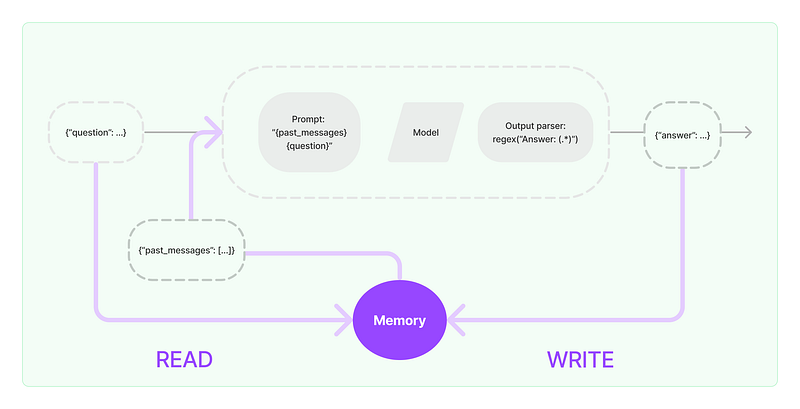
However, instead of using LnagChain’s abstraction, I want to reimplement the LLMChain class for you to develop a basic intuition, which will help you to debug things better moving forward.
from typing import List

class LLMChain:
    def __init__(self, llm, prompt):
        self.llm = llm
        self.prompt = prompt
        self.history: List[str] = []  # Initialize an empty list to keep track of the conversation history

    def add_to_history(self, user_input: str, bot_response: str):
        self.history.append(f"<human>: {user_input}")
        self.history.append(f"<bot>: {bot_response}")

    def generate_prompt(self, question: str) -> str:
        history_str = "\n".join(self.history)  # Convert the history list into a single string
        return f"{history_str}\n<human>: {question}\n<bot>:"

    def ask(self, question: str) -> str:
        full_prompt = self.generate_prompt(question)
        response = self.llm._call(full_prompt)  # Assuming _call method handles the actual API call
        self.add_to_history(question, response)
        return response
In this implementation, each time we call theaskmethod, the conversation history is updated with the latest exchange. The generate_prompt method constructs a new prompt that includes this history, ensuring that the context of the conversation is maintained. This approach allows the bot to have a memory of the conversation, making the interactions more coherent and context-aware.
Here’s how you can use it:
A Personal Request to Our Valued Reader:
We envision a future where every individual is equipped with the knowledge and tools to harness the power of AI, driving positive change and innovation in the world.
Each article we publish, every notebook we share, and all the resources we offer are a testament to our commitment to this vision. We pour our passion, expertise, and countless hours into creating content that we believe can make a difference in your journey.
But, here’s a surprising fact: Out of the thousands who benefit from our content, only a mere 1% choose to follow us on Medium. Our dream is to see that number rise to 10%. Why? Because every follow is a vote of confidence, a sign that we’re on the right track, and an indicator of the topics and resources you’d love to see more of.
If you ever found value in our work, if you believe in a world empowered by AI, and if you’d like to be part of this exciting journey with us, please take a moment to Follow Us on Medium. It’s a small gesture, but it means the world to us and helps us tailor our content to your needs.
Thank you for being an integral part of our community. Together, let’s shape the future of AI.
# Usage
llm = TogetherLLM(
    model = model,
    max_tokens = 256,
    temperature = 0.8
)

prompt_template = "You are a friendly bot, answer the following question: {question}"
prompt = PromptTemplate(
    input_variables=["question"], template=prompt_template
)

chat = LLMChain(llm=llm, prompt=prompt)

# Example interaction
response = chat.ask("What is the weather like today?")
print(response)  # Bot's response

# The next call to chat.ask will include the previous interaction in the prompt
response = chat.ask("How can I enjoy such a weather?")
print(response)
You have probably noticed that as your chat history grows, it will be hard to manage the model’s context window, and there are several strategies to deal with it, but that’s for another post.
I hope you find this walk-through helpful. If you have questions or want to share your experiences, please leave a comment below.
You can find more information in the official announcement from TogetherAI.


